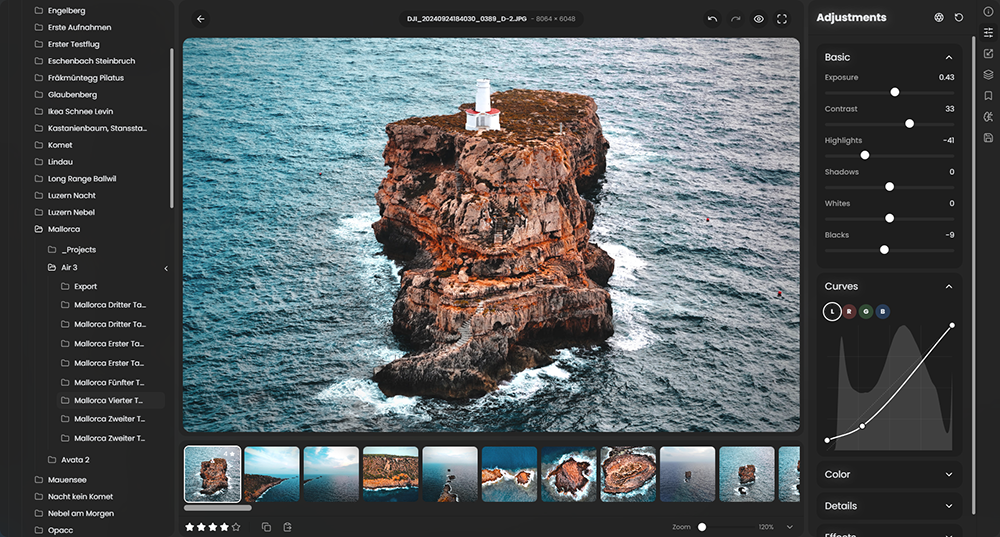
 RapidRAW is een modern, krachtig opensourcealternatief voor Adobe Lightroom. Het levert een eenvoudige en mooie bewerkingservaring in een lichtgewicht pakket van ongeveer 20MB voor Windows, macOS, Linux en Android. Het wordt ontwikkeld door een Zwitser, die hier juli 2025 mee is begonnen als een persoonlijke uitdaging met als doel om een krachtig programma te creëren voor zijn eigen fotografieworkflow. RapidRAW is gebouwd met een Rust-backend en een React/TypeScript-frontend, verpakt met Tauri om hem licht te houden. Versie 1.6.3 is uitgekomen en hier zijn de volgende veranderingen en verbeteringen in aangebracht:
Liquify ToolI've added a new Liquify tool that gives you the ability to reshape and warp specific parts of an image. It's perfect for subtle structural adjustments or creative distortion directly within your RAW workflow.
Retouch ToolA dedicated Retouch tool is now available for smoothing out textures and fixing skin blemishes. It intelligently preserves edges, ensuring your subjects retain their natural look and fine details without unwanted blurring.
Guided Perspective CorrectionFixing architectural distortion is now much easier. You can draw up to four guide lines directly on the canvas to automatically correct the perspective and perfectly align structures and buildings.
Edge-Aware Filter for AI Subject MasksI've implemented a new post-processing step for AI subject masks. The masks are now edge-aware, meaning edges snap precisely to the actual subjects in the image. This renders the transitions much more natural and eliminates the "pasted-on" look.
Rewritten Crop Panel & Transform/Lens CorrectionThe crop panel and transform/lens correction modals have been completely unified. All sliders are now directly integrated into the crop panel, allowing you to preview your changes in real-time on the main image canvas without needing to open a secondary modal.
Rewritten EXIF Caching EngineTo improve efficiency, I realized the old EXIF architecture wasn't optimal. Previously, the app created a
Rewritten Thumbnail Engine.rrdatasidecar file for every single image just to store metadata for filtering and sorting. Now, metadata is cached directly in the application directory, and a.rrdatafile is only created when you actually make adjustments to an image. This keeps your folders much cleaner.Previously, RapidRAW generated one medium-large thumbnail per image to use in both the library grid and the main canvas while loading. I've completely rewritten this engine to generate one low-resolution thumbnail for the library and one high-resolution thumbnail as an intermediate preview. This drastically improves both library performance and the visual clarity of images while they finish loading.
Categorized Mask Creation PanelThe mask creation panel has been redesigned. Masks are now categorized and structured, making it much faster and more intuitive to access the exact tool you need.
Auto-Apply Lens CorrectionTo speed up your workflow, there is a new context menu shortcut that allows you to automatically apply lens corrections to all selected images at once.
Straighten ShortcutYou can now hold
Core ImprovementsShift+Dragdirectly on the image canvas to quickly draw a horizon line and auto-straighten the image.
- Sharpening Algorithm Refinements: Reduced artifacts around high-contrast edges when using the sharpening slider.
- Original Preview Toggle: The "Show original preview" logic has been completely rewritten. It now toggles instantly and utilizes the same rendering path as the normal canvas.
- EXIF Metadata Consistency: Fixed bugs that prevented certain EXIF tags from copying over correctly to exported images.
- GPU Processor Auto-Healing: Improved error handling with automatic GPU recovery if rendering errors occur.
- Denoise Exposure Fix: Resolved a bug that caused denoised images to appear noticeably darker or underexposed compared to the original RAW.
- Wayland Improvements (Linux): Fixed compatibility issues under Wayland sessions, meaning manual environment workarounds are no longer required.
- 100% Zoom Toggle Option: Added a new setting to instantly jump between fit-to-screen and a 1:1 (100%) zoom view with a single click, instead of having to zoom in granularly.
- Mobile & Tablet UX: Refined interfaces and slider interactions for touch devices.
- Visual Updates: Refreshed and updated icons throughout the application.
- Under-the-Hood: Addressed numerous backend bugs for improved overall stability.

:strip_exif()/i/2007866846.png?f=thumbmedium)