 RapidRAW is een modern, krachtig open source alternatief voor Adobe Lightroom. Het levert een eenvoudige en mooie bewerkingservaring in een lichtgewicht pakket van iets meer dan 20MB voor Windows, macOS, Linux en Android. Het wordt ontwikkeld door een Zwitser, die hier juli 2025 mee is begonnen als een persoonlijke uitdaging met als doel om een krachtig programma te creëren voor zijn eigen fotografieworkflow. RapidRAW is gebouwd met een Rust-backend en een React/TypeScript-frontend, verpakt met Tauri om hem licht te houden. Versie 1.6.7 is uitgekomen en hier zijn de volgende veranderingen en verbeteringen in aangebracht:
Performance Improvements & Lower RAM UsageThis release is all about speed. I went through the whole app to find out where time and memory were wasted and rewrote large parts of the image pipeline:
Immich Integration
- Faster Library: Thumbnails load much faster and scrolling through big folders feels smoother.
- Faster Editing: Previews update quicker while moving sliders, and preset previews render much faster.
- Faster Exports: Exports finish noticeably faster and use less RAM. Two new Advanced settings let you choose how many images are exported at the same time and how much free RAM a batch export may use.
- Faster Batch Actions: Pasting adjustments, resetting and auto lens correction across many images are now much quicker.
- Optimized GPU Shaders: The shaders were optimized and the histogram and scopes now run on a zero-copy pipeline, so they update without slowing down the editor.
- Smarter Decoding: Images that are already decoded are reused, for example in the culling view, the collage tool and tethering.
- Lower Memory Usage: RAM usage was reduced across the whole app, from the preview pipeline, masks and AI denoise to the UI itself.
RapidRAW can now connect directly to your Immich server. A new Immich section in the library lets you browse your albums and timeline, and edit any photo just like a local file. Images show Immich's preview as a thumbnail and the original is only downloaded when you open or export it, so you don't need to sync your whole library to your computer.
The best part: your edits are stored together with the photo on your Immich server. This means your edits look the same on every computer and they are kept even if you clear your cache. If you edit the same photo on two computers, nothing gets lost: your local edits stay and the other version is kept as a virtual copy. What you can do:
- Browse Albums & Timeline: Navigate your whole Immich library right inside RapidRAW. Large albums load fast, and stacks are shown once and open the RAW file.
- Synced Edits & Ratings: Changes are sent to Immich every few seconds and when you close the app. If the server is offline, RapidRAW shows how many edits are still waiting and sends them as soon as the server is back, even after a restart.
- Export to Immich: Immich is now a destination in the export panel. Your export is uploaded, stacked on top of its original and added to an album of your choice. This also works for photos from your local folders.
- Manage Your Library: Remove images from Immich albums, delete them to Immich's trash (where they can be restored for 30 days), or copy them to your local folders with their edits.
- Secure by Default: Your API key is stored in your system's credential store (Windows Credential Manager, macOS Keychain, Secret Service or Android Keystore).
Immich 2.5 or newer is required, as it is the first version that lets apps store their own data with a photo. Huge thanks to @cl1x for building this whole integration!
New Before / After Compare ModesComparing your edit with the original is now much more flexible. Next to the full original view, you can now choose split left/right, split top/bottom and side by side. Just right-click the compare button to choose a mode, or press B to toggle. In split mode, you can drag the divider to any position, and your zoom and position are kept when switching modes, so you can easily compare small details.
Smart AI Masks for Copy & Paste and PresetsUntil now, when you copied a mask or saved it in a preset, AI masks kept the exact mask of the original photo. A pasted sky mask still showed the sky of the first image, which made AI masks pretty useless for batch editing.
Now, AI masks adapt to every photo. When you paste adjustments or apply a preset that contains AI masks, RapidRAW automatically generates them again for each image in the background: a sky mask finds the sky, a subject mask finds the subject and a face mask finds the face in every single photo. The same works for depth & normal maps and AI denoise. Lens Blur, Fog, Relight and AI Denoise are also new groups in the copy & paste dialog. This makes it super easy to edit a whole shoot with local adjustments, without opening every image one by one.
Job QueueEverything that runs in the background now shows up in one place. The new job queue replaces the old AI queue and covers exports, imports, file transfers, AI model downloads, AI tagging and all other AI work. You can follow the progress of each job, cancel running exports, and jump to your files with one click when a job is done. AI processing can be paused, resumed or retried, and pending AI work continues where it stopped after a restart.
Non-Destructive Batch Denoise & Classic DenoiseIn v1.6.6, I promised GPU acceleration and non-destructive batch denoising for AI Denoise. Both are now here. AI Denoise runs on your GPU on Windows and macOS, and you can simply paste your denoise settings onto as many photos as you like. The job queue denoises them in the background, without creating a single extra file. The old denoise modal, which saved a separate TIFF file, is now completely gone. For photographers who use AI-Free Mode, the Details panel now offers a non-destructive Classic Denoise based on BM3D instead.
Data Management & StorageThe Data Management section in the settings has been redesigned into a clear Storage page. You can now see exactly how much space RapidRAW uses on your device, split into thumbnails, metadata, AI models, AI denoise results, depth & normal maps, Immich downloads and logs. Each one can be cleared on its own, and you can set size limits for thumbnails, AI denoise, depth & normal maps and Immich downloads. Once a limit is reached, the least recently used files are removed automatically. Tools for clearing tags and edits from your library are also on this page.
New AI Sky & Foreground ModelsThe old U2Net models for sky and foreground masks have been replaced with EfficientSAM3 for the sky and BiRefNet for the foreground. The masks are now much more accurate, follow fine details like hair, branches and thin structures, and have cleaner edges. AI models are now also downloaded only when you first use a feature, so you don't need to download everything at once.
New Mask Types: AI Text Mask & Face SegmentationThere are two new AI mask types:
GPU Acceleration for AI Models
- AI Text Mask: Simply type what you want to select, for example "person", "car" or "water", and RapidRAW creates a mask for it. This makes it super fast to select objects that are hard to paint by hand.
- Face Segmentation: The new face mask finds the faces in your photo and lets you pick exactly which parts you want to edit on a small face illustration: face skin, body skin, hair, eyebrows, eye whites, iris & pupil, nose, lips and teeth. This is perfect for portrait retouching, like whitening teeth, brightening eyes or smoothing skin, without painting a single stroke.
The built-in AI features now run on your graphics card: denoise, masks, depth & normal maps and AI tagging. On Windows this uses DirectML with your high-performance GPU, and on macOS it uses CoreML. If your GPU is not supported, RapidRAW falls back to the CPU automatically, and you can turn GPU acceleration off in the settings if you ever run into problems.
Auto Adjust LevelsAuto adjust now comes with three strength levels: Subtle, Normal and Strong. Just right-click the Auto button in the editor, or pick a level from the right-click menu in the library to apply it to many photos at once. Auto adjust also no longer touches the Brightness slider and only sets the exposure, so your results are cleaner and easier to fine-tune.
Color-Preserving Highlight ReconstructionHighlight recovery got another upgrade. RapidRAW now works directly on the RAW data and finds the real clipping point of each color channel in your photo. Areas where all channels are blown out are rebuilt with color from the surrounding pixels, so clipped areas keep their natural color, while bright light sources like lamps and the sun stay neutral instead of turning pink or yellow.
More Accurate RAW ColorsRAW colors are now much more accurate, especially under artificial light:
Rewritten Noise Reduction & Sharpening
- Dual-Illuminant Camera Color: Most cameras store two color profiles, one for daylight and one for warm tungsten light. RapidRAW now blends between them based on the white balance of your photo, just like the DNG standard does. Photos taken under tungsten or stage lights no longer get a magenta or purple cast.
- Gamut Compression: Very saturated colors that the camera can capture but sRGB can't show used to be hard clipped. They are now gently compressed instead, so strong stage lights and neon signs no longer turn into noisy blotches.
I rewrote the manual noise reduction and sharpening in the main shader, together with the color noise reduction and sharpening that run when a RAW file is first loaded. Noise is now removed more cleanly while fine details stay crisp, and curved edges no longer show jagged artifacts.
Rewritten DehazeDehaze has been completely rewritten. It now estimates the real color and brightness of the haze in your photo and removes it with an edge-aware filter, so distant mountains, cityscapes and foggy scenes get their contrast and color back without dark halos around edges. The haze is removed evenly across the frame, and bright areas roll off smoothly instead of getting crushed. Pulling the slider to the left still adds haze for a softer, dreamy look.
Non-Destructive Negative ConversionNegative conversion is now a normal non-destructive tool in the Details panel. The old modal is gone. You can adjust the red, green and blue balance, print exposure and print grade at any time without creating a new file, and convert many negatives at once from the right-click menu.
Core ImprovementsNote for Upgrading Users
- Better Fast Inpainting: Fast inpainting now keeps more fine detail by copying the texture of the surrounding area.
- Better AI Mask Edges: Improved AI mask edges and text mask detection, and fixed banding at the edges of face, hair and skin masks.
- Tethering Fix: Cameras that reuse file names no longer show the previous image after a new capture.
- Up-to-Date Thumbnails: Thumbnails now update when you change RAW processing settings.
- Wider Whites Range: The Whites slider is now stronger and also reaches into the brighter midtones, giving you more room to make bright areas pop.
- Highlights Slider Fix: Fixed a jump in the highlights adjustment when moving away from zero.
- Network Drive Support: Fixed loading files on filesystems that don't support file locking.
- Arrow Key Grid Navigation: Use the up and down arrow keys to move through rows in the library grid.
- Undo for Filtered Images: When rating or flagging an image makes it disappear from the current filter, a small toast lets you undo it right away.
- Stability & Bug Fixes: Resolved various issues and refined overall application performance.
This release improves several core parts of the image pipeline, so some of your existing edits may look slightly different after updating:
- RAW Colors: Photos shot under tungsten, stage or other artificial light will have more accurate colors, and very saturated colors are now compressed instead of clipped.
- Dehaze & Whites: Images that use the Dehaze or Whites slider may need a small readjustment, as both now behave differently.
- Noise Reduction & Sharpening: Images that use these sliders may look a bit cleaner or sharper than before.
- Highlights: Clipped highlights in RAW files are now rebuilt with more natural color.
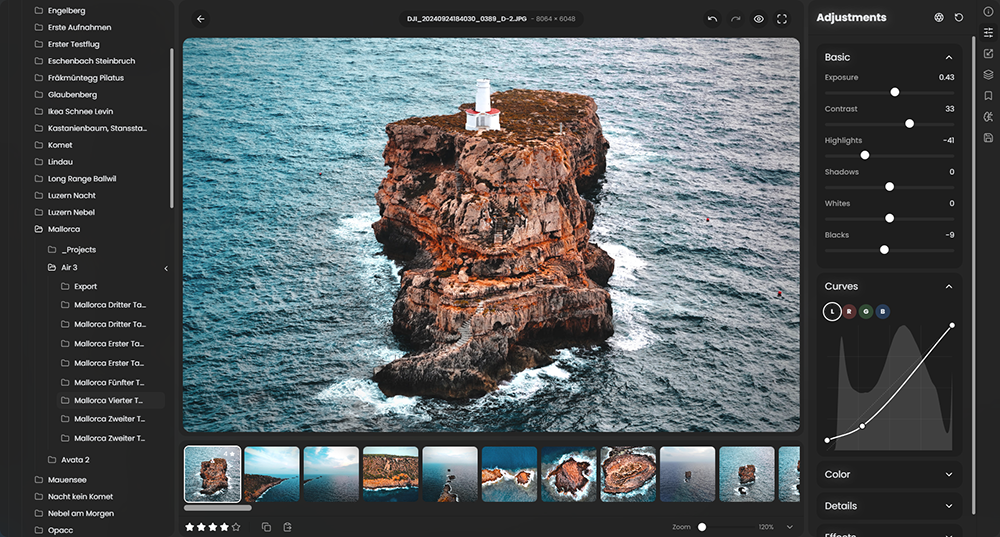

:strip_exif()/i/2007866846.png?f=thumbmedium)
:strip_icc():strip_exif()/u/88719/crop624ccd84437db_cropped.jpg?f=community)