 RapidRAW is een modern, krachtig open source alternatief voor Adobe Lightroom. Het levert een eenvoudige en mooie bewerkingservaring in een lichtgewicht pakket van iets meer dan 20MB voor Windows, macOS, Linux en Android. Het wordt ontwikkeld door een Zwitser, die hier juli 2025 mee is begonnen als een persoonlijke uitdaging met als doel om een krachtig programma te creëren voor zijn eigen fotografieworkflow. RapidRAW is gebouwd met een Rust-backend en een React/TypeScript-frontend, verpakt met Tauri om hem licht te houden. Versie 1.6.5 is uitgekomen en hier zijn de volgende veranderingen en verbeteringen in aangebracht:
Kelvin White Balance with Area SamplingThis update completely overhauls how the app handles color temperature, turning white balance into a precise, camera-grade tool. In earlier versions, adjusting temperature and tint relied on rough guesswork sliders and a basic eyedropper that merely sampled a single screen pixel, often leading to uneven or unnatural color shifts.
RapidRAW now reads the white balance recorded by your camera in RAW files and lets you toggle into true Kelvin temperatures, ensuring that light adjustments behave just like real-world daylight or warm indoor lamps.
Alongside this, the eyedropper tool has been completely redesigned: as you move across the canvas, a floating preview card displays live color readings, and you can now click and drag a box over any neutral gray or white area to smooth out image noise and calculate the correct balance automatically. Together, these changes make neutralizing unwanted color casts and dialing in the perfect photographic mood both effortless and true to life.
Guided Filter for Edge-Aware AdjustmentsFine detail enhancements no longer produce distracting halos. In place of standard blurs, clarity, structure, dehaze, shadows, and highlights now run through an edge-aware filtering system that cleanly separates broad lighting changes from sharp object contours. When lifting dark shadows or taming highlights, the software captures original surface micro-textures and feeds them back into the picture. Textures like skin, fabric, and foliage stay crisp and authentic rather than muddying together.
Rewritten Whites SliderPreviously, the whites slider simply boosted areas with a flat multiplier, which easily blew out highlights and erased delicate textures. Now, it applies a smooth, targeted curve that brightens the lightest tones while directly reinjecting fine surface details and mid-level textures back in. As a result, bright areas like clouds, snow, or white clothing gain extra brilliance and pop without turning into flat, featureless patches.
Pick and Reject FlagsCulling large shoots is now significantly faster thanks to a dedicated flagging workflow. You can mark favorites as "Picked" or bad takes as "Rejected" using quick keyboard shortcuts, visual badges, or bottom bar toggles. Rejected photos automatically dim in your library, making it easy to filter them out of view or delete all of them at once with a single confirmation.
Apple RAW 9 Decoding and Denoising SupportMac users can now tap directly into Apple’s advanced RAW 9 engine. Designed to take full advantage of the Neural Engine, this system demosaics camera sensor data and cleans up image noise in a single unified step. You can enable this engine in the RapidRAW processing settings as your default RAW developer, or pick it inside the Denoise menu. Unsupported cameras or file types seamlessly fall back to the built-in processor without interrupting your workflow.
RapidRAW Cloud IntegrationRapidRAW is built on the belief that great photo editing should never be locked behind a paywall. The entire editor, its full RAW processing engine, smart masking, and built-in spot removal tools remain 100% free and run privately right on your own computer. If you have a dedicated graphics card and enjoy managing your own setup, you can even connect your own local server to run advanced generative tasks without paying a single cent. You have total freedom over how you edit, and nothing you already use is being restricted or hidden away.
For those who simply want effortless object removal without buying an expensive graphics card or wrestling with technical installations, RapidRAW Cloud is here purely as a convenience. With a quick sign-in, remote servers handle the heavy lifting for complex textures and large removals - only processing the small patch you brush over and deleting it immediately, so your full RAW files never leave your computer. At $14 a month, it is an easy, zero-hassle upgrade that gives you remote editing when you want it, while directly funding independent, open-source development without venture capital, bloat, or ads.
As this is the initial rollout of RapidRAW Cloud, your early feedback is crucial! Whether it's processing speed, inpainting quality, or workflow suggestions, please share your thoughts via GitHub, Email or Discord so I can continue refining the experience. Learn more here.
AI-Free ModeFor photographers who prefer a purely traditional workflow or need to follow strict photo contest rules, RapidRAW includes a dedicated AI-Free Mode. Flipping this single switch completely hides all generative buttons, AI masks, and neural tools, automatically reverting features like noise reduction back to classic algorithms. Your existing edits will still display normally, leaving you with a clean, distraction-free workspace focused entirely on authentic photography.
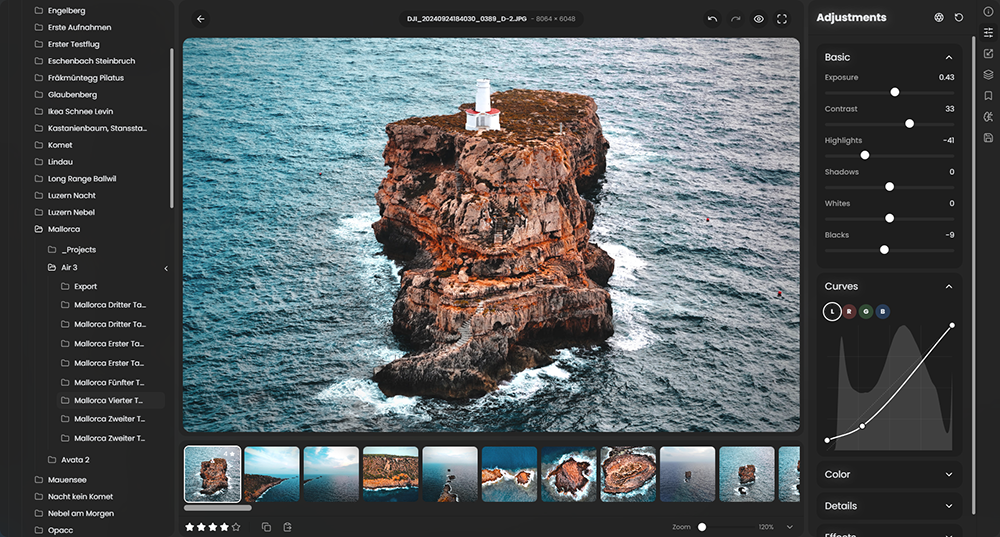
Reorderable and Collapsible Adjustment PanelsYour editing workspace is now completely modular. You can drag and drop to reorder entire sections and individual tools, hide controls you rarely touch, and collapse items to save vertical space. The app automatically remembers your preferred arrangement and open sections, keeping your workspace clean, organized, and tailored to how you work.
Savable Custom Aspect RatiosYou can now save your favorite custom crop aspect ratios as permanent presets. After typing in any unique width and height, clicking the save icon adds it directly alongside your standard crop buttons with an automatically formatted label. These custom ratios stay saved across all your editing sessions, and you can remove them anytime with a single click.
Core ImprovementsNote for Upgrading Users
- Precision Curves: Added a fine adjust mode for tone curves, plus inactive channels now show as colored overlay curves and reference markers.
- Crop Enhancements: Center-anchor crop resizing by holding Ctrl/Cmd, and align framing with a new center mark guide.
- Export Options: Added borders and aspect ratio padding to exports, embedded sRGB ICC profiles, and refreshed export presets.
- AI Task Controls: Added real-time progress tracking in the UI with the ability to cancel running AI tasks.
- Interface Polish: Streamlined adjustment panel customization and improved default tool visibility across the workspace.
- Metadata & Color Fixes: Improved lens EXIF detection and refined continuous RAW magenta highlight corrections.
- Localization: Added full Dutch & Netherlands language support.
- Stability & Bug Fixes: Resolved various issues and refined overall application performance.
Due to the introduction of the new camera-accurate Kelvin white balance engine and updated tint shaders, white balance handling has changed significantly. As a result, existing edits opened in v1.6.5 may appear slightly different, potentially shifting more magenta or greenish compared to previous versions as they map to the new, physically accurate color pipeline.
Recommendation: If you are in the middle of editing an active client shoot or critical project, I strongly recommend finishing and exporting your work on your current version before upgrading. Once your current shoot is wrapped up, upgrade to v1.6.5 to take full advantage of the improved color science for your next projects.

:strip_exif()/i/2007866846.png?f=thumbmedium)