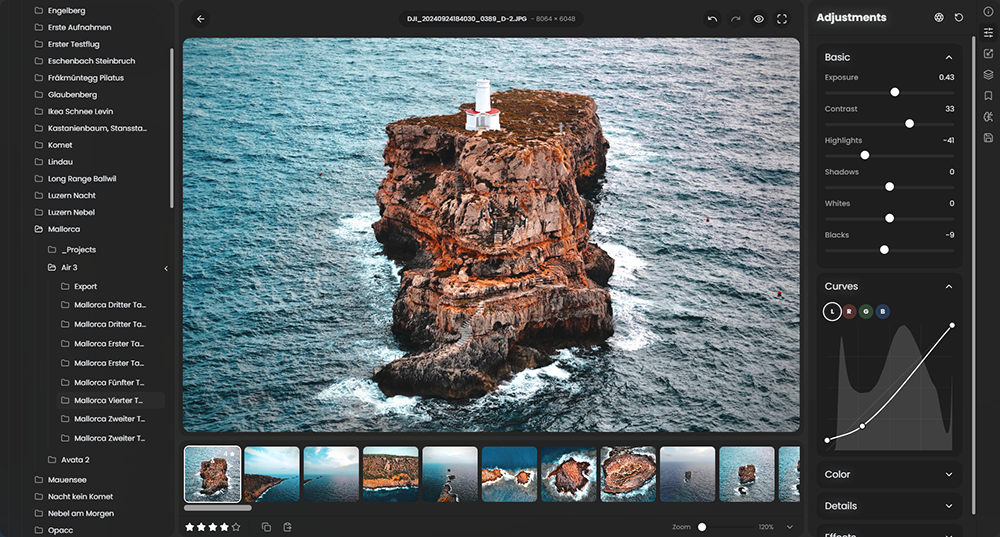
 RapidRAW is een modern, krachtig open source alternatief voor Adobe Lightroom. Het levert een eenvoudige en mooie bewerkingservaring in een lichtgewicht pakket van iets meer dan 20MB voor Windows, macOS, Linux en Android. Het wordt ontwikkeld door een Zwitser, die hier juli 2025 mee is begonnen als een persoonlijke uitdaging met als doel om een krachtig programma te creëren voor zijn eigen fotografieworkflow. RapidRAW is gebouwd met een Rust-backend en een React/TypeScript-frontend, verpakt met Tauri om hem licht te houden. Versie 1.6.9 is uitgekomen en hier zijn de volgende veranderingen en verbeteringen in aangebracht:
Black & White ModeRapidRAW now has a dedicated Black & White mode instead of simply turning the saturation down. It gives you the tools of a real darkroom:
Motion Blur
- Film Responses: Choose how the "film" reacts to color, from Neutral and Panchromatic to Orthochromatic, Extended Red and Infrared for glowing foliage and near-black skies.
- Color Filters: Add a yellow, orange, red, green or blue filter, just like on a real lens, with an adjustable strength.
- B&W Mix: Control how bright each color turns out. Click and drag up or down directly on the photo to change the colors under your cursor.
- Toning: Finish your image with Sepia, Selenium, Gold, Platinum, Cyanotype or Split Toning.
The new Motion Blur effect adds movement to your photos, either to the whole image or only inside a mask. You can choose between Linear, Zoom, Spin, and Smooth blur, and decide what should move: invert a mask to blur just the background for a panning shot, isolate the subject itself, or blur everything at once. Using the estimated depth of your scene, near objects can blur more than far ones, which makes the effect look like real camera movement.
Speed EditSpeed Edit is a new way to edit without searching for sliders. Hold W, or tap it once to lock it on, and drag anywhere on the photo to change the current slider. A small display on the canvas shows you which slider you are changing and its value.
A/D: Switch to the previous or next sliderQ/E: Go to the previous or next imageR: Reset the sliderC/V: Copy and paste a slider valueLeft/RightArrow: Change the value step by stepShift/Alt: Make fine adjustments.You can choose which sliders Speed Edit cycles through in the Shortcuts settings.
Rebuilt Clone, Heal, Liquify & RetouchAll retouching tools have been rebuilt from the ground up:
Match Brush Mask
- Clone & Heal: Just paint over a spot, wire or distraction and RapidRAW automatically finds a matching source. Heal now blends the patch much more smoothly into its surroundings. You can drag the source outline to move it, or click "Find Another Source" to try a different one. Every stroke becomes its own spot, so it is easy to fix them one by one.
- Liquify: Strokes now follow your crop and rotation, and all warps are combined into one clean result.
- Retouch: Skin smoothing now uses frequency separation, so it evens out tones while keeping the natural skin texture.
The new Match Brush is a smart brush for masks. It only paints on areas that are similar in color, tone and texture to where you started your stroke, so you can quickly select a sky behind trees, a piece of clothing or a building without painting along every edge.
Second WindowYou can now open your edit in a second window, which is perfect for a second monitor. It updates live while you move sliders, has its own zoom and pan, and remembers its size, position and fullscreen state. Open it with Shift+F or from the right-click menu.
Edit In External EditorsYou can now send photos to other programs and get the result back into your library. Add your favorite programs in Settings under Processing, then open any photo in them from the right-click menu.
Color Mixer Picker
- Send original file: For RAW tools like Topaz Photo AI or DxO PureRAW. The result is brought back next to your original, with your edits.
- Send edited TIFF: Sends a 16-bit TIFF with your current edits to programs like Photoshop, GIMP or Affinity.
The color mixer now has a picker and an advanced mode. Turn it on, then click and drag up or down directly on the photo to change the colors under your cursor. It also works inside masks.
Interactive 3D Depth ViewsLens Blur, Fog, Relight, Motion Blur and AI depth masks now show an interactive 3D view of the estimated depth of your photo. You can rotate, zoom and pan it to see exactly which part of the scene an effect or mask will cover.
Rebuilt Glow, Halation, Lens Flare & Film GrainReworked Lens Correction
- Glow, Halation & Lens Flare: Rebuilt on a new light engine with realistic glare and aperture ghosts.
- Film Grain: Now made of crisp, overlapping grains that react to the brightness of the image, for a much more authentic film look.
Lens correction now matches Lensfun exactly, with correct distortion, full chromatic aberration correction, smoother vignetting correction and an exact auto crop. The lens profile is found for every photo from its own EXIF data, so copying and pasting lens correction between photos taken with different lenses just works.
Performance ImprovementsImmich Improvements
- More Work on the GPU: Relight, Fog, Lens Blur, lens correction, perspective, rotation and crop now run fully on the GPU, so edits no longer copy images back and forth between the CPU and GPU.
- Image Preloading: The next and previous images are loaded in the background, so switching between photos is much faster.
- Network Drives: Opening folders from a NAS or network share is now much faster, as RapidRAW only reads the parts of a file it needs.
- Sharper Crop Previews: Crop previews are now rendered at the real resolution of your screen, and mask and crop overlays stay sharp at any zoom level.
- Faster Slider Updates: Previews are encoded in parallel, which makes slider updates up to three times faster on Linux and Android.
GPU Renderer on Linux Wayland
- Sort Into Albums: Drag and drop images onto Immich albums. Local images are uploaded with their edits first.
- In No Album: A new view shows all images that are not in any album yet, to help you sort them.
- Create Albums: Create a new Immich album right from the export panel. This needs the album.create permission on your API key.
- Better Organization: Albums are now grouped in a collapsible section and follow your folder sort order.
The direct GPU renderer can now be turned on under Linux Wayland in Settings under Processing, for much more responsive previews. This option is still experimental on Linux and is not available on X11.
Core Improvements
- Interface Scale: Make the interface smaller or larger in the General settings, independent of your system display scaling.
- Hide Collapsed Panels: Collapsed side panels can now be hidden completely.
- Readable History: Every step in the edit history now shows a clear name with its value, like the slider or mask that changed.
- Export the Original: Export the original next to your edited photo, with options to apply the crop and keep the exposure. This also works in the CLI.
- Correct Colors for JPEGs: Images with an embedded color profile, like Adobe RGB or Display P3 photos from phones, are now converted correctly and no longer look washed out.
- Crop Shortcuts: Press Enter to apply a crop and Escape to cancel it.
- Select All: Ctrl+A now toggles select & deselect all.
- Better TIFF Exports: TIFF files now include EXIF metadata and the sRGB color profile.
- JPEG XL Exports: Lossless JPEG XL exports use far less memory and finish much faster.
- Export DPI: The default export resolution is now 96 DPI.
- Safer Saves: Presets, albums and settings are now saved safely, so they can't get lost if a save is interrupted. HDR, panorama, focus stack and collage results no longer overwrite earlier results.
- Network Drive Fixes: Saving edits no longer fails on drives that don't support a full flush.
- macOS Fixes: Fixed right-click and Ctrl+click context menus and local network access, for example to an Immich server at home.
- Android: Fixed connecting to servers with Let's Encrypt certificates.
- New Languages: Added Ukrainian and Lithuanian.
- Updated Lens & Camera Support: Updated the Lensfun database and RAW decoder.
- Stability & Bug Fixes: Resolved various issues and refined overall application performance.
Note: v1.6.9 replaces v1.6.8 from earlier today. It fixes wrong colors (a green tint) on Olympus and OM System ORF files. If you already installed v1.6.8, please update.