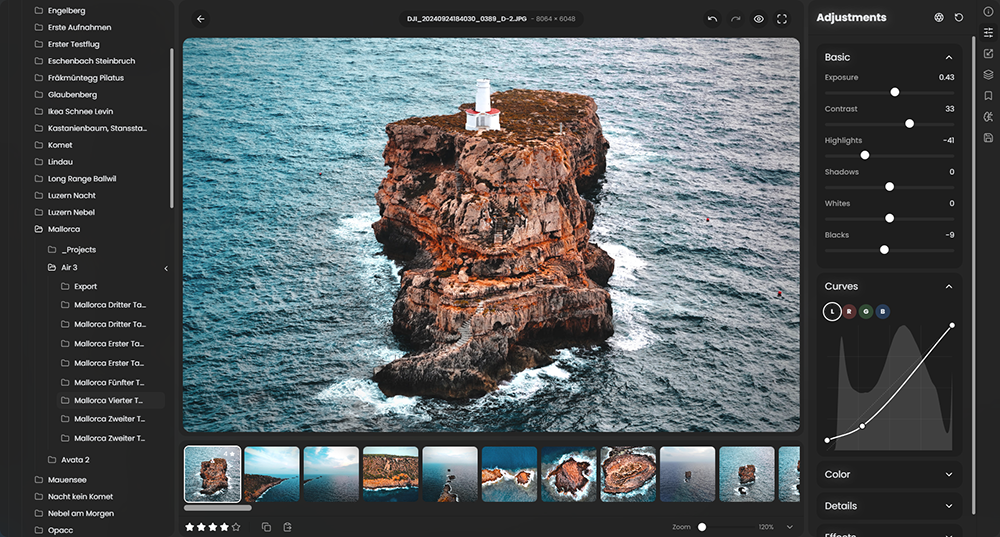
 RapidRAW is een modern, krachtig open source alternatief voor Adobe Lightroom. Het levert een eenvoudige en mooie bewerkingservaring in een lichtgewicht pakket van iets meer dan 20MB voor Windows, macOS, Linux en Android. Het wordt ontwikkeld door een Zwitser, die hier juli 2025 mee is begonnen als een persoonlijke uitdaging met als doel om een krachtig programma te creëren voor zijn eigen fotografieworkflow. RapidRAW is gebouwd met een Rust-backend en een React/TypeScript-frontend, verpakt met Tauri om hem licht te houden. Versie 1.6.6 is uitgekomen en hier zijn de volgende veranderingen en verbeteringen in aangebracht:
Spatial Effects & 2.5D RelightingI’ve added a brand-new Spatial Effects section that transforms flat 2D images into interactive 2.5D environments in real time. Under the hood, the system automatically analyzes the scene to estimate a depth map and derive surface normal maps. By reconstructing surface orientations (normals) and distance (depth), the rendering pipeline can accurately compute how light bounces off surfaces, handle specular/diffuse falloff, cast occlusion shadows, and drive depth-aware atmospheric effects like ground fog and lens blur.
Real-Time Relighting (Point, Spot & Directional Lights)Using the generated normal maps, you can place dynamic light sources directly into your scene with realistic surface response.
Ray-Traced ShadowsThe relight engine can also cast realistic shadows emitted from newly placed lights by ray-marching against the reconstructed depth buffer:
Volumetric & Ground FogLeveraging the estimated scene geometry, you can simulate realistic atmospheric haze and ground fog that naturally wraps around objects based on their height and distance from the camera:
Non-Destructive AI DenoiseCleaning up high-ISO noise no longer requires generating massive duplicate files, as AI Denoise is now built directly into the main editing pipeline. Previously, running the denoiser meant triggering a context menu action that produced an enormous standalone TIFF file with compressed dynamic range. Now, it operates as a native, non-destructive tool inside the Details panel, preserving the full dynamic range of your original image with zero quality loss. Dedicated sliders for reduction strength and fine detail recovery give you complete control over texture without locking you in.
Note: Dedicated GPU acceleration and non-destructive batch-denoising are actively in development and will arrive in upcoming releases to make high-volume throughput even faster.
Auto StraightenLeveling crooked photos now takes just a single click or keyboard press with the new auto straighten feature. By analyzing structural lines such as horizons, architecture edges, and natural contours, the editor automatically calculates the ideal rotation angle and reframes your crop to keep the composition tight without empty corners. You can trigger it instantly in the Crop panel with Shift+S, through the right-click menu, or even batch-apply it across multiple selected photos directly from the library grid. We're still fine-tuning the detection algorithm to improve accuracy across tricky scenes and complex geometry, so expect further refinements in upcoming releases.
Custom Center Point for Vignette & CentréFraming off-center subjects is now much easier with interactive center positioning for Vignette and Centré adjustments. Instead of being locked to the middle of the frame, you can now drag an on-canvas pin directly over your subject to draw the viewer's eye exactly where you want it. A subtle, real-time contour overlay shows you the exact shape and falloff of the effect as you position it, and double-clicking the marker instantly snaps it back to the center, giving you precise compositional control for portraits and dynamic compositions.
Individual Tool Visibility ControlsComparing before-and-after edits is now much more precise with granular tool visibility controls. Instead of turning an entire category of edits on or off all at once, each individual tool, and sub-section now has its own dedicated toggle. This lets you quickly isolate and evaluate specific adjustments, like checking the effect of just your grain, sharpening, or color grading, without disabling the rest of your grade or losing your slider settings.
RAW Baseline Exposure & Highlight Preservation CompensationThis update introduces intelligent baseline exposure handling and camera highlight-preservation compensation to deliver more balanced, true-to-scene exposures for RAW files right out of the box. Users can now apply a configurable baseline exposure bias (defaulting to +0.7 EV, similar to darktable's scene-referred workflow, alongside embedded DNG baseline tags) and automatically restore exposure intentionally held back by in-camera highlight protection features, such as Fujifilm DR200/DR400, Canon Highlight Tone Priority & Auto Lighting Optimizer, Nikon Active D-Lighting, Olympus Gradation, and Pentax D-Range expansion. Both options can be fine-tuned in Preferences, integrate seamlessly across previews, auto-adjustments, and exports, and are tracked per-image so previously edited photos remain completely unaffected.
Core Improvements
- Export DPI Controls: Added customizable DPI resolution settings in the export dialog for print-ready file preparation.
- Standardized Metadata Writing: Keywords, ratings, and color labels are now embedded as standard XMP metadata if enabled, alongside improved RAW EXIF handling.
- Android Touch Multi-Selection: Added a touch multi-selection mode to easily manage, rate, and batch edit photo selections on Android.
- Batch Renaming Tokens: Added support for the
{original_filename_number}token in the batch rename tool to easily preserve in-camera frame sequence numbering.- Updated Lens Database: Integrated the latest Lensfun definitions to expand automated lens correction support across newly released lenses.
- Cleaner Sidecar Storage: Refined sidecar creation logic to avoid writing out default-only
.rrdatafiles, keeping your image directories clutter-free.- Staged Preview Caching: Implemented staged preview cache updates to reduce lag and flicker during rapid slider adjustments.
- Stability & Bug Fixes: Resolved various issues and refined overall application performance.

:strip_exif()/i/2007866846.png?f=thumbmedium)