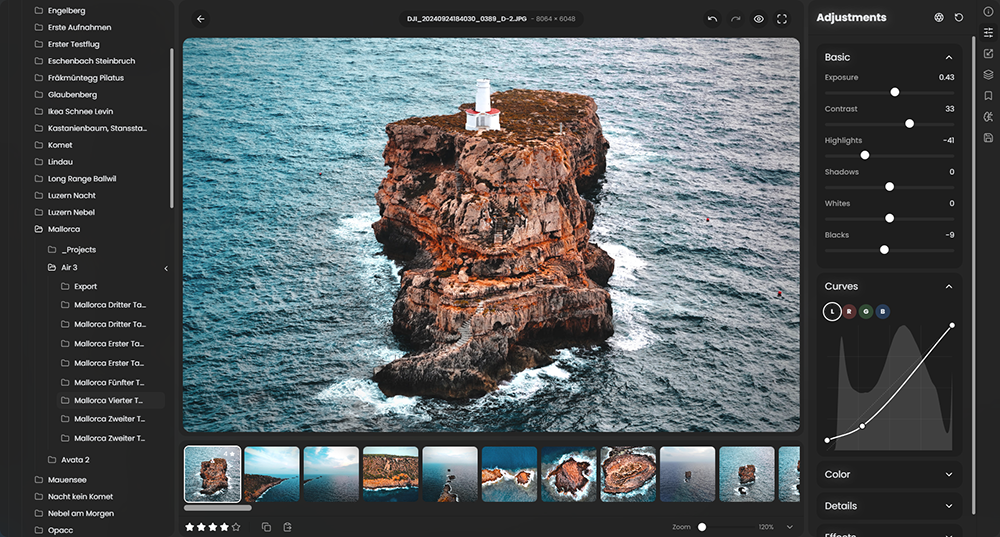
 RapidRAW is een modern, krachtig opensource alternatief voor Adobe Lightroom. Het levert een eenvoudige en mooie bewerkingservaring in een lichtgewicht pakket van ongeveer 20MB voor Windows, macOS en Linux. Het wordt ontwikkeld door een 18-jarige Zwitser, die hier juli 2025 mee is begonnen als een persoonlijke uitdaging met als doel om een krachtig programma te creëren voor zijn eigen fotografieworkflow. RapidRAW is gebouwd met een Rust-backend en een React/TypeScript-frontend, verpakt met Tauri om hem licht te houden. In versie 1.6.0 zijn de volgende veranderingen en verbeteringen aangebracht:
RapidRAW v1.6.0 - Lens Blur, Culling View, Pair Grouping & Much More!I am very excited to launch this new update. It is designed to speed up your workflow and give you new creative options. Sorting through hundreds of photos can be exhausting. To help with that, this update brings a much better photo organization system, featuring a multi-image Culling View and smart RAW+JPEG grouping. Plus, there is a new depth-based Lens Blur feature that lets you add realistic, beautiful depth to your photos after you shoot them.
Lens Blur (Bokeh)Sometimes you capture a great shot, but the background is just a bit too distracting or lacks that premium optical depth. To solve this, I've implemented a new depth-based Lens Blur tool that generates realistic depth-of-field blurring. You have full control over the effect: you can dial in the blur amount, add diffusion, choose your preferred bokeh shape, and fine-tune the exact depth range to seamlessly separate your subject from the background.
Beyond standard background defocusing, the fine-grained depth range controls also allow you to emulate a tilt-shift lens effect. By isolating a precise horizontal or vertical band of focus, you can easily transform cityscapes and wide landscapes into miniature-style scenes directly inside RapidRAW.
Culling ViewCulling through a massive shoot just got a lot faster and more intuitive. I've added a dedicated Culling View that allows you to place up to 6 images side-by-side on your screen. This makes it incredibly easy to compare similar shots for sharpness and composition. You can instantly apply star ratings and view essential metadata right alongside your grouped images to pick the absolute best shot of the bunch.
This tool came in super handy for me during a recent shoot. I had taken a series of long exposure drone shots of a waterfall, where subtle wind gusts meant only a couple of frames came out pin-sharp. By loading the entire bracket side-by-side in Culling View, I was able to easily spot the sharpest capture, rate it 5 stars, and move on in seconds without having to constantly flip back and forth.
Group RAW + JPEGIf you shoot in RAW+JPEG mode, your library can quickly become a cluttered mess of duplicates. This update introduces a new grouping feature in the library view options that stacks these pairs together. You can choose whether you prefer the RAW or JPEG to be displayed as the primary file, optionally ignore mismatched EXIF dates, and easily toggle between the two formats right from the image information overlay.
Command Line Interface (CLI)RapidRAW now includes a headless export tool for batch processing photos in automated scripts, terminal pipelines, or server environments without opening the GUI:
# Export an entire folder using edits found in .rrdata sidecar files
rapidraw export /path/to/photos --output /path/to/output_dir --format jpeg --quality 90

# Export a single image directly to a specific target file
rapidraw export /path/to/photo.raw --output /path/to/output.png --format png

# Batch export a folder using a custom adjustments JSON file to override sidecars
rapidraw export /path/to/photos --output /path/to/output_dir --adjustments /path/to/preset.json
Checkout the README for more information.
Core ImprovementsWhile the new UI features are the stars of this release, this update also brings major under-the-hood performance optimizations and heavily requested workflow improvements:
- Performance: Drastically improved thumbnail loading speeds, especially for users storing their libraries on HDDs. Optimized the underlying performance of the library and image analytics scopes. RapidRAW now tries to read the embedded jpeg first, before decoding the full RAW image for the thumbnail.
- Cropping Upgrades: The crop tool has been enhanced with area preservation and crop-centered rotation for a much smoother framing experience.
- Export & Memory: Significantly reduced overall RAM usage during export operations and calibrated the quality curves for JPEG XL (JXL) exports for better file-size-to-quality ratios.
- Workflow Enhancements:
- Selection is now kept between the library and editor view.
- Added a quick shortcut for library searching.
- Added a quick shortcut to jump straight into the settings.
- Made automatic adjustment synchronization optional for multi-selections, giving you more control over batch edits.
- Metadata & Decoding: Improved EXIF lens metadata extraction across the board and fixed an issue with Canon multi-exposure White Balance.
- Linux Stability: Resolved bugs that were causing the app to run slow for Linux users with NVIDIA GPUs.

:strip_exif()/i/2007866846.png?f=thumbmedium)