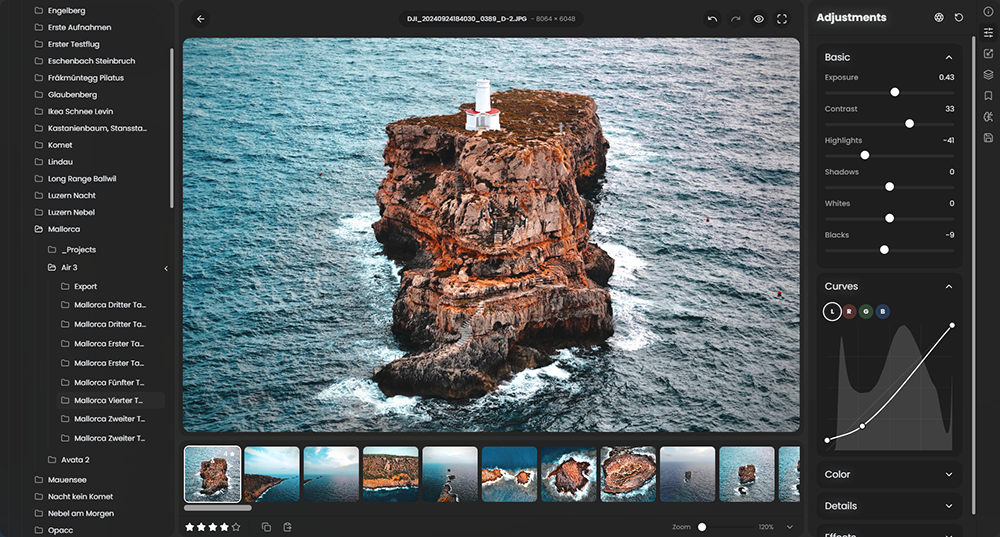
 RapidRAW is een modern, krachtig open source alternatief voor Adobe Lightroom. Het levert een eenvoudige en mooie bewerkingservaring in een lichtgewicht pakket van iets meer dan 20MB voor Windows, macOS, Linux en Android. Het wordt ontwikkeld door een Zwitser, die hier juli 2025 mee is begonnen als een persoonlijke uitdaging met als doel om een krachtig programma te creëren voor zijn eigen fotografieworkflow. RapidRAW is gebouwd met een Rust-backend en een React/TypeScript-frontend, verpakt met Tauri om hem licht te houden. Versie 1.7.0 is uitgekomen en hier zijn de volgende veranderingen en verbeteringen in aangebracht:
Furka Rendering EngineFurka is RapidRAW's new rendering engine. RAW files are now demosaiced on the GPU with RCD for Bayer sensors and Markesteijn for Fujifilm X-Trans, which removes most of the false color, maze patterns and moiré in fine detail. Highlights, Shadows, Whites, Blacks, Clarity and Structure were rebuilt on a new, edge-aware base, so they no longer create halos around mountains, trees and buildings. Highlight and shadow recovery are much stronger, Contrast now works around each photo's own midtones, sharpening is halo-free and the color grading wheels now work in OKLab. You can read everything about Furka, with lots of comparisons, in the blog post: Introducing the Furka Rendering Engine
RapidRes AI Super ResolutionRapidRes is a new 2x AI upscaler that sits right next to AI Denoise in the Details panel. It is fine-tuned on RapidRAW's own Bayer and X-Trans pipeline, so it adds real detail without the plastic look of generic upscalers. A Detail slider controls how much fine detail it adds, and it works together with AI Denoise. Like AI Denoise, it is fully non-destructive and cached, so it only needs to run once per photo. You can read more about how RapidRes was made, with comparisons, in the blog post: Introducing RapidRes
Docked FilmstripThe filmstrip can now be docked into the left or right side panel as a vertical grid. This gives you much more room to see your photos on wide screens. The docked filmstrip has its own header, a quick filter, a toggle to show file names, and you can change the thumbnail size with Ctrl + mouse wheel. Dragging panels between the side panels was also reworked. You can now drop a panel at the top or bottom of a side to split it, with a live preview of where it will land.
Default AdjustmentsYou can now choose what unedited photos start with in the new Default Adjustments settings.
Better Generative Fill & Cloud Inpainting
- Default Preset: Pick a preset that is applied to every unedited photo. Masks, crops and transforms are skipped, since they only fit the photo they were made on.
- Per-Camera Defaults: Give photos from specific cameras their own preset. You can also right-click a preset while editing a photo and set it as the default for that camera.
- Automatic Lens Correction: Turn on lens correction for all photos, using the lens profile found in each photo's metadata.
- RAW Only: By default, the defaults only apply to RAW files, as JPEGs from your camera are usually already processed. You can turn this on for other files too.
- Slider Reset: Choose whether double-clicking a slider resets it to your default or to the neutral value.
Generative fill now blends much better into the photo. Fills use a hard mask with a soft blend at the edge, and cloud inpainting sends more of the surrounding image at up to 2048 px and matches the tone and grain of your photo. The feather sliders are gone, as they are no longer needed.
With RapidRAW Cloud, you can remove objects, fill in empty areas and replace parts of your photo with high-quality AI, right inside RapidRAW. No powerful GPU or extra setup is needed if you don't want to self-host via ComfyUI.
RapidRAW is free and open source, and I work on it in my free time. Subscribing to RapidRAW Cloud is also the best way to support its development and keep new updates like this one coming. Thank you to everyone who already does!
Rotate Crop By DraggingIn crop mode, you can now rotate the image by dragging anywhere around the crop frame or outside the image. The cursor turns into a curved arrow that faces your pointer. Hold Shift or Alt while rotating for fine adjustments. The crop handles also have bigger hit areas now, which makes them easier to grab, especially on touch screens.
Library ImprovementsCore Improvements
- Six Thumbnail Sizes: The library now has six thumbnail sizes instead of three.
- Natural Sorting: File names are now sorted in natural number order, so frame_2 comes before frame_10.
- Camera Make & Model: The metadata panel now shows the camera make next to the model.
- Smooth Zooming While Loading: RAW files are now decoded on their own GPU queue, so zooming and panning stay smooth while a photo is loading.
- Smaller AI Cache: The AI Denoise and RapidRes cache now takes about a third of the space. Old cache files still work. Both cache limits were raised to 25 GB.
- Metadata in JPEG XL & TIFF: JPEG XL exports now keep the RAW EXIF and XMP metadata, and the metadata export options are now shown for JPEG XL and TIFF.
- Exporting With AI: Exporting the open photo now waits for RapidRes and AI Denoise to finish, so they are always included.
- Virtual Copy Exports: Exported virtual copies are now numbered one after another.
- Copy & Paste: Motion Blur is now included when you copy and paste adjustments.
- Embedded Preview Notice: If a RAW file can't be decoded and RapidRAW falls back to the camera's embedded JPEG, a message now tells you, so its lower quality isn't mistaken for RapidRAW's processing.
- Opening From Your OS: Opening a photo from your file manager now loads its folder into the filmstrip without adding it to your library folders.
- AI Masks on Linux: Fixed AI sky, subject, face and text masks on Linux systems that use a decimal comma.
- Renaming: Fixed renames that left sidecar files behind, and renames that only change upper and lower case now work.
- Mask Drawing: Fixed the mask overlay jumping while drawing at high zoom.
- Stability & Bug Fixes: Resolved various issues and refined overall application performance.