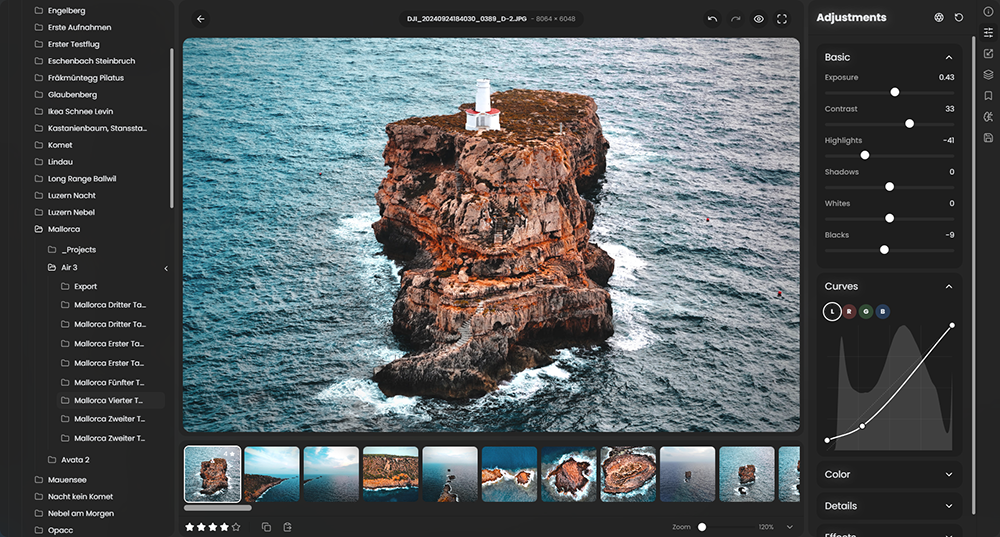
 RapidRAW is een modern, krachtig opensource alternatief voor Adobe Lightroom. Het levert een eenvoudige en mooie bewerkingservaring in een lichtgewicht pakket van ongeveer 20MB voor Windows, macOS en Linux. Het wordt ontwikkeld door een 18-jarige Zwitser, die hier juli 2025 mee is begonnen als een persoonlijke uitdaging met als doel om een krachtig programma te creëren voor zijn eigen fotografieworkflow. RapidRAW is gebouwd met een Rust-backend en een React/TypeScript-frontend, verpakt met Tauri om hem licht te houden. In versie 1.5.4 zijn de volgende veranderingen en verbeteringen in aangebracht:
WGPU Renderer, Reworked Presets System, Android Support & Much More!This update brings a boost in rendering speed, a reworked preset system, and the first steps onto Android. I've built a direct WGPU renderer that skips the usual webview overhead, making the app feel incredibly fast. I've also rewritten the presets system so you can now create "Tool" presets that stack on top of your edits, and you can finally save masks and crops into them. On top of that, there's a new mask intersect mode alongside new flow masks, and several highly requested workflow improvements like batch denoising or keeping EXIF data for stitched and denoised files.
Direct WGPU RendererI've implemented a direct WGPU renderer that bypasses Tauri's standard communication and browser decoding. It essentially draws a native window behind the webview, making the editing experience noticeably smoother. Note for especially Linux users: This new renderer is currently experimental and not available on Linux. Tauri uses GTK for webviews on Linux, which conflicts with WGPU on the same screen surface and causes flickering. To keep things stable, Linux versions will safely default to the standard webview renderer for now. For more informations, check this issue: tauri-apps/tauri#9220.
Reworked Presets SystemThe presets system has been completely rebuilt to give you more flexibility in your workflow.
Experimental Android Support
- Style vs. Tool Presets: You can now set a preset to be a "Style" (which overwrites the entire image's settings) or a "Tool" (which acts additively, blending new changes on top of your current edit).
- Mask & Crop Support: You can now save your masks and crops directly into your presets.
I'm excited to officially bring RapidRAW to Android! This is an early, experimental build, so you might run into a few bugs. Currently, the UI is specifically optimized for tablets (it will not display properly on phones yet). General editing and masking are working nicely. The AI tools require a lot of memory, so I highly recommend testing this on an Android device with at least 8 GB of RAM.
Intersecting MasksYou can now easily intersect masks, making complex masking workflows simpler and more precise.
Flow MasksThe new Flow Mask type works like an additive brush. It builds up strength when you paint over the same area multiple times, which is perfect for dodge and burn adjustments.
Copy/Paste UpgradesYou can now copy and paste masks and crops between images! This is turned off by default to prevent accidental overwrites, but you can easily enable it in the copy/paste settings.
Fluid Canvas NavigationI've completely rewritten the engine for zooming, panning, and pinching on the canvas. Trackpad users on macOS will notice it finally feels completely native and smooth.
Retaining EXIF Data
Windows users: There is currently a minor gesture quirk on Windows, so you will need to hold downCTRLwhile using a two-finger scroll to zoom. A more seamless fix is planned for a future update!Denoised and stitched images now keep their original EXIF data (saved using the new
Core Improvements.rrexifformat). This means you will no longer lose your lens correction profiles, capture dates, or export data when running these intensive processes.
- Better Auto-Adjust: The auto-adjustment algorithm has been greatly improved to deliver faster, more accurate results.
- Redesigned Color Wheels: The color grading wheels have been redesigned for a clean, consistent look and now feature dynamic sliders.
- Batch Processing Upgrades: I've added batch denoising and a new option to preserve your exact folder structure when exporting in batches.
- AVIF Export: Added support for AVIF export.
- Removed mask limits.
- Improved the downscaling algorithm so you feel less of a difference when dragging sliders.
- Fixed bugs that occurred when rapidly switching between images.
- General UI polish, bug fixes & usability improvements.

:strip_exif()/i/2007866846.png?f=thumbmedium)
/u/175440/crop5b5f0d899a5e8_cropped.png?f=community)