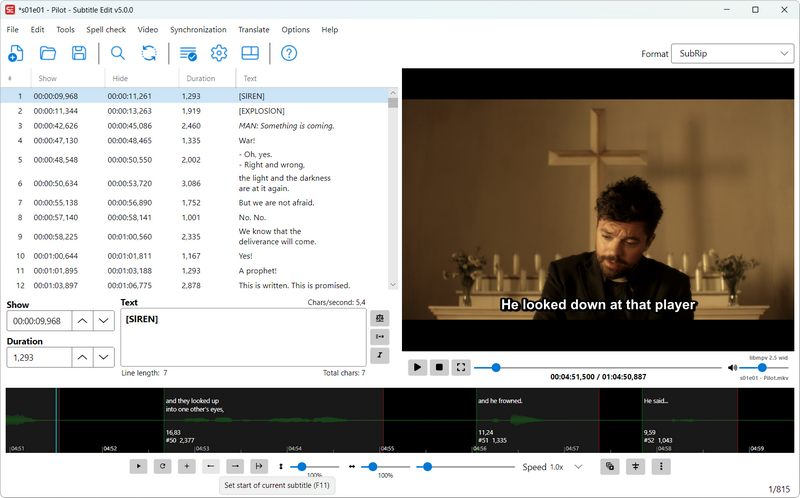
 Versie 5.1.0 van Subtitle Edit is uitgekomen, een opensource programma waarmee ondertitels gemaakt, bewerkt, gesynchroniseerd en geconverteerd kunnen worden. Ondersteuning is aanwezig voor meer dan 250 verschillende formaten en het programma kan in een groot aantal talen worden gebruikt. Sinds versie 5.0.0 kan het programma ook op Linux en macOS draaien zonder dat daar Mono voor nodig is. In versie 5.1.0 zijn verder nog de volgende veranderingen en verbeteringen aangebracht:
Subtitle Edit 5.1.0
- AI review (Tools > AI review) - proofread subtitles with a local LLM via llama.cpp or Ollama, with a before/after grid and an editable prompt
- AI assistant in the subtitle text box - quick actions like fix spelling/grammar, reading speed and change tone
- Auto-translate: new generic OpenAI-compatible engine, remote llama.cpp server option, DeepL formality picker, and many new local models (TranslateGemma, Gemma 4, Hy-MT2, Qwen 3.5/3.6, Aya Expanse)
- Auto-translate: retry with backoff on rate-limited (429) LLM engines, show the API URL in error details, and fix engines that ignored a custom URL
- Speech to text: new engines and models - MOSS-Transcribe-Diarize with speaker labels, OpenRouter and Alibaba Qwen3-ASR online engines, and Parakeet, Kyutai, SenseVoice, ARK-ASR and Cohere models - plus live progress for all CrispASR engines, and the input language is remembered again
- Text to speech: new MOSS-TTS engine with zero-shot voice cloning and a target language dropdown, new Q6_K/Q8_0 quants, a big window overhaul, and a large bug-fix pass across the engines and the review window
- OCR: new CrispEmbed local OCR engine (GLM-OCR, GOT-OCR2, Qwen3-VL), llama.cpp OCR vision models in Batch convert and seconv, a "Show only forced subtitles" filter, and histogram-based color isolation for VobSub/DVD subtitles
- New formats: EBU-TT-D (read/write), IMSC 1.1 image profile export, and "DVD sup (MuxMan/Scenarist)" image-based export
- macOS: multi-window support - "File -> New window" opens an independent editor window
- New "file saved" prompt with file info, copy path and Play/Open - used across text to speech and the video tools
- Waveform: SE4-style center/lock scrubbing (paused and while playing), configurable toolbar with seek and play buttons, drag a multi-line selection to shift time codes together
- Subtitle text box: new native tag-coloring text box - IME/CJK input, right-to-left and live spell check now work with color tags enabled
- Live spell check in the subtitle grid context menu, spell check window fixes, MS Word engine fixes, and new Georgian, Armenian, Luxembourgish and Faroese dictionaries
- Fix common errors: reworked fix list with category chips, sortable columns and live counts - and unticked fixes are no longer applied
- Shortcuts window: categories with icons, sortable columns, better search - plus many new SE4-parity shortcuts (column shortcuts, set start and go to next, play previous/next, extend, and more)
- Subtitle grid: type-a-number line navigation, alternating row colors, text fit setting (clip/wrap/ellipsis), and "Insert subtitle after current line..." keeping the inserted file's own time codes
- Auto-save of the open subtitle file (Options > General)
- Right-to-left: mirrored grid columns, content direction in text boxes, and an ASSA karaoke RTL option
- Accessibility: menu bar activation via Alt/F10, and named controls for screen readers across the app
- Image-based subtitle editor: PGS position monitor, adjust color for selected lines, change speed, and HTML index export
- Point sync and visual sync: sorted sync points, re-pointing, delete via menu/keyboard, and a time code box for the sync point
- Split/re-balance long lines: respect the single line max length
- Auto-trim white space: use the detected language, so Dutch keeps " 's"
- Network: always bypass the proxy for local (loopback) URLs, and proxy password/crash fixes
- Performance: non-English start-up about 3.5x faster, 10-25x faster auto line-breaking, much faster subtitle grid and waveform rendering, faster .srt/ASSA loading and MP4 parsing, and a wide allocation-cutting pass (source-generated regexes, reused StringBuilders) - thx ivandrofly
- Stability: hundreds of fixes, including a 46-bug codebase sweep, an async/await bug hunt, and hardened binary subtitle parsers
- Command line (seconv): llama.cpp auto-translate and OCR, image output styling options, fix-common-errors profile settings in --settings JSON, VobSub/.idx fixes, and clear errors on malformed SCC input
- The libse core library is now published on NuGet
- New UI languages: Arabic, Turkish, Persian, Traditional Chinese, Indonesian, Vietnamese, Greek and Thai - and all language files synced with English (3,000+ strings)
- Updated engines: CrispASR v0.8.24, llama.cpp b10142 (with a CUDA 13 build on Windows), whisper.cpp v1.9.1, CrispEmbed v0.16.1, Qwen3 ASR CPP v0.1.7 and yt-dlp 2026.07.04

:strip_exif()/i/2008230754.png?f=thumbmedium)
/u/2173836/crop670edc9ca7631.png?f=community)
:strip_icc():strip_exif()/u/4550/crop687f77c2ee2fc_cropped.jpg?f=community)
:strip_icc():strip_exif()/u/461755/crop691db788db25a_cropped.jpg?f=community)
:strip_icc():strip_exif()/u/526002/crop5903118017c66.jpeg?f=community)
:strip_icc():strip_exif()/u/177953/vogel.jpg?f=community)