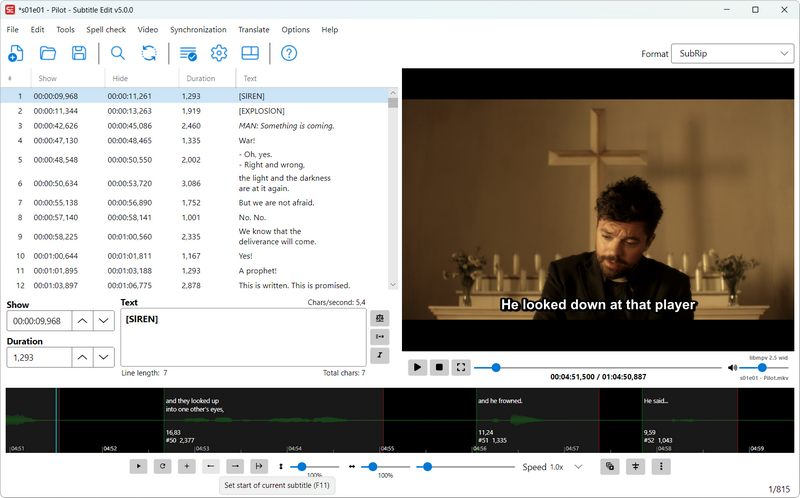
 Versie 5.2.0 van Subtitle Edit is uitgekomen, een open source programma waarmee ondertitels gemaakt, bewerkt, gesynchroniseerd en geconverteerd kunnen worden. Ondersteuning is aanwezig voor meer dan 250 verschillende formaten en het programma kan in een groot aantal talen worden gebruikt. Sinds versie 5.0.0 kan het programma ook op Linux en macOS draaien zonder dat daar Mono voor nodig is. In deze uitgave zijn verder nog de volgende veranderingen en verbeteringen aangebracht:
New features:SE 4 parity:
- Assisted split and Assisted move - ranked one-click suggestions with full previews
- Chapter editor with Matroska/MP4/OGM chapter formats (Video > More > Chapters)
- Edit original - edit the original reference rows in place, open a non-matching original as a read-only reference, and show the original subtitle on the waveform
- Forced narrative lines - a "Forced" column and "Save forced lines as..."
- Error list with summary cards (Tools > List errors..., batch convert) - export to clipboard, text, Excel or web page
- Statistics dashboard with tiles, meters, checks and a CPS histogram
- Subtitle grid: "Columns..." dialog to reorder/hide columns, "Hide tags" formatting mode, and type-to-search in all combo boxes
- Text boxes: drag-and-drop text (e.g. original to working text), configurable "Search via" shortcuts, "Google it", macOS "Look up", "Sentence case" and more "Surround with" slots
- Waveform: guess start/end time from the waveform, snap to shot changes, editable video position box, per-track audio picker, and copy/paste at the video/waveform position
- Beautify time codes using the video's real frame times, and in batch convert
- Video offset remembers recent offsets; "Open recent video" and "Go to video position..." in the Video menu
- Multiple replace: import/export rule categories, select all/none/invert, move shortcuts and regex match timeouts
- Image-based subtitle editor: open DVD sup, XSUB, MP4 VobSub and more, "Video resolution..." scaling, and burn in Blu-ray sup
- Update check settings with a stable/beta channel and a startup notification
- Default save location, auto-break "do not break after" lists with an editor, and cut the subtitle with "Cut video"
Auto-translate and AI:
- Train nOCR, the minimum gap frame rate calculator, and "Remove/replace Unicode characters" (SE 4 plugin port)
- WebVTT style manager, voices and browser preview, and configurable WebVTT cue settings
- Import an SE 4 Settings.xml, and 22 more SE 4 shortcuts on shortcut import
- Shortcuts: go to next empty line, go to first/last line, bookmarks, underline, toggle custom tags, recalculate duration, go to next/prev subtitle (play translate), move first word to previous subtitle, break at first space from cursor
- Layout 10 (edit box under the waveform), "Center text in subtitle grid", the four grid double-click actions, and a toolbar frame rate that works like SE 4's
- "Set up like Subtitle Edit 4" also arranges the waveform toolbar; "Open second subtitle file..." is back in SE 4's Video menu spot
- Remove blank lines when opening a subtitle, full frame image export, regex snippet context menu in Find/replace, and Alt+F/Alt+R in Replace
- Tesseract OCR: SE 4's 10 px margin and resize retry passes
- Copy-to-clipboard grid menu items and plain text column paste are back
Speech to text:
- New "llama.cpp advanced" and "Ollama advanced" engines with batch context, system prompt and schema-forced output - also in batch convert and seconv (--translate-prompt)
- MiLMMT-46 translation models; DeepL offers every API language; Google Translate retries via a fallback endpoint when the free service is blocked
- Re-break translated rows that break the line profile, keep the chosen languages when the engine changes, and the original text is no longer lost after translating
- AI review: in the grid context menu, apply suggestions in passes, Play current, start/stop the llama.cpp server, delay between requests, and new models (Gemma 4 E2B, EuroLLM, Granite 4.1)
Text to speech:
- New engines and models: WhisperX (standalone, no Python), Google Cloud Speech-to-Text v2, Voxtral (Crisp ASR) and anime-whisper for Japanese
- Transcription quality report with non-speech and repeated-line removal
- Crisp ASR: "Auto detect" language on all backends, a VAD off switch and a retry without VAD; live progress for WhisperX
- The MLX Whisper engine was removed
OCR:
- New engines: IndexTTS 2.5, Higgs Audio v3, Fish Audio S2 Pro and FireRedTTS3 (audio.cpp), dots.tts, Confucius4-TTS and Pocket TTS (Crisp ASR), plus VibeVoice again, CosyVoice3 RL models and multilingual Chatterbox V3 (23 languages)
- Voice cloning from the video - "Find voices in video and clone them all", and per-line cloning on Qwen3, audio.cpp, VibeVoice, MOSS-TTS, CosyVoice3 and VoxCPM2 - with a consent prompt before the first clone
- Speaker-name detection, "leave sound/music lines silent", a Zonos language picker and custom Piper voice models
Subtitle formats:
- New engines and models: Apple Vision OCR (macOS), Paddle OCR 3.7 (PP-OCRv6), CrispEmbed PP-OCRv6 and DeepSeek-OCR-2, and llama.cpp HunyuanOCR 1.5, LFM2.5-VL 3B and custom vision models
- Video OCR (burned-in subtitles): far more subtitles read, better text and start times, CrispEmbed engine, OCR fix engine and spell check coloring
- OCR fix engine: new Spanish/Portuguese/Italian and Cyrillic rules, around 115 repaired replace list entries, and apostrophe straightening
- Auto-detect the OCR language, open the matching video after OCR, "Save all images with HTML index", and faster nOCR matching
Video and image export:
- New: EBU-TT (Tech 3350), Manzanita DVB teletext (.dvbttx), Csv Excel, CANVASs SSTG1 (.sdb), Wistia json, DVD Junior SPC, Sonic DVD Producer, YouTube srv3 (.ytt), DaVinci Resolve marker EDL and Adobe Premiere markers
- New exports: Final Cut Pro Xml Captions, BDN/xml 8-bit and Audacity/Tenacity labels
- Read subtitles from fragmented MP4 (DASH/CMAF), ARIB STD-B24 captions from transport streams, and SMPTE-TT bitmap captions
- Much better import of unknown formats (generic XML importer), "Import plain text" from the unknown format prompt, and spreadsheets from File > Open
- EBU STL/teletext: color picker, alignment dialog, TT column, video preview with box/justification/double height, and frame-based time codes
- SCC: colors as CEA-608 mid-row codes, a line length warning, and frame-accurate import timing
- ASSA: embed and trim fonts, offer resampling on a resolution mismatch, new advanced effects, and "Change ASSA style properties" in batch convert
- Ruby and emphasis in Lambda Cap and Netflix IMSC 1.1 Japanese; font colors in EBU-TT-D and IMSC Rosetta
Batch convert and seconv:
- Image-based export: advanced text effects (gradient, neon glow, 3D extrude), per-line ASSA colors and outlines, inline font face/size, and Blu-ray sup fades and overlapping subtitles
- Burn-in: VideoToolbox hardware encoders on macOS, .webm/.ts output, letter spacing and libass style previews
- Sync dialogs: subtitle on the video, resizable waveform, and the selected audio track
- Smoother waveform/video cursor with mpv, faster scrubbing on long-GOP video, and fixed audio dropouts when pausing or seeking
Translations and engines:
- Batch convert: Beautify time codes, convert colors to dialog, snap time codes to frames, "Add folder...", translation progress, keep the source file date/time, and every teletext page per PID
- seconv: --json output and --help-json, --ocr-prompt, --translate-prompt, --override-position, --output-filename-append, full frame image export, .avi/XSUB reading and batched Paddle OCR
- New UI languages: Central Kurdish and Azerbaijani - and all language files synced with English
- Updated engines: Crisp ASR v0.8.32, llama.cpp b10840, whisper.cpp v1.9.3, CrispEmbed v0.17.9, Paddle OCR 3.7, Tesseract 5.5.3, ffmpeg 9.0.1 (Windows), libmpv 20260814 (Windows) and yt-dlp 2026.08.19

:strip_exif()/i/2008230754.png?f=thumbmedium)
:strip_icc():strip_exif()/u/900587/crop58d287fd6389a_cropped.jpeg?f=community)
 ) om de vertaling te doen, gaat als een bloemetje. Opensource for the win
 :strip_icc():strip_exif()/u/367113/crop63490beb6ee04_cropped.jpg?f=community)
:strip_icc():strip_exif()/u/270970/close-button.jpg?f=community)
:strip_icc():strip_exif()/u/85246/alterbirdgeblackbirdsmall.jpg?f=community)