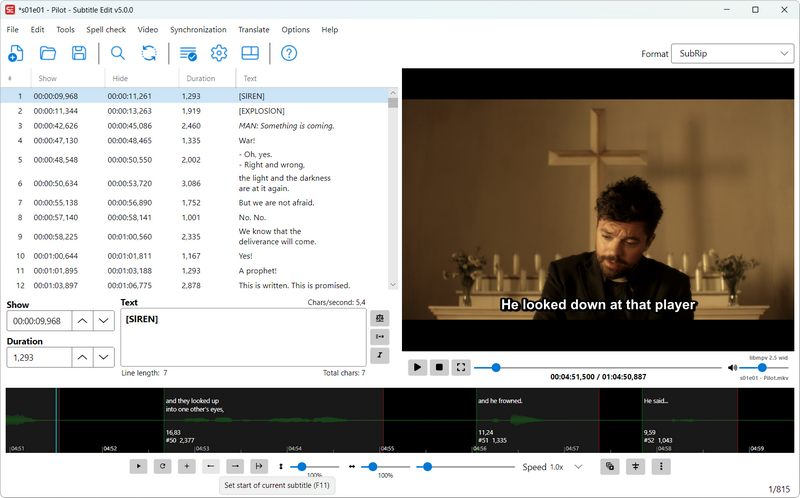
 Na maar liefst 33 bèta's en 4 releasecandidates is versie 5.0 van Subtitle Edit uitgekomen, een opensource programma waarmee ondertitels gemaakt, bewerkt, gesynchroniseerd en geconverteerd kunnen worden. Ondersteuning is aanwezig voor meer dan 250 verschillende formaten en het programma kan in een groot aantal talen worden gebruikt. Versie 5.0.0 is vanaf de grond op opnieuw opgebouwd en kan nu ook op Linux en macOS draaien zonder dat daar Mono voor nodig is.
Subtitle Edit 5.0.0Subtitle Edit 5 is a major new release and a big step for the project. For the first time, Subtitle Edit runs natively on Windows, macOS, and Linux from a single, modern, cross-platform codebase. The builds are self-contained, so no separate .NET installation is required, and on macOS and Linux the needed media components (mpv/ffmpeg) are bundled in.
Please read before upgrading:Subtitle Edit 5 is a new application, not just an update of Subtitle Edit 4. It has been rebuilt from the ground up to be cross-platform, so:
- It is not 100% the same app. The look, layout, and some workflows have changed. Some things are in different places, and a few behave differently than in SE4.
- Not every SE4 feature exists in SE5 yet. SE5 covers all the core editing, conversion, sync, video playback, OCR, and online services, but some of the more specialized SE4 tools are not available yet. Features will continue to be added.
If you rely on a specific SE4 feature that is missing, please keep SE4 installed alongside SE5. The easiest way to run both side by side is to use the Portable versions of SE4 and SE5, which keep their settings separate and do not interfere with each other.
Which version should I use?To run SE4 and SE5 at the same time, use the Portable versions - you can try SE5 while keeping SE4 as a fallback.
- Subtitle Edit 5: recommended for most users on Windows 10 (22H2) or newer, macOS 12+, and Linux.
- Subtitle Edit 4: please continue to use SE4 if you are on an older Windows version (Windows 7/8), or on older / slower computers where SE5 may not run well. SE4 remains available and is the right choice in those cases.

:strip_exif()/i/2008230754.png?f=thumbmedium)
:strip_icc():strip_exif()/u/11345/Auge.jpg?f=community)

:strip_icc():strip_exif()/u/209901/crop56d585630cd78_cropped.jpeg?f=community)
:strip_icc():strip_exif()/u/76569/garfield14.jpg?f=community)