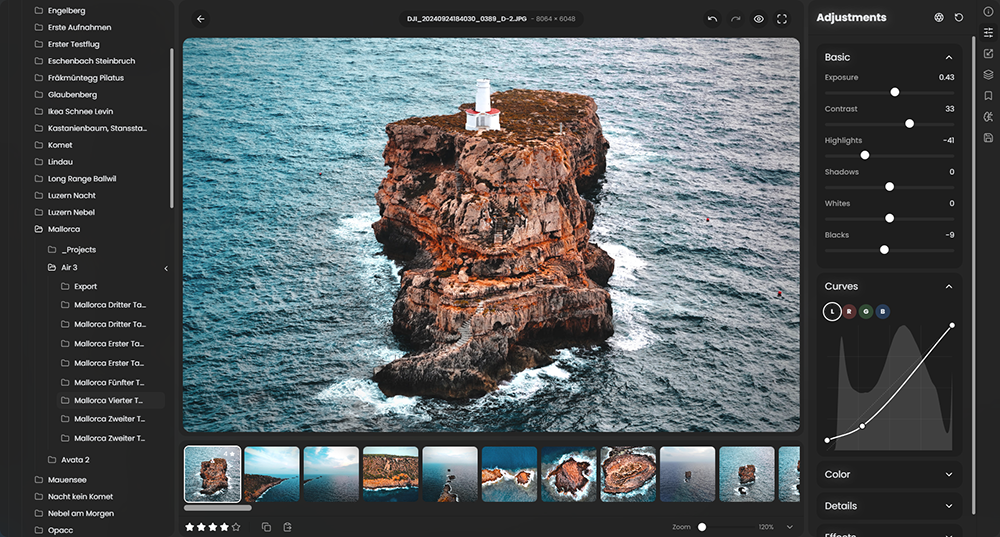
 RapidRAW is een modern, krachtig opensource alternatief voor Adobe Lightroom. Het levert een eenvoudige en mooie bewerkingservaring in een lichtgewicht pakket van ongeveer 20MB voor Windows, macOS en Linux. Het wordt ontwikkeld door een 18-jarige Zwitser, die hier juli 2025 mee is begonnen als een persoonlijke uitdaging met als doel om een krachtig programma te creëren voor zijn eigen fotografieworkflow. RapidRAW is gebouwd met een Rust-backend en een React/TypeScript-frontend, verpakt met Tauri om hem licht te houden. In versie 1.5.6 zijn de volgende veranderingen en verbeteringen in aangebracht:
Full Internationalization & German TranslationI’ve rewritten all core components to support full internationalization (i18n). This makes the entire application multilingual at its foundation, paving the way for further community translations down the road. With this update, I am officially shipping German as the first supported language alongside English, which you can toggle directly in the settings.
Advanced Library Filtering & Search QueriesI’ve implemented a more robust search input that parses structured queries and regular search terms into interactive tags. You can now quickly narrow down large libraries using metadata attributes directly in the search bar. Supported query fields include:
- Exposure & Optics:
iso:>=1600(oriso:<400),aperture:<=2.8(orf:<4),shutter:>=1/125(ors:<1),focal:>=50(ormm:85)- Hardware:
lens:50mm,camera:Sony(matches make or model)- Metadata & Organization:
color:red,rating:>=4You can combine multiple query tags and choose between AND (match all) or OR (match any) modes with a single click inside the search bar to handle complex logical filtering.
Multi-Root Folders, Custom Albums & Folder IconsTo make cataloging and browsing more flexible, I’ve expanded the library database architecture:
Dedicated EXIF Overlays & Metadata Caching
- Multi-Root Folders: You are no longer restricted to a single parent folder. You can now add multiple independent directories (and pin them!) from different drives or locations on your system.
- Custom Albums: You can now create virtual albums to group images together without physically moving the source files on your storage. It's in beta for now as I haven't found an elegant solution to resync the album after a file move outside of RapidRAW for now.
- Custom Icons: To help keep your workspace organized, you can now assign custom icons to individual folders or albums within the library tree.
I've added a dedicated EXIF display option directly inside the library grid and list views. In the revamped View Options panel, you can set the EXIF overlay to Off, On Hover, or Always Show. Under the hood, I also built a metadata caching system so the app doesn't have to parse raw files every time a thumbnail enters the viewport, making scrolling through large folders feel much lighter.
Track, Filter, and Sort by Edited StatusTo make managing your progress through a large shoot easier, I have implemented an Edited Status tracking system. RapidRAW now keeps track of which images have active adjustments.
Improved Canvas Mask Overlays
- Indicators: A visual indicator now highlights edited files in your library.
- Filtering: You can quickly clean up your grid by filtering for Edited Only or Unedited Only images.
- Sorting: A new sorting option lets you group your files by edit status, pushing all modified files to the beginning or end of your library view.
Making local adjustments is now more intuitive. I’ve moved the control handles for linear, radial, and brush masks so they render directly over the image canvas. This lets you position, rotate, and scale your active masks with smoother feedback.
Expanded View Options PanelI've rebuilt the View Options dropdown to put more fine-grained library controls at your disposal.
Core Improvements
- Major Backend Refactoring (Zustand Migration): To solve performance bottlenecks and prevent unnecessary UI calculations, I did a major refit of the state management architecture. I decomposed the giant state tree into five isolated Zustand stores:
useEditorStore,useLibraryStore,useUIStore,useSettingsStore, anduseProcessStore. Now, when you resize a panel or adjust a slider, only the components that actually rely on that specific data re-render, resulting in a snappier interface overall.- Batch Lens Correction Copy/Paste: Thanks to the new EXIF caching system, you can now copy and paste lens correction parameters across multiple images at once. This should make applying lens corrections to an entire shoot much faster. Do not forget to enable it in the copy & paste settings modal ;).
- Resource-Aware Export Pipeline: The export backend has been refactored to check your system resources. It automatically scales and manages concurrency based on your device's available memory and processor cores, making batch exports safer on systems with limited resources.
- Improved Brush Tool: The masking brush uses now a more accurate preview.

:strip_exif()/i/2007866846.png?f=thumbmedium)
:strip_exif()/u/28363/sine5_17797_064.gif?f=community)
:strip_exif()/u/346082/crop6489c050bfe9d_cropped.gif?f=community)

:strip_icc():strip_exif()/u/71414/images.jpg?f=community)
