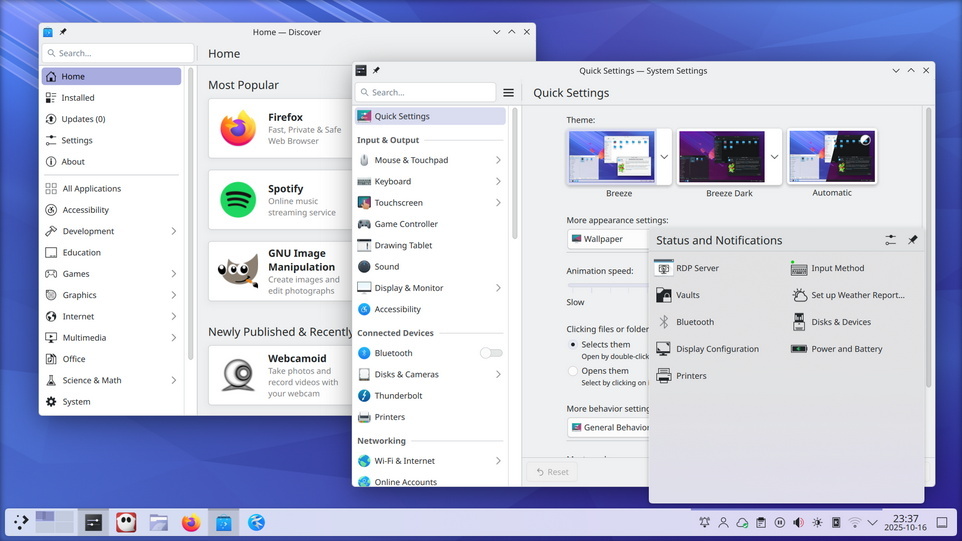
 KDE heeft versie 6.8 van Plasma uitgebracht, een uitgave die tevens de dertigste verjaardag markeert. Plasma Workspaces is een populaire desktopomgeving die primair voor Linux, FreeBSD en Solaris wordt ontwikkeld. In versie 6.0 is onder meer de overstap naar de laatste versie van het applicatieframework Qt gemaakt en is Wayland nu als standaard ingesteld ten koste van X11. De belangrijkste veranderingen die in KDE Plasma 6.8 zijn aangebracht zijn hieronder voor je op een rijtje gezet:
Improvements you can use today
Better accessibilityPart of our continued effort to bring digital control to everyone, a new “dwell clicker” feature can send a mouse click when the pointer stops moving. Designed especially for users with mobility issues, an external app is no longer required to use your system in this way; now it’s built right in!
Serving more users worldwidePlasma 6.8 gains support for the Bikram Sambat calendar in the Digital Clock, and the Amharic language in the on-screen keyboard. These are just two more additions of the dozens incorporated into Plasma over recent versions in our effort to make Plasma a truly universal desktop.
System monitoring Gain an extreme level of control over your system with Plasma’s System Monitor. In Plasma 6.8, you can assign compute-intensive tasks to only the CPUs of your choosing from directly within the monitor, and keep your machine running smoothly.
Remote desktopWe’ve invested a great deal of time into polishing the experience provided by Plasma’s built-in remote desktop server. In Plasma 6.8, you’ll be able to enjoy the following improvements — with more in the pipeline:
- Much better performance and quality that prioritizes latency and responsiveness by adapting to slow networks and rapidly-updating screen content.
- Exclusive mode optionally locks the server’s screen and provides the client with a virtual screen that exactly matches its window size.
- Bi-directional clipboard synchronization makes it easier to exchange content between the server and client.
These features will only take effect in remote desktop client apps that support them. Spectacle can now optionally include both system audio and microphone input in its screen recordings, making it possible to narrate a recording or accurately record everything that’s going on. Plasma’s screen sharing portal dialog lets you create a virtual screen to share, instead of an existing display. In Plasma 6.8, you can now specify the resolution of the virtual screen instead of being limited to only 1920 × 1080.
Nicer-looking third-party app windowsWe’ve added support for window rules that add desktop shadows, outlines, and rounded corners to client-side-decorated windows that can’t provide these visual niceties themselves. Plasma 6.8 ships with one such rule for Steam, making it feel more at home in Plasma. We’ve added new global shortcuts to help power users manage their open windows with the Task Manager widget. By pressing Meta + Ctrl + Page Up or Page Down, you can cycle between the previous and next tasks. By also holding Shift, you can move the active task backwards and forwards.
Setting the stage for decades to come
ThemingFour months ago, Plasma 6.7 included an alpha release of the new Union theming system, demonstrating its ability to style Qt Quick applications. Plasma 6.8 builds on this with a beta release of Union, including not only refinements for Qt Quick theming, but also the ability to style Qt Widgets applications! This includes KDE’s more traditional desktop applications, such as Dolphin, Kate, and Konsole.
While Union is not quite ready to be used by default, Plasma 6.8 brings it ever closer to being a single source of truth for styling all of KDE’s products, and more. To learn more about the current state of Union, read the blog posts from Arjen and Akseli. To try Union, ensure the
unionpackage is installed (name may differ depending on your distribution), apply “Breeze (Union)” in System Settings → Colors & Themes → Application Style, then restart your apps or the system.Apps are expected to look nearly identical to how they do with the traditional Breeze theme. If you’ve found a Union-specific issue, please report it. If you’re interested in experimenting with creating your own Union style, you can find out more in Union’s documentation.
Wayland30 years is an impressive milestone for a community like KDE. But even older is the venerable X Window System (or “X11”), first released in 1984! After 42 years of faithful service, support for starting X11 sessions in Plasma is being retired, in conjunction with full adoption of the newer Wayland system. Compared to X11, Wayland offers better support for modern screens and graphics cards, and is actively developed. The small number of individual apps that still require X11 will continue to work via the “XWayland” compatibility layer. KDE applications will continue to support X11 for the foreseeable future.
Performance, colors, and graphicsAs part of the backend improvements included in Plasma 6.8, we’ve made changes to help Plasma load faster and use less memory. Discover’s update notifier now uses less memory, too. With KWin, NVIDIA GPUs now use triple buffering by default, and all users will have better-looking HDR when using an ICC color profile. We’ve also added support for the HLG transfer function, which means that certain media and applications that did not previously work in HDR are now working as expected.
But that’s not all…
Plasma 6.8 is chock-full of smaller changes, including:
- A new
kscreenctltool makes managing displays from the command-line easier and also offers the potential for scripting and automation.- Kup, the KDE backup tool, has been polished up and is now released as a part of Plasma.
- We have added EAP-TTLS authentication support for StrongSwan VPNs.
- You can enable and disable auto-starting apps without having to delete and recreate their entries.
- Use the arrow keys to move screens pixel-by-pixel in Display Configuration.
- The system shows a warning notification when trying to print using an unavailable printer.
- Copying secrets such as passwords to the clipboard now clarifies why they are not included in history.
- Emojis in the Emoji Selector can now be shown at different sizes.
- …and countless bug fixes and small tweaks to make Plasma better than ever!
To see a high-level overview of all user-facing changes, see the Plasma 6.8 wiki page. To see the full list of all changes, read the complete changelog.

:fill(white):strip_exif()/i/2007852662.jpeg?f=thumbmedium)
:strip_icc():strip_exif()/u/630253/crop6ad1513f212cd_cropped.jpg?f=community)

/u/367878/crop68203cf741501_cropped.png?f=community)
:strip_exif()/u/148758/crop672e132f0ee41.gif?f=community)

:strip_icc():strip_exif()/u/289675/crop6401bf2c85501_cropped.jpg?f=community)

:strip_icc():strip_exif()/u/1427178/crop626a923e6b621_cropped.jpg?f=community)
/u/26191/AC-60px.png?f=community)
:strip_icc():strip_exif()/u/5144/crop690b1b1fabee4_cropped.jpg?f=community)
:strip_exif()/u/16970/crop57cd1ef1eb0d0.gif?f=community)

/u/11570/crop64b5645ba45a2.png?f=community)