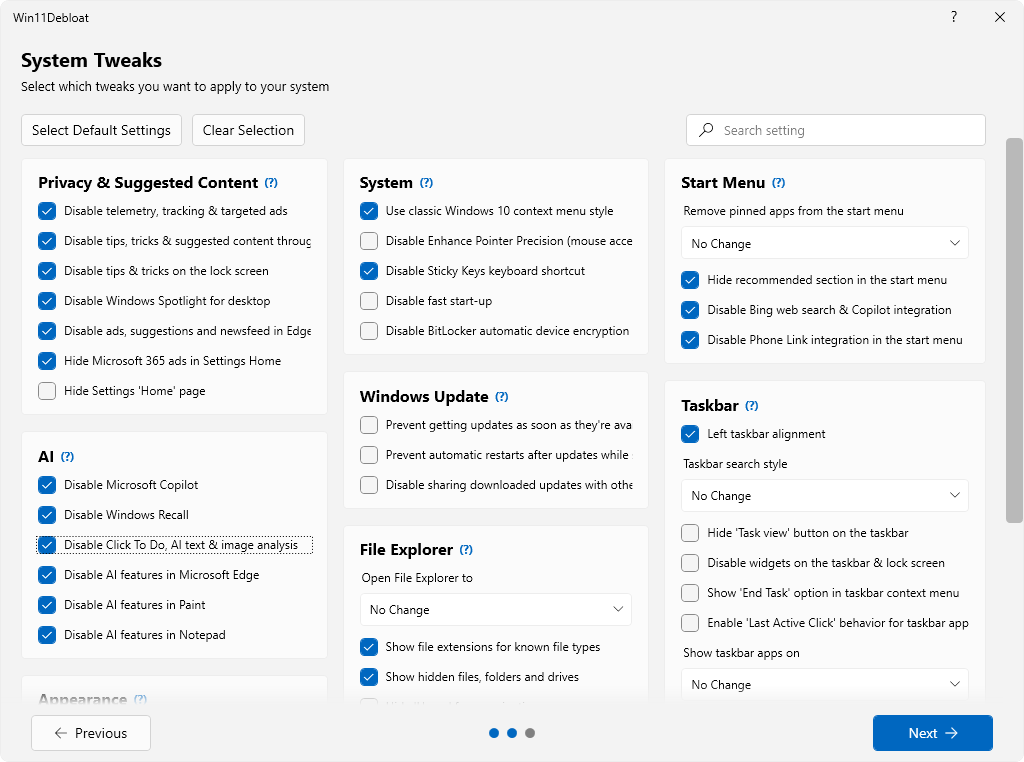
 Win11Debloat is een PowerShell-script dat enerzijds een groot aantal met Windows meegeleverde applicaties kan verwijderen en anderzijds instellingen kan wijzigen die voor een verbeterde privacy en gebruikersgemak zorgen. Ondanks dat het een script is, heeft het wel een grafische gebruikersinterface en in tegenstelling tot wat de naam suggereert kan het op zowel Windows 10 als 11 worden gebruikt. Te veel uitschakelen is uiteraard niet zonder risico, maar de als standaard aanbevolen instellingen kunnen redelijk veilig worden uitgevoerd. Ook biedt het de mogelijkheid om een herstelpunt te maken voordat de gekozen aanpassingen worden doorgevoerd. De changelog van de afgelopen paar versies kan hieronder worden gevonden.
Release 2026.03.15
- Add a hint bubble to highlight the selected changes in
Default Modein #519- Improve app selection page in #520
- Add app presets for Xbox gaming and OEM apps
- Add option to sort app table
- Add app removal recommendations for all apps
- Add proper titlebar button styling in #520
- Improve logic for loading/populating GUI elements in #520
- Fix UI stuttering when creating system restore point in #520
Release 2026.03.09
This release changes the (expected) location of all config files to a dedicated
What's ChangedConfigfolder. This includesFeatures.json,DefaultSettings,json,Apps.json,LastUsedSettings.jsonandCustomAppsList
This change only affects people that have downloaded the script locally and made changes to any of these files. If you have, simply copy these files over to theConfigfolder after updating the script.
- Fix error with module importing when launching the script from PowerShell 7 in #514
- Add option to hide the 'All Apps' section from the start menu in #514
- Move all config files to a dedicated
Configfolder in #514- Replace support button with a
Report a bugbutton when script encounters an error when applying changes in #514

:strip_exif()/i/2008010274.png?f=thumbmedium)
:strip_icc():strip_exif()/u/651550/DD.jpg?f=community)
:strip_exif()/u/306122/TNJ_P38.gif?f=community)
:strip_icc():strip_exif()/u/1427178/crop626a923e6b621_cropped.jpg?f=community)
:strip_icc():strip_exif()/u/126804/crop60008216c7eb0_cropped.jpeg?f=community)
:strip_icc():strip_exif()/u/1138733/crop5bed7f8ee609f_cropped.jpeg?f=community)
:strip_exif()/u/28363/sine5_17797_064.gif?f=community)

:strip_exif()/u/322645/crop5a9092a3b809f_cropped.gif?f=community)
/u/388475/crop5ffeb64bbd97a_cropped.png?f=community)
