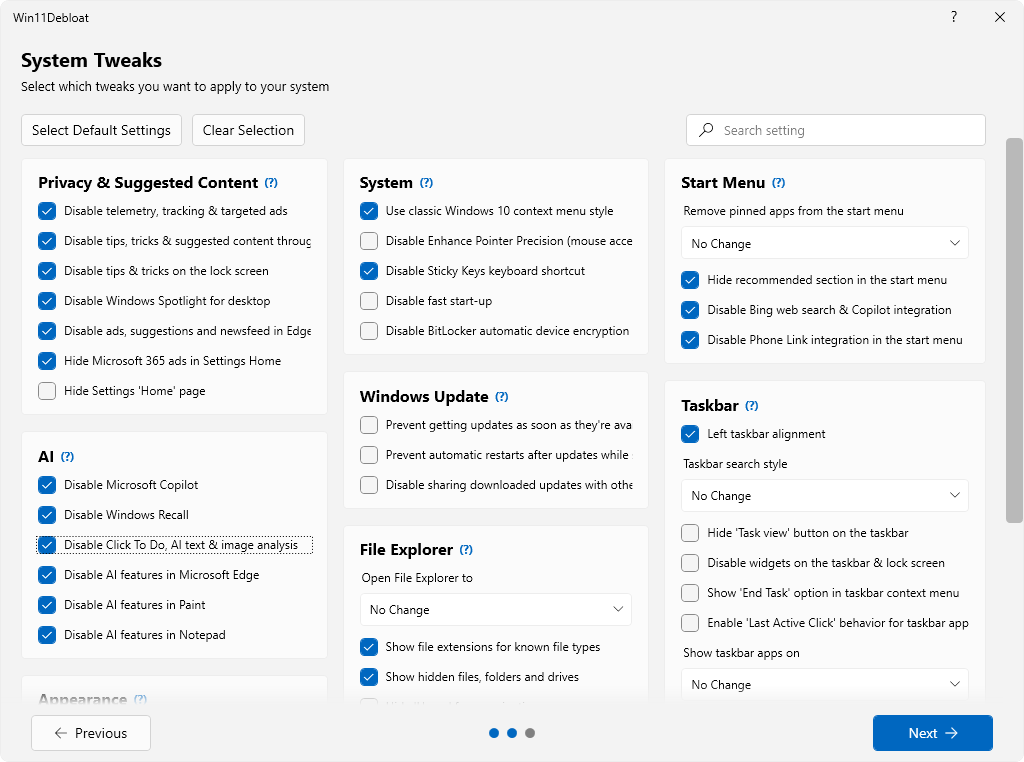
 Win11Debloat is een PowerShell-script dat enerzijds een groot aantal met Windows meegeleverde applicaties kan verwijderen en anderzijds instellingen kan wijzigen die voor een verbeterde privacy en gebruikersgemak zorgen. Ondanks dat het een script is, heeft het tegenwoordig wel een grafische gebruikersinterface en in tegenstelling tot wat de naam suggereert kan het op zowel Windows 10 als 11 worden gebruikt. Te veel uitschakelen is uiteraard niet zonder risico, maar de als standaard aanbevolen instellingen kunnen redelijk veilig worden uitgevoerd. Ook biedt het de mogelijkheid om een herstelpunt te maken voordat de gekozen aanpassingen worden doorgevoerd. De changelog van de afgelopen paar versies kan hieronder worden gevonden.
Release 2026.02.07
- UI improvements to Overview page in #455
- Add Windows Explorer restart checkbox, replacing the prompt after execution
- Updated styling
- Properly cancel script when closing during execution in #455
- Allow forceful MS Edge removal via GUI in #454
- Remove max version from DisableStartRecommended feature in #454
- Fix key in Enable_Game_Bar_Integration.reg file
- Add link to wiki next to tweak category headers
Release 2026.02.04
Following our recent update, this release focuses on refining the new Win11Debloat GUI with improved functionality & accessibility, as well as addressing some bugs that were introduced. Additionally, this version introduces a few new options for managing Windows Updates and BitLocker encryption.
What's Changed
- Improve UI accessibility for screen readers in #441
- Add search bar to tweak page in #440
- Support Ctrl+F for search boxes in #449
- Respect NoRestartExplorer flag in GUI
- Fix crash on clearing Start menu pinned apps for all users in #447
- Make GUI resizable in #448
- Add Windows Update Settings in #450
- Add option to disable BitLocker automatic device encryption in #451
Release 2026.02.01-R2
Several undocumented parameters in Win11Debloat have been removed with this release. Click here for more information.
This is a big one, for quite a while people have requested a proper graphical UI for Win11Debloat. Today it's finally here! The new graphical UI will become the new default way to use Win11Debloat, but don't worry, Win11Debloat powerful CLI features are still here. If you choose, you can even access the old CLI menu by launching the script with the
What's Changed-CLIparameter. This release also includes some new settings, as well as some big changes under the hood, please refer to the changelog below for more details.
- Add full GUI in #432
- Update App Selection UI to be in line with new GUI
- Move supported app definitions from
Appslist.txttoApps.jsonand add proper app names and descriptions- Move Feature definitions to
Assets/Features.json- Add option to apply changes to other users or the default user profile through the GUI.
- Add
-CLIparameter to open CLI menu instead of GUI- Add missing Sysprep registry files for Multi-Monitor taskbar settings
- Add option to disable the 'Drag Tray' in #433
- Add option to disable bloat in Brave browser in #408
- Add error logging to run.bat in #437
- Removed deprecated parameters, see #435

:strip_exif()/i/2008010274.png?f=thumbmedium)
:strip_icc():strip_exif()/u/421299/crop695270665adec_cropped.jpg?f=community)
:strip_icc():strip_exif()/u/391670/crop61e41b5e44ad9_cropped.jpg?f=community)
:strip_icc():strip_exif()/u/637028/crop6a3e22601b0f7_cropped.jpg?f=community)
/u/136764/crop679f3f4b83ed2_cropped.png?f=community)
:strip_exif()/u/9179/crop586dff9d475a6_cropped.gif?f=community)


:strip_icc():strip_exif()/u/55093/UPpharoah.jpg?f=community)
:strip_exif()/u/18357/WapenStar62.gif?f=community)

/u/472627/crop5c83fe498b36e_cropped.png?f=community)
:strip_icc():strip_exif()/u/241987/drowning.jpg?f=community)
:strip_icc():strip_exif()/u/270970/close-button.jpg?f=community)
:strip_icc():strip_exif()/u/408989/crop5613f0d80e7bb_cropped.jpeg?f=community)
:strip_icc():strip_exif()/u/900587/crop58d287fd6389a_cropped.jpeg?f=community)
:strip_icc():strip_exif()/u/341611/crop59bdeb03f3805_cropped.jpeg?f=community)

:strip_icc():strip_exif()/u/335350/crop61a63ee1f224f.jpg?f=community)
:strip_icc():strip_exif()/u/56530/crop5bb12158a69d0_cropped.jpeg?f=community)
:strip_icc():strip_exif()/u/724904/crop67a50ee17aa71_cropped.jpg?f=community)
/u/1273008/crop68f8983a85676_cropped.png?f=community)
