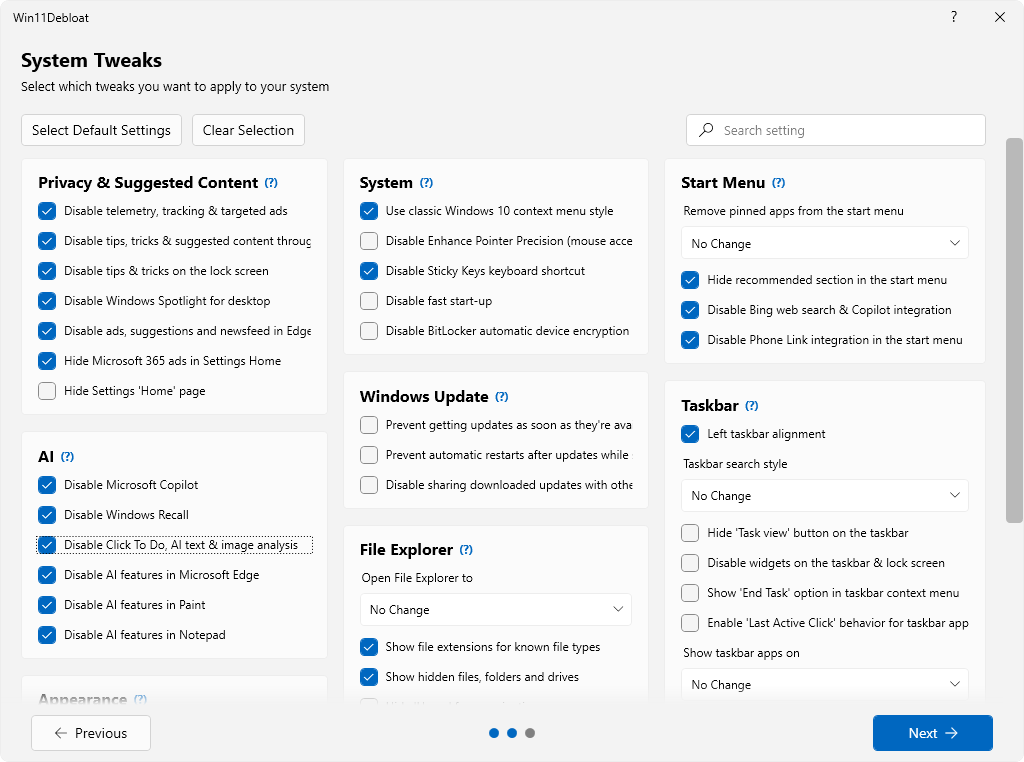
 Win11Debloat is een PowerShell-script dat enerzijds een groot aantal met Windows meegeleverde applicaties kan verwijderen en anderzijds instellingen kan wijzigen die voor een verbeterde privacy en gebruikersgemak zorgen. Ondanks dat het een script is, heeft het wel een grafische gebruikersinterface en in tegenstelling tot wat de naam suggereert kan het op zowel Windows 10 als 11 worden gebruikt. Te veel uitschakelen is uiteraard niet zonder risico, maar de als standaard aanbevolen instellingen kunnen redelijk veilig worden uitgevoerd. Ook biedt het de mogelijkheid om een herstelpunt te maken voordat de gekozen aanpassingen worden doorgevoerd. De changelog voor versie 2026.10.30 kan hieronder worden gevonden.
Release 2026.10.30Win11Debloat now stores user data, including your last used settings, preferences, and logs, in
%LOCALAPPDATA%\Win11Debloatinstead of the script directory. The script will still fall back to the script directory when it is run in system context.This release introduces one of the most requested features for Win11Debloat: localization support! Made possible by contributions from the community, the GUI now supports 13 languages. Beyond localization, this update brings several new features, expanded app removal support, and numerous improvements to the user interface, security, reliability, and performance.
New Features & EnhancementsOther Changes & Fixes
- Localization support
- Add localization framework for the GUI (en-US baseline) in #764
- Add localization for app names and descriptions in #769
- Add Brazilian Portuguese (pt-BR) translation in #768
- Add Dutch (nl-NL) translations in #778
- Add pt-BR app names and descriptions in #781
- Add Italian (it-IT) translations in #786
- Add Japanese (ja-JP) translations in #791
- Add Simplified Chinese (zh-CN) GUI translations in #799
- Add Russian (ru-RU) GUI translation in #857
- Add Traditional Chinese (Taiwan) (zh-TW) GUI translation in #838
- Add Korean (ko-KR) GUI translation in #842
- Add German (de-DE) GUI translation in #839
- Add French (fr-FR) GUI translation in #841
- Add Spanish (es-ES) GUI translation in #840
- feat: add Turkish (tr-TR) UI translations in #845
- Add an option to disable Google Chrome AI features in #763
- Add settings UI for theme and language in #780
- chore: update Edge AI feature to also disable Copilot Chat button in #811
- feat: update FriendlyNames and descriptions for various apps in #861
- feat: Add support for removing the Windows App in #863
- feat: Add support for removing additional OEM bloatware apps in #864
- feat: add option to disable driver updates through Windows Update in #870
- Allow home screen buttons to expand to fit localized labels in #775
- Optimize installed app detection in #771
- Add warning to 'Hide Home' feature tooltips regarding Quick access links in #779
- Add performance warning to Xbox Game Overlay descriptions in #787
- fix(translations): add the missing en-US translation for DisableChromeAI in #797
- Refactor app recommendation visuals to use shapes for improved clarity in #788
- test: fix flaky Replace-StartMenu restore-copy spec in #801
- fix: remove the DisableSearchHistory and DisableSearchHighlights switches in #800
- chore: remove support for Eclipse Manager in #809
- fix: update Bing News references to Microsoft News and enhance descriptions across multiple languages in #810
- fix(en-US): correct grammar slips in feature labels in #816
- Fix uninstallation of user-scope apps in WinGet with deferred uninstall in #802
- fix: give the import/export window's CategoryDetails a hashtable default in #817
- feat: add text trimming to styles for better UI presentation in #824
- feat: enhance hyperlink accessibility and automation properties in UI components in #825
- fix: compare binary and multi-string registry data in order in #818
- feat: enhance FindName reference validation in #826
- fix(launcher): quote argument values passed on by Get.ps1 in #793
- docs: add a security policy in #795
- feat: refactor file paths to use %LOCALAPPDATA% for user data and logs in #829
- fix: read boolean deployment values from a config file as booleans in #833
- fix: skip features that the running Windows build does not support in #832
- fix: ignore 0x80070002 uninstall errors in Windows 10 in #835
- fix(translations): correct four inaccurate source strings and sync translations in #846
- fix: read language JSON as UTF-8 so BOM-less packs load correctly in #844
- Improve backup validation in #849
- fix: handle missing LOCALAPPDATA in user data path assignment in #852
- feat: add Dependabot configuration and enhance PSScriptAnalyzer workflow in #853
- feat(launcher): verify the release archive against a published SHA-256 in #831
- chore(deps): bump actions/checkout from 4.3.1 to 7.0.1 in #854
- remove: disable Drag Tray feature and related configurations in #850
- fix(pt-BR): use Brazilian wording and fix a grammar slip in #803
- fix: update ComboBox popup behavior and style when scrollbar is visible in #865
- feat: add release preparation workflow and build script for versioned assets in #855
- fix: update RunOnce command handling to avoid & enforce length limits in #866
- Wrap checkbox labels to ensure they fit for all languages in #869
- move Windows notifications setting to system and update labels + descriptions in #871

:strip_exif()/i/2008010274.png?f=thumbmedium)
:strip_icc():strip_exif()/u/612605/crop56ce1c7847a02_cropped.jpeg?f=community)
/u/2581832/crop6ae5c6d62c616_cropped.png?f=community)
/u/472627/crop5c83fe498b36e_cropped.png?f=community)
:strip_exif()/u/609320/crop6acbca402e657_cropped.gif?f=community)

:strip_icc():strip_exif()/u/1650152/crop677eca9974266.jpg?f=community)
/u/425296/crop674f138b23ed9_cropped.png?f=community)