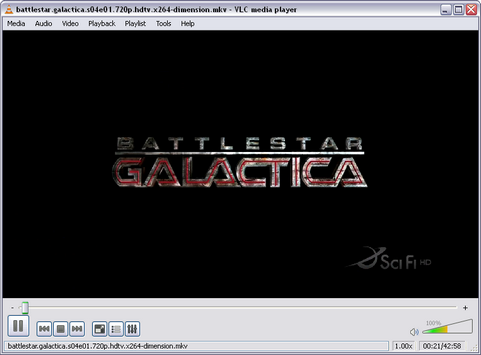
 Na ongeveer twee jaar van ontwikkeling hebben de ontwikkelaars van Videolan versie 0.9.2 van VLC Media Player beschikbaar gesteld. VLC Media Player is een opensource- en crossplatformmediaspeler die diverse audio-, video- en streamingformaten kan afspelen zonder dat hiervoor de betreffende codec hoeft te worden geïnstalleerd. Versie 0.9.2 is beschikbaar voor Windows, Linux en Mac OS X, oudere versies zijn ook beschikbaar voor Beos, BSD, Linux, Morphos, Solaris en Windows CE. De belangrijkste veranderingen in deze release zijn de nieuwe interface voor Windows en Linux, het gebruik van een mediabibliotheek en ondersteuning voor diverse nieuwe audio- en videoformaten. Voor de volledigheid kunnen hieronder alle veranderingen sinds versie 0.8.6i worden gevonden:
Changes between 0.9.2 and 1.0.0-git:Changes between 0.9.1 and 0.9.2
- Inputs:
- Mouse cursor support in x11 and win32 screen modules
- Screen module now supports partial screen capture and mouse following on windows.
- Decoders:
- AES3 (SMPTE 302M) support
- E-AC3 (A/52b) support
- Stream output:
- Restored the old mpeg2 transrating module.
- Multiple bridge-in instances are now possible.
- bridge-in can be used to configure a placeholder stream.
Changes between 0.9.1 and 0.9.0:
- Restored the old behavior of --sout-keep. It is now de-activated by default.
- Skins2 interface repaired on Windows.
- Multiple bugfixes.
Changes between 0.8.6i and 0.9.0:
- Multiple bug fixes.
Important notes:Changes:
- This release will need Windows 2000 and Mac OS X 10.4 (Tiger), or more recent to work correctly
- The HTTP interface is now only available on the local machine by default. If you want to make it available from other machines, you will have to edit the ".hosts" file. - On UNIX/Linux, the file is in /usr/share/vlc/http/.hosts If you're using the old http interface, it's located in /usr/share/vlc/http/old/.hosts - On Windows they are in C:\Program Files\VideoLAN\VLC\http\.hosts and C:\Program Files\VideoLAN\VLC\http\old\.hosts - On Mac OS X, you can find it in VLC.app/Contents/MacOS/share/http/.hosts and respectively in VLC.app/Contents/MacOS/share/http/old/.hosts
- This version of VLC contains a new interface for Windows and Linux. This interface has a fullscreen controller and simplified preferences. This interface lacks the "Streaming Wizard" that used to be present in VLC 0.8.6, but provides basic profiles.
- The behavior of --sout-keep was changed. It's now activated by default.
- The marq, mosaic and logo commands in the rc interface changed. They now require a target name as their first argument. Example: vlc --sub-filter "marq@test{marquee=Hello}" -I rc
You can then use commands like: @test marq-marquee Goodbye If you didn't name the object using @test, its name will default to the plugin name (hence 'marq') in this example. These new commands are also available in the telnet interface. - The "rtp" access output module has been removed. Please use the RTP stream output instead, e.g.: Old: '#std{access=rtp,mux=ts,dst=239.255.1.2:5004,sap}' New: '#rtp{mux=ts,dst=239.255.1.2,port=5004,sap}'
- You now need to append --m3u-extvlcopt to your command line to enable EXTVLCOPT options parsing in m3u playlists. Note that only a limited set of options is available to m3u playlists (CVE-2007-6683).
- The old access:url syntax is no longer supported to resolve ambiguities with some file names. Use access://url instead. E.g.: vlc:quit -> vlc://quit ; udp:@239.255.12.12 -> udp://@239.255.12.12
- The ffmpeg module has been removed and replaced by the new avcodec, avformat, swscale (or imgresample if you use a swscale-less ffmpeg build) and postproc modules.
- The web plugins ActiveX (IE)/Firefox/Mozilla/Safari now recognize the following states: IDLE/CLOSE=0, OPENING=1, BUFFERING=2, PLAYING=3, PAUSED=4, STOPPING=5, FORWARD=6, BACKWARD=7, ENDED=8, ERROR=9. With FORWARD and BACKWARD being reserved for future implementations and are thus not functional atm.
- Croping and padding in transcode are now done using the croppadd video filter. For example: transcode{vcodec=mp2v,vfilter=croppadd{cropttop=20,cropbottom=30,paddleft=100}}
- Canvas setting in transcode is now done using the canvas video filter. For example: transcode{vcodec=mp2v,vfilter=canvas{width=640,height=480}}
- Glide video output module has been removed.
[break]
- Security updates:
- Updated libfreetype on Windows and Mac OS X (CVE-2008-1806, CVE-2008-1806, CVE-2008-1807)
- TTA Parser improvements (CVE-2008-3732)
- MMS Access Module improvements (CVE-2008-3794 )
- Playlist:
- Vastly improved playlist support:
- Media library creation to save all your playlist items
- "Live search"
- Shoutcast TV listings
- Audioscrobbler/Last.FM support
- Album art support
- User definable Lua playlist scripts. See share/lua/playlist/README.txt (Default scripts open YouTube, DailyMotion, metacafe, Google Video and lots of other URLs)
- User definable Lua album art fetcher scripts. See share/lua/meta/README.txt
- Inputs:
- Video for Linux 2 (V4L2) input support
- UDP-Lite transport for RTP/AVP
- DCCP transport for RTP/AVP
- Proxy support for MMSH stream
- JACK audio input support
- Input run time option (improved live stream recording)
- BDA devices access module for DVB-C/S/T capture cards on Microsoft Windows
- Re-written Screen access module for Mac OS X using OpenGL instead of QuickDraw
- Screen module now supports partial screen capture and mouse following on X11.
- Experimental EyeTV access module This requires the user to install a plugin to EyeTV.app (available as a separate download).
- Simple RTP input (with MPEG A/V, G.711 and PCM support).
- RTMP input support
- QTKit-based Input module for Mac OS X allowing display and streaming of video taken from all iSight-labelled video cameras (no audio support)
- HTTP access now supports gzip compressed data and Digest Access Authentication.
- New options to reduce latency between arrival of raw data and display of frames. (--auto-adjust-pts-delay and --use-stream-immediate)
- Demuxers:
- MP4 gpac and Apple chapter support
- Fixed playback of AIFF stereo files
- Fixed audio glitch on seek
- Improved FLAC demuxer (duration / current time / meta data)
- AAC tags support
- APEv1/2 tags support
- Improved ID3v2 tags support
- Improved Ogg/Vorbis tags support
- Raw video support
- Standard MIDI File (types 0 & 1) support
- TiVo Series 2 support
- CD+G karaoke Files support
- MXF files support
- OMA support
- Decoders:
- VP60/VP61/VP6F/VP62 support
- Flash Screen Video support
- CamStudio Screen Video support
- DosBox Capture support
- Karl Morton's Video support
- limited atrac3 support
- Fraps support
- Fluidsynth MIDI software synthesis (with external sound fonts)
- New codec FOURCCs to support more specific files: Avid, FCP, Sony, Samsung, ...
- H.264 PAFF support
- DNxHD / VC-3 support
- NellyMoser ASAO support
- APE (Monkey audio) support
- RealVideo support (with the RealVideo run-time)
- Dirac video support using libschroedinger
- Subtitles:
- Closed Caption Decoder (DVD, ReplayTV, TiVo, DVB/ATSC)
- VBI & EBU (Teletext) support (*nix, Mac OS)
- Ogg/Kate subtitles support
- AQTitle subtitles support
- MKV USF subtitles support
- HTML-based subtitles support
- MPSub subtitles support
- JacoSub subtitles basic support
- MPL2 subtitles support
- Rewrite of ASS/SSA scripts and subtitles support
- PowerDivx (.psb) Subtitles support
- Realtext subtitle support
- DKS subtitle support
- SubViewer 1.0 (SubRip09) subtitles support
- Correct Right-to-left languages in subtitles support
- Encoders:
- Flash Screen Video support
- Improved H.264 encoding speed
- Video outputs and filters:
- New CoreAnimation-based output module (VLCKit framework on OS X only)
- Adjust, Invert and Distort (now split into Wave, Ripple, Gradient and Psychedelic) video filters can now be streamed
- New puzzle video output filter
- Re-written motion detection video filter
- New extract video filter (extract Red, Green and Blue components from a video)
- New sharpen video filter (increase the contrast of adjacent pixels)
- New erase video filter (removes logos from a video)
- Enhanced subtitles' renderer to support bold, italic and some HTML tags (Google Summer of Code Student project)
- Support for RGBA and I420 blending. The latter improves Mosaic CPU usage *a lot*.
- New transparency mask video filter (for use with the mosaic_bridge module).
- New bluescreen video filter (for use with the mosaic_bridge module). This was previously part of the mosaic module.
- Fixed random characters problem in RSS filter.
- Add rotate-deciangle for more precision on rotate filter
- Support for Intel SSE2 instruction set in chroma converters
- Improved use of Intel MMX instruction set in chroma converters
- New croppadd and canvas video filters.
- Audio outputs and filters:
- Replay gain support
- Audio playback when going slower/faster (with pitch correction via new scaletempo audio filter)
- New spatializer audio filter
- Correct DTS output via S/PDIF
- Stream output:
- RTSP for TS-multiplexed broadcast streams
- New RTP payload formats:
- Speex voice audio codec
- ITU T.140 (for text, subtitles) output
- G.711 (both A-law and µ-law) output
- UDP-Lite transport for RTP
- DCCP transport for RTP
- Lots of fixes for RTSP broadcasting
- RTMP output
- Interfaces:
- All
- New Simple Preferences dialogs showing the most important settings in an end-user suitable way.
- Improved user interaction
- Improved mouse gestures
- Vastly improved Update checker
- Full support for meta data editing (ID3v2, Ogg/Vorbis, AAC, APEv1/2)
- Windows/Linux
- Brand new interface for Linux and Windows, based on the Qt toolkit
- Fullscreen controller (transparency on Linux+Composite)
- Mac OS X
- Improved video output features
- Online access to VideoLAN's Help Wiki within VLC
- New setting to disable the "Recent Items" service
- When playing Radio (live) streams, the current track is shown correctly
- Correct appearance on Macs using Aqua's graphite theme
- Simplified Extended Controls panel
- Ncurses:
- Correctly displays wide characters when using an UTF-8 locale, if libncursesw is available.
- Some nice colors if the terminal supports it (most do)
- Experimental Lua interface modules. See vlc -I lua and share/lua/playlist/README.txt for more info.
- Unix
- Option to allow only one running instance, using D-Bus interface.
- D-Bus Interface implementing the MPRIS (Media Player Remote Interfacing specification), a common dbus control interface for media players that intends to become an xdg standard when finished: http://wiki.xmms2.xmms.se/index.php/Media_Player_Interfaces .
- Motion module using disk accelerometers to keep video horizontal
- Plugin to set Telepathy presence message using MissionControl
- Fixed VLM schedule time on Linux
- Linux Port:
- VLC now complies with the XDG Base Directory Specification version 0.6 http://standards.freedesktop.org/basedir-spec/basedir-spec-0.6.html (which means that VLC doesn't use the $HOME/.vlc directory anymore)
- Mac OS X Port:
- Mac OS X Framework "VLCKit" that can be used to embed VLC in third party applications (Google Summer of Code Student project, Mac OS X 10.5 only)
- New text renderer based on Quartz replacing the existing Freetype solution
- Complete compatibility with Mac OS X 10.5 Leopard
- It is now required to compile a fully featured build
- The support of Mac OS X 10.3.9 and QuickTime 6.x was discontinued.
- LibVLC:
- Event management and various improvements in libvlc (Part of a Google Summer of Code Student project)
- New Localizations:
- Finnish
- Persian
- Polish
- Punjabi
- Bulgarian
- Developers:
- LibVLC now supports externally built plugins properly. A "vlc-plugin" pkg-config package is provided.
- Java bindings are now built from a separate source.

:fill(white):strip_exif()/i/2006758682.jpeg?f=thumbmedium)
:strip_icc():strip_exif()/u/26692/evil.jpg?f=community)
:strip_icc():strip_exif()/u/26427/YyRIk.jpg?f=community)
/u/152942/crop687206d7bca78.png?f=community)

/u/55784/crop5aebfed47e17e.png?f=community)
:strip_exif()/u/198203/logospenk_2_60maal71.gif?f=community)
/u/28121/avatar_kleiner.png?f=community)

:strip_icc():strip_exif()/u/223538/crop5e60c344da52b_cropped.jpeg?f=community)
:strip_icc():strip_exif()/u/48952/Ultraman-60x60-Ray-Animated.jpg?f=community)
/u/260857/Untitled.png?f=community)
:strip_exif()/u/29711/tweakers.gif?f=community)
:strip_icc():strip_exif()/u/78725/train-icon3.jpg?f=community)

:strip_icc():strip_exif()/u/273318/crop5aa10fd329164_cropped.jpeg?f=community)

:strip_exif()/u/159650/Vogelaar.gif?f=community)
:strip_icc():strip_exif()/u/116001/crop5db1ffa2442b3_cropped.jpeg?f=community)
:strip_icc():strip_exif()/u/110278/crop67ee2ecd65d76_cropped.jpg?f=community)
:strip_icc():strip_exif()/u/97062/crop5601be1a24867_cropped.jpeg?f=community)
:strip_icc():strip_exif()/u/140051/BSOD.jpg?f=community)
 - ik dacht dat dat al lang was vervangen door mpeg en WMV