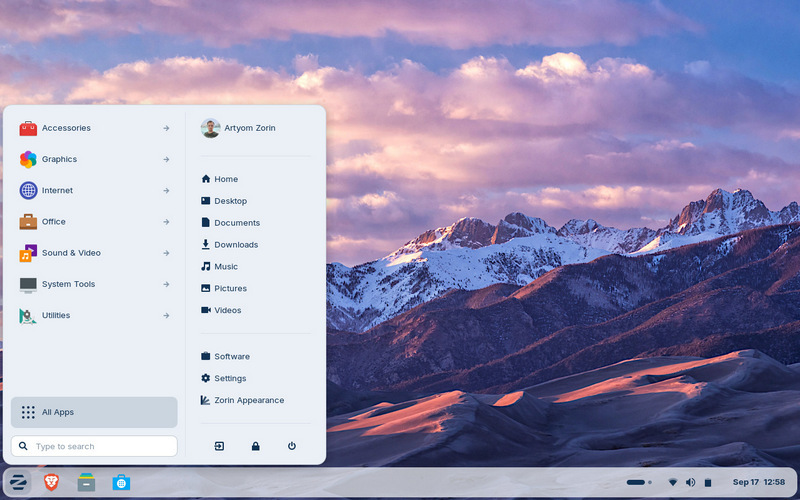
 Versie 18.1 van Zorin OS is uitgekomen. Zorin OS is een op Ubuntu gebaseerd besturingssysteem met een Gnome 3- of Xfce 4-desktopomgeving dat erop gericht is om de overstap van Microsoft Windows zo eenvoudig en pijnloos mogelijk te maken. Zorin OS is beschikbaar in drie uitvoeringen: Core, Education en de betaalde Pro. Het verschil zit hem in de meegeleverde software. In versie 18 heeft de interface een opfrisbeurt gekregen, is er integratie met OneDrive en toont het een alternatief wanneer je een Windows-applicatie probeert te installeren. In deze eerste update zijn verder nog de volgende verbeteringen doorgevoerd:
Suggested alternatives to more Windows appsWe’ve expanded our built-in database to detect installer files for popular Windows apps by more than 40%. It now supports over 240 apps, recommending even more tailored alternatives to sideloading their Windows executables. For example, when you launch the Windows installer for an app like Plex, Zorin OS displays a dialog that directs you to the best way to use that app: installing its native Linux version from the Software store. It also suggests the closest native alternatives to many Windows-only apps, like Evolution Mail in place of Microsoft Outlook, for instance.
If you’re migrating from Windows, this means you’ll get tailored guidance on how to use the most compatible versions of your favourite apps in Zorin OS. It’s one of many reasons why Zorin OS is the ideal choice for Windows users making the switch.
Many improvements to the desktopThe Advanced Window Tiling feature introduces new options (accessible from the Zorin Menu → Zorin Appearance → Windows), including:
- Bring all tiled windows to the foreground together when switching to a tiled app from the taskbar or dash.
- Reorder tiling layouts from the edit layouts dialog in the Advanced Window Tiling settings.
- Enhanced edge tiling, allowing you to snap windows to your active custom tiling layout instead of only screen half & quarter tiling.
The panel now works seamlessly with right-to-left scripts. That means if you’re using Zorin OS in a language like Arabic, Hebrew, or Urdu, your taskbar and panel layout will display right-to-left to match the rest of the system’s interface. Some apps might display their own indicator icon in the panel tray, allowing you to view the app’s status or quickly access its functions. To let you decide if and how they’re displayed, we’ve added a toggle for “Tray Icons in the Panel” and settings for them to the Interface section of Zorin Appearance.
You might also notice that Zorin OS 18.1 feels a bit faster and smoother. That’s because many performance enhancements and bug fixes have been implemented throughout the desktop in this latest release.
The latest LibreOfficeLibreOffice is one of the most essential apps in Zorin OS, and with this new release, it’s getting even better. We’ve included LibreOffice 26.2, the newest version of the award-winning office suite. It brings even better compatibility with Microsoft Office/365 documents, Markdown support, connector shape objects in Calc and Writer, performance boosts, and many other improvements. Learn more about what’s new › With this upgrade, we’re further achieving our goal of making Zorin OS the best alternative to Windows for work.
Updated appsMany other pre-installed apps are updated in Zorin OS 18.1 for a more feature-rich experience out of the box. That also means you’ll need to download fewer software updates after installing Zorin OS on your computer for the first time. Built-in support for Flatpak, AppImage, and Snap packages ensures you’ll have the latest versions of your favorite apps for years to come.
Lite edition now availableAlongside the launch of Zorin OS 18.1, we’re introducing the Lite edition to our latest release series. It’s our edition intended for old and lower-spec computers.

:fill(white):strip_exif()/i/2007842954.jpeg?f=thumbmedium)
:strip_icc():strip_exif()/u/289675/crop6401bf2c85501_cropped.jpg?f=community)

 .
. 
:strip_icc():strip_exif()/u/856937/crop5f2131f40f511_cropped.jpeg?f=community)
/u/346071/crop57f12a024058c_cropped.png?f=community)
:strip_icc():strip_exif()/u/5144/crop690b1b1fabee4_cropped.jpg?f=community)

/u/1782830/crop66a77ec6a31d2_cropped.png?f=community)
:strip_exif()/u/82844/crop5aec235376101.gif?f=community)
/u/75437/crop5daf1210eb5fc.png?f=community)