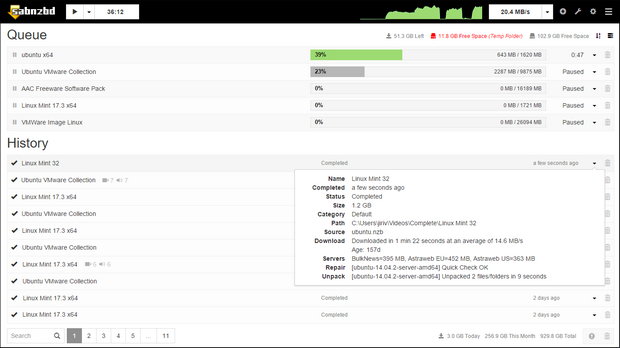
 Versie 5.1.2 van SABnzbd is uitgekomen. Met SABnzbd kunnen bestanden van usenet worden gedownload. Dit opensourceprogramma is beschikbaar voor Windows, Linux en macOS, en biedt de mogelijkheid om nzb-bestanden te laden, waarna de juiste bestanden van usenet worden geplukt. Met de ingebouwde webinterface is het mogelijk om het programma via een webbrowser te bedienen. In deze uitgave zijn twee beveiligingsproblemen verholpen.
Critical remote code execution vulnerability resolved (GHSA-rgqj-28c2-gxwp)You are only affected if an untrusted party can reach the web interface. By default, SABnzbd is only accessible from your own device and
External internet accessis set toNo access. If either of those is still at its default, or if you use a proxy service for authentication, you are not affected.In version 5.1.1 and earlier, an attacker who can reach the web interface could bypass authentication on configuration endpoints, even when SABnzbd is protected with a username and password. By changing SABnzbd's settings this way, an attacker could ultimately execute arbitrary commands on the system running SABnzbd, with the same permissions as SABnzbd itself. This also means that all information in SABnzbd would be exposed.
See GHSA-xrfq-jhgh-wqch below for actions and mitigations. More information: https://sabnzbd.org/5-1-vulnerabilities
High-severity path traversal vulnerability resolved (GHSA-75g3-96fr-7p2r)You are affected if SABnzbd processes NZBs or downloads from a source you do not fully trust, such as a public indexer.
In version 5.1.1 and earlier, a maliciously crafted PAR2 or SFV file inside a download could cause SABnzbd to move downloaded content outside of the job's own folder during post-processing. By using this to plant a file in another job's internal administration, an attacker could ultimately execute arbitrary commands on the system running SABnzbd, with the same permissions as SABnzbd itself.
The only mitigation is to update, there is no configuration change that prevents this. More information: https://sabnzbd.org/5-1-vulnerabilities

:strip_exif()/i/2000918435.png?f=thumbmedium)
:strip_exif()/u/217171/avatar60.gif?f=community)

 .
.
:strip_icc():strip_exif()/u/198189/crop67ecf5f08705a_cropped.jpg?f=community)
/u/106038/crop5681266cc787f_cropped.png?f=community)
/u/117615/crop69626010b5a38_cropped.png?f=community)

:strip_icc():strip_exif()/u/132250/d1ca484677dbb1382705e67689809639.jpeg?f=community)