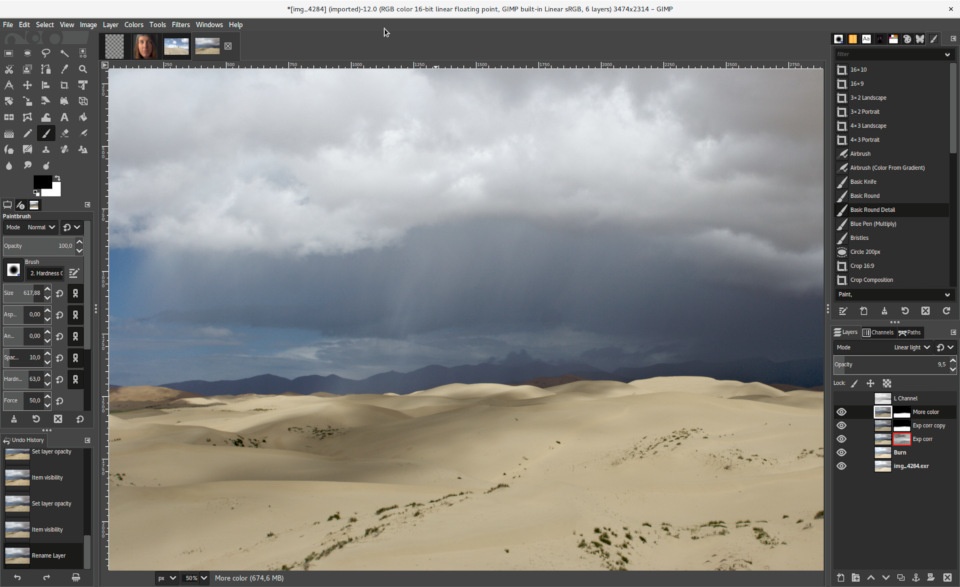
 Versie 3.2.4 van het opensource beeldbewerkingsprogramma GIMP is uitgekomen. De naam GIMP is een afkorting voor 'GNU Image Manipulation Program'. De software is beschikbaar voor diverse besturingssystemen, waaronder Windows, FreeBSD, Linux, macOS en Solaris. In deze tweede update voor versie 3.2.0 zijn de volgende veranderingen en verbeteringen aangebracht:
General HighlightsWe continue to polish GIMP 3.2 in this release. Several new contributors have provided patches this time around, which is very exciting! For more details, check out our NEWS file in our code repository.
Scanning on Windows
- We’ve caught more cases where tools would accidentally rasterize link, text, and vector layers. For instance, the
Edit > Fill with...menu options for colors and patterns now work the same as dragging and dropping colors onto non-raster layers. The Crop Tool now behaves more consistently and does not attempt to resize vector layers.- New contributor anenasa both reported and fixed an issue with the Text Outline feature being cut off with vertical oriented text.
- One for the record books - Jehan fixed a bug in our XCF code that’s existed since 1999! He’s also added code to correctly load XCFs made with and without this bug, as backwards compatibility with XCF project files is very important to us.
- Sometimes a bug fix can create other, unrelated bugs. A fix we made in GIMP 3.2.2 caused some text layers to become uneditable after reloading them from an XCF file. Jehan found and fixed the new bug, so you should be able to edit both XCFs created in 3.2.2 and new ones.
- Speaking of text, Gabriele Barbe has fixed an issue where rotating the canvas rather than the image could cause the on-canvas text editor to appear in the wrong place when moved.
- New contributor balooii fixed a crash that could occur when selecting a non-existant filter tag in a plug-in like GFig.
- Security contributors bb1abu, HanTul, Rakan Alotaib, JungWoo Park, and Bronson Yen studied our image import plug-ins and reported several possible issues. We appreciate their code review and mitigation suggestions! Gabriele Barbe and Alx Sa implemented their suggestions for APNG, PAA, PNG, DDS, PSP, PNM, PSD, JIF, PVR, TIM, XWD, and SFW files.
- The OpenRaster format stores layers as PNGs and notes their opacity in a separate settings file. Our export plug-in saved that setting but also exported the PNG with the same opacity, resulting in higher transparency when reloaded. We’ve fixed this so now layers are saved with 100% opacity, thus ensuring they reopen correctly.
- New contributor Ahmed E. Yassin fixed a bug where exporting metadata in our Metadata Viewer could result in empty files.
- New contributor Kaushik B fixed a bug in the
Open as Layersfeature where multi-layer XCF files would have their layer names changed on import.- Balooii also fixed an issue on Wayland where the tool cursor icon might disappear when moving it.
- New contributor v4vansh resolved an issue where the image tab preview wouldn’t correctly update after switching between grayscale and RGB color modes.
- Bruno Lopes added support for the macOS ScreenCaptureKit to our color picker feature. This allows us to use the newer API for macOS 12+.
In GIMP 3.2.2, we dropped support for 32bit Windows builds. Unfortunately, our scanner plug-in was also lost since it required 32bit TWAIN drivers. We’ve now built a new Windows Image Acquisition (WIA) scanner plug-in to replace it. You can access it in the same place in the menu -
File > Create > Scanner/Camera.Note that because this plug-in uses a new Windows API, the scanning UI will likely look different than what you’re use to. You may also need to install new WIA-compatible drivers for your scanner to make it work correctly.
UX/UI and Performance ImprovementsScript and Plug-in Developers
- The Welcome Dialog now shortens long file names in the Create page to prevent the dialog window from stretching too far out. This UX feature was lost when we updated the Welcome Dialog to a new API, but it is now restored. You can still see the full name by hovering over the image preview or name.
- New contributor infinity improved performance when making selections inside a large image with
Intersection Modeenabled. Their fixes allows GIMP to only consider pixels within the existing selection rather than trying to calculate across the entire image. This can lead to a significant speed-up!- Aruius raised the maximum UI image size to 8192 pixels. This should allow the Gradient Editor dock and other docks with images to expand much further on larger displays.
- When moving a floating layer or selection, the “marching ants” outline is temporarily turned off. This provides a noticable boost in performance and less lag.
Release Stats
- An oversight when updating the
GimpUnitAPI for 3.0 caused functions that accept units of measure to not allow setting it to pixels. This has been fixed now. You can test this in functions likegimp_context_set_line_width_unit ()andgimp_vector_layer_set_stroke_width_unit ().- The
gimp_quit ()function has now been deprecated. You can continue to use it for GIMP 3.x, but it will be removed in the eventual GIMP 4.x release. Instead, you should use a return statement withGIMP_PDB_EXECUTION_ERRORand an GError variable with an explanation of why the plug-in needed to quit.- A new
gimp_resources_loaded ()function has been added by Jehan. You can use this to determine if a resource (like brushes, patterns, fonts, etc) has been loaded in GIMP before trying to use it in your plug-in.- Several deprecated Script-fu functions (such as
gimp-drawable-brightness-contrastandgimp-drawable-threshold) in our official scripts have been converted to using GEGL filters via thegimp-drawable-merge-new-filterAPI. You can check out how to use them in your own scripts by browsing our repository.Since GIMP 3.2.2, in the main GIMP repository:
- 45 reports were closed as FIXED.
- 21 merge requests were merged.
- 258 commits were pushed.
- 18 translations were updated: Brazilian Portuguese, Chinese (China), Cornish, Czech, Danish, Esperanto, Georgian, Italian, Kazakh, Lao, Norwegian Nynorsk, Russian, Serbian, Slovak, Slovenian, Swedish, Turkish, Ukrainian.

:strip_exif()/i/2007035870.png?f=thumbmedium)
:strip_icc():strip_exif()/u/612605/crop56ce1c7847a02_cropped.jpeg?f=community)
:strip_exif()/u/19665/ElfEverQuestTweakersSmall.gif?f=community)