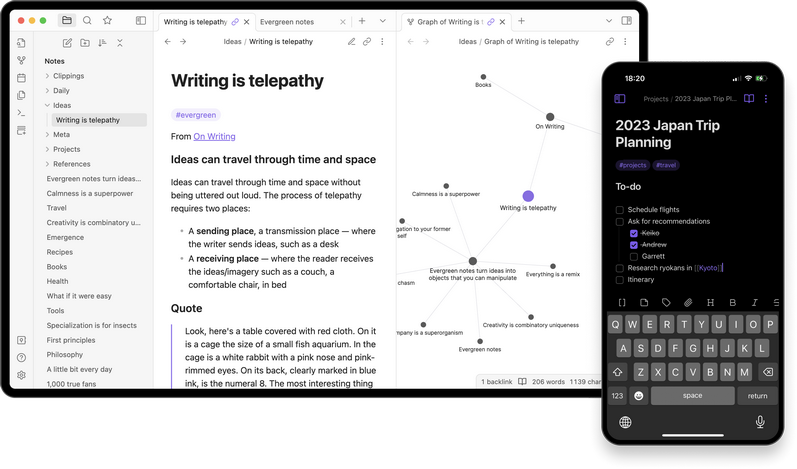
 Versie 1.12.4 van Obsidian is uitgekomen. Obsidian is een applicatie voor het maken van notities en is beschikbaar voor Android, iOS, Windows, Linux en macOS. Notities worden lokaal in Markdown opgeslagen, waardoor je altijd baas over je eigen data bent en deze eenvoudig naar een ander platform is te converteren. Het programma is uiterst aanpasbaar met honderden plug-ins en gratis te gebruiken, maar voor commercieel gebruik of bepaalde functionaliteit, zoals end-to-endversleuteling of versiecontrole, wordt wel een vergoeding gevraagd. De changelog voor deze uitgave ziet er als volgt uit:
New
Obsidian CLIThis release introduces the Obsidian CLI, a command line interface that lets you control Obsidian from your terminal for scripting, automation, and integration with external tools. For installation help, check the troubleshooting section for the platform-specific information.
Image resizingImages in Live Preview can now be resized by dragging from the corner. Double-click the corner to reset the image size.
Automatic attachment cleanupWhen deleting a file, a prompt will ask if you would also like to delete its attachments. A new setting in Files & Links allows you to configure this behavior (choose "Always", "Ask every time", or "Never").
Improvements
BasesFile Explorer
- Added a search toolbar button to filter query results.
- Added the ability to import files into Bases via drag and drop.
- Right-clicking on a single row in table view now shows context menu items related to that file.
Editor
- Copy and paste operations are now using
Ctrl-C/Ctrl-V(Cmd-C/Cmd-Von macOS).Other
- Added new menu items when you right-click in the empty space next to the editor:
- Toggle line numbers
- Toggle inline title
- Fixed missing space after blockquotes.
- Fixed styling of bold links.
- Image size is no longer treated as display text when dragging a link.
- Added detection for backlinks in Canvas files. They now appear in the Backlinks view, and count as links in the Graph view.
- "Change vault..." has been renamed to "Manage vaults".
- Added a new "Change vault..." command to quickly switch between vaults via the keyboard.
- Added a new "Open vault..." command to open an existing vault via the keyboard and keep the current vault open.
- Alt-clicking a file in the File Explorer now adds the previous active item to the selection.
- Quick switcher: Dragging results is now supported.
- Added new "Copy image" menu item when right-clicking on an image.
- Copying text from the editor now includes HTML formatting, making it easier to paste into apps like Google Docs.
- Obsidian Sync now logs when files were skipped for being too large.
- Improved fuzzy search results when the query contains spaces.
- Opening files in an external application now shows a confirmation dialog for added safety.
- Added a warning when attempting to open an executable file.
- Added new app translations.
No longer broken
Other
- Keychain: Added handling for when encryption is unavailable on some Linux machines.
- Fixed issue where layout was not always saved when the app is closed.
- Fixed issue where selecting text near a link or tag would incorrectly trigger the link or tag token.
- Fixed issue where closing a pop-out window with active notices would cause them to move to the main window and never disappear.
- Added a new
uniqueURI action.- Fixed the outline view flickering while typing.
- Fixed scroll position not updating after changing the row height in Bases table view.
- Fixed "More options" menu not closing when clicking the "..." button in a pop-out window.
- Fixed list properties not showing edit and remove options in the context menu when right-clicking a link inside a list item.
- File Explorer: Fixed "Duplicate" menu item generating an incomplete folder name when duplicating a folder that includes "." in the name.
Developers
- The installer has been updated to use Electron v39.7.0 (requires downloading the latest installer).
- We've updated how our translation files are created and bundled with the app. For translators, see the updated instructions on our translations repository.
- Added theming support for corner shapes using
corner-shapeCSS property. Replaced-electron-corner-smoothing. Requires Chromium 139 and Obsidian 1.11+.- macOS: New
traffic-lights-offset-xand--traffic-lights-offset-yCSS variables to configure where the traffic lights appear in the window frame. These offsets are now applied immediately when the app loads.- We've introduced a breaking API change to
BaseOption#shouldHide. This function no longer receives the config as an argument. Options should be accessed fromBasesViewRegistration.optionsinstead.registerView('my-view-id', { name: 'View Name', icon: 'my-icon', factory: () => new MyView(), options: (config: BasesViewConfig) => ({ // Here ^ }) });
- Added
appendBinarymethod to the vault and adapter API.

:strip_exif()/i/2005760768.png?f=thumbmedium)
:strip_icc():strip_exif()/u/467288/Bitmist%252060%2520Static%2520Lossy.jpg?f=community)
/u/150672/crop61af6d6572df8_cropped.png?f=community)
:strip_icc():strip_exif()/u/80624/crop56269c878c330.jpeg?f=community)
:strip_exif()/u/18284/crop698b254cc1194.gif?f=community)

:strip_icc():strip_exif()/u/1338646/crop6053af3af3a39_cropped.jpg?f=community)
:strip_icc():strip_exif()/u/316318/evil_smiley2.jpg?f=community)