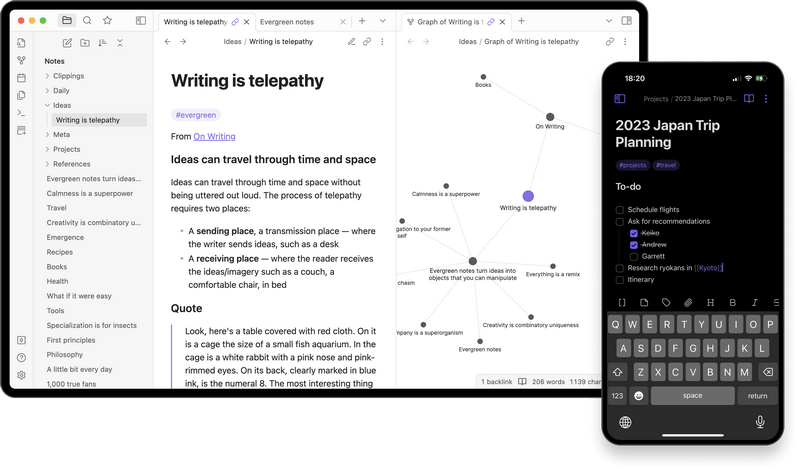
 Versie 1.15.1 van Obsidian is uitgekomen. Obsidian is een applicatie voor het maken van notities en is beschikbaar voor Android, iOS, Windows, Linux en macOS. Notities worden lokaal in Markdown opgeslagen, waardoor je altijd baas over je eigen data bent en deze eenvoudig naar een ander platform is te converteren. Het programma is uiterst aanpasbaar met honderden plug-ins en gratis te gebruiken, maar voor commercieel gebruik of bepaalde functionaliteit, zoals end-to-endversleuteling of versiecontrole, wordt wel een vergoeding gevraagd. De changelog voor deze uitgave ziet er als volgt uit:
New
Search
- Added Relevance sort option that sorts notes based on the best match for your query.
Improvements
SearchPerformance
- Search and search filters in other views (e.g. Backlinks, Outline and Bookmarks) now ignore accents, so
cafefindscafé.- Search and suggestions now treat
ø,ł,đ,ð,ħandıaso,l,d,d,handi, andß,æ,œandþasss,ae,oeandth, which helps with German, French, Danish, Norwegian, Polish, Croatian, Serbian, Vietnamese, Icelandic, Faroese, Maltese, Turkish and Azerbaijani. For example,lodzfindsŁódźandstrassefindsStraße.- Results now appear much faster when a search matches thousands of notes.
- Results now update faster as you keep typing a word or add words to a search.
- The search term explanation no longer flickers and shifts the results while you type.
Editor
- The workspace now appears right away while Obsidian starts, with start-up progress in the status bar instead of a loading screen.
- Notes now render faster in Reading mode, and the vault is indexed faster, especially with long notes.
- Files: Loads faster in vaults with thousands of notes, and when expanding large folders.
- Canvas: Large canvases now open, pan, and zoom much faster when content is visible.
- The first launch after re-indexing a vault is no longer slower than usual.
Other
- Live Preview: Opening a note no longer shows the Markdown syntax at the cursor (e.g. the
##of a heading on the first line) until you move the cursor or start typing.- Smart lists prevents over-indenting list items more than one level deeper than the item above it.
- Smart lists no longer moves nested list items when indenting or moving lines where text is selected.
- New vaults no longer show the ribbon. It can be turned on in Settings → Interface → Show ribbon.
- Settings → Files and links → Allow URI callbacks is now set once on each device for all vaults instead of syncing with the vault. If you use callbacks, turn it on again on each device.
- Opening a file of an unrecognized type in another app from a link in a note now requires confirmation, since some file types can run code on your computer.
- Settings → Web viewer → Homepage and Search engine are now set separately on each device instead of syncing with the vault.
- Sync: Vaults shared with you no longer sync main settings, appearance, themes, snippets, or hotkeys by default when you first connect.
- Holding
Ctrl/Cmdwhile picking a vault from the vault profile menu in the sidebar now replaces the current window instead of opening a new one.- Deleting a file now shows an error when it can’t be moved to the system trash, instead of moving it to the vault’s
.trashfolder (except from the CLI’sdeletecommand).- Community plugins: Installing a plugin no longer picks up settings that came with the vault before it was installed. They’re kept as
data.json.bakinstead.- Obsidian URI:
obsidian://newwith aheadingbut noappendorprependnow appends to that heading instead of showing an error.- On Windows, creating or moving a vault inside Obsidian’s installation folder, or opening a folder there that isn’t in your vault list, now shows an error. Opening a vault that’s already in your list shows a warning, since the installer erases that folder when Obsidian updates.
No longer broken
SearchCanvas
- Fixed Show more context showing a whole long table, code block, or list at once instead of the part around the match.
macOS
- Curved connections no longer disappear near the edge of the screen.
- Scroll position no longer resets after you zoom out and move away from a card.
- Buttons on a “missing file” card stay responsive after you zoom out and back in.
Links and backlinks
- Fixed the main window turning black when you minimize the Settings window while the main window is in full screen.
- Fixed Obsidian staying open in the Dock, or not reopening after “Relaunch”, when a note was still saving or a pop-out window was open.
Other
- Fixed a rare case of links and backlinks no longer updating until restart, after a note was deleted just after it changed.
- Fixed a rare case of links and backlinks no longer updating after Settings was closed right after it opened in its own window.
- Fixed a rare case of a note renamed just after it changed being listed twice in backlinks, or sharing its headings and links with a new note at its old name, until restart.
- Fixed a rare case of a note in Reading view no longer updating after a pop-out window, such as Settings in its own window, was closed.
- Vault: Fixed a vault failing to load when it contains a folder Obsidian can’t read.
- Settings: Fixed plugins turned on or off and Sync settings changed right before quitting sometimes going back to how they were the next time Obsidian opened.
- Community plugins: Fixed Settings → Community plugins showing nothing when a plugin’s
manifest.jsonhas no name. Such plugins are now skipped.- Files: Fixed long folders snapping open or closed instead of animating.
- Tabs: Fixed empty tabs showing the old buttons after a core plugin is turned on or off.
- Editor: Fixed “Inline math” in the Format menu not showing a check mark when the cursor is inside inline math.
- Diagrams: Fixed
obsidian://links in Mermaid diagrams not opening the URI.- Graph view: Fixed a
tag:filter with Tags turned on still showing the other tags of matching notes.- Tags: Fixed a
tag:search (e.g.tag:#foo) hiding every tag.- Vault switcher: Fixed it staying in the old language after you pick a new one.
- CLI: Fixed commands that take a moment to finish printing nothing when run from a script or another program.
- Sync: Fixed folders at the top of the vault with certain names (e.g.
constructor) never syncing to other devices.- Publish: Fixed Publish changes, Publish’s navigation settings and “Bookmark” not working with a top-level folder named
constructor,toStringorvalueOf.- Math: Fixed links in formulas (
\rel="external" href) accepting addresses other than web and file links.Developers
setTimeoutandsetIntervalnow run on time in minimized and hidden windows. Usewindow.setTimeoutinstead ofactiveWindow.setTimeout, whose timers never fire once their pop-out window closes.- CLI:
evalnow supports top-levelawait(e.g.eval code="await app.vault.adapter.list('/')").Array#containsandString#containsare deprecated. Useincludesinstead.FileManager#trashFileandFileManager#promptForDeletionnow resolve tofalsewhen the file couldn’t be moved to the system trash.- The installer has been updated to use Electron v43.8.9 (requires downloading the latest installer).