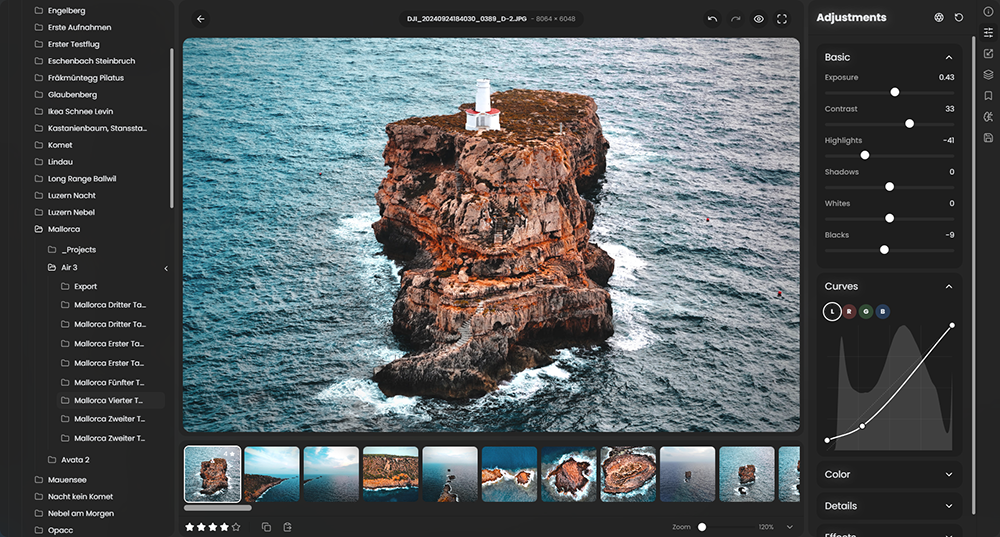
 RapidRAW is een modern, krachtig opensource alternatief voor Adobe Lightroom. Het levert een eenvoudige en mooie bewerkingservaring in een lichtgewicht pakket van ongeveer 20MB voor Windows, macOS en Linux. Het wordt ontwikkeld door een 18-jarige Zwitser, die hier juli 2025 mee is begonnen als een persoonlijke uitdaging met als doel om een krachtig programma te creëren voor zijn eigen fotografieworkflow. RapidRAW is gebouwd met een Rust-backend en een React/TypeScript-frontend, verpakt met Tauri om hem licht te houden. Versie 1.4.9 is uitgekomen en hier zijn de volgende veranderingen en verbeteringen in aangebracht:
Lens CorrectionProper lens correction has been one of the most requested features, and I’ve finally integrated the Lensfun library. This allows for dedicated corrections of optical flaws. My knowledge of lens correction is limited, so some aspects / sliders may require further refinement in future updates. I would appreciate your feedback.
New Geometry Warping ToolsI’ve built a dedicated transform modal to handle image geometry. This is about fixing perspective and composition. When you’re warping or transforming an image, the UI can display dynamic lines to help you align horizons and vertical structures perfectly.
A More Powerful Masking SystemThe old masking panel was starting to feel a bit limited and not really intuitive, so I’ve completely refactored it.
Export Presets
- Sequential Masking: Masks (& submask components) are now applied one after another. This makes the math much more predictable when you're stacking multiple adjustments.
- Drag & Drop: You can now reorder your mask layers just by dragging them. I also added smooth animations for adding or removing components so the UI doesn't feel so "jumpy."
- Per-Mask Opacity: I added individual opacity and invert toggles for every mask component, giving you much finer control over local adjustments.
You can now save your export settings. I got tired of re-typing the same JPEG quality and dimensions every time, so I built a manager for it.
Generative AI InfrastructureI moved away from the direct ComfyUI integration in favor of a dedicated AI middleware client, which makes the overall architecture more robust and flexible. The new RapidRAW-AI-Connector sits between RapidRAW and your local ComfyUI server and is responsible for image caching, workflow injection, and AI coordination. High-resolution images are cached once; for subsequent edits, only the mask and prompt are sent, significantly improving performance during iterative generative edits. This system is very much work in progress and not ready for production use yet.
By decoupling the AI integration from RapidRAW itself, development of the AI Connector can now happen independently and in parallel. Updates to the connector no longer require re-downloading RapidRAW, making experimentation and rapid iteration much easier while preserving full control over hardware, models, and custom ComfyUI workflows.
Better Performance for Large LibrariesIf you have thousands of photos in a folder, you probably noticed the filmstrip could get sluggish which then slowed down the whole editor. It now only renders what is actually on your screen, which makes navigating huge catalogs significantly faster.
Centralized EXIFI refactored the metadata handling to ensure greater consistency across various RAW formats, enhancing support through Rawler. As a result, RapidRAW can now read EXIF data from additional specialized RAW formats, including .RAF and .CR3.
Core Improvements
- Library Preloading: The app now tries to stay one step ahead of you by preloading images in the library to reduce loading times.
- Improved Contrast: I tweaked the dark theme to make the UI elements pop a bit more.
- Consistent UI: I’ve standardized the slider styles across all panels and fixed many alignment issues or other inconsistencies.
- Updated Rawler: The raw loading library is again synced and updated, which adds support / improvements for some more cameras.
- A Lot More: As I've decided to rather use my time for coding than to write patch notes, this list is a bit shorter now ;)

:strip_exif()/i/2007866846.png?f=thumbmedium)
:strip_icc():strip_exif()/u/932885/crop593fa3c0a2262.jpeg?f=community)
:strip_exif()/u/346082/crop6489c050bfe9d_cropped.gif?f=community)