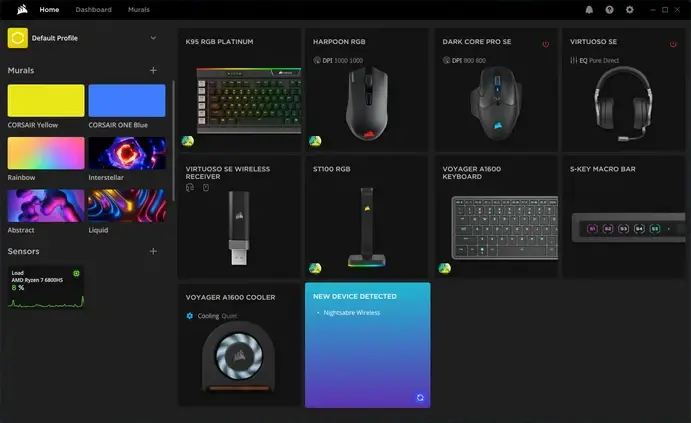
 Corsair heeft versie 5.39.77 van iCUE uitgebracht. Dit programma, wat beschikbaar is voor Windows en macOS, kan worden gebruikt om specifieke hardware van Corsair te beheren en aan te passen. Denk daarbij aan het in de gaten houden van temperaturen, het aanpassen van RGB-verlichting en de snelheden van de fans, en de instellingen van muis, toetsenbord en hoofdtelefoon. De changelog voor deze uitgave kan hieronder worden gevonden.
What’s New:Bug Fixes:
- Added new Chronograph and Decision Coin widgets to Xeneon Edge and Pump Screens
- Added Adjustable Over Current Protection Settings for when Axion PSU is operating in multi-rail mode
- Fixed an issue where using "Disconnect this Display" in Windows Display Settings caused iCUE to disconnect from Xeneon Edge
- Fixed an issue for MAKR 75 where the hardware saving process was unable to complete and caused iCUE to crash
- Fixed an issue for MAKR 75 where quitting while saving an image caused a disconnection with the wireless receiver
- Fixed an issue for the Software Update tab where checked boxes are cleared after scrolling down and back up
- Fixed an issue for iCUE Installer where after installing a headset module, the restart required icon in the Software Update tab was lost
- Fixed an issue on Xeneon Edge where enabling display duplication in Windows caused the gyroscope feature to rotate both screens simultaneously
- Fixed an issue for Xeneon Edge where videos were not loaded in the correct resolution when set as the device background
- Fixed an issue for Govee (H610A) where adjusting the brightness bar did not affect the physical lighting
- Fixed an issue where selecting a device in the “Software Updates” list caused the page to scroll to the top
- Fixed an issue where the module list flickered when scrolling in the Software Update tab
- Fixed an issue where the "Blur" toggle for a Profile Image or Video in the Software Profile Settings did not work properly
- Fixed an issue where in iCUE Settings the dash was clickable
- Fixed an issue where the tooltip for the iCUE Settings icon continued to be displayed after mouse pointer was moved
- Fixed an issue for Xeneon Edge Calendar Widget where iCUE displayed incorrect text on some fields
- Fixed an issue for Xeneon Edge where iCUE would crash after using the "facebook.com" web URL and then duplicating it twice

:strip_exif()/i/2007971018.webp?f=thumbmedium)
/u/426872/crop65857b9defacc_cropped.png?f=community)
:strip_icc():strip_exif()/u/99872/crop6442df4114e7a_cropped.jpg?f=community)

:strip_icc():strip_exif()/u/856937/crop5f2131f40f511_cropped.jpeg?f=community)
/u/150672/crop6adb5a99bd7aa.png?f=community)
:strip_icc():strip_exif()/u/461755/crop691db788db25a_cropped.jpg?f=community)

/u/452542/crop57b8a2dd1446b_cropped.png?f=community)