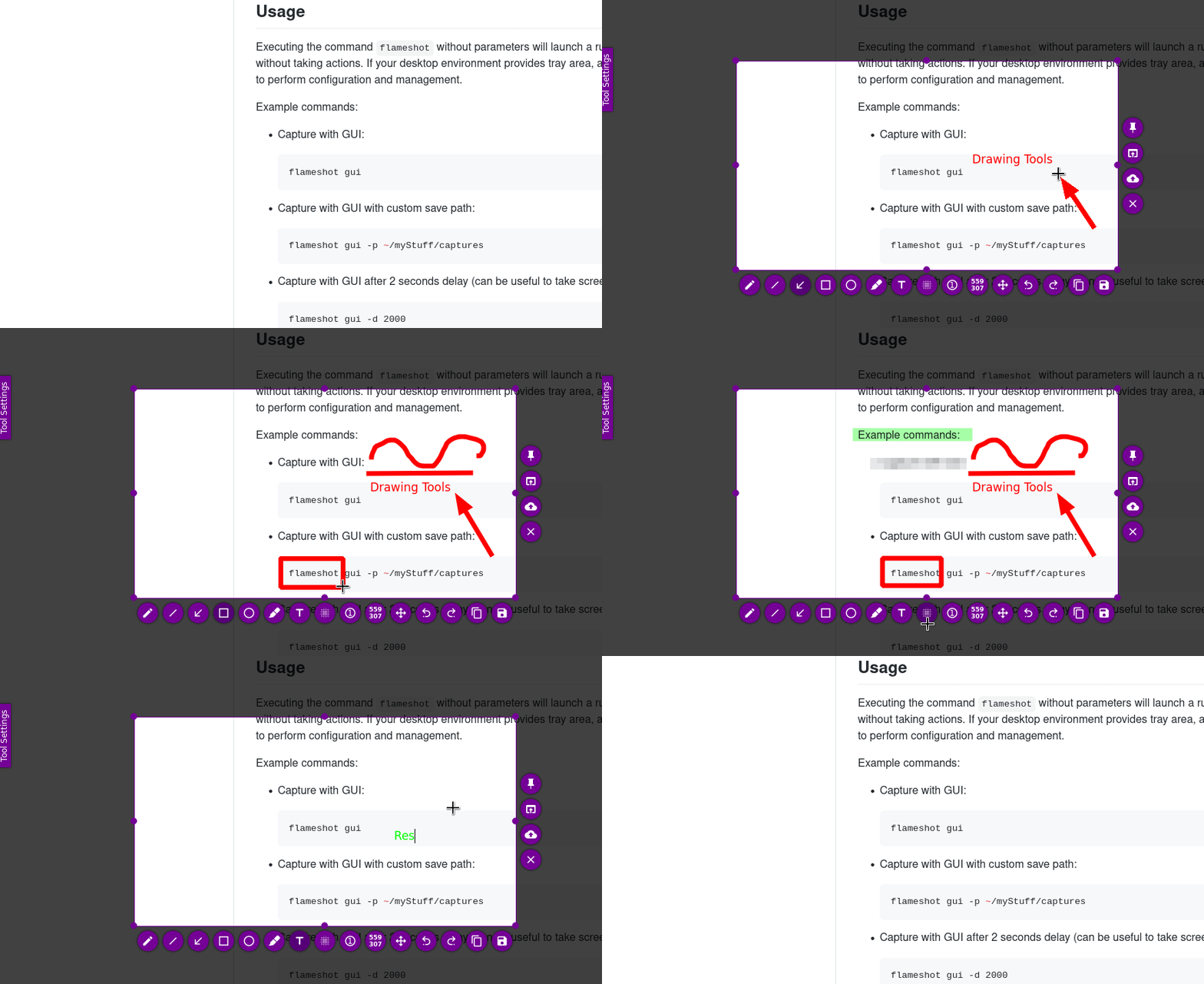
 Versie 14.0.0 van Flameshot is uitgekomen en wegens enkele fouten is ook 13.3.0 op te halen. Met dit opensource en crossplatform programma kunnen screenshots worden gemaakt en meteen ook worden bewerkt. Zo kunnen er bijvoorbeeld tekst, lijnen, pijlen, cirkels en genummerde stappen worden toegevoegd en gevoelige informatie worden verborgen. Na afloop kan de afbeelding worden opgeslagen of naar het klembord worden gestuurd. De changelog voor deze uitgave kan hieronder worden gevonden.
New Features
Unified Approach to Multi-Monitor / ScalingThe largest change in this version is when a screenshot is taken, the user will be prompted to select which monitor to capture. Previously on Linux and Windows the capture widget was drawn across all monitors. This presents significant challenges as we diversify the DE's that are supported in linux and mixed scaling becomes more common. After a lot of testing and iteration I decided the best path forward is this solution.
I understand this is a change in workflow, and some may find it cumbersome. However, this will be the path forward for the time being. Please read the following sections as well if you are on X11 or Windows.
Additionally, on Linux the primary way to take a screenshot is using the xdg-desktop-portal calls. This is the only way to screenshot on Wayland, and many X11 DE's also support this. I reccomend looking at this Arch Wiki page to see if your DE supports it. If not there is a "deprecated" option that can be enabled that will fall back to the legacy method for capturing. (See below)
Legacy X11 Screenshot FallbackFor users on minimal window managers (i3, xmonad, etc.) without
Tray Menu to select screenxdg-desktop-portal, there is now a Settings → General → "Use legacy X11 screenshot method" option that bypasses the portal. This is marked as deprecated but ensures Flameshot works in more environments.If you typically launch flameshot from the tray menu, there is a new dropdown that will directly let you select which monitor to capture and bypass the monitor selection widget.
Capture Active Monitor (X11 & Windows)When this is enabled Flameshot will skip the monitor selection dialog entirely and will automatically capture whichever monitor your cursor is on. Enable it in Settings → General → "Capture active monitor (skip monitor selection)". Not available on Wayland due to security model limitations.
Windows Global Screenshot ShortcutFlameshot on Windows now supports a global "take screenshot" hotkey, meaning that you can now take screenshots with keybindings other than PrntScn. It can also detect if Windows has reserved PrtScn for Snipping Tool and offers to change that registry setting, or register Flameshot as the system's screen capture application.
D-Bus Capture Method (Linux)A new
Portable Binary Mode (Windows)captureScreen()D-Bus method lets scripts and external applications trigger Flameshot's GUI capture programmatically, making automation and integration even more easier on Linux.Flameshot can now store its configuration in a
Screen Subcommand Redesignflameshot.inifile alongside the executable instead of the user config directory. This enables portable/USB-stick deployment. Controlled by theUSE_PORTABLE_CONFIGCMake flag (on by default for Windows).The
Nix Flake Supportflameshot screenCLI subcommand has been reworked to support a per-screen capture paradigm. A new--edit/-eflag enables the user to specify which screen to capture. Users can use this to bind custom hotkeys to screenshot specific monitors to bypass the monitor selection widget.A comprehensive
flake.nixis now included for reproducible builds and development on NixOS. Usenix build,nix run, ornix developout of the box.Improvements
Launcher UI Made More CompactThe launcher dialog is now significantly smaller: monitor selection is hidden on single-screen setups, layout margins are tighter, and the window auto-fits its content.
Update Checker ReworkThe update notification system has been overhauled. The menu now shows "Download version X.Y.Z" when an update is available. Manual checks display "You have the latest version" when up to date, and the UI updates smoothly without requiring a menu close/reopen.
New macOS Icon SetThe application icon on macOS has been replaced with a higher-quality, multi-resolution icon set.
Removed Startup DelayThe 500ms arbitrary delay on the desktop entry's "Take Screenshot" action has been removed. This was exclusively affecting some Linux users and was initially meant for older version of Unity DE.
Bug Fixes
WaylandCosmic Desktop
- QPainter crashes on KDE Plasma Wayland (Qt 6): Added safety checks across 9 widget files to prevent "Paint device returned engine == 0" crashes when the backing store isn't ready.
- Clipboard runtime detection: A single binary now works on both Wayland and X11 — the clipboard backend is selected at runtime instead of compile time.
- GNOME clipboard copy failure: Worked around GNOME's requirement for a visible window during clipboard operations. The capture window now stays briefly alive until the compositor fetches the data. (Fixes #4116, #4298)
X11 / GNOME
- Fixed capture window not going fullscreen on Cosmic DE.
Windows
- Fixed crash caused by
Qt::BypassWindowManagerHinton X11 GNOME.macOS
- Forced PNG clipboard format on Windows — the JPG option caused compatibility issues and is now disabled.
Cross-Platform
- Fixed copy-to-clipboard not working when invoked from the terminal.
- D-Bus hang fix: Flameshot no longer hangs on systems without a
org.freedesktop.Notificationsservice registered. (Fixes #4353)- D-Bus race condition: Fixed a race condition where a temporary QApplication could corrupt Wayland connections, causing subsequent portal calls to hang.
- Double right-click segfault: Fixed a crash caused by double right-clicking in the capture window.
- Last region on scaled displays: Saved region coordinates now correctly account for the device pixel ratio on HiDPI screens.
- Layout warning fix: Removed a duplicate layout parent assignment that printed a Qt warning on every capture.
Packaging & Infrastructure
- Dropped support for Ubuntu Focal; bumped minimum dependency versions.
- Added Windows installation instructions for Scoop.
- Added instructions for setting the screenshot hotkey on GNOME when installed via Flatpak.
- Updated Flathub badge and GCC version requirement.
- MacOS intel build is no longer included. The CI was producing binaries users reported as not working in the beta and I have no ability to troubleshoot it
Translations
- 19 translation updates via Weblate, including improvements to Spanish, Finnish, and many other languages.

:strip_exif()/i/2005183684.gif?f=thumbmedium)
:strip_icc():strip_exif()/u/821329/crop6817c75ef2272_cropped.jpg?f=community)

 Allemachtig! Inderdaad, je hebt gelijk! Dit wist ik helemaal niet. Super bedankt hiervoor
:strip_icc():strip_exif()/u/604689/rsz_1triryche.jpg?f=community)
:strip_icc():strip_exif()/u/105641/dratat_icon.jpg?f=community)