 Technitium DNS Server is een opensource DNS-server met uitgebreide mogelijkheden, die kan worden gebruikt om ad- en malware buiten de deur te houden en je privacy te beschermen. Het is daarmee vergelijkbaar met Pi-hole en AdGuard Home. De software is beschikbaar voor Windows, Linux, macOS en Docker en is eenvoudig op te zetten en eenvoudig in gebruik. Versie 15.0 uitgekomen met meteen een update erachteraan om enkele kleine problemen te verhelpen, en hierin zijn de volgende veranderingen en verbeteringen aangebracht:
Version 15.0.1Version 15.0
- Fixed issue that caused cluster API token to fail to sync when a secondary node joins a cluster.
- Fixed issue of incorrect sync state for SSO group map on secondary nodes.
- Added SSO scopes required by some SSO providers.
- Fixed typo in Prometheus metrics API text output.
- Upgraded codebase to use .NET 10 runtime. If you had manually installed the DNS Server or .NET Runtime earlier then you must install .NET 10 Runtime manually before upgrading the DNS Server.
- Updated the DNS Server's install script for Linux to install the DNS Server to run as a non-root systemd service. However, existing installations would work the same after the upgrade. It is recommended to use the uninstall script before running the install script to take advantage of the new non-root systemd service installation. Note! It is recommended to export a backup zip file of the DNS Server's config from the Settings section on the panel before the upgrade.
- Updated the DNS Server's Installer for Windows to install the DNS Server to run as a non-system service. However, existing installations would work the same after the upgrade. It is recommended to uninstall the DNS Server and delete the "config" folder from the installation folder, before using the new installer to take advantage of the new non-system service installation. Warning! You must export a backup zip file of the DNS Server config from the Settings section on the panel before uninstalling the old version and deleting the existing "config" folder, and use the said backup zip file to restore config after the new installation.
- The HTTP API now supports passing session token via the
Authorization: Bearer <token>HTTP header. The oldertokenparameter in query string and form data is supported for backward compatibility.- If you have DNS Server Cluster setup, make sure to upgrade all nodes for the Cluster to work due to a few breaking changes.
- Added support for Single Sign-On (SSO) with OpenID Connect (OIDC). PR #1678.
- Added new EDNS Client Subnet (ECS) Source Address feature to read client's source IP address from the EDNS Client Subnet (ECS) option in the DNS requests coming via DNS-over-UDP or DNS-over-TCP protocols. This option allows a DNS proxy to pass the client's source IP address via ECS option to the DNS Server.
- Added new option in Import Zone feature to allow overwriting entire zone such that only the records being imported will exist (along with zone's SOA record) after the import process.
- Added option to manually activate primary zone's Key Signing Key (KSK) status to prevent the DNS Server from regularly looking up for DS records in parent zone.
- Added new option in Setting > General section to allow configuring UDP listener socket send and receive buffer size.
- Added support for Prometheus with new metrics API call that returns lifetime counters.
- Updated DNS Server to dynamically bind UDP listeners to local interface IP address on first request to ANY address. This allows sending response to the correct interface the request was received on.
- Updated DHCP Server's DNS entry management implementation to allow having persistent DNS records for reserved leases with hostname configured even when reserved lease was not allocated.
- Implemented new IPv6 Mode option in DNS Server for better performance on dual-stack networks.
- Implemented support for EDNS EXPIRE option (RFC 7314).
- Fixed bug in DNS-over-QUIC (DoQ) optional protocol that caused the DoQ service to fail to accept new connections.
- Fixed DNS amplification vulnerability reported by Shuhan Zhang, Dan Li, and Baojun Liu from Tsinghua University, caused by Self-Pointed Glue Records.
- Fixed DNS amplification vulnerability reported by Shuhan Zhang, Dan Li, and Baojun Liu from Tsinghua University, caused by Aggressive Fetching of DNSSEC Records.
- Fixed a DNS amplification vulnerability reported by Qifan Zhang, Palo Alto Networks, caused by Cyclic Name Server Delegation.
- Implemented new Change Theme menu feature with support for automatic dark/light mode based on host system's theme.
- Added a new Amber theme for improved visual ergonomics and accessibility. PR #1810.
- The Logs > Query Logs section now support Live Update feature for automatically refreshing query logs in results.
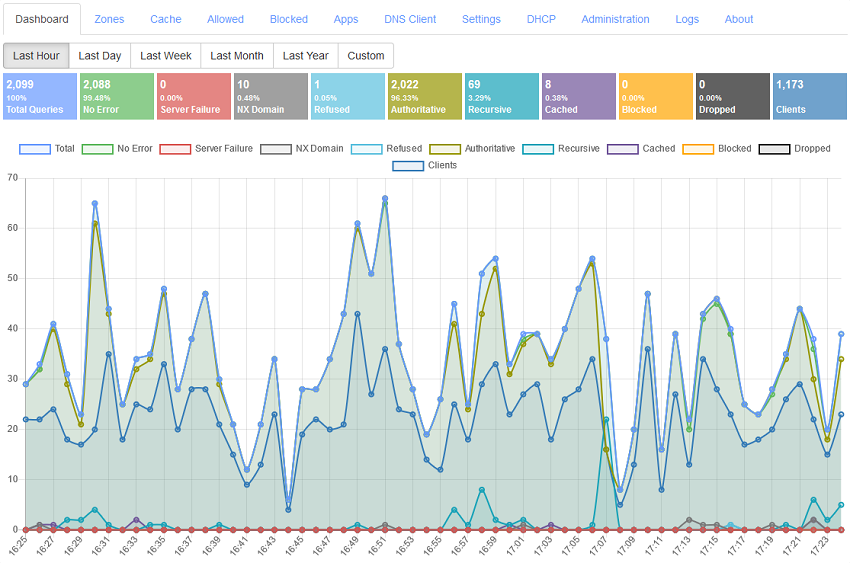
- The Dashboard now includes a convenient option at Top Blocked Domains to enable/disable blocking.
- Query Logs (PostgreSQL) App: Added new app to support PostgreSQL as the backend database for query logs. PR #1600.
- Query Logs (Sqlite) App: Updated the app's pagination logic to significantly improve query performance. PR #1702.
- Query Logs (MySQL) App: Updated the app's pagination logic to significantly improve query performance. PR #1702.
- Query Logs (SQL Server) App: Updated the app's pagination logic to significantly improve query performance. PR #1702.
- Block Page App: Updated the app to implement online SSL certificate signing feature to allow it to do SSL MiTM when app's self-signed root certificate is installed on client systems.
- Wild IP App: Added new
allowedNetworksoption in the APP record data config for configuring allowed networks to prevent misuse/abuse.- Drop Requests App: Added new
allowedLocalEndPointsoption to allow requests coming only from the listed DNS Server Local End Points while dropping requests coming from any other DNS Server Local End Point.- Geo Continent App: Updated app to support Autonomous System Number (ASN) entries in APP record data.
- Geo Country App: Updated app to support Autonomous System Number (ASN) entries in APP record data.
- MISP Connector App: Removed the app since it is not feasible to be supported.
- All DNS Apps now support comments in its JSON config. The APP record data JSON too now supports comments.
- All DNS Apps now include a Read Me file in MD format. PR #1704.
- Fresh installation of DNS Server now uses platform specific log folder path.
- Multiple other minor bug fixes and improvements.

:strip_exif()/i/2007891328.png?f=thumbmedium)
/u/67860/crop68642802b2883_cropped.png?f=community)

:strip_exif()/u/8422/waarschuwing.gif?f=community)
:strip_exif()/u/44466/0115455001290429971.gif?f=community)
/u/298866/crop5ef045407bab9_cropped.png?f=community)

/u/176086/crop5f0823fa5e8d6_cropped.png?f=community)