 Een veelbesproken aspect van Windows is de hoeveelheid informatie die naar Microsoft wordt gestuurd. Vaak is dat handig, want zo kunnen veel zaken beter worden afgehandeld. Maar niet alles is even nuttig, dus zijn er wel degelijk zorgen om de privacy. Gelukkig kunnen veel van deze 'phone home'-opties uitgezet worden, al zijn ze niet allemaal even makkelijk te vinden.
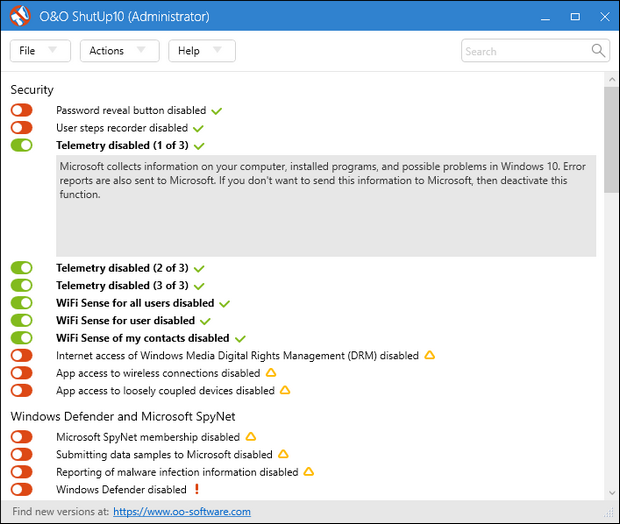
O&O Software heeft een gratis tooltje ontwikkeld waarmee veel van deze opties makkelijk aan- of uitgezet kunnen worden. Zet je teveel uit dan kan dat gevolgen voor de functionaliteit van Windows hebben, maar het programma laat duidelijk met kleurcodes zien wat wel en niet wordt aangeraden. Bovendien biedt het de optie om vooraf een systeemherstelpunt aan te maken. ShutUp10++ hoeft niet te worden geïnstalleerd om zijn werk te kunnen doen. De changelog voor deze uitgave ziet er als volgt uit:
Added:Changed:
- Show O&O product overview when exiting the application
- Disable Bing Chat permission in Windows Copilot (C104)
- Hide welcome screen and startup animation (E132)
- Disable Spotlight experiences and recommendations (E133)
- Disable automatic sign-in from the web to the browser (E134)
- Disable Bing Chat on the new tab page (E135)
- Disable content on the new tab page (E136)
- Disable AI-generated designs (E137)
- Disable integrated AI APIs for websites (E138)
- Disable inline compose feature (E139)
- Disable Copilot access to page context (E140)
- Disable prompts to set Edge as the default browser (E141)
- Disable default browser campaigns (E142)
- Disable diagnostic data collection (E143)
- Disable shopping assistant (E144)
- Hide Microsoft 365 Copilot chat icon (E145)
- Hide Microsoft Rewards (E146)
- Disable recommendations in Settings (E147)
- Disable cloud-based tab services (E148)
- Disable text prediction in forms (E149)
- Disable visual search (E150)
- Disable AI-powered history search (E151)
- Allow user control over local AI features (E152)
- Disable quick startup (E153)
- Hide default top sites on the new tab page (E154)
- Hide Adobe Acrobat subscription button (E155)
- Hide welcome screen and startup animation (E232)
- Disable Spotlight experiences and recommendations (E233)
- Disable automatic sign-in from the web to the browser (E234)
- Disable Bing Chat on the new tab page (E235)
- Disable content on the new tab page (E236)
- Disable AI-generated designs (E237)
- Disable integrated AI APIs for websites (E238)
- Disable inline compose feature (E239)
- Disable Copilot access to page context (E240)
- Disable prompts to set Edge as the default browser (E241)
- Disable default browser campaigns (E242)
- Disable diagnostic data collection (E243)
- Disable shopping assistant (E244)
- Hide Microsoft 365 Copilot chat icon (E245)
- Hide Microsoft Rewards (E246)
- Disable recommendations in Settings (E247)
- Disable cloud-based tab services (E248)
- Disable text prediction in forms (E249)
- Disable visual search (E250)
- Disable AI-powered history search (E251)
- Allow user control over local AI features (E252)
- Disable quick startup (E253)
- Hide default top sites on the new tab page (E254)
- Hide Adobe Acrobat subscription button (E255)
- Set diagnostic data level to minimum (None) (F018)
- Hide privacy settings notification on first launch (F019)
Removed:
- Disable display of LinkedIn information (F016)
- Disable news and interests display on the taskbar on this device (M019)
- Disable app access to calendar for the current user (P011)
- Disable app access to account information on this device (P107)
- Disable app access to calendar on this device (P111)
- Disable app access to camera on this device (P112)
- Disable app access to microphone on this device (P113)
- Disable app access to messages on this device (P114)
- Disable app access to call history on this device (P118)
- Disable app access to contacts on this device (P120)
Info:
- Removed note and link to the O&O newsletter from the Current User view
- Removed note and link to O&O Syspectr from the Local Machine view
- Removed setting F017 (Disable Microsoft feedback tracking) as duplicate of F009
- Compatible with Windows 11 and Windows 10; x86, x64 and ARM architecture
- Available in German, English, French, Italian, Spanish, Russian and Chinese (Simplified)

:strip_exif()/i/2001015049.png?f=thumbmedium)
/u/590416/crop5d8a8f12228ba_cropped.png?f=community)
:strip_icc():strip_exif()/u/2370468/crop6901c511c81b0_cropped.jpg?f=community)
/u/472627/crop5c83fe498b36e_cropped.png?f=community)
/u/150672/crop61af6d6572df8_cropped.png?f=community)
:strip_icc():strip_exif()/u/21673/crop65674aee06c6d_cropped.jpg?f=community)
:strip_icc():strip_exif()/u/6694/crop62e546fe108c4.jpg?f=community)
/u/403512/crop69327050426ec.png?f=community)
:strip_exif()/u/20843/RadioheadAvatar.gif?f=community)

:strip_icc():strip_exif()/u/45000/zardoz3-edit.jpg?f=community)
/u/2085276/crop6ab0252952718.png?f=community)
/u/89311/crop65c27e53cad7a.png?f=community)
:strip_icc():strip_exif()/u/1427178/crop626a923e6b621_cropped.jpg?f=community)
:strip_icc():strip_exif()/u/787841/crop603a17eb5415f.jpg?f=community)