Jordan Russell Software heeft versie 6.7.0 van Inno Setup uitgebracht. Met dit programma kunnen op eenvoudige wijze installatiepakketten voor Windows worden gecreëerd. Het programma biedt de mogelijkheid om informatie toe te voegen aan het register, kan configuratiebestanden en snelkoppelingen aanmaken en heeft de mogelijkheid om de installatiebestanden te comprimeren. Verder kan natuurlijk een uninstaller worden toegevoegd en kan bij de installatie uit verschillende talen worden gekozen. Sinds versie 6.5.0 is het ook mogelijk om een commerciële licentie af te nemen. De changelog voor deze uitgave kan hieronder worden gevonden.
Custom wizard background colors and imagesSetup now allows you to specify a custom background color and optionally also a background image. This supports blending the color and image with each other, and optionally supports using a separate background color and image if dark mode is active. Custom background colors are also supported by Uninstall. These changes are backward compatible: if you do not set any of the new directives, then your installers and uninstallers will look the same as before.
Compiler IDE improvements
- Added new WizardStyle modifier excludelightcontrols. Disables custom styling of all controls (including buttons) when a light style is active, except when styling is required to achieve transparency.
- Added new WizardStyle modifier hidebevels. Hides all bevels (horizontal lines) across Setup and Uninstall, except those in native system dialogs.
- Added new [Setup] section directives WizardBackColor and WizardBackColorDynamicDark to specify custom background colors to use for wizard pages and all other windows such as the Select Language dialog, in both Setup and Uninstall.
If you set this directive but a custom style is not specified by WizardStyle, it will automatically activate custom style windows11 with modifier excludelightcontrols.- Added new [Setup] section directives WizardBackImageFile and WizardBackImageFileDynamicDark to specify custom images to display as the background of wizard pages in Setup, but not in Uninstall.
Supports specifying multiple files for high-quality results on all DPI settings.
If you set this directive but a custom style is not specified by WizardStyle, it will automatically activate custom style windows11 with modifiers excludelightcontrols and hidebevels.
Note that in light mode, the windows11 custom style uses an off-white background color. To revert this, set WizardBackColor to white.
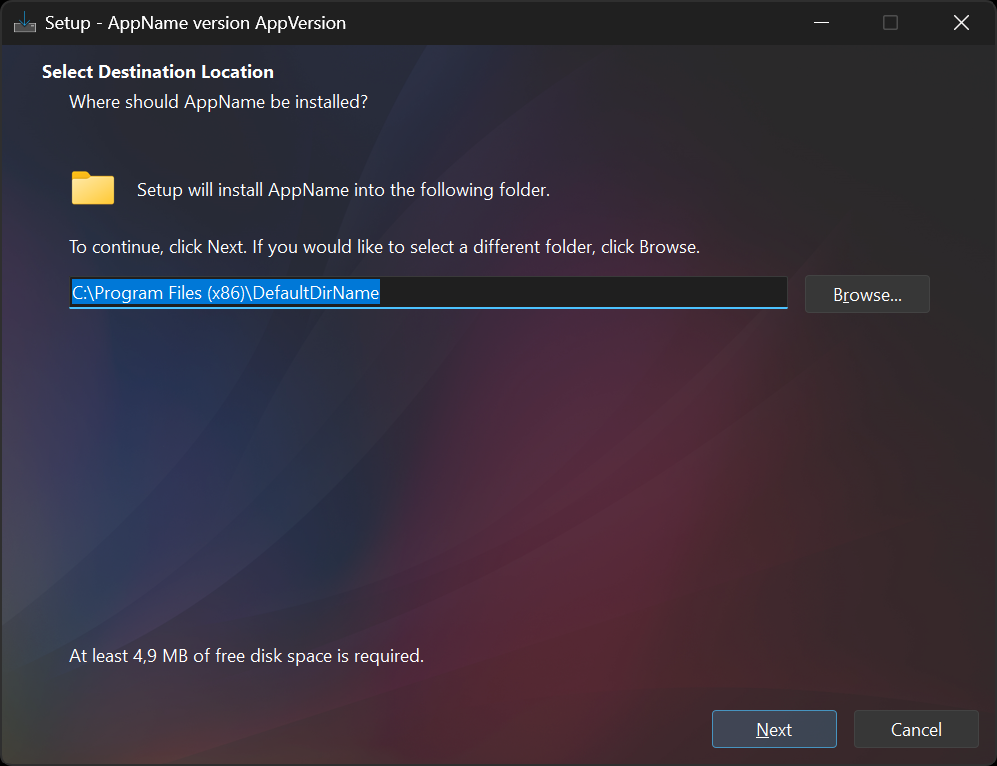
Example screenshot of Setup using a background image in dark mode, at 150% DPI.
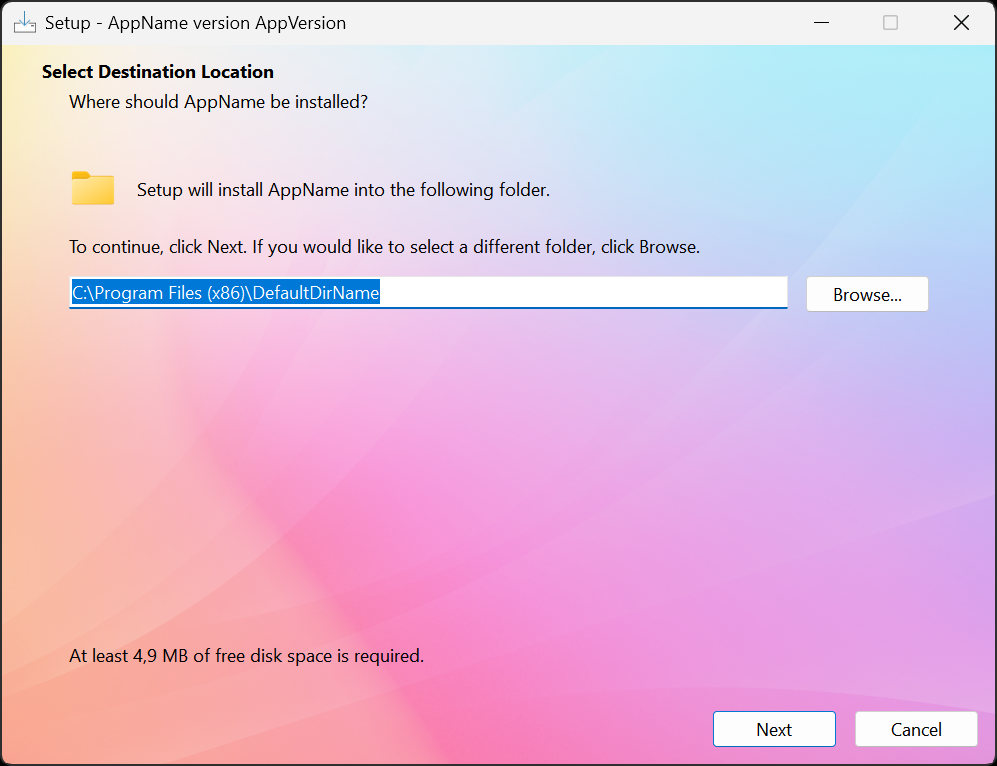
Example screenshot of Setup using a background image in light mode, at 150% DPI.
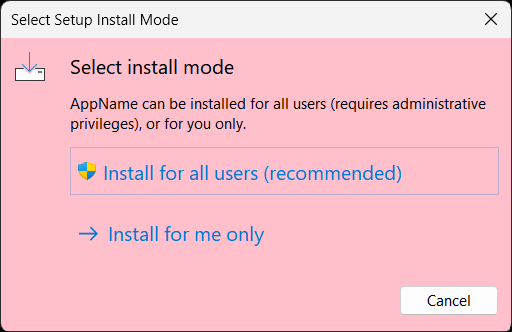
Example screenshot of a task dialog using a background color, at 125% DPI.- [Setup] section directives WizardImageFile and WizardSmallImageFile can now be set to blank values when you want the background image (or color) to stand on its own. Doing so does not change the layout of the wizard.
Alternatively, set WizardImageOpacity to blend these images with the background image (or color). Can be used with the built-in wizard images as well.- Added new [Setup] section directive WizardBackImageOpacity to specify the opacity (non-transparency) of the background image.
This is useful if you want to use an identical regular and DynamicDark background image.- Examples:
; Use separate background images for light and dark appearances WizardBackImageFile=MyBackImage.png WizardBackImageFileDynamicDark=MyBackImage_Dark.png ; Hide the large and small wizard images WizardImageFile= WizardSmallImageFile= ; Use the same background image for both light and dark appearances WizardBackImageFile=MyBackImage.png WizardBackImageFileDynamicDark=MyBackImage.png ; Apply transparency to the background image so it works well in ; both light and dark appearances WizardBackImageOpacity=150 ; Keep large and small wizard images, applying transparency so they ; blend with the background image WizardImageOpacity=150 ; Use a background image in the wizard, and also use custom ; background colors on other windows, and in Uninstall WizardBackImageFile=MyBackImage.png WizardBackImageFileDynamicDark=MyBackImage.png WizardBackColor=#ffc0cb WizardBackColorDynamicDark=#570c22 ; On wizard pages blend the background image and color together WizardBackImageOpacity=150- Pascal Scripting: Added new support function WizardSetBackImage to set, update, or remove the background image at runtime. It can be used not only in Setup, but also in Uninstall.
See the new help topic for an example, and see new function BackImageButtonOnClick in CodeClasses.iss for another example.Autocomplete now cuts [Setup] section directive lookup time, and #include tabs are more manageable, even in large projects.
Security improvements
- Added autocomplete support in the [Setup] section for directive values with fixed options, such as all yes/no directives and others like WizardStyle.
- The Compiler IDE now opens up to 50 #include files in tabs, instead of up to 20.
- Added a new Keep new #include files closed option, disabled by default.
When enabled, newly discovered #include files during compilation remain closed until you explicitly reopen their tabs via, for example, the View menu.- Added new Go to File menu item to the Edit menu to go to a file (
Ctrl+F12orCtrl+P).- When opening a file that is an #include file of the current main file using the Open menu item of the File menu, the IDE now offers to go to its tab instead of opening it as the new main file.
Ctrl+Wnow closes the current tab (in addition toCtrl+F4), consistent with other modern editors. Previously,Ctrl+Wwas assigned to Target Uninstall in the Run menu, which is now reassigned toAlt+Q.Updating is recommended, even if you don't plan to use the other enhancements right away. We continually add extra checks to make your installers safer and more reliable. In this version:
Other changes
Setup and Uninstall now attempt to enable Windows' RedirectionGuard mitigation on their own processes by default. This mitigation, available on Windows 11 and Windows 10 22H2, blocks traversal of NTFS junctions and symbolic links created by unprivileged users (or any non-elevated processes), providing protection against path redirection attacks that could lead to privilege escalation.
For further details, refer to the help topic for the new [Setup] section directive RedirectionGuard, which controls whether RedirectionGuard should be enabled. New command line parameters /NOREDIRECTIONGUARD and /REDIRECTIONGUARD are also supported, which override the RedirectionGuard setting.
- Added retry mechanisms to the compiler to make the compilation process more robust against temporary file access issues, such as when antivirus software or other processes temporarily lock output files.
- Fix: On Windows Server, when an installer attempted to restart the computer, an "unable to restart the computer" error message may have been seen. This was due to the restart being initiated from a non-elevated process, which Windows Server does not allow by default. The restart is now initiated from an elevated process, resolving the issue, provided that the installer requests elevation. If PrivilegesRequired is set to lowest instead of admin, then none of Setup's processes are elevated (unless the installer was started using "Run as administrator"), and the error message may still be seen.
- [Setup] section directives such as WizardImageBackColor and WizardBackColor now also accept color names like white and black, in addition to clWhite, clBlack, #ffffff, and #000000.
- Fix: File and directory controls in Setup should always use left-to-right reading order, even when a right-to-left language is active, but this has not been the case since version 6.5.2.
- Pascal Scripting:
- [Setup] section directives UsePreviousAppDir, UsePreviousGroup, UsePreviousSetupType, UsePreviousTasks, and UsePreviousUserInfo may now be set to a boolean expression, which may contain calls to check functions. For example: UsePreviousAppDir=not PortableCheck.
- Added support functions PathCombine, PathEndsWith, PathHasInvalidCharacters, PathIsRooted, PathNormalizeSlashes, PathSame, and PathStartsWith to make path handling easier.
- Added support class TNewPathEdit, a TNewEdit descendant that always uses left-to-right reading order and provides filesystem autocompletion.
You should use TNewPathEdit instead of TNewEdit for file and directory controls, but using TInputFileWizardPage and TInputDirWizardPage instead is still recommended.- Added support function RPos.
- ISPP:
- Added support function Is64BitPEImage.
- Fix: Support function SameStr is now properly case-sensitive.
- Fix: Support function RPos now properly returns 0 for empty substrings.
- Using support function ExtractFileDir no longer triggers a warning about RemoveBackslash.
- The various options for [Setup] section directive DisablePrecompiledFileVerifications have had their dll/e32/exe postfixes removed. Options setupldre32 and setuplde64 have been merged into a single setupldr option.
- Experimental: Added support for using a 64-bit version of the "Setup Loader" program by setting existing [Setup] section directive UseSetupLdr to x64.
Using x64 does not mean that Setup itself will also be 64-bit: Setup itself is currently always built as a 32-bit x86 binary.
Using x64 anyway has several benefits: your installer initially presents itself as a native 64-bit executable, and the 64-bit loader has high-entropy ASLR enabled. Additionally, it can help satisfy policy or third-party requirements that mandate 64-bit installers, even while the main Setup program is still 32-bit.
The downside is that your installer will no longer load on systems running x86 Windows.- If Inno Setup is not already installed, the installer will again prompt you to choose the installation mode (all users or current user only) using a suppressible dialog. Since version 6.1.1, this choice was only available via the '/ALLUSERS' and '/CURRENTUSER' command-line parameters.
- Other minor improvements.

:strip_exif()/i/2004407586.png?f=thumbmedium)
/u/1811186/crop68014ddd75ebc.png?f=community)
/u/105032/crop67abba6371914.png?f=community)