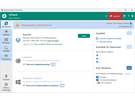
 Adlice Software heeft versie 6.8.0 van UCheck uitgebracht. Met dit programma kan de software op de computer up-to-date worden gehouden. Met de gratis uitvoering moet een scan handmatig uitgevoerd worden. De betaalde uitvoering kan dat periodiek automatisch doen en deze kan de ondersteunde programma's ook installeren als die nog niet op de computer aanwezig zijn. Het programma zelf heeft ondersteuning voor 363 programma's en via zogenaamde communityupdates zijn dat er vele duizenden meer. Sinds versie 6.7.5 zijn de volgende veranderingen en verbeteringen doorgevoerd:
Changes in UCheck 6.8.0Changes in UCheck 6.7.8
- Windows Updates: the count badge on the sidebar now matches what the Windows tab actually lists. It counted only updates in a handful of legacy categories, so on recent Windows it often stayed empty while the tab was full.
- The sidebar expands on hover when collapsed, drawing over the page instead of pushing it.
- Update badges no longer rely on colour alone to carry their meaning: Major / Minor / Patch now use a single-hue blue scale (darker = bigger change) with a tooltip explaining each one, instead of a red/amber "traffic light".
- The dashboard no longer scores your machine. The ring that rated how up to date you were has been replaced, after a scan, by a plain count of the programs needing an update; during a scan it still shows scan progress.
- The dashboard reads as information rather than an alarm: the scan banner, the pending-updates tile and the sidebar badge use the app's blue accent instead of orange, and the count is no longer printed twice.
- Exclusions: the full version is shown for pinned entries instead of being cut off, so near-identical entries (several builds of the same program) can be told apart. Pattern editing is multi-line again, in the Add dialog and in the list.
- Report windows open centred on the main window and are kept on screen, so a report is no longer clipped or opened off a secondary monitor.
- Added Norwegian (thanks to Christer Johansen). German and Italian updated.
- Installer: the Qt6 build now declares Windows 10/11 only, which is what it has always required.
- Updated to core 9.1.0 (bundles the RKSdk engine and the shared utility / UI layers). Core / engine changes folded into this build:
- Update offers are sanity-checked on the client instead of being taken from the catalog as-is. A server-side defect (bad version comparison, wrong channel, mis-scraped version) could previously reach you as an update offer, including a DOWNGRADE; the available version must now be strictly newer.
- In-app update on Windows 10 builds older than 1709 no longer installs a setup that cannot run there ("This program does not support the version of Windows your computer is running"). Those systems are now sent the legacy installer.
- The last lines written at shutdown are no longer lost from the debug log, which previously made cleanup look like it had not run.
- Restored the static CRT for the x64 build.
Changes in UCheck 6.7.7
- Update badges are now clearer and less alarming. A big version jump used to show a red "Critical" badge, which read like a security warning for what is just a feature update; badges now say "Major" (orange), "Minor" (amber) or "Patch" and match the true version change. Previously the labels were also shifted a level too high (a minor bump showing as "major").
- Closing the window to the tray now tells you once that UCheck is still running in the notification area (and how to reopen or quit it), instead of appearing to vanish silently.
- Installer: a EULA acceptance page is shown during install, linking to the online End-User License Agreement (matching RogueKiller and Diag). Accepting it records the agreement, so the in-app EULA prompt no longer reappears for installed users.
- Uninstaller: the temporary helper DLL is no longer left behind in the %TEMP% folder after uninstalling. It is now removed (resetting its permissions first, and scheduling removal on reboot if it is still in use).
- Uninstaller: running the uninstaller silently (unattended) no longer hangs on the "remove data?" prompt; it now keeps your data by default in that mode.
- Fixed a German typo: "Downlaod beendet" -> "Download beendet".
- Updated the bundled engine / shared layers:
- Debug log: the final shutdown lines (e.g. the worker-stop cleanup) are now always written. They could previously be dropped because the log buffer wasn't flushed on exit, making it look like cleanup hadn't run when it actually had.
Changes in UCheck 6.7.6
- Fixed detection of programs backed by winget (Visual C++ Redistributables, .NET runtimes, and others) being wrongly shown as "Unsupported": on some machines winget takes longer than usual to start (e.g. Windows 10 ESU, where its package index loads more slowly), and UCheck was giving up before winget produced its output, so it saw no winget programs at all even though winget works fine from a terminal. UCheck now waits for winget to finish instead of timing out early. (This also makes UCheck more robust with any slow-to-start helper tool.)
- Report window: the report view now adapts to UCheck's "software update" reports — the sidebar shows only the relevant sections, wording uses "updates available" instead of security-scan terms, the scan-only cards and category grid are hidden, and the sidebar icons/hamburger are aligned. Double-clicking a report in History opens it without ticking its checkbox.
- Windows Update: the sidebar badge now counts only important updates. Optional and driver-only updates no longer raise it.
- Exclusions page: rows are aligned into columns, with search and sorting. Removing an exclusion now updates the count shown on the settings menu tile immediately. An excluded program is also removed from the dashboard right away when excluded from the Installed tab.
- Settings menu: the History tile shows a live report count, like the Exclusions tile.
- Reports now record the current user again (the field could be blank).
- Fixed a German typo: "Downlaod beendet" -> "Download beendet".
- Installer: the modern (Qt6) build now requires Windows 10 version 1709 or later, matching Diag. Earlier Windows 10 builds and Server 2016 are missing APIs this build imports, which made it fail at startup; those systems now correctly get the classic build instead (aligns the OS check with Diag).
- Cleaned up harmless QML/debug warnings (layout anchors, duplicate style setup).
- Updated to core 9.0.11 (bundles the RKSdk engine and the shared utility / UI layers). Core / engine changes folded into this build:
- External-tool output capture no longer times out early on a slow-to-start process (the winget fix above lives here, in the shared process layer, so it benefits every helper UCheck runs).
- curl error 60 fix: an embedded Mozilla CA bundle is used as a fallback so HTTPS program downloads validate even when the machine's certificate store is missing a needed root; added a matching CA/TLS diagnostic.
- Downloads: an explicit quiet mode avoids logging a CRITICAL error on expected non-2xx responses; size formatting no longer depends on the system locale for sub-KB values.
- Proxy: when none is configured, the system-configured proxy is now auto-detected.
- Dynamic (cloud) configuration reworked into a single shared instance with cloud-driven endpoints.
- Licensing: removing a license clears the cached tier and always refreshes the UI; account states that could leave a dead-end "unknown license" screen now route back to activation.
- Reports record the current user again when the scan info doesn't carry one.
- 32-bit build fixes surfaced by the unit tests; bundled YARA engine updated (4.2.3 -> 4.5.5); signature-load failures are now explicit.
- Settings pages rebuilt with the modern interface (General, Scan, Cache, Exclusions, Custom Locations, History and About), matching the Diag look, including the settings landing menu and the Support page.
- Fixed the settings screens showing in English regardless of the selected language: their text was not being extracted for translation. All settings strings are now translated across supported languages (pending translator review) and the language files recompiled.
- An installed program is no longer removed as an "old duplicate" when it is actually the up-to-date copy (or the only installed copy), which previously could uninstall it with nothing put back.
- Sidebar: clearer icons for the Windows Update and Installed items.
- Updated to core 9.0.8 (carries 9.0.6 / 9.0.7 fixes folded in; bundles RKSdk + utility / UI layers):
- Program updates now download the correct build for your Windows version. The download link omitted the OS, so the server fell back to the legacy (Windows 7) build even on Windows 10/11.
- Portable software (loose .exe files, e.g. in the Downloads folder) is no longer wrongly flagged as a duplicate of an installed program — this also fixes the case where processing such an item would uninstall the real program without reinstalling it.
- Proxy: when no proxy is configured, the system proxy is now auto-detected.
- Added diagnostic logging around winget to investigate cases where no winget updates are detected even though winget works from a terminal.
- Application self-update is more robust: phased progress reporting and automatic retry of the download on a transient network failure. (9.0.7)
- Service-scan mode: slimmer scan-result data and scan-info relay. (9.0.6)
- Registry: 32-bit (WOW6432Node) uninstall keys now resolve to their true redirected path, improving installed-program and duplicate detection.
- Path expansion preserves an absolute path after a \SystemRoot\ prefix.
- License registration: importing a valid license file no longer shows a false "not imported" error and correctly fills in the Id and Key (an inverted check affected both the new and legacy registration screens).
- Account / registration: license states that previously left an empty "unknown license" screen with no way out (not-checked, missing info, trial disabled, blacklisted) now route back to the activation page.