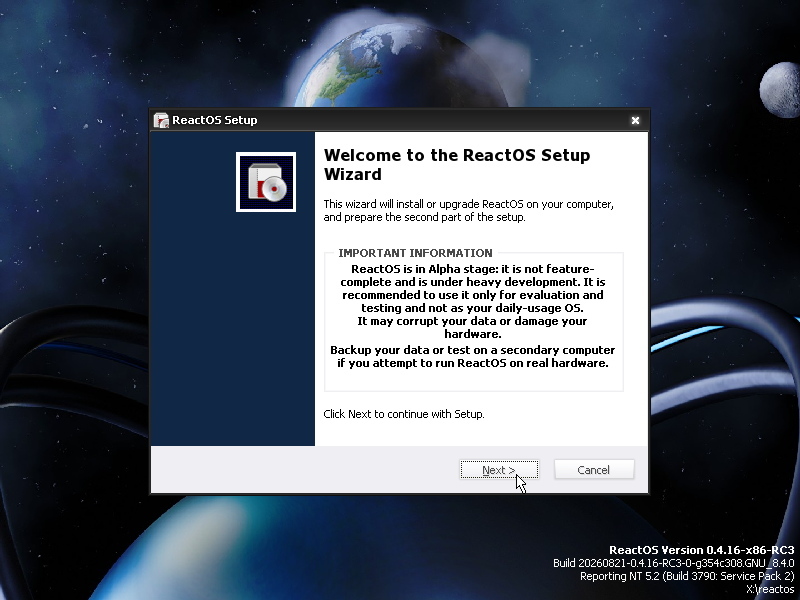
 Versie 0.4.16 van ReactOS is uitgekomen. Het React Operating System is een opensourcebesturingssysteem dat als doelstelling heeft om compatibel te zijn met Windows NT, 2000 en XP, zodat er Windows-applicaties en drivers op gedraaid kunnen worden. Hoewel er al veel software probleemloos op draait, waaronder LibreOffice, Mozilla Firefox, Mozilla Thunderbird en diverse spellen, verkeert het hele project volgens de ontwikkelaars nog in het alfastadium en is het niet geschikt voor dagelijks gebruik. Op deze pagina kunnen enkele screenshots van ReactOS worden bekeken. De changelog voor deze uitgave kan hier worden gevonden; dit zijn de belangrijkste verbeteringen:
Graphical Installer and the All-in-One Boot CDHistorically, ReactOS offered two images for download, a livecd which let you test ReactOS in a read-only environment, and a bootcd which let you install ReactOS to your hard disk using a text-based installer. Thanks to the efforts of Hermès Bélusca-Maïto (hbelusca), ReactOS 0.4.16 has a new graphical installer and a combined bootcd and livecd. Now you can test and install ReactOS using the same image
During 0.4.15 development, core developer Hervé Poussineau (hpoussin) put in the ground work for multi-monitor support and falling back to a VGA driver when display drivers fail to load. This foundation enabled us to continue pursuing better video driver compatibility in 0.4.16.
For years ReactOS has been plagued by different issues with all major video driver vendors. Nvidia GPUs in particular had been plagued by a slow down issue that many talented contributors and developers investigated. Eventually, Justin Miller (The_DarkFire_) recognized that the kernel was running out of system page table entries (PTEs) when loading third party drivers. This limitation was most apparent with graphics drivers, which allocate more memory than most other drivers. Justin changed the memory layout used by our memory manager to increase the amount of system PTEs. This fixed the hard-to-debug slowdown bug with Nvidia graphics drivers. On AMD video drivers, the OpenGL window would end up blank. This was resolved by rewriting
AudioExtEscape, inspired by a patch from the late core developer James Tabor (jimtabor). These improvements enhanced stability, better handled resource management of the new devices, and fixed many edge case bugs in ourwin32k.sysdriver. We thank our contributors and developers for their time as these fixes needed an incredible amount of research.Prior to 0.4.16, ReactOS had incomplete High Definition (HD) audio support. HD audio drivers depend on a bus driver (
hdaudbus.sys), including drivers from AMD, IDT, Nvidia, Realtek, and SigmaTel. Our initial implementation was written long ago by Johannes Anderwald (janderwald). This implementation was never finished, and was a frequent source of bugchecks when attempting to install HD audio controller drivers. Core developer Oleg Dubinskiy (oleg-dubinskiy) imported sklhdaudbus, a new HD audio bus driver, to replace our old implementation. HD audio controllers which are compatible with Windows XP and Windows Server 2003 should now work in ReactOS 0.4.16.The new HD audio bus driver depends on the Kernel Mode Driver Framework (KMDF). Microsoft open sourced KMDF as part of the Windows-Driver-Frameworks repository. Justin imported KMDF for the new HD audio bus driver, and now we can use KMDF to import or develop other drivers.
Oleg also fixed the volume and balance sliders in Sound Properties (
Storagemmsys.cpl) and Audio Volume Mixer (sndvol32.exe). Now the volume and balance levels are saved and restored on reboot when using an HD audio codec. In addition, Oleg updated the audio device enumeration code to support more sound cards. On top of that, Oleg improved binary compatibility with the Windows audio stack thanks to some fixes he contributed to our Plug and Play (PnP) stack and SetupAPI.Since 2009, ReactOS has been using the UniATA storage driver to add SATA, AHCI, and support for partitions greater than 8GB. This was a huge help to ReactOS then, but today UniATA is responsible for slow boot times and failing to load on many devices, leading to the dreaded
INACCESSIBLE_BOOT_DEVICE(0x7B) bugcheck. ReactOS 0.4.16 introduces a new ATA driver developed by contributor Dmitry Borisov (disean). This new ATA driver allows ReactOS to boot in far more environments, including inside Hyper-V Generation 1.In 2021 we imported and enabled the open-source Microsoft FastFAT driver. Unfortunately, this broke our ability to repair FAT partitions using chkdsk. Core developer Doug Lyons (Doug-Lyons) fixed our FAT chkdsk routines to work with the Microsoft FastFAT driver.
Core developer Mark Jansen (learn-more) added a disk cleanup utility in ReactOS 0.4.16. The disk cleanup utility is compatible with extensions for the Windows disk cleanup utility, allowing third party programs to clean up disk usage as well as the operating system.
NetworkingDuring ReactOS 0.4.15 development, Dmitry introduced a new DC21X4 network adapter driver for better hardware compatibility. This driver is used on devices with DECchip 21x4-based network adapters, and virtualized environments such as Microsoft Virtual PC 2007 and Hyper-V Generation 1. Now ReactOS 0.4.16 can boot and access the Internet on both.
ReactOS 0.4.16 also adds asynchronous connection support. This improves networking performance by allowing applications to execute networking operations without stalling. This also improves application compatibility as many programs assume that these asynchronous connection APIs are always present.
ReactOS Server CoreReactOS supports Workstation and Server installation types. In a Workstation install, more fancy graphical options are enabled by default compared to a Server install. In addition, user folders on Workstation installs currently live inside the “My Documents” folder, although Windows Vista and newer moved these folders out of the “Documents” folder for both Server and Workstation installs.
Interested in seeing ReactOS being more widely used in server and embedded environments, core developer Carl Bialorucki (cbialorucki) added the Server Core installation type. This install type disables the graphical explorer shell, but otherwise loads the full Win32 subsystem. ReactOS Server Core works similarly to Windows Server Core which was introduced with Windows Server 2008.
Third-Party Code SyncsReactOS utilizes several other open-source projects as part of its code base. One of the largest open-source projects we leverage is Wine, a re-implementation of several Windows APIs for Unix-like operating systems. ReactOS uses a fork of Wine that interfaces directly with a Windows-like kernel instead of translating calls to a Unix-like one.
For many years, ReactOS was limited to Wine 2.x and 3.x due to compatibility concerns adopting APIs newer than those available to Windows Server 2003. Towards the end of the 0.4.15 development cycle, we abandoned this strict adherence to Windows Server 2003 compatibility, which allowed us to slowly update our Wine fork to Wine 10.0. This upgrade is still on going, but 0.4.16 has a significant amount of this work in it. We anticipate that updating to Wine 11.0 or later versions will be significantly easier thanks to this effort to bring it up to Wine 10.0.
At this time, the ReactOS release image is still compiled with Windows Server 2003 exports only since there are several programs that expect all Windows Vista and newer exports available even if only some are exposed. If you’d like to experiment with Windows Vista and newer application support, build ReactOS using the
-DDLL_EXPORT_VERSIONflag. Instructions on how to build ReactOS are available here.For the first time, ReactOS release images will include WineVDM, which increases compatibility with 16-bit Windows applications. WineVDM is available here.

:fill(white):strip_exif()/i/2007340022.jpeg?f=thumbmedium)
:strip_exif()/u/7689/Copicon.gif?f=community)
:strip_icc():strip_exif()/u/132224/crop677a9fc7782e4.jpg?f=community)
:strip_exif()/u/8422/waarschuwing.gif?f=community)


:strip_icc():strip_exif()/u/489983/crop5db33928bbeea_cropped.jpeg?f=community)
/u/466919/Tweakers_p9_v2.png?f=community)
/u/214894/crop5baaa31f9c4ff_cropped.png?f=community)
:strip_exif()/u/4086/avatar3.gif?f=community)
/u/40371/pino.JPG?f=community)
:strip_icc():strip_exif()/u/793705/crop57de4b2cc3582_cropped.jpeg?f=community)

:strip_icc():strip_exif()/u/140697/crop6180fb9103afa_cropped.jpg?f=community)
/u/211309/crop61b0ff95cd8ef.png?f=community)
:strip_icc():strip_exif()/u/335350/crop61a63ee1f224f.jpg?f=community)
