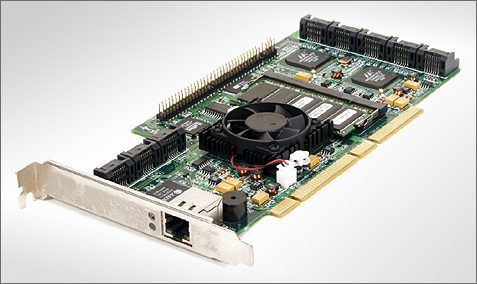
A year ago Tweakers.net published a review of four Serial ATA RAID-adapters, which were the first flock of a new era on workstation- and server storage. The once dominant SCSI interface is being pushed to fewer niches by the cheaper alternatives based on Serial ATA technology. Since our previous SATA RAID-roundup Serial ATA has continued its way into business and consumer markets. The introduction of new disks, controllers and (storage) systems is met with great interest of buyers in both desktop, workstation and server segments. Serial ATA is an accepted standard in midrange and high-end desktops, workstations and certain server appliances by now. In the recent Wave 4 investigation of TheInfoPro (TIP) Serial ATA was once more on the first place within the "Technology Heat Index". This index is a ranking of the current and upcoming use of more than 20 different storage technologies, ranked on short-term expenses and based on polls filled in by 150 to 250 decisionmakers (selected on expertise) of big companies. The most recent study concluded that by now 40 percent of those polled are using ATA disks by now. Said usage mostly consists of near-line storage, often implemented in what is called "tiered storage" where ATA-hard disks are being used as temporary storage before the data is written to tape.
In lower market segments all barebone builders are offering products incorperating Serial ATA technology. Our report on the CeBIT 2004 tradeshow once again showed the momentum Serial ATA has gained. The manufacturers of computer systems can choose from countless new Serial ATA components, where developments concentrate mostly around server solutions. Maxtor began with the roll-out of its MaXline III series, Western-Digital introduced its Caviar RAID Edition, Seagate has added the Barracuda 7200.8 to its product line and Hitachi introduced new 2,5 inch SATA disks geared towards use in blades. In the meantime Western Digital still offers the Raptor WD740GD, which holds its own against 10.000rpm SCSI-disks, despite the lack of a decent command-queuing mechanism, even in server applications.
Regarding RAID adapters, especially new products from unknown and less reknown manufacturers were put on the market. The testfield in our
Test objective and test field
Before introducing the players in this roundup it is important to define the objectives of this article. In the first place it is going to be a comparison of the features and performance of the discussed RAID-adapters. It's not that we don't value the importance of reliability and availability, but testing these factors in a sterile test environment is difficult, if not impossible. All adapters in this roundup have support for essential availability features such as hotplug, hotswap and hotspares. In controlled environmentss these products did exactly what was expected of them - hotswapping was no problem, automatic rebuilding was functional, capacity expansion worked, and so on. Unforeseen problems only come to the surface when the adapters are handed over to he whims of real-world surroundings with high duty cycles, 24/7 usage and the enormous variety in hardware. Incompatibility with motherboards, hard disks which suddenly drop out of the array, failed rebuilds due to certain rare conditions. It is the typical misery that only comes to surface in very well facilitated qualification procedures or real world use as described above. In this review, Tweakers.net doesn't pretend to make claims concerning the reliability and availability of the adapters. We however can and will make judgements concerning the performance of the participants in this roundup.
All of the participants in this test have a minimum of four SATA ports and support RAID 5. How these two conditions were met and which pricetag was put on, didn't matter for the composition of the test field. The result is a differed field of participants with prices ranging from 180 to 620 euro and some adapters having onboard processors while others are relying on the power of the CPU. While one adapter had to put up with a simple 32-bit PCI interface others could use PCI-X up to clock speeds up to 133Mhz. And one adapter already had support for Serial ATA II while other contestants used PATA bridge chips. The big differences in price, features and implementations made it all the more interesting to search for answers to the question which adapter scored best in the different areas; price, performance and features.
Test field
To get a picture of the latest state of the art in the land of the SATA RAID adapters we let come to the party eight adapters of the manufacturers 3ware, Areca, HighPoint, LSI Logic, Promise and RAIDCore. The contestants are successively the 3ware Escalade 8506-8, 3ware Escalade 9500S-8, Areca ARC-1120, HighPoint RocketRAID 1820A, LSI Logic MegaRAID SATA 150-4 and its sibling the 6-port MegaRAID SATA 150-6, the Promise FastTrak S150 SX4 and finally the RAIDCore BC4852. The Escalade 8506-8 is the successor of the Escalade 8500-8 whom we tested in our previous roundup. Meanwhile also this controller has gotten a successor, the Escalade 9500S-8. The LSI Logic MegaRAID SATA 150-4 and the Promise FastTrak S150 SX4 already participated in last year's review. The products of Areca, HighPoint and RAIDCore were announced last summer and belong to the select share of newcomers.
Note: Since the original Dutch article was published in late January, we have finished tests of the 16-port Areca ARC-1160 using 128MB, 512MB and 1GB cache configurations and RAID 5 arrays of up to 12 drives. The ARC-1160 was using the latest 1.35 beta firmware. Furthermore, a non-disclosure agreement on the LSI MegaRAID SCSI 320-2E PCI Express x8 SCSI RAID adapter was lifted. The performance graphs have been updated to include the Areca ARC-1160 and LSI MegaRAID SCSI 320-2E results. Discussions of the results have not been updated, however. The results should be self-explanatory.
Anatomy of a RAID adapter (1)
Before talking about the individual participants we must first discuss the internal design of different RAID-implementations and give you an update on the current techniques of RAID components like SATA controllers and I/O processors, so everyone knows what we're talking about.
In this lesson on the anatomy of a RAID adapter we will first distinguish two categories. Those belonging to the so-called "software RAID-adapters" and those in the "hardware RAID adapter" category. In the first category we find controllers which use the CPU for RAID specific calculations. In the second group we find controllers where all RAID functionality is handled by the adapter itself. The distinction between software and hardware RAID makes you think that for the second group RAID logic is baked into silicon. Nothing is more true: even in the so-called hardware RAID controllers RAID arrays are bind together through software, the difference is the software is running on a dedicated I/O processor. It is therefore better tot speak off hostbased RAID adapters and intelligent RAID adapters. The first group is dependent upon the host CPU while the second group has sufficient intelligence available to run the RAID computations independently from the host.
RAIDCore BC4852: its hardware design is no more complicated than a normal SATA host bus adapter
Hostbased RAID and intelligent RAID each have their own advantages and disadvantages. The most obvious advantage of hostbased RAID is its lower cost. The RAID controller or adapter design does not need to be more complicated than a normal controller without RAID-functionality. Because it uses the brute force of contemporary fast processors, hostbased RAID implementations are able to offer excellent performance scaling. The downside, especially on RAID levels with parity, is that the controller uses much more CPU-cycles. Besides higher CPU usage, also more interrupts are requested, more memory bandwidth is consumed and more I/O bandwidth is used. Furthermore besides the actual data, redundant data for RAID levels with parity or mirroring must also be transferred over the bus. On intelligent RAID adapters redundant data is not sent over the host PCI bus. Another disadvantage of hostbased RAID controllers is that they cannot operate independently from the processor and/or the operating system. For handling of operations like reconstructing or expanding a RAID volume it is often necessary to have an active operating system with installed RAID management software. A hardware reset will, with certain hostbased solutions, result in a rebuilding or initialization operation starting again from scratch. If system memory is used as cache (write-back data) it cannot be protected by a battery backup unit (BBU).
Intelligent RAID-controllers have the advantage that they can operate entirely independent from the system. Rebooting, resetting or shutting down the system generally won't affect them. When using RAID levels with parity intelligent RAID-controllers use considerably less CPU cycles then hostbased controllers. The downside is that a slow I/O processor can become a bottleneck and will decrease performance. All RAID-adapters with an Intel i960, IOP302 or IOP303 processor experience a bottleneck which is frequently felt at transfer rates reaching 130MB/s. Consequential, when using more than four fast disks, throughputs will no longer increase. On the other hand RAID adapters with the new Intel XScale I/O processors scale extremely well.
Intelligent RAID: I/O processor in the center, memory chips on the right, SATA controllers on the left
Previously we have listed examples of the superior availability features of intelligent RAID adapters. The independent operation ensures a higher availability of data. And because most adapters can be equipped with a battery backup unit protecting the contents of the cache, write-back caching can be enabled without risk, resulting in a considerable performance improvement, especially in RAID 5. At least as important is that the manufacturers of intelligent RAID adapters seem to put more effort in qualification of their products. Because much intelligence takes place in hardware or firmware, these manufacturers better make sure that their products are functioning properly. Ad-hoc fixing of problems will be more cumbersome than issuing a simple driver update. The fact that these manufacturers frequently aim at higher market segments then makers of hostbased RAID adapters also plays a role. We feel that more driver- and compatibility problems arise with hostbased RAID adapters. For example look at the disastrous performance of the Promise FastTrak S150 SX4 with the first-release drivers, the call-back action of the RAIDCore RC4x52 and the bad experiences of those using the HighPoint RocketRAID 1820. But manufacturers of intelligent raid adapters aren't spared of trouble. Recent 3ware cards with support for 64-bit 66MHz have compatibility issues with certain PCI-X mainboards and LSI Logic had to call back early versions of the MegaRAID SATA 150-4 and MegaRAID SATA 150-6.
As you might have guessed reality isn't painted black or white with regards to the difference between hardware or software RAID, and hostbased RAID-adapters versus intelligent RAID-adapters. There are mixtures of the above which use hardware acceleration for certain tasks and are dependent on software running on the host CPU for other tasks. One of the manufacturers with a so-called hardware assisted RAID solution is Promise. The Fasttrak S150 SX4 is capable of making XOR-computations in hardware and is equipped with an onboard memory, however it lacks a fully featured I/O processor.
Anatomy of a RAID adapter (2)
The hardware implementation of hostbased RAID adapters generally differs little from storage adapters without RAID functionality. A low-profile PCB (Printed Circuit Board), I/O controller, flash chip and the necessary connectors to wire the hard disks are the most important components. Specially adapted BIOS software and drivers ensure that disks connected either by the PATA, SATA or SCSI protocol act as a RAID volume.
In the intelligent RAID adapter category there are many manufacturers using third party I/O processors and I/O controllers. In the case of Serial ATA the controllers are mostly originating from Marvell and Silicon Image. SCSI RAID adapters fequently use controllers made by Adaptec and LSI Logic. The I/O processors are in most cases originating from Intel, but there are manufacturers who incorporate PowerPC cores on their cards. The I/O processor communicates through the PCI bus with the host and uses memory chips soldered on the PCB or DIMM / SO-DIMM modules. A large part of the memory is reserved for cache. Many I/O processors contain an integrated PCI bridge on which local I/O controllers can be connected. The manufacturer-specific RAID software stack (also called a RAID kernel) ensures that the connected hard disks are presented to the outside world as one or several RAID arrays. The RAID software stack is therefore a piece of software that resides on top of the I/O processor. The recent processors of Intel are based on the standardised ARM instruction set. They are general purpose processors, but have been equipped with hardware acceleration for I/O specific tasks such as XOR and CRC operations.
Intel IOP331 block diagram
With the above concept, makers of RAID adapters have the ability to realize truly elegant RAID implementations. New developments by manufacturers of I/O processors and I/O controllers can, in surprisingly little time, be converted into improved RAID implementations. Thus now we see the first SATA RAID adapters of Areca and LSI Logic using Intel's new generation XScale I/O processors and Marvell's new 8-port Serial ATA II-controller. These components both have a very good performance, a high degree of integration and a huge featureset. Intel has even incorporated PCI Express in its newest I/O processor and with aid of the newest Marvel controllers no less than 8 ports can be made available by one chip with each port supporting 300MB/s SATA II speeds and port multipliers. The modular concept also ensures scalable solutions: by using several I/O controllers on the RAID adapter, manufacturers can easily increase the number of ports or channels. The I/O controllers communicate with the I/O processor by means of standard PCI bus protocols, which results in a high degree of flexibility. The downside of this approach is the high price level, at least compared to hostbased RAID. The higher price is justified by a better featureset, but not always by better performances. Areca, Adaptec, ICP Vortex and LSI Logic are examples of manufacturers using modular RAID implementations.
3ware StorSwitch ASIC
In spite of the advantages of the modular concept with third-party components there are still manufacturers who create their own solutions. The working method of Promise has been described before. 3ware is another example. In its storSwitch architecture the manufacturer uses its own I/O controllers and its own RAID ASIC. The slow development process of this solution is proven by the fact that support for native Serial ATA is still lacking in the 3ware's latest chip generation. In order to enable the use of SATA hard drives a Marvell PATA to SATA bridge had to be added for every port. In its newest incarnation the RAID ASIC can process 100MB/s RAID 5 sequential writes using only a few CPU-cycles. With current hard disks, managing sequential transfer rates of 60MB/s a piece, a RAID 5 write transfer rate of 100MB/s is hardly impressive. It is remarkable that until now 3ware didn't use memory on its cards and therefore lacked support for write-back cache. The absence of onboard cache is one of the reasons for the disappointing performance of 3ware Escalade 8500-8 in our
SATA controllers and I/O processors
Now that we have some knowledge about the design of the different species of RAID adapters, it is time for a tour along the different SATA controllers and I/O processors which can be used as building blocks by manufacturers of both hostbased RAID adapters and intelligent modular RAID adapters. On this page we also inform you about the latest developments around the Serial ATA standard.
The improvements in the SATA II standard are particularly interesting for server applications. SATA II will become even more attractive for use with servers when the Serial Attached SCSI standard arrives on the market sometime this year. SAS controllers will be able to connect to both SAS and SATA drives, making it possible to combine both interfaces in a single storage system.
Serial ATA controllers
At the moment Silicon Image and Marvell are the most important suppliers of discrete Serial ATA controllers. Broadcom is also offering a line of SATA controllers, but as far as we know these solutions are only used by RAIDCore, a daughter company of Broadcom. Purely based on specifications Marvell produces the most versatile controllers. The 88SX60xx series of this manufacturer supports phase two features and is available in 4-port and 8-port versions. Due to a high degree of integration and support for 300MB/s speeds, NCQ, port multipliers and 133MHz PCI-X these chips are popular among manufacturers of RAID-adapters. For less demanding applications, Marvell is offering the 88SX50xx series of SATA I controllers. This series is also available in 4- and 8-port versions. The 88SX60xx controllers from Marvell are used on the SATA II RAID-adapters of Areca and LSI Logic. HighPoint makes use of services delivered by the 88SX50xx series.
With its SATALink Sil 3124 Silicon Image also has a controller supporting second phase SATA II, however the number of ports have been restricted to just four. The company can provide two versions, the Sil 3124-1 with SATA/150 port speeds and the Sil 3124-2 with SATA/300 performance. Last Sil 3112 and 4-port Sil 3114, which are used on many motherboards. The Sil 3112 and Sil 3114 are also used on the SATA RAID adapters of Adaptec, ICP Vortex and LSI Logic (MegaRAID SATA 150-4 and 150-6). Featurewise the Sil 3112 and 3114 are outdated compared to controllers from other manufacturers. Not only SATA II support is lacking, also the PCI-interface is restricted to 32-bit 66MHz. For this reason the Sil 3112 and Sil 3114 are no longer used on new RAID adapters. The lack of an 8-port version was most likely the reason Areca and LSI Logic switched to Marvell. As far as we know the Sil 3124 isn't used on any motherboard or RAID adapter.
At present Broadcom still has no controller with SATA II support. Its line of products exists of 4-port and 8-port SATA/150 controllers, which both are capable of using 133MHz PCI-X. The Broadcom controllers are used on the RAIDCore BC4x52 series. The older RAIDCore RC4x52 series were based on Marvell 88SX50xx controllers, but these adapters were replaced by BC4x52 models during a large-scale replacement program. According to RAIDCore, the reason for the replacement is a fault in the Marvell SATA controller.
I/O processors
Intel, being the main manufacturer of I/O processors for RAID adapters, didn't stand still during the last years. The i960 architecture was followed by XScale, a modern architecture based on the industry standard ARM instruction set. The clockspeeds went up 8-fold from 100MHz for i960 processors to 800MHz for the fastest XScale core. The most recent model is named IOP332 and is available in clockspeeds of 500MHz, 667MHz and 800MHz. The core is equipped with a PCI Express x8 interface and a PCI Express to PCI-X bridge, which enables to use of local PCI-X I/O controllers while the I/O processor can communicate with the host through PCI Express. The IOP332 has support for DDR333 and DDR2-400 memory, so the memory interface is entirely up to date. These I/O processors are used in the PCI Express SATA RAID-adapters of Areca and will also appear in the MegaRAID SCSI 320-2E from LSI Logic.
For systems with a PCI-X interface, Intel is offering the IOP331 I/O processor. The specifications of the IOP331 are almost eqeal to the IOP332. The IOP331 is equipped with a PCI-X to PCI-X bridge and communicates with the host through PCI-X. IOP331 processors are used on the PCI-X SATA RAID adapters from Areca and LSI Logic. The 8-port Areca ARC-1120 is reviewed in this article. One generation behind the IOP331 is the IOP321, which is sporting a DDR200 memory interface and is available in clock frequencies ranging from 400MHz to 600MHz. The IOP321 lacks an integrated PCI bridge. The IOP321 is used on the LSI MegaRAID SCSI 320-2X and is at the heart of many external RAID solutions. The MegaRAID SCSI 320-2X showed for the first time the power of the new generation XScale I/O processors.
Still popular, but performance- and feature-wise no longer state-of-the-art, are the IOP303 and IOP302. These two chips are based on the i960 architecture and run at clockspeeds of 100MHz. The memory and the internal bus are clocked at 100MHz (IOP303) and 66MHz (IOP302). In both cases the PCI bridge is limited to 66MHz 64-bit PCI 2.2. The IOP303 and IOP302 processors have serious scaling issues. For this reason, both processors are unsuitable for modern RAID adapters. The LSI Logic MegaRAID SATA 150-4 and 150-6 are based on the IOP302. At present, all SATA RAID-adapters from Adaptec and ICP Vortex still use the out-of-date IOP302 and IOP303 processors.
Besides the I/O processors from Intel, embedded processors from other manufacturers are used for I/O purposes. The PowerPC 7xx-series from IBM are one example. AMCC, the owner of 3ware,
3ware Escalade 8506-8
The name 3ware needs no introduction to users of parallel ATA RAID arrays. The company is one of the pioneers in this area. In this article, 3ware is joining us with two adapters, the Escalade 8506-8 and the Escalade 9500S-8. The 8506-series was introduced during the summer of 2003 and was the second-generation Serial ATA RAID adapter made by 3ware. The first generation was tested in our previous comparsion of SATA RAID adapters.
The main improvement in the second generation 8506-series is support for 64-bit 66Mhz PCI 2.2. The first generation Escalade 8500 had to do with a 64-bit wide 33Mhz bus. Thanks to the higher PCI clockspeed, the maximum available bandwidth increased from 266MB/s to 533MB/s. More important however is the fact that the bus will no longer be clocked down to 33MHz. This could have disadvantageous consequences for the performances of other devices residing on the bus, such as (onboard) gigabit ethernet controllers. The 8506 series ranges from 4 to 12-port models. The Escalade 8506-8 is the 8-port model.
On the previous pages we have already talked about the non-standard design used in the Escalade 8506. 3ware belongs to the select group of manufacturers whom are approaching RAID-adapter implementation their own way. The central part in the design of the Escalade 8506-8 is a 3ware-branded ASIC controlling two ATA/133 controllers and supporting hardware XOR calculations. For each port a Marvell 88i8030 Serial ATA bridge provides a 2-way translation of the parallel ATA protocol to Serial ATA. Together with the other components found on the adapter (among them three SRAM memory chips manufactured by Samsung), the PCB leaves a messy and badly integrated impression.
An important performance enhancing feature, available in many RAID-designs but lacking on the Escalade 8506, is onboard cache memory. The large quantities of cache found on many intelligent RAID-adapters, have a positive influence on the performance under nearly all workloads and are particularly important to RAID 5 performance, especially when write intensive workloads are used. In the first edition of our RAID comparison the Escalade 8500 was noted for very disappointing RAID 5 performance. The lack of cache memory was one of the causes, another cause was the insufficient performance of the I/O processor. The performance in the IOMeter random I/O tests, which are barely influenced by cache memory, were also quite disappointing. The Escalade 8506 will have to improve a great deal, and it won't succeed at that with only an inproved PCI interface.
Concerning the featureset, the Escalade 8506 doesn't convince either. Online capacity expansion, online RAID level migration, 64-bit LBA and RAID level 50 are not supported. Luckily, 3ware's driver support is outstanding. The RAID adapters from 3ware have been supported in the Linux kernel since a long time. Besides the kernel driver, there are driver packages suited for Red Hat Linux and SuSE Linux, and 3ware has a beta driver for FreeBSD 4.8. Microsoft-operating systems are supported from Windows 2000 and upwards. There are already x64-versions for Windows XP and Windows 2003 server. The design and the functionality of the webbased management tool remained largely the same as the software that was delivered with the Escalade 8500-8. See
3ware Escalade 9500S-8
By including cache memory, the current 3ware top model settles with one of the shortcomings that earlier 3ware adapters were suffering. In its default configuration, the new Escalade 9500 series is shipped with 128MB cache. The cache memory is provided by means of a 144-pins SO-DIMM module, which can be replaced by memory modules with a maximum capacity of 1GB. At the moment 512MB is the limit because 1GB SDRAM SO-DIMMs are scarcely available. An optional battery backup unit (BBU) prevents the loss of data in the write-back cache when a power failure occurs.
The hardware implementation of the Escalade 9500S largely remained the same compared to its predecessor. The SRAM chips could be omitted because the SO-DIMM is also used for RAM. A NEC V850E microcontroller is residing on the back of the PCB, opposite to the location of the SO-DIMM slot at the frontside of the board. 3ware still uses its in-house ATA/133 controllers. These chips, named 200-0033-00, are now in use for several years. Native Serial ATA is still lacking in the design, and it seems a native Serial ATA solution won't be appearing in the near future. Last September 3ware and Marvell demonstrated a SATA/300 bridge chip at the Intel Developer Forum.
Besides the 8-port version, which will be tested in this article, 3ware provides models with four and twelve ports. The eight and twelve port versions are available in ML versions supporting multi-lane connections. 3ware has developed its own solution to combine four Serial ATA-ports in one InfiniBand connection, so that the number of cables can be reduced four times. A chassis with a multi-lane backplane is required to use multi-lane cables.
According to 3ware, the Escalade 9500S-8 is capable of reaching 400MB/s sequential transfer rates on read operations, and write operations can be processed with transfer rates exceeding 100MB/s. Nothing bad can be said about the read transfer speeds, however writing speeds of 100MB/s are not impressive at all. Using current generation 7200rpm drives, even a small RAID 5 arrays consisting of three disks have the ability to reach transfer rates of in excess of 120MB/s.
3ware's featureset has made a considerable jump forward in the Escalade 9500S series. Support for RAID 50, adapter teaming, and 64-bit LBA have been added. 3ware is promising the addition of online capacity expansion and online RAID level migration in future firmware updates. With those extensions the featureset of 3ware's RAID software stack would reach the enterprise level. The firmware update has been in the pipeline for quite some time now, but so far has not been delivered. According to the original roadmap, online capacity expansion and online RAID level migration were planned for the summer of 2004. The driver support for the Escalade 9500S is similar to the Escalade 8506; pretty good.
A very irritating feature of the Escalade 9500S-8, which nagged us horribly during testing, was the habit of this adapter to lock hard disks, as a result of which they could no longer be used by other controllers. There are two ways to make the hard disk accessible for other controllers. The first way is to reconnect the drive to the Escalade 9500 and configure the drive as a single disk in the management tool. The second method of unlocking the drive is by using the obscure hotkey -r in the management tool. Although putting a lock on the disks helps preventing the disk to be written by accident there is also a potential danger: if the Escalade or the array fails, it won't be possible to reconstruct the data on the array by using recovery tools on a system with a non-3ware controller. We would prefer not to have the locking feature. It can be really frustrating for the user, especially because you can only learn about the existence of this 'feature' by reading the manual. We all know that most users only read manuals after a problem arises. In our case, we were hinted about the existence of the locking feature in an appendix to the RAIDCore BC4852 manual.
The webbased managment interface is simple and effective by design. Similar to its predecessor, the Escalade 9500S-8 comes with a firm price tag. Only by exchanging ¤ 600,00 one can become the owner of this card.
Areca ARC-1120
At present, the Taiwanese firm Areca remains largely unknown. However, this should not be taken as an indication to of the performance and quality of their products. Areca has specialized in designing external RAID controllers, which are used mainly by third parties in storage rackmount systems. In the summer of 2004, Areca introduced a series of PCI-X and PCI Express based Serial ATA RAID adapters utilizing a modular implementation based on Intel's latest generation I/O processors. The 8-port ARC-1220 PCI-X adapter was used for this review, but it must be noted that Areca also manufactures 4-port, 12-port and 16-port adapters, both in PCI-X and PCI Express flavors.
Areca’s ARC-1120 can be considered a truly modern RAID adapter, due to the fact that it combines a 500MHz Intel IOP331 processor, 128MB DDR333 RAM and an 8-port Marvell 88SX6081 SATA-II controller. Without a doubt, this is the most powerful adapter in this review and offers any feature one might expect a SATA RAID-adapter to have. The bus interface can be set to either 133MHz PCI-X or PCI Express x8, while the SATA controller supports native command queuing and port speeds up to 300MB/s. A battery backup unit is present for mission critical applications, and in case 128MB is not enough, the 12-port and 16-port versions are upgradeable to 1GB via a 200-pin SO-DIMM slot. What's more, for these two versions Areca offers a multi-lane option, which reduces the amount of required cabling to 25 percent.
The RAID software stack designed by Areca supports all essential RAID features, including online capacity expansion, online RAID level and stripe size migration, array roaming, instant availability, S.M.A.R.T. disk drive monitoring and 64-bit LBA for arrays of more than 2 terabyte in size. Two unique features of the Areca RAID adapters are a redundant flash memory for the BIOS and firmware, and support for RAID level 6. The latter has been realized by using block level striping with double parity spread. As a result, an array will remain operational even after the failure of two disks. The downside, however, is the loss of capacity of two disks instead of one. Overall, RAID 6 is notably interesting for very large RAID arrays.
Besides having a great feature set, the Areca ARC-1120 and its family members enjoy excellent driver support. For Microsoft operating systems, Areca supports Windows 2000 and higher, including drivers for the upcoming x64-versions of Windows XP and Windows Server 2003. Driver packages are available for the Linux based Mandrake, Red Hat, Red Hat Advanced Server, Fedora core, SuSe and SuSE Linux Enterprise Server operating systems, in addition to the source code for each of these. FreeBSD versions 4.2, 4.4 and 5.2 are supported, and driver source code is available for those as well.
The onboard HTTP server allows for online management of the controller. The management interface design is simple yet effective, and houses some features uncommon to other adapters. This includes the ability to view the speed (in rpm) of the onboard I/O processor fan and the temperatures of the attached hard drives. The use of this fan is somewhat of a small disadvantage for those who value a quiet workstation; consequently it may be appealing to substitute it by a large, passively cooled heatsink. As a matter of fact, that's exactly LSI Logic's solution in their new RAID adapters, which are based on the very same I/O processor used by the ARC-1120.
HighPoint RocketRAID 1820A
In the early days of the ATA raid revolution, HighPoint was well known for its ATA-controllers. HighPoint chips were used on legendary motherboards such as the Abit BX133 RAID. However, HighPoint did not go along with the Serial ATA-evolution, resulting in greater popularity of Marvell, Promise and Silicon Image with the motherboard manufacturers. The company did eventually bring new Serial ATA RAID-adapters to the market. At first these adapters used Highpoint’s own ATA-controllers in combination with a SATA-bridge, but for its recent adapters HighPoint has changed over to Marvell’s Serial ATA-controllers. Highpoint’s latest product is the RocketRAID 1820A, an 8-port hostbased SATA raid adapter based on the Marvell 88SX5080. This controller is one generation older than the one used by the Areca ARC-1120 (88SX6081), which is why SATA II is not supported. The Marvell 88SX5080 does have a fast 133MHz PCI-X-interface and support for ATA Tagged Command Queuing. As it turns out, in most circumstances TCQ results in a performance loss, except for very high server workload, so ATA Tagged Command Queuing should not be considered a real bonus.
The RocketRAID 1820A is a direct successor to the RocketRAID 1820. The RocketRAID 1820 never got a good reputation, largely thanks to complaints regarding bad performance and even stuttering mouse cursors. On the hardware level, the RocketRAID 1820A differs from its predecessor by the addition of the HighPoint HPT601 chip, which, according to information provided on HighPoint’s website, has to its disposal an optimized XOR technique and an advanced Intelligent Cache Algorithm. A fully fledged I/O processor is not present, so most instructions are handled by the CPU. As can be seen in the upcoming pages, the lack of an I/O processor can lay a considerable burden on the resources of a single processor system in the case of parity calculations.
The RAID feature set on the Highpoint RocketRAID 1820A doesn’t score too many points. Some notable missing features are support for online RAID level migration, online capacity expansion and RAID level 50, but this is not surprising given its low price tag of approximately € 250. The Windows management interface is simple but does a satisfactory job. One can’t complain about driver support. Windows is supported starting from NT 4.0, and drivers for x64-versions are available. Support for Linux is offered in the form of open source driver packages for a number of popular distributions. Furthermore, one can get drivers for FreeBSD 4.x and 5.x, and perhaps most notably also for MacOS X. This makes the HighPoint RocketRAID 1820A the only adapter in this review with support for Mac-users. Because the RAID implementation is entirely based in the driver, it remains to be seen if our 1820A benchmark can be translated from a Windows to a MacOS X environment.
LSI Logic MegaRAID SATA 150-4/6
LSI Logic is a manufacturer with an enormous presence in the storage market. Up to some years ago the company provided mainly building blocks for third parties, so their large presence hasn't yet translated into a brand reputation. According to its own figures, LSI Logic provides 80 percent of the Fibre Channel chips worldwide. What's more, over 80 percent of Ultra320 SCSI interfaces in servers use LSI Logic solutions. Lately, the company has also focused on consumer markets with the introduction of its own SCSI and Fibre Channel adapters, and its own line of RAID adapters. As a part of this strategy, the megaRAID division of American Megatrends and the RAID division of Mylex were successively taken over. LSI chose to continue the American Megatrends brand name and its RAID stack. The company has made quite some progress since then: Unique features of the Mylex RAID software stack were integrated into the megaRAID software stack, and the software stack was ported to the XScale architecture. As such, LSI Logic delivers a broad and modern line of serial RAID-adapters under the megaRAID brand name. In January 2004 the company was the first to market a SCSI RAID adapter based on Intel's new generation XScale I/O processors.
LSI MegaRAID SATA 150-4
In the spring of 2003, LSI Logic introduced their first Serial ATA RAID adapters. The MegaRAID SATA 150-4 and MegaRAID SATA 150-6 have four and six ports respectively, and have a nearly similar hardware design. The only differences between these cards are the presence of BBU connection, an extra SATA controller and two extra SATA connectors on the MegaRAID SATA 150-6. The core of both adapters is an outdated Intel IOP302 running at a clock speed of 66MHz. The I/O processor is assisted by 64MB SDRAM and two (SATA 150-4) or three (SATA 150-6) Silicon Image Sil 3112 controllers. These first generation controllers from Silicon Image have two ports and communicate with the I/O processor by means of a 32-bit 66MHz PCI bus. Although the PCI bridge of the IOP302 supports 64-bit 66MHz PCI (with a bandwidth of 533MB/s), communication with the SATA controllers is limited to 266MB/s. In reality this isn't a big issue since the IOP302 is too slow to be able to process such large quantities of data. Taken everything into consideration, the MegaRAID SATA 150-4 and its 6-port sibling are not that impressive. In our previous SATA RAID comparison, the MegaRAID SATA 150-4 faired good, but with increased competition from new and more modern RAID implementations, it shouldn't come as a surprise that these two LSI Logic cards will take some beatings.
LSI MegaRAID SATA 150-6
The RAID software stack of the MegaRAID SATA 150-4 and 150-6 has been taken directly from the high-end LSI Logic SCSI RAID adapters. This means all essential RAID features are supported. LSI Logic is the only manufacturer that offers a graphical BIOS interface which can be operated with a mouse. This feature is significant in that it operates more pleasantly and it is better designed than the text-based interfaces of similar intelligent RAID adapters. Unfortunately, a web-based management interface is not available. However, the Windows management tool does offer the possibility to remotely manage RAID adapters over a local network. Microsoft operating systems are supported upwards from Windows 2000, unfortunately not including x64-versions of Windows XP and Windows server 2003. Drivers for the SATA megaRAID are available in the Linux kernel by default. Beside open source drivers, LSI Logic provides driver packages for Red Hat and SuSE Linux. Also, the MegaRAID SATA 150-4 and 150-6 are the only cards in this roundup to have Netware support.
Prices of the MegaRAID 150-4 and 150-6 are ¤ 240 and ¤ 320, respectively. This is an honest pricing scheme for a card based on an out-of-date hardware design, but with an enterprise level feature set.
Promise FastTrak S150 SX4
For most tweakers the Promise name will ring a bell. The company is solely focused on products using ATA and SATA interfaces. Promise was one of the first manufacturers to bring ATA RAID controllers to the market. In august 2003 Promise introduced a 4-port SATA RAID adapter with RAID 5 support, just in time to be included in our previous SATA RAID review. This product, the FastTrak S150 SX4, is nothing more than a modified FastTrak SX4000 which has been equipped with four Marvell ATA to SATA bridge chips. Therefore the FastTrak S150 SX4 is not a native Serial ATA-adapter.
The architecture of the FastTrak S150 SX4 can be qualified as hardware assisted RAID. A Promise PDC20621-chip, mounted just above the PCI connector, provides four ATA channels and delivers XOR acceleration. A maximum of 256MB cache memory is provided by a 168-pin DIMM slot. All this has been put on an enormous full size PCB that doesn't testify of a need for integration. Promise should take a close look at SCSI RAID adapters from LSI Logic. The latter can shove all components - a SCSI controller, I/O processor, 184-pin DIMM slot and a Battery Backup Unit connector - on a half-length PCI board. Despite the overgrown format of the PCB, the FastTrak S150 SX4 only supports a regular 32-bit PCI slot. The interface is able to run at 66MHz clockspeeds in mainboard supporting 64-bit 66MHz and PCI-X. In that case, the FastTrak S150 SX4 has a bandwidth of 266MB/s at its disposal. Although the FastTrak S150 SX4 has a connection for a Battery Backup Unit, the BBU itself is only available as an option for OEMs.
Promise provides no cache memory with the retail package of the FastTrak S150 SX4. A minimum of 32MB memory is required. To remedy memory compatibility issues, Promise has recently replaced the FastTrak S150 SX4 with the FastTrak S150 SX4-M, which is equipped with 64MB SDRAM. No other changes were introduced. In this review we have tested the FastTrak S150 SX4 with the maximum cache capacity of 256MB.
Even though XOR calculations are handled by hardware, the FastTrak S150 SX4 relies on the driver and CPU to handle the RAID operations. As a result, RAID 5 CPU usage is higher than intelligent RAID adapters. The FastTrak S150 SX4 does have an advantage over hostbased RAID adapters, which totally rely on the CPU. Because many intelligence has been moved to the driver, it is of vital importance that the driver is reliable and stable. Unfortunately Promise doesn't fulfill this last condition. The first version of Windows-driver caused a huge amount of problems and frustration for purchasers of the S150 SX4. The largest problem was a crawling performance when the adapter was used to control the boot drive. In October 2003 Promise released a driver for the FastTrak SX4000 which also remedied most of the issues concerning the FastTrak S150 SX4. Although the beta driver was available, users of the S150 SX4 had to wait until June 2004 before a stable driver that solved the peformance issues was officially launched. An outrageous display, especially for a manufacturer who recommends its products as a performance solution for professional applications.
Now this suffering is over, the Promise FastTrak S150 SX4 with its price of 190 euro (without memory), is once more an attractive solution for budget-aware users. The price is the lowest of all adapters tested, although the HighPoint RocketRAID 1820A comes with a lower price per port. In our previous RAID comparison, the FastTrak S150 SX4 performed well in RAID 0 and offered reasonable performance in RAID 5. Today, the card will probably experience the same problem as the megaRAID SATA 150-4 and 150-6, because no improvements were made the competition of newcomers such as Areca, HighPoint and RAIDCore can catch up.
Concerning RAID features the card does not score bad. RAID level migration, online RAID level migration and instant availability are supported. Creating arrays larger than 2 terabyte is not possible, but with only four disks that won't be possible in the near future anyway. Drivers are available for Windows 2000, Windows XP, Windows server 2003, Red Hat Linux and SuSE Linux. A source code driver for Linux is not available. Promise provides a user-friendly management tool for Windows environments. A handy feature of the FastTrak S150 SX4 is the ability to swap (RAID 0, RAID 1 and RAID 10) arrays between the FastTrak S150 SX4 and onboard Promise RAID controllers. Users of FastTrak S150 TX2plus, FastTrak S150 TX4 and onboard Promise SATA controllers will be able to transfer their arrays to the FastTrak S150 SX4 and then have the possibility to modify the RAID configuration by means of online RAID level migration and online capacity expansion.
RAIDCore BC4852
The first RAID adapters of newcomer RAIDCore where put on the market in late 2003. Thanks to a positive review on Tom's Hardware Guide, the RAIDCore products received the attention from the thousands of tweakers and hardware addicts. RAIDCore was founded in 2000 by a group of former Adaptec employees. The company concentrates entirely on the development of RAID storage products. RAIDCore's Fulcrum architecture is the base of these products, a flexible RAID architecture which is independent of operating system, I/O bus and hardware platform. RAIDCore has deliberately chosen for a hostbased solution. An important difference with hostbased RAID adapters from other manufacturers, is the rich featureset of the RAIDCore Fulcrum architecture. The featureset is on the same level as the RAID implementations of established manufacturers such as LSI Logic and ICP Vortex. Impressed by the abilities of RAIDCore's engineers, network giant Broadcom decided to acquire RAIDCore in the spring of 2004.
Unfortunately, the short history of RAIDCore already has some black pages. The first product of the firm, the RC4000 series, suffered a hardware failure, which forced RAIDCore to organize a large scale replacement program. The failure caused errors leading to drives dropping out of the array during the (re)boot procedure. According to RAIDcore, the SATA controllers manufactured by Marvell were to blame. Halfway 2004 RAIDCore introduced a new series of SATA controllers, name BC4000, in which the 4- and 8-port Marvell SATA controllers were replaced with Broadcom controllers. The transistion to the BC4000 series was a perfect example of how easily the Fulcrum architecture can be adapted to different hardware platforms. For this comparison, RAID supplier WebConneXXion supplied an 8-port BC4852. Together with its 4-port cousin (BC4452), the BC4852 is forming RAIDCore's current product range.
Although the Fulcrum architecture includes support for external XOR and DMA acceleration, the BC4000-series leaves this feature unused. The PCB includes no more components than required for a basic Serial ATA adapter without RAID functionality. Parity calculation is handled by the CPU. A Broadcom BCM5770 is in control over a maximum of eight hard disks. The BCM5770 SATA controller supports 133MHz PCI-X but unfortunately misses all the nice features of the SATA II specification. Thanks to its lean hardware implementation, the BC4852 PCB could be easily molded in low profile format. The RAIDCore BC4852, Areca ARC-1120 and HighPoint RocketRAID 1820A are the only adapters in this roundup suitable for use in low profile systems.
As said before, the featureset of the Fulcrum architecture is very complete and supports, among other things, RAID 50, online capacity expansion, online RAID level migration and distributed hot-spares. The hardware-independent nature of the Fulcrum architecture made it relatively easy to implement support for controller teaming. In its current state, the software stack supports up to four controllers, thereby enabling RAID configurations consisting of a maximum of 32 hard drives. A handy feature is the possibility to divide the capacity of a hard disk over several arrays. With the majority of RAID-adapters, the capacity of a disk can only be assigned to one array. No cache is available on the adapter but the software stack solves this by using system RAM. RAIDCore has developed a self-tuning cache design, which dynamically assigns cache memory based upon available system memory, and optimises cache strategies based on I/O profiles.
At present, the driver support for the BC4000 series is restricted to Red Hat Linux 9.0, Red Hat Advanced server 3.0, Fedora Core 1 and Windows-versions 2000, XP and 2003 server. Considering the fact that all RAID intelligence is consolidated in the driver, it is unlikely that the source code for the Linux-drivers will ever be released. For Windows-users RAIDcore provides a pleasant management tool. Configuring arrays on the BC4852 is very easy, mainly because there is no possibility to tune arrays manually. RAIDCore uses the philosophy that the user must not be bothered with difficult concepts like stripe-size and cache strategy, settings which have an unpredictable impact on performance. To offer good performance RAIDCore has developed an automatic tuning system. The results of the benchmarks on the coming pages makes the impression that RAIDCore has succeeded at that. The price of the 8-port version adds up to 420 euro. Based on that price tag, the RAIDCore BC4852 fits in between the more expensive intelligent RAID adapters and more affordable hostbased RAID-adapters.
Feature comparison (1)
In order to provide an overview of the features supported by the RAID-adapters in our roundup, we have put all relevant features into a table. Due to the large amount of data, the table had to be split into two tables found on this and following page. To free the tables from the standard page width, some CSS-trickery was necessary.
Feature comparison (2)
In order to provide an overview of the features supported by the RAID-adapters in our roundup, we have put all relevant features into a table. Due to the large amount of data, the table had to be split into two tables found on this and following page. To free the tables from the standard page width, some CSS-trickery was necessary.
Alternatives not included in this review
This article is not only a review of a certain group of Serial ATA RAID adapters, it is also a discussion of current Serial ATA technology and SATA RAID products. On this page we will briefly discuss the alternatives from manufacturers which have not been included in the test. The selection has been restricted to adapters falling into the same scope as the products in the review, meaning the products at least need to have support for RAID 5.
Adaptec
Adaptec provides three adapters in versions with four, eight and sixteen ports. These are respectively the 2410SA, 2810SA and 21610SA. The hardware implementation of these cards strongly corresponds to the adapters from LSI Logic, discussed previously in this article. The 2410SA is based on a 66MHz IOP302 processor in combination with two Silicon Image Sil 3112 SATA controllers and 64MB memory. The eight and sixteen port versions are using the slightly faster 100MHz IOP303 processors. The SATA controller is not recognisable from the product photograph. Supposedly Adaptec uses the 4-port Silicon Image Sil 3114 chips, which in that case should be placed on both sides of the PCB. All products are equipped with a 64-bit 66MHz PCI interface and 64MB cache. The 8- and 16-port modules can be extended with a battery backup Unit.
Adaptec 2810SA
Based on earlier experiences with equally configured SCSI RAID adapters from Adaptec, ICP Vortex and LSI Logic, and experiences with the SATA RAID adapters from ICP Vortex and LSI Logic, we expect the performance of the 2410SA and 2810SA to be somewhat below the level of the ICP Vortex adapters. ICP's adapters for their part are somewhat slower than the adapters from LSI Logic. The Adaptec 2810SA and 21610SA should be primarly considered as a solution to create large storage volumes. The performance of the IOP303 is insufficient to reach satisfactory performance scaling on large RAID 5 arrays. The Silicon Image Sil 3114 controllers are also restricting bandwidth to 266MB/s because the controllers have to share a single 32-bit 66MHz PCI connection. The bad scaling characteristics of the IOP302 and IOP303 are the reason that we have not conducted tests on IOP302/303-based products other than the popular MegaRAID SATA 150-4 and 150-6 adapters.
With a price ticket of successively 360 and 530 euro, the Adaptec 2410SA and 2810SA are clearly overpriced. The 16-port model costs 770 euro, a price similar to the 12-port 3ware Escalade 9500S-12.
ICP Vortex
The German manufacturer ICP Vortex was acquired by Adaptec in 2003. Before this take-over the company was property of Intel. The current ICP Vortex product line still has no integration with Adaptec's products. ICP Vortex offers its own line of SATA RAID adapters, consisting of the 4-port GDT8546RZ and the 8-port GDT8586RZ. The cards are respectively equipped with two and four Silicon Image Sil 3112-controllers, and both are based on a 100MHz IOP303-processor in combination with 128MB memory. The GDT8546RZ was tested in our previous SATA RAID comparison and performed below the level of the LSI megaRAID SATA 150-4. Partly because of its German background, ICP Vortex solutions are very expensive. The 4-port model is priced 599 euro and the 8-port version comes with a price tag of 925 euro.
NetCell is a small startup, which has specialised in the development of ATA RAID technology. NetCell's product line consists of 3-port and 5-port adapters, supporting the self proclaimed 'RAID XL' level. Besides RAID XL, the RAID levels 0 and 1 are supported as well. With respect to parity distribution, the functioning of RAID XL is similar to RAID 4: one disk is designated to parity information. Therefore parity is not distributed over all disks, as is the case with RAID 5. According to NetCell, this produces a performance advantage in desktop applications. A unique feature of the NetCell adapters is the fact that arrays are presented to the operating system as regular ATA disks. Thanks to this feature there is no need for special drivers. The NetCell adapters are equipped with 64MB cache and a 32-bit 66MHz PCI interface. The US price is 219 dollars for the 3 port model and 249 dollars for the 5-port version.
Tekram
Based on Areca's hardware design and RAID software stack, Tekram recently annouced a line of Tekram-branded intelligent SATA RAID adapters. The adapters will become available in 4- and 8-port versions with PCI-X and PCI Express interfaces. Like the adapters from Areca, the Tekram controllers are supporting RAID 6. Tekram aims at a lower market segment. By using cheaper components - Tekram-cards use 250MHz processors and older generation SATA/150 controllers from Marvell - Tekram was able to cut costs. The naming of the adapters is very recognisable for those familiar with the Areca product range. The Tekram version of the Areca ARC-1120 is named the SIR-1120. In Japan, the Tekram SIR-1120 is approximately 35 per cent cheaper than the Areca ARC-1120. In the Netherlands this difference would result in a price of approximately 410 euro, which is an attractive price level for an intelligent RAID adapter with eight ports. We soon hope to be able to test the Tekram cards.
Update: meanwhile Tekram has changed the specifications of its RAID-adapters. These now correspond to the specifications of Areca-adapters. Also the model naming scheme has been adapted.
Tekram SIR-1120 and NetCell SR5113
Testbed and test methodology
The eight RAID-adapters were tested on a system equipped with a Tyan Thunder K8S mainboard, one 1,4GHz Opteron 240 processor, 2GB RAM and eight Western Digital WD740GD hard drives. The Tyan mainboard has two independent 133MHz PCI-X busses so that the adapters could be tested under optimal conditions. Thanks to the eight Raptors, the cards could be tested with the fastest SATA-disks available at this time. The use of Raptor WD740GD drives ensures that any reasonable bottleneck, resulting in performance scaling degradations, would surface during the performance tests. We are particularly grateful to the Dutch Western Digital branch office for providing the Raptor samples.
Tyan Thunder K8S
The SATA RAID adapters where rigorously tested through a vast test program in which the controllers had to work their way through an almost complete version of the Tweakers.net benchmark suite consisting of a total of fifteen different RAID configurations (in the case of an 8-port card). For logical reasons, the temperature and sound measurements were omitted. Furthermore the low-level tests in AnalyzeDisk were not run because this review concentras mainly on the performance in realistic workloads. The tests for this article are much more extensive than those for last year's RAID review, when only a selection of the desktop benchmarks were run on the adapters and our server workload simulations had not yet been developed. At an effective use of the test system for 20 hours a day, it roughly took a week to perform all required tests on an eight port adapter.
Because the performance scaling of the adapters is not predictable, there was no other way than to run the tests on a large number of RAID levels. The test scheme is displayed below. Naturally, a shortened test program was used on adapters with four and six ports.
Test scheme
RAID level
Disk drives
Cache mode
Array status
Single disk
1
WB
Optimal
RAID 0
2
WB
Optimal
RAID 1
2
WB
Optimal
RAID 1
2
WT
Optimal
RAID 5
3
WB
Optimal
RAID 0
4
WB
Optimal
RAID 5
4
WB
Optimal
RAID 5
4
WB
Degraded
RAID 5
4
WT
Optimal
RAID 10
4
WB
Optimal
RAID 10
4
WT
Optimal
RAID 5
6
WB
Optimal
RAID 50
6
WB
Optimal
RAID 5
8
WB
Optimal
RAID 50
8
WB
Optimal
The tests with eight disks in RAID 50 were only performed if the configuration showed higher performace with six drives in RAID 5 than the same configuration in RAID 50. In reality RAID 50 (a stripe consisting of two RAID 5-arrays) is mostly slower than RAID 5, and because the effective capacity is lower it has little value to test a configuration with eight disks in RAID 50, if the RAID 50 test with six disks already proved to perform less a RAID 5 configuration. No RAID 0 and RAID 10 tests were run with more than four disks. The risks of a drive failure in large RAID 0 configurations takes on such form, that noone will seriously consider using more than four disks in a RAID 0 configuration. RAID 10 offers a very low effective storage capacity. For this reason, RAID 5 is the preferred choice for large RAID arrays.
The write-through tests were restricted to a number of low-level benchmarks and the workload simulations taken from the server StorageMark 2004 suite. The majority of workstation users will use write-back cache, even if no Battery Backup Unit is used. For this reason it is not very useful to test the desktop and workstation performance in write-through configurations.
To test how the adapters performed when a disk failure occurs in a RAID 5-array, tests were run on a degraded array from which one hard disk had been removed. No measurements were conducted from the performance during the rebuild of an array. This being because of the fact that not all adapters used the same rebuild priority rate. A rebuild rate of 30 per cent is standard (meaning that the rebuild process is limited to a disk usage of 30 per cent). However, many adapters do not offer an unlimited choice of percentages. In many cases the user has to choose from predefined profiles. The available rebuild rates were not corresponding for all adapters. As a result it wasn't possible to make a fair comparison.
Performance tuning is extremely important to obtain the maximum performance from a RAID adapter. Some adapters, such as the RAIDCore BC4852, have a very user friendly setup, whereas other cards offer many tuning options. Our goal was to test all RAID adapters with their optimal settings. Because it is not feasible to test all possible configurations, we were obliged to use a pragmatical method for finding the optimal settings. Firstly the optimal cache setting for the adapter was examined, testing with lower or higher stripe sizes (relative to the standard 64K or 128K setting). Then we searched for the optimal stripe size by testing with the best cache configuration at larger or smaller stripe sizes (relatively to the starting point of 64K or 128K), until we found the stripe size which showed no improvement in performances. The performance comparison was based on the weighted and indexed averages of the Desktop, Gaming, Workstation and Server StorageMark 2004 suites, in which we differentiated between desktop and server workloads. For the desktop benchmarks the stripe size which had the best average performance in the desktop-, gaming- and workstation index, was chosen. Therefore on the coming pages we do not show the optimal result per desktop index. Most people use their system for all kinds of desktop, workstation and gaming applications. They do not have the possibility to optimize the stripe size and cache settings for specific applications. More information about the benchmarks of Tweakers.net can be read in Benchmark Database (both are only available in Dutch).
It is noteworthy how reliable the Raptor WD740GDs performed during the many hours of testing. Despite the high duty cycles the disks had to endure and the hundreds of millions I/O operations they had to process, all disks are still in excellent condition. Apart from the irritation caused by the locking feature of the 3ware Escalade 9500S-8, fore which the Raptors where not to blame, the configuration of the disk arrays happened without complications. That's all very different to large SCSI arrays. Even in server rackmounts with integrated SCSI backplanes and fixed SCSI IDs, sometimes it is problematic to get the desired bus speed. The booting of an array with lets say four 68-pins LVD disks can be a real challenge due to loose SCSI cables and the manual SCSI ID settings. Serial ATA does not have any of these problems thanks to the point-to-point topology and serial data transfer.
Access times and sequential transfer rates
We start our tour through the benchmark results with a discussion of the low-level performance characteristics of the adapters. Examples of low-level tests are the average access time, the sequential media transfer rate, the cache transfer rate and the random I/O performance. These tests do not provide a complete picture of the performance of the RAID adapters in real world applications, but they are useful to explain the performance differences in our workload simulations, which will discussed on the next pages.
The Winbench 99 v2.0 Disk Inspection Test was used to measure the average access times. Because of the minimal differences between the adapters, the results are displayed in table format. The 3ware adapters and the RAIDCore BC4852 consequently belonged to the group of controllers with the lowest average access time, whereas the LSI MegaRAID SATA 150-4/6 are without any doubt the slowest solutions in this particular test. The out-of-date architecture of the MegaRAID SATA 150-4/6 is evident in higher latencies. In the RAID 5 tests, the 3ware Escalade 9500S-8 scores a green colour four times. The Areca ARC-1120 with its modern RAID implementation belonged to the middle of the pack. We weren't suprised that intelligent RAID adapters had higher latencies then hostbased RAID adapters such as the RAIDCore BC4852, where the SATA controller can interact directly with the system. On the Areca ARC-1120, the signal moves through extra components like the I/O processor and local PCI-bridge to reach the SATA-controller on the PCB of the RAID adapter. The communication between the RAID ASIC and the ATA controllers on the 3ware Escalade 9500S-8 is excellent, however. The presence of a Marvell PATA to SATA bridge does not seem to affect latencies.
Winbench 99 v2.0 - Average access time (ms)
RAID level
Single
0
1
5
10
50
Drives
1
2
4
2
3
4
6
8
4
6
8
3ware Escalade 8506-8
7,96
7,84
8,00
6,91
8,00
7,95
7,89
8,24
7,10
3ware Escalade 9500S-8
7,77
7,93
7,91
7,99
7,80
7,69
7,64
7,95
7,85
7,88
7,93
Areca ARC-1120
7,96
7,98
7,97
8,04
7,99
8,04
8,54
8,19
7,91
HighPoint RR1820A
8,01
7,87
7,84
6,99
8,03
7,98
7,72
8,17
6,96
LSI MegaRAID SATA 150-4/6
8,15
8,30
8,12
7,15
8,30
8,18
8,24
7,42
8,21
Promise FastTrak S150 SX4
7,93
8,06
7,99
6,98
8,23
8,03
7,30
RAIDCore BC4852
7,70
7,86
7,83
6,96
7,89
7,80
7,72
8,18
6,98
7,78
Flaunting with high sequential transfer rates (STRs) is a popular activity amongst owners of large RAID arrays. On our forum, whole topics are dedicated to showing STR benchmarks. In this roundup of SATA RAID adapters, sequential transfer rates are especially useful for researching the scaling capabilities of the RAID adapters in the test. Ideally, the STR should increase linearly with the number of disks used. In the real world, STR scaling is rarely perfect because the performance is limited by all kinds of bottlenecks in the system bus, the CPU and the I/O processor.
Measuring the sequential transfer rates was once again done with the Winbench 99 v2.0 Disk Inspection Test. Winbench measures the STR over the whole disk surface. For this reason, it is one the most reliable tools for testing sequential transfer rates. The results are reflected in a graph. Winbench returns two numbers, one for the transfer rate at the beginning and one for the transfer rate at the end of the array. Most of the hard disks reach their highest transfer rate at the beginning of the partitioned space, meaning on the outer tracks of the disk. The transfer rate decreases when the position on the disk reaches the inner tracks, sometimes this happens smoothly, but mostly this phenomenon is visible in gradual steps. The decrease of transfer rates over the capacity range of the disk also occurs on RAID arrays. The comming graphs shows the sequential transfer rates at the beginning and at the end of the RAID volume in RAID 0, RAID 1/10 and RAID 5-configurations. Per RAID type an equal y-axis scale is used so that the results can be compared easily.
In RAID 0 with two or four disks, the RAIDCore BC4852 puts the highest transfer rates on the scoreboard. Its RAID 0 transfer rate at the beginning of the disk cannot be equalled by any of its competitors. At the end of the disk, the differences where minimal: the RAIDCore BC4852, 3ware Escalade 8506-8 and Promise FastTrak S150 SX4 performed nearly the same. It is striking to see that the FastTrak S150 SX4 could not reach optimal transfer rates in a single disk configuration. In the RAID 0 configuration with four disks, the LSI MegaRAID SATA 150-5/6 and the HighPoint RocketRAID 1820A didn't come close to the theoretically possible transfer rates.
In the RAID 1 and RAID 10 tests, the RAIDCore BC4852 once again belonged to the adapters with the highest sequential transfer rates. This time the differences between the adapters were limited. In the RAID 1 tests, the Promise FastTrak S150 SX4 scored miserably. The Areca ARC-1120 showed low end-transfer rates in the RAID 1 and RAID 10 tests.
Things get interesting when we look at the RAID 5 tests. The adapters with six and eight ports now get the chance to show very high transfer rates. In theory (8 - 1) * 70MB/s is possible, but not all adapters reach the optimal transfer rate of 490MB/s. The RAIDCore BC4852 gets very close and also the HighPoint RocketRAID 1820A was not far from optimal results. A good performance was also scored by the Areca ARC-1120 and - to a lesser degree - the 3ware Escalade 9500S-8. The 3ware Escalade 8506-8 and the LSI MegaRAID SATA 150-5/6 scored poor transfer rates. The Promise FastTrak S150 SX4 escaped criticism because it only had four ports, so it couldn't reach very high transfer rates.
ATTO STRs and cache transfer rates
Because of its simplicity and short test duration, the ATTO Disk Benchmark is used a lot for comparing the 'peformance' of hard disks. The tool measures the sequential transfer rate of a partition using a test length of 32MB at most. Because of this small dataset, ATTO is unsuitable for measuring media transfer rates of intelligent RAID-adapters which are equipped with cache memory. The smart RAID adapters will serve the requested data directly from their cache, as a result of which the results have no relationship to the media transfer rates of these cards. For this reason ATTO is an ideal tool to test the cache transfer rates of intelligent RAID-adapters.
Not all adapters are able to fool ATTO. In some cases the results in the graphs shown below are related to the cache transfer rate of some of the adapters, in other cases they reflect the media transfer rates of the adapters. When results are cached, it is recognisable by a transfer rate that remains the same irrespective of the RAID configuration. ATTO-tests were carried out on empty NTFS-partitions with ATTO set to its standard queue-depth of 4 I/Os, a test length of 32MB and transfer blocks ranging from 512 bytes to 1MB. As the result of this test, the highest read and write transfer rate over all transer blocks was picked. Generally the highest throughput is reached at transfer blocks of 256KB or 512KB.
The results of the Areca ARC-1120 in the RAID 0 tests cleary show this adapter does not have any trouble with ATTO's tiny dataset. Floating high above the crowd, the ARC-1120 has a perfect view on the struggles of the other adapters. Exceeding 750MB/s, the transfer rates from the Areca ARC-1120 are almost equal to the effective bandwidth of the 133MHz PCI-X bus. A bit less rapid, but still impressive, are the write transfer rates of 450MB/s. Although it is not clear when looking at the results, also the LSI MegaRAID SATA 150-4/6 uses caching. The older architecture of this adapter doesn't allow higher throughputs then 145MB/s. It's highest write transfer rate of 125MB/s is not impressive. The MegaRAID SATA 150-4/6 cannot take much advantage from its cache. Most other adapters obtain higher media transfer rates in configurations with more than two disks then the MegaRAID cache is able to perform. The difference between a transfer from cache over a transfer from disk is of course, the much lower latency of cache transfers.
The RAIDCore BC4852 is the only card that, amongst the non-caching participants, reaches decent transfer rates in RAID 0 configuration with four disks. The queue size of 4 I/O creates problems with some cards. In tests with a queue size of 1 I/O the 3ware Escalade 9500S-8 showed healthy scaling transfers rates. We left the queue size at 4 because this is the standard setting for ATTO with which most people perform the test. Nevertheless, it is disappointing that the Escalade 9500S-8 is not capable of exploiting the benefits of onboard cache in the ATTO Disk Benchmark.
The use of caching is more visible on the LSI MegaRAID SATA 150-4/6 in RAID 1 and RAID 10. Thanks to the cache memory, the transfer rate of the MegaRAID in RAID 1 is nearly double the performance of non-caching adapters. The results of the RAIDCore BC4852 in RAID 10 are nearly equal to the ideal (media) transfer rate. Furthermore one notices that the write transfer rates of the 3ware Escalade 9500S-8 are rather good in RAID 10, whereas read transfer rates are disappointing. The Escalade 8506-8 has the same problem but also performs worse in the write test.
In the RAID 5 tests the RAIDCore BC4852 and the HighPoint RocketRAID 1820A once again show good performance scaling. Both do not succeed in reaching the level of the Areca ARC-1120, however. The Escalade 9500S-8 can't cope with sequential transfer rates at a queue size of 4 I/O's, resulting in disappointing performance in the read test. Even the older Escalade 8506-8 is faster in this benchmark. In the write test the roles are reversed. The Escalade 8506-8 has a less powerful I/O processor than its successor and as a result its performance line dangles at the bottom of the graph. Despite a certain improvement over its predecessor, no great stories can be told about the write transfer rate of the Escalade 9500S-9. The differences compared to the RAIDCore BC4852 and the HighPoint RocketRAID 1820A are enormous.
Write STR and CPU usage
The results of the ATTO Disk Benchmark have shown large differences between the RAID 5 write transfer rates of the various RAID adapters. Because RAID 5 parity has to be calculated before write operations can be finished, write operations are stressful for the I/O processor or the CPU (in the case of hostbased RAID 5 adapters). There is an almost linear dependency between CPU or I/O processor and the write transfer rate. Nearly all intelligent adapters reach a maximum transfer rate at some point. With a hostbased adapter this maximum is determined by the CPU performance and the bus bandwidth.
Because ATTO is cache-sensitive and its test duration is too short to make reliable conclusions, other test methods are necessary to compare the media write transfer rates of the RAID adapters. IOMeter offers the possibility to compose custom access patterns. We have created a test with a 2 minute duration, in which data is sequentially written to the disk at a transfer size of 1MB per I/O. Besides measuring the transfer rate, IOMeter also gathers statistics of the CPU usage, the number of interrupts and the number of I/O operations processed.
In the RAID 0 tests, parity calculations don't play a part. Nevertheless many cards are exhibiting bottlenecks. The LSI MegaRAID SATA 150-4 and Promise FastTrak S150 SX4 perform well below average and the performance scaling of the 3ware Escalade 8506-8, 3ware Escalade 9500S-8 and HighPoint RocketRAID 1820A are far from optimal. Nevertheless, the Escalade 8506-8 is the best performing card in the RAID 0 configuration with two drives. The Areca ARC-1120 and the RAIDCore BC4852 are the only two adapters which have an excellent STR scaling when four drives are attached. The BC4852 only has a moderate score in the two disk configuration, however.
The LSI MegaRAID SATA 150-4/6, the 3ware Escalade 8506-8 and the Promise FastTrak S150 SX4 are setting moderate performance scores in the RAID 10 test. The write transfer rates of the Areca ARC-1120, HighPoint RocketRAID 1820A and RAIDCore BC4852 clearly are on a higher level.
As expected, large differences come to surface in the RAID 5 test. The HighPoint RocketRAID 1820A and the RAIDCore BC4852 can profit from the high performance of the latest generation CPUs. With eight disks configured in RAID 5, write speeds are reaching transfer rates of almost 350MB/s. In theory, both adapters should be able to perform even better, however a near 100 percent CPU usage on our 1,4GHz Opteron 240 processor prevents further scaling of the write transfer rate. Despite its modern architecture, the Areca ARC-1120 is not free of bottlenecks. The maximum write transfer rate is reached at 240MB/s. The 3ware Escalade 9500S-8 is limited to a write STR of 100MB/s, while its predecessor won't scale beyond 75MB/s. In between we find the Promise FastTrak S150 SX4 having a transfer rate just a bit over 90MB/s. At the bottom of the graph we find the LSI MegaRAID SATA 150-4/6 working hard to put a miserable 55MB/s on the scoreboard.
The picture above looks great for the hostbased RAID adapters in this comparison. There is a downside to the excellent write transfer rates of these adapters, being the high processor loads involved. To enable a fair comparison, not only the transfer rate but also the CPU usage should be taken into consideration. As said before, the CPU load is almost linearly dependent on the write transfer rate. For this reason, we have created a comparison of the relative CPU usage per 100MB/s transfer rate. In general, the relative processor usage remains constant at different RAID levels and array sizes. For this reason, we only show the results of RAID 0, RAID 10 and RAID 5 configurations with four disks. Obviously, the CPU usage is dependent on the performance of the processor. The Opteron 240 in our test system is no speed maniac.
The Areca ARC-1120, 3ware Escalade 8506-8 and HighPoint RocketRAID 1820A have the lowest relative processor usage in the RAID 0 test. All of these cards scored a CPU usage of less than two per cent per 100MB/s write transfers. On short distance, the performance of the first group of three is followed by the 3ware Escalade 9500S-8, setting a relative CPU usage of 2.30 percent. The results of the HighPoint RocketRAID 1820A are excellent. In spite of the fact that the RAID calculations on this card are not offloaded to hardware, the relative processor usage is hardly higher than the best performing intelligent RAID adapters. At 4.17 percent, the results of the RAIDCore BC4852 are somewhat behind the top performers. The Promise FastTrak S150 SX4 leaves no doubt that much of the RAID routines are handles by the CPU. An astonishing bad result is set by the LSI MegaRAID SATA 150-4/6. In spite of its intelligent nature, this card finished last place with a relative processor usage of 12.60 percent. I must be said here that the write transfer rate of the MegaRAID was below 100MB/s, so the real processor usage is less than 12.60 percent.
The results of the RAID 10 benchmarks are once again positive for 3ware the Escalade 9500S-8, the Areca ARC-1120 and the HighPoint RocketRAID 1820A. The most striking change with respect to the RAID 0 test is the disappointing performance of the 3ware Escalade 8506-8 (12.35 percent) and the Promise FastTrak S150 SX4 (15.04 percent).
The extra workload for parity calculations caused the RAIDCore BC4852 and the HighPoint RocketRAID 1820A to have, by far, the highest relative processor usage in the RAID-5 test. The Promise FastTrak S150 SX4 uses a hardware XOR-processor and as a result its processor usage is no higher then in RAID 0. The 3ware Escalade 8506-8, the Areca ARC-1120 and 3ware the Escalade use 9500S-8 finished on top.
People who have been shocked by the results shown above, must realise that the processor usage of the hostbased RAID adapters are in direct relation to the write transfer rates and the CPU performance. In the real world, write transfer rates will rarely exceed hundreds of megabytes per second. Only a few applications write data at transfer rates this high. In many cases data will not be written to the disk in a sequential pattern, therefore performance is limited by the latencies caused by head movements. Transfer rates of hundreds of MB/s are impossible when the disks have to seek contineously, for instance in server systems where data is written to different locations on the array. Moreover, the processors of the latest desktop and server systems are more powerful than the Opteron 240 used in our testbed. The higher processor load of hostbased RAID adapters doesn't have to an obstacle in the real world. Nevertheless, it is still wise chose intelligent RAID over hostbased RAID for server systems which already have high CPU loads caused by the applications running on these systems.
Random I/O performance
The possibilities of IOMeter reach much further then creating sequential access patterns with a certain read/write proportion. It's also possible to compose access patterns with a certain degree of randomness and a certain distribution of transfer sizes. Years ago, Intel, the original IOMeter developer, created a file access pattern that nowadays is used by many websites to measure the server performance of hard drives and RAID adapters. Storage Review and Tom's Hardware Guide are examples of sites using the IOMeter fileserver pattern. The IOMeter server simulation consists of a 100 percent random access pattern with an 80/20 read/write proportion and transfer sizes starting at 512 bytes and going up to 64KB. 4KB transfers are occurring 60 per cent of the time, 512 bytes (10 per cent) and 64KB (10 per cent). The test is performed at gradually increasing queue lengths of 1, 2, 4, 8, 16, 32 and 64 outstanding I/Os. To enable an easy comparison of the performance in the IOMeter fileserver simulation, the results of the tests with various queue depths are converted to a weighted average. This average is weighted in order to prevent the results from the large queue depths having a greater influence on the performance average. Hard disks and RAID arrays usually attain their maximum performance at the highest queue depths.
The above approach to file server performance is obviously rather theoretically. For this reason, the importance of the IOMeter file server simulation should not be exaggerated. Using Intel IPEAK Storage Performance Toolkit, Tweakers.net has created a number of server workload simulations that have been based on the access patterns of real world server applications. These benchmarks have more affinity with real world workloads.
IOMeter, however, remains useful for low-level performance measurements. The performance in the IOMeter fileserver simulation is largely determined by the access times and the command queuing performance of the hard disk. In case of a RAID array, the ability of the RAID controller to divide I/O operations over the spindles in the array, also affects performance grealy. Outstanding results in the IOMeter random I/O access patterns can be useful to explain the performance characteristics of the RAID adapters in our database and mail server workloads, which also have a large proportion of random I/O. Because of the random nature of the access patterns, transfer rates are very low in this test. Bottlenecks in bus bandwidth and the processing power of the I/O processor won't have a significant impact on the performance.
The IOMeter fileserver simulation was performed in the RAID levels 1, 10 and 5. No tests were performed in RAID 0 because this RAID level is unsuitable for use in server environments. The RAID 1 and RAID 10 benchmarks show excellent results from the 3ware Escalade 9500S-8 and the Promise FastTrak S150 SX4. The Escalade 9500S-8 is the best performing adapter in the RAID 10 test. The performance of the HighPoint RocketRAID 1820A and the Areca ARC-1120 is disappointing. Especially the last one lags behind its competitors.
Note: Since the original Dutch article was published in late January, we have finished tests of the 16-port Areca ARC-1160 using 128MB, 512MB and 1GB cache configurations and RAID 5 arrays of up to 12 drives. The ARC-1160 was using the latest 1.35 beta firmware. The performance graphs have been updated to include the ARC-1160 results. Discussions of the results have not been updated, however. The ARC-1160 delivers slightly lower base performance than the ARC-1120, possibly due to increased bus overhead caused by the presence of a second Marvell SATA controller. Random I/O performance has increased considerably thanks to the new firmware. The results should be self-explanatory.
The 3ware Escalade 9500S-8 once again shows excellent performance in the RAID 5 tests. Reasonable results were delivered by the LSI MegaRAID SATA 150-4/6, Promise FastTrak S150 SX4 and RAIDCore BC4852. The Areca ARC-1120 and the HighPoint RocketRAID 1820A, accompenied by the 3ware Escalade 8506-8, are at the bottom of the field. The disappointing random I/O performance of the ARC-1120 has already been confirmed by Areca. The company has developed a firmware update, which will remedy these problems (see
Desktop performance
After finishing the warm up exercises, time has come to confront the contenders in this comparison with some serious workloads. The first test that we will discuss, is the Desktop StorageMark 2004 Index, a composition of 13 frequently used desktop applications and activities. The suit consists of traces from office applications in different scenarios, copy/paste actions, file compression, defragmentation, virus scanning, installing software, the Windows boot process and other disk intensive activities. The results from the individual tests were converted to a weighted and indexed average, so one gets a clear view on overall performance in desktop environments. A rating of 100 is equal to the performance of a single Raptor WD360GD. More information on the desktop index composition can be found on
In the RAID 1 en RAID 10 tests, the performance of the 3ware Escalade 8506-8 and the controllers from HighPoint, LSI Logic, Promise and RAIDCore is significantly behind the Areca ARC-1120 and 3ware Escalade 9500S-8. The Areca-card is a bit faster in RAID 10 while the adapter from 3ware shows better performance in RAID 1. The cache performance of the Escalade is far less than the Areca ARC-1120, but thanks to excellent mirroring optimizations the Escalade 9500S-8 performs at the same level as the ARC-1120..
The situation changes drastically in the RAID 5 performance graph. The Areca ARC-1120 consolidates its first position, but the two adapters from 3ware perform miserably. The Escalade 8506-8 is not able to outperform a single disk, no matter the size of the RAID 5 array. Its successor has improved a lot, but nonetheless the performance of the Escalade 9500S-8 is far from impressive. It simply doesn't scale well. A positive remark can be made about the performance of the LSI MegaRAID SATA 150-4/6 in the RAID 5 configuration with four drives. In this particular test, the MegaRAID is barely slower then the second best, the RAIDCore BC4852. Unfortunately, bad scaling, caused by the underpowered architecture of the MegaRAID SATA 150-4/6, leads to decreased performance in the tests with six drives. The performance of the HighPoint RocketRAID 1820A holds the middle position between the Areca ARC-1120 and the 3ware Escalade 8506-8.
The drawback to the Desktop StorageMark Index is that results can not be reproduced by third parties. In response to demand for verifiable benchmarks, we also have performed tests in the PCMark04. The PCMark04 disk benchmarks are based on trace/playback principle also found in Intel IPEAK Storage Performance Toolkit. The big difference between our IPEAK SPT workload simulations and the PCMark04 disk benchmarks is that the latter is less thorough and thus provides a coarser view on disk performance. The disk test in PCMark04 only takes a few minutes while our complete set of desktop-, gaming- and workstation benchmarks takes about 2 hours, on a fast RAID system.
The excellent RAID 0 performance of the Areca ARC-1120 and the disappointing RAID 5 performance of the Promise FastTrak S150 SX4 and the adapters from 3ware are confirmed in the results from the PCMark04 HDD Index.
Workstation performance
In similar manner as the Desktop StorageMark Index, Tweakers.net has created an index for the workstation performance of hard drives and RAID adapters. The workstation suite consists of traces from workstation applications, like Adobe Premiere, Adobe Photoshop, Newtek LightWave, Steinberg Wavelab, Macromedia Director MX and Windows Media Encoder, together with traces from desktop applications in moderate and heavy multi-tasking scenarios. Furthermorem traces from copy actions, file compression, DVD ripping (also representative for certain video-editing related tasks), audio-editing and Photoshop load/save actions have been added. Details concerning the composition of this index can read
In RAID 1 and RAID 10, the Areca ARC-1120 again achieves good results. The 3ware Escalade 9500S-8 also weathered the storm. Given the generally positive image we got about the RAIDCore BC4852, the performance in this test was a bit disappointing. In the RAID 1 test it even dangles at the bottom of the graph. The prize for worst scaling adapter once again was admitted to the LSI MegaRAID SATA 150-4/6.
The traces in the workstation suite consist of a relatively large portion of sequential disk accesses. Also, there are a lot of sequential write actions, for example in the DVD ripping trace and the Photoshop load/save test, where Photoshop frequently uses its pagefiles. This means that a higher load is put on the XOR accelerators of the intelligent and hardware assisted RAID adapters, or a higher load is placed on the CPU in configurations with hostbased RAID adapters. Adapters with bad scaling proporties or an unsufficiently powerful architecture won't escape judgement in this test.
On the previous pages, we already expressed negative thoughts about the disappointing RAID 5 performances of the 3ware adapters. There is no change of picture in the the RAID 5 results of the workstation index. In the configurations with three and four disks, the performance of the 3ware Escalade 8506-8 is far below the performance of a single Raptor WD740GD. The performance with six and eight disks in RAID 5 is nothing to brag about, but at least it gets close to the performance of a single Raptor WD360GD. The Escalade 9500S-8 does a better job and reaches the performance level of a single Raptor WD740GD in three and four disk RAID 5 configurations. The results of the tests with six and eight disks show a small increase in performance. The HighPoint RocketRAID 1820A and the RAIDCore BC4852 are the first adapters to show good performance scaling, but there not capable of reaching the excellent performance of the Areca ARC-1120. The LSI MegaRAID SATA 150-5/6 delivers reasonable performance with three and four disks. Unfortunately, performance does not improve with six disks.
Server performance (1)
Last year, Tweakers.net put a lot of energy in the development of an extensive and representative set of server benchmarks. Several server applications were simulated on a dual Opteron 244 running Windows Server 2003 (Intel IPEAK SPT only runs on Windows sytems). The server was equipped with 8GB of memory and a SCSI RAID setup configured with two 10K hard drives and six 15K hard drives. The ultimate goal was to trace disk access patterns from various server scenarios. The server StorageMark 2004 Index consists of traces from disk-to-disk backup servers, file servers, database servers, streaming media servers and mail servers. Further information is found on
In RAID 5, the Areca ARC-1120 generally offers the highest server performance. The RAIDCore BC4852 also provides good results. The midfield is occupied by the LSI MegaRAID SATA 150-4/6 and the HighPoint RocketRAID 1820A. In RAID 5 configurations consisting of three and four drives, the LSI Logic and HighPoitn adapters performance nearly identical to the RAIDCore BC4852. With six and eight disks, performances does not improve a lot, however. The products manufactured by 3ware and Promise occupy similar disappointing positions as seen previously seen in the RAID 5 desktop benchmarks. The Escalade 8506-8 fails to improve over the performance of a single disk while the Escalade 9500S-8 is only slightly faster than one Raptor WD740GD.
A selection of the tests from the server suite will be discusses individually on the next pages. The stripe size used by the adapters was tweaked for optimal performance in the server index, and therefore was not optimized for each individual test. It would be too time consuming to run the tests with all possible stripe size settings for each RAID level. In some cases, multiple tests for a certain RAID configuration were run (to examine which stripe size or cache setting wouold deliver the best performance in the server index). In that case we will display the best result for the invidual tests. This could be result which set at a different setting than the configuration delivering the highest index score.
The first test is a scenario simulating a high concurrency disk-to-disk backup server. The use of disk arrays for backup storage is increasing day by day. Disk storage is frequently combined with tape storage to create tiered storage systems: first data is written to a backup array and at a later time the backup is copied to tape. The advantage is a smaller backup window, lower loads on the backup clients, and faster data transfer to tape drives. Because of their low price per gigabyte, Serial ATA hard drives are ideally suited for use in backup servers. Coupled with a high performance RAID adapter, Serial ATA hard drives can offer high performance and excellent reliability.
The high concurrency version of the backup server simulation is a scenario in which seven clients are writing backup data to the server using two gigabit ethernet connections. During the trace, the simulation server reached network transfer rates of 70MB/s. A total amount of 43GB of data was written to the backup server. The performance of the write-back cache has a large effect on performance, as well as the capacity to handle large I/O queues. On average 30 I/Os where waiting to be processed by the RAID adapter.
The results of the RAID 1 and RAID 10 benchmarks place the Areca ARC-1120 once again in the first spot. The 3ware Escalade 9500S-8 delivers a disappointing performance. We have seen better RAID 1 and RAID 10 results from this adapter. The LSI MegaRAID SATA 150-4/6 does a nice job in RAID 1 and the 3ware Escalade 8506-8 is performing quite good in RAID 10 as well.
The RAID 5 graph shows excellent results from the MegaRAID in configurations with three and four disks. Unfortunately, the performance of the MegaRAID doesn't scale beyond four drives. The Areca ARC-1120 and the RAIDCore BC4852 offer good performance in all disk configurations. Starting at six drives, these adapters provide significantly better performance than a single Raptor. The two 3ware cards offer very disappointing RAID 5 performance. In all RAID 5 configurations they perform worse than a single disk.
Server performance (2)
Fileserving is another exemple of a server application for which Serial ATA RAID is ideally suited. Serial ATA's low price per gigabyte is especially suited for applications requiring large storage capacities, for instance storage of rich media content. The behaviour of a fileserver was simulated using a set of PHP scripts and a group of seven Windows clients. The simulation server was stuffed wit all kinds of file types, filling a dataset of 73GB. The location and the size of the files were stored in a database hosted on one of the clients. Using this database, it was possible to randomly request files within a certain range of file sizes. Locality was also take into account: there was an increased likelihood that successively requested files were located in the same directory. In same cases, files were only partially opened. Because the simulation server was equipped with 8GB of RAM (4GB effectively in 32-bit Windows), a large disk cache could be used, decreasing read operations in the disk array. Three fileserver scenarios were created: small filesize, medium filesize and large filesize.
The filesize in the medium filesize scenario ranged from ~0KB to 64MB, with a likelihood of 15 percent for sizes between 16KB and 64KB, 30 percent for sizes between 64KB and 256KB, 27 percent for files sizing 256KB to 1MB and 15 percent for files weighting 1MB to 4MB. These file sizes are common for text documents, PDF documents and images for the web. The client requests lead to an average queue length of 8.5 outstanding I/Os on the fileserver. The peak queue length was 35 I/Os. Approximately 65 percent of the disk actions existed of write operations.
The Areca ARC-1120 performs very well in the medium filesize scenario. The ARC-1120 once again finishes first place in the RAID 10 test, way ahead of the competition. The 3ware Escalade 8506-8 and the HighPoint RocketRAID 1820A are second an third place. In RAID 1, the differences between the previously mentioned boards and the LSI MegaRAID SATA 150-4/6 are minimal. All four performed exceptionally good. In our previous benchmarks, the RAIDCore BC4852 showed moderate performance in RAID 1 and RAID 10. The performance level is no different in the medium filesize fileserver scenario. RAIDCore's driver developers certainly have some work to do to improve mirroring optimizations in the Fulcrum RAID stack.
The Areca ARC-1120 collects another victory in the RAID 5 tests. Areca's SATA RAID adapters are perfectly suited for use in fileservers with similar workloads to our medium filesize scenario. The good performance of the RAIDCore BC4852 and the bad performance of the 3ware-cards won't suprise anyone.
The second fileserver scenario is based on a distribution with larger file sizes. The file size varied from ~0KB to 256MB distributed at 10 percent for sizes between 1MB en 4MB, 30 percent for sizes between 4MB and 16MB, 22 percent for sizes between 16MB and 64MB, and 12 percent for sizes between 64MB and 256MB. These very large files are representative for media studios handling large graphics and audio/video content. SATA RAID technology is already frequently applied in these situations. The large filesize scenario features on average queue length of 9.8 I/Os with peaks up to 41 I/Os. 80 percent of the disk operations consisted of write operations.
The RAID 1 and RAID 10 tests of the large filesize scenario is the first server benchmark in which the Areca ARC-1120 does not claim victory. The performance of ARC-1120 is really disappointing. The best performance is set by the 3ware Escalade 8506-8 and the LSI MegaRAID SATA 150-4/6.
The Areca ARC-1120 revenges in the RAID 5 tests. The performance is right up with the RAIDCore BC4852 and the LSI MegaRAID SATA 150-4/6, which performed surprisingly well in this test. The ARC-1120 offers the best overall performances of this group, though. For the first time, the Escalade 9500S-8's RAID 5 performance is able to keep up with the competition. This will undoubtedly be different when the distribution of read and write operations changes to a relatively higher number of writes.
Server performance (3)
For the database server simulation we resort to the Tweakers.net and Gathering of Tweakers (forum) databases. The Tweakers.net environment was transferred to our simulation server running MySQL 4.0 on Windows Server 2003 and PHP/Apache on the Windows clients. Surely MySQL will be considered inmature, and therefore unsuitable to reproduce a database disk usage scenario, by some people. The fact is that MySQL has been supporting enterprise features like transactions and replication for many years now. The MySQL database server is very well suited for certain applications, web databases being one example. Moreover, the ultimate goal of this operation is to record typical database I/O. The access patterns, generated by the different database server applications, will be roughly similar at equal workloads. More important is the specific composition of the database and its workload.
The Tweakers.net and GoT databases are quite large, with a dataset of 40GB. The queries mostly existed out of SELECT statements, but also many inserts and updates are issued to log visitor statistics, post comments, add or update prices in the Pricewatch, etcetera. Logs and data were seperated into two storage arrays, one RAID 1 log array and a 73GB RAID 5 data array. The 'MySQL data drive' scenario that we will be discussing here, is a playback of the traces from the data array. Due to the separation of logs and data there are considerably less write operations compared to a situation with logs and arrays stored on a single array. Tracing was started with a full Windows disk cache on the simulation server and a full query, index and data caches on the database server. 84 per cent of data transfers existed out of read operations. The average queue length was 12 oustanding I/Os with peaks reaching up to 50 I/Os. Would the activity on the logs have taken place on the data-array, approximately 64 per cent of the operations would be read operations.
The performance leadership in the RAID 1 and RAID 10 comparison is held by the two 3ware adapters. The Areca ARC-1120 clearly doesn't know how to handle the specific access pattern of the database scenario, and finishes dead last. The disappointing random I/O performance had already been adressed by Areca. The issues have been fixed in a new beta firmware, which was released after our benchmarking was done.
Thanks to the restricted number of write operations the 3ware Escalade 9500S-8 excels in the RAID 5 test. The best performance scaling was achieved by the RAIDCore BC4852. With eight disks in RAID 5 this adapter is approximately 2.75 times faster than a single drive. The LSI MegaRAID SATA 150-4/6 and the HighPoint RocketRAID 1820A are in the middle of the pack. Moderate to bad performance were provided by the 3ware Escalade 8506-8, the Promise FastTrak S150 SX4 and the Areca ARC-1120.
The second database scenario is a dump of a running database. In this scenario, data, logs and dumps were stored on a single disk array. The server was given time to acclimatize to the workload, so it could work with realistically filled buffers. Due to the activity from the database dump and the log files, the percentage of read I/Os was reduced to 57 per cent. The average queue length remained nearly identical. The MySQL Dump scenario occurs when database backups are created during regular (daytime) workloads. High performance RAID arrays ensure that no performance degradation is noticed by the database server users.
In the previous tests, the LSI MegaRAID SATA 150-4 and the Promise FastTrak S150 SX4 didn't turn out to be racing devils. In this particular scenario, both adapters are performing very well, at least in the RAID 1 and the RAID 10 benchmarks. The performance of the other contenders in our comparsion did't deviate that much from each other. The HighPoint RocketRAID 1820A is the only product which falls behind somewhat.
The results of the RAID 5 test are again a honary mention on the MegaRAID's track record. The RAIDCore BC4852 and the RocketRAID 1820A deliver excellent performance. The Areca ARC-1120 performs moderately and the 3ware adapters are just slow us usual in RAID 5.
Server performance (4)
Another application for which SATA RAID is very well suited is streaming media. The streaming of large quantities of video content demands high disk capacities and high sequential transfer rates. On both points, Serial ATA-hard disks are up to the job. SCSI-hard disks spinning at 10,000 and 15,000 rotations per minute are better performers than typical 7,200 rpm SATA disks and (in some cases) the 10,000rpm Raptor WD740GD. The performance advantage is hardly in proportion to the price difference, however. Moreover, RAID adapters also have a considerable influence on the overall performance of the storage array.
The streaming media scenarios were simulated using Windows Media Services 9, the streaming media server built into Windows server 2003. Load was generated on the clients by using Microsoft Media Load Simulator. The video content on the server conisted of Windows Media videos with different sizes and bitrates. Two scenarios were simulated; the first having a restricted dataset of 6GB and a restricted server memory of 2GB, the second one with a larger 19GB dataset and 4GB of server RAM. Thanks to the large amount of RAM, a huge disk cache could be used by the streaming media server. In both scenarios hundreds of clients were simulated by the load simulator. On this page we will discuss the results of the large dataset scenario.
During a part of the trace, a video stream was uploaded to the server at a transfer rate of approximately 800KB/s. An average disk transfer rate of 20.5MB/s was achieved during the trace. 98 percent of the disk I/O were read operations. In spite of the large number of clients, the average queue length was only 3.5 I/Os. Nevertheless, the disk usage was extremely high, averaging at 89 percents.
Thanks to their excellent mirroring optimizations in 3ware's RAID stack, the Escalade 8506-8 and 9500S-8 are able to take the lead in the RAID 1 and RAID 10 benchmarks. The Areca ARC-1120 offers good performance in RAID 10 with four drives, but unfortunately falls behind in RAID 1. Moderate performance levels were delivered by the LSI MegaRAID SATA 150-4/6 and the Promise FastTrak S150 SX4. The HighPoint RocketRAID 1820A and the RAIDCore BC4852 performed rather disappointing. The poor RAID 1 and RAID 10 performance of the BC4852 has been observed before.
The RAID 5 graph tells a completely different story. The Areca ARC-1120 is far ahead of its competitors and almost breaks through the roof of the graph. A rare decline in the RAID 5 formation consisting of eight disks is no threat to its throne. The 3ware Ecalade 9500S-8 is on a well deserved second place, showing higher than average performance scaling. The remaining contenders are quite close to each other in terms of performance. The one exception is the Promise FastTrak S150 SX4, which showed absolutely no performance scaling.
Generally, mailserver and database server storage is still dominated by SCSI RAID solutions. In situations not requiring the best available performance, there is no reason to exclude Serial ATA by definition. To be able to test the workloads of large mail servers we used Exchange 2003 and Microsoft Load Simulator to create simulations of medium sized and large scale Exchange environments. The medium concurrency Exchange scenario simulates 500 users, of which 150 were heavy users and 350 were using an average profile. The dataset, sized 33GB, was distributed over the whole range of the 73GB RAID 10 data array. Logfiles were seperated on a RAID 1 array. The medium concurrency Exchange 2003 scenario obviously is a playback of the data drive. The writing of the logfiles is largely sequential by nature, putting no high demands on the performance of the storage array. The load simulation generated an average transfer rate of 4.3MB/s and an average I/O rate of 810 IOps on the data array. An extremely high average disk usage of 99 percent and the low average transfer rate are evidence for the highly randomized characteristics of the access patterns. Overall, 49.4 percent of the I/O operations and 57.6 percent of the data movements were caused by write activity, while the I/O queue length averaged 16.1 outstanding I/Os.
The LSI MegaRAID SATA 150-4/6 has previously proved to cope well in situations consisting of high levels of random I/O. That is also the case in the RAID 1 and RAID 5 mailserver simulations. Unfortunately, the MegaRAID is unable to keep pace in RAID 10. The mirroring and striping discipline is better mastered by the two 3ware adapters. We are less positive about the performance of the Areca ARC-1120 and the RAIDCore BC4852. Both adapters perform badly in RAID 1 and RAID 10.
In the RAID 5 test, we once again observe good performance by the MegaRAID, although the I/O performance does not improve when using more than four drives. The RAIDCore BC4852 does a fantastic job and is faster than the MegaRAID in arrays consisting of more than five disks. The differences in the midfield, consisting out of the HighPoint RocketRAID 1820A and the Areca ARC-1120, are considerably large. Disappointing results were achieved by the Promise FastTrak S150 SX4 and the 3ware cards. The Escalade 9500S-8 comes along quite nicely in the configurations with three and four disks, however.
For the high concurrency Exchange scenario, the number of mailserver users was raised to 1500. Out of these 1500 users, 700 were average users, 500 were heavy users and 300 users were using the so called cached mode. The larger number of users ensures a considerable increase in mailserver workload. The average transfer rate in this trace rised to 6.45MB/s and the average I/O rate went up to 1047 IOps. 46.3 Percent of the data movements existed out of writes and 35.2 percent of I/O operations existed out of write operations. The increased workload caused an enormous increase of the queue length, now averaging at 72.3 I/Os. The mode (most occuring queue length) was lower however, around 48 I/Os. Hence, the high concurrency simulation is an extremely heavy scenario that will only occur on very large mailservers.
Due to the high proportion of random I/O, the Areca ARC-1120 performs badly in this scenario. Once almighty, it now occupies a sad last place in the ranking of the RAID 1 and RAID 10 performance. The results of the LSI MegaRAID SATA 150-4/6 and the 3ware Escalade 9500S-8 are excellent. To a lesser degree the same applies to the older Escalade 8506-8. The midfield is formed by the adapters manufactured by Promise, RAIDCore and HighPoint.
In the RAID 5 test the LSI MegaRAID SATA 150-4/6 again showes surprisingly good performance. Even with six disks, the MegaRAID was hardly inferior to the RAIDCore BC4852. The remaing contenders scaled much less than the delegates from LSI Logic and RAIDCore. The performance of the 3ware Escalade 8506-8 is a sad story and even the Areca ARC-1120 disappoints. We are curious about the improvements promised by the latest firmware.
RAID 6 and RAID 50 performance
Besides RAID 0, 1, 5 and 10, a number of the adapters in this review are also supporting RAID 6 and 50. The boards supporting RAID 50 are the 3ware Escalade 9500S-8, the LSI MegaRAID SATA 150-6 and the RAIDCore 4852. RAID 6 is an unique feature of the Areca ARC-1120. The performance in RAID level 6 and 50 will be briefly discussed on this page. We won't repeat the endless benchmark graphs seen on the previous pages of this article.
As implied by its name, RAID 50 is a combination of RAID 5 (block-level striping with distributed parity) and RAID 0 (block-level striping). A RAID 50-array is therefore a stripe of two or more RAID 5 arrays. Some RAID adapters are limited a two stripes, others have the ability to stripe more than two RAID 5 arrays. The minimum number of hard disks for a RAID 50 array is two times the minimal number in RAID 5, therefore six disks. A configuration with six drives will loose the capacity of two drives due to storage of parity information. The advantage of RAID 50 lies in its higher fault tolerance: two hard disks are allowed to fail in a RAID 50 array, but only one disk may fail in each individual RAID 5 array. The functioning of RAID 6 is equal to that of RAID 5, however in this case parity is stored twice, resulting in the loss of effective capacity from two drives. RAID 6 offers a higher fault tolerance than RAID 50: two drives may fail at all time, irrespective of their position in the array.
In theory, RAID 50 promises increased write performance over RAID 5. The results of our write STR benchmarks demonstrate that none of the adapters is capable of improving write performance in RAID 50. Random I/O performance improved significanly on the 3ware Escalade 9500S-8 and the LSI MegaRAID SATA 150-6. RAID 6 offers no performance advantage, which is completely logical since there is one less stripe available compared to a RAID 5 array consisting of an equal number of drives. The RAID 50 configurations where tested using six disks so the MegaRAID SATA 150-6 (having only six ports) could be included in this comparison. RAID 6 on the Areca ARC-1120 was tested with eight hard disks because the need for double parity is best felt at the highest number of disks.
With the exception of the 3ware Escalade 9500S-8, the performance of all adapters was negatively influenced by the use of RAID 6 and RAID 50. The RAIDCore BC4852 and the LSI MegaRAID SATA 150-6 only suffered a small performance degradation in RAID 50, though. For this reason, RAID 50 is certainly worth considering if higher fault tolerance is desired and a lower effective capacity is no issue. The performance of RAID 6 on the Areca ARC-1120 RAID 6 was considerably lower than RAID 5 on this card.
In our server benchmark the 3ware Escalade 9500S-8 produces a considerable performance profit if used in RAID 50. The difference with the six disks RAID 5-setup is no less than 26 per cent. At the RAIDCore BC4852 we see a small decrease in the performances, but this time the MegaRAID is a little bit faster in the server benchmarks than it was in RAID 5. Again the Areca ARC-1120 performed considerably less than it did in RAID 5.
All benchmarks on the previous pages were executed with write-back mode enabled on both the hard drives and the RAID adapter. When using write-back cache, write operations are considered succesful once the data is writte to cache memory. The operating system is fooled into thinking the data has been written to the media, while in reality this may not have happened yet. Data is written to disk in an optimized way at a later, more suitable time. On the introductory pages of this article we have already explained the dangers of write-back cache without the use of a Battery Backup Unit (BBU). The BBU prevents the loss of data in the write-back cache when a power failure or system crash occurs. The 3ware Escalade 9500S-8, Areca ARC-1120 and LSI MegaRAID SATA 150-6 can be equipped with a BBU. It is recommended to disable write-back cache if no BBU is present or no BBU expansion is available and consistent data storage is top priority. Turning off write-back cache has great consequences on performance, as you will see in the following tables.
Areca battery backup unit
The performance in write-through caching scenarios were tested in RAID 1, RAID 10 and RAID 5 configurations using four disks. Here we will only discuss the results of the Server StorageMark 2004 Index since the risks of using write-back cache are considered less important by the majority of workstation users. The Areca ARC-1120 is, without doubt, the best performing adapter in write-through mode. Ironically, this adapter is one of the few for which a BBU option exists. The 3ware and LSI Logic adapters are having a hard time to approach the performance level of a single WB-enabled Raptor WD740GD (score: 120 points).
In the table below, we have gathered some data about the performance of write-through caching relative to write-back caching. This will provide a picture of the performance loss associated with the use of write-through caching. The Areca ARC-1120 is losing far less performance than its competitors. The RAIDCore BC4852 finishes last place in this comparison. The huge performance degration indicates a very efficient write-back caching mechanishm within RAIDCore's RAID software stack. The BC4852 does not onboard memory, instead it uses system RAM.
Write-through vs write-back caching performance
Adapter
2x RAID 1
4x RAID 10
4x RAID 5
3ware Escalade 8506-8
51,9%
46,4%
63,3%
3ware Escalade 9500S-8
47,2%
47,4%
54,1%
Areca ARC-1120
81,4%
77,0%
50,0%
HighPoint RR1820A
47,0%
41,6%
71,5%
LSI MegaRAID SATA 150-4/6
48,9%
54,6%
48,2%
Promise FastTrak S150 SX4
48,5%
49,7%
58,5%
RAIDCore BC4852
43,2%
47,5%
43,9%
Due to several issues involving the comparison of rebuild performance, we have not conducted tests of the performance during rebuilds of RAID 5 arrays. Not all adapters have the possibility to set rebuild priority to a certain level. We did, however, examine how the cards performed in a degraded RAID 5-array consisting of four disks. The arrays were forced into degraded mode by disconnecting the cable between one of the hard disks and the controller. There are some striking differences in the performance loss caused by array degradation. The Areca ARC-1120 experiences absolutely no performance loss in the server index. Looking at the results of the individual tests, there are in fact differences between the optimal and degraded array situation, sometimes in favour of the degraded array. The average performance is hardly affected, however. The 3ware Escalade 8506-8 suffers the highest performance loss, with degraded array performance at only 75 percent of optimal array performance.
Serial ATA has been common technology in desktops and workstations for quite some time now. Market share in server environments has been growing steadily over the last couple of years. The interest for Serial ATA is certainly there. The server market is very conservative by nature, however. Many businesses still prefer SCSI for mission critical appliations. Reliability and availability are top priority. Serial ATA still has a long road ahead in winning the trust of corporate users. There are many true and false stories circling around about the performance of SCSI systems in server workloads. On this page, we will make a direct comparison between SCSI and SATA RAID.
We have no intention to pass sound judgements about the reliability of the Serial ATA solutions reviewed in this article. However, based on the features of the adapters in this test we can say that SATA RAID need not be inferior compared to alternatives using a SCSI interface. The high-end SATA RAID adapters are supporting all the important availability features found on SCSI RAID-adapters. The SATA RAID-adapters made by Areca and LSI Logic have been directly ported from architectures which have been used in SCSI RAID systems for many years. So with respect to features, Serial ATA is certainly up to the job of handling enterprise storage.
That leaves the question if Serial ATA can offer acceptable performance in workstation and server environments. Thanks to the large number of RAID adapters which have been tested by Tweakers.net in the previous months, we can certainly say something meaningful about the performance of SATA and SCSI RAID systems. Besides performance, price and rack density are important selling points that need to be taken into consideration. Does one give priority to the highest performance or the lowest price/capacity, or is performance and capacity per height unit important? These different priorities leave us with several possible interpretations of the results you find on this page. For example, a SATA RAID setup using six 10.000rpm hard drives can be cheaper and better performing than a SCSI RAID setup, whereas SCSI setups with 15K hard disks will realize a higher performance per height unit. No discussion is needed about the answer to the question which configuration provides the lowest price per gigabyte. Serial ATA will always have the advantage in this area.
Adaptec 2230SLP
For the comparison of SATA and SCSI RAID performance we used six 18GB Maxtor Atlas 15K hard drives coupled with the latest dual channel SCSI RAID-adapters from Adaptec and LSI Logic. These adapters are the Adaptec 2230SLP and the LSI MegaRAID SCSI 320-2X. The 2230SLP is a new RAID-on-Chip design from Adaptec, which integrates the SCSI controller and I/O processor on a single chip. The 2230SLP has been available on the market for only a short time. LSI Logic brought its MegaRAID 320-2X to the market during the winter of 2004. The MegaRAID SCSI 320-2X was the first SCSI RAID card using the new generation of Intel XScale I/O processors. The adapter is based on the 400MHz IOP321, a predecessor of the 500MHz IOP331 fitted on the Areca ARC-1120. In the comparison we have also included an older generation Ultra160 SCSI adapter. The LSI MegaRAID elite 1600 is equipped with a 100MHz i960RN processor and offers two Ultra160 SCSI channels. The MegaRAID SCSI 320-2X was tested with 128MB and 512MB cache while the MegaRAID elite 1600 was equipped with 128MB cache.
LSI MegaRAID SCSI 320-2X
Due to circumstances, we had to use a testbed different to the one used for the SATA RAID benchmarks. The Adaptec 2230SLP and the MegaRAID cards with 128MB were tested on an Intel E7525 system equipped with two Xeon 3,0GHz processors, while the MegaRAID SCSI 320-2X with 512MB cache had already been tested on our default storage testbed based on the AMD 8000 chipset and one Opteron 240 processor. The differences in test configurations are because of a pending test of PCI Express and PCI-X SCSI RAID adapters. The Opteron system doesn't have PCI Express, so we had to use different configuration. There is only a very small difference in I/O performance between the Intel and AMD system, mostly less than one percent.
LSI MegaRAID SCSI 320-2E
The Adaptec 2230SLP kit with cables is priced at approximately 670 euro. The LSI MegaRAID SCSI 320-2X standard version with 128Mb costs 760 euro. The price level of the dual channel Ultra320 SCSI RAID adapters is not far off from the prices of the 8-port intelligent SATA RAID-adapters from 3ware and Areca. The price difference between a 18GB Maxtor Atlas 15K and a Raptor WD740GD is about 20 euro in advantage of the Atlas 15K. Obviously, the Raptor WD740GD has a large advantage in terms of capacity. To keep the graphs readable, the results of the old 3ware Escalade 8506-8 and the 4-port Promise FastTrak S150 SX4 have been left out.
The results of the workstation index show a picture that will be returning in many other tests. The SCSI cards can be found at the bottom and the top of the graph. So certainly, performance is affected by much more factors than just the interface. The performance of the RAID adapter and the hard drives used in the array are certainly more important than the the disk interface. Starting at four drives, the best performance is achieved by the MegaRAID SCSI 320-2X with 512MB cache. The Areca ARC-1120 is biting at the 320-2X's tail, however. The MegaRAID SCSI 320-2X with 128MB cache and the Adaptec 2230SLP are filling the gap between next fastest SATA RAID adapters, the RAIDCore BC452 and the HighPoint RocketRAID 1820A.
Note: Since the original Dutch article was published in late January, we have finished tests of the 16-port Areca ARC-1160 using 128MB, 512MB and 1GB cache configurations and RAID 5 arrays of up to 12 drives. The ARC-1160 was using the latest 1.35 beta firmware. Furthermore, a non-disclosure agreement on the LSI Logic MegaRAID SCSI 320-2E PCI Express x8 SCSI RAID adapter was lifted. The performance graphs have been updated to include the Areca ARC-1160 and LSI MegaRAID SCSI 320-2E results. Discussions of the results have not been updated, however. The results should be self-explanatory.
The performance in the server index are in favour of the SCSI RAID adapters. The MegaRAID SCSI 320-2X with 512MB cache triumphs over its competitors having headroom to spare. In second place we find its brother with 128MB cache, followed by the Areca ARC-1120, RAIDCore BC4852, Adaptec 2230SLP, LSI MegaRAID SATA 150-4/6 and LSI MegaRAID Elite 1600. The position of SATA RAID compared to SCSI RAID is not bad if price/capacity is an important consideration. The Areca ARC-1120 with six Raptor WD740GDs in RAID 5 costs roughly the same as the MegaRAID SCSI 320-2X 128MB with four 36GB 15,000rpm harddisks (price approximately 190 euro a piece) in RAID 5. The SATA configuration offers roughly 3.5 times more storage capacity, while the performance of six Raptors will exceed the performance of four 15K drives in many scenarios.
We will briefly discuss the results of certain tests in the Server StorageMark 2004 suite. Eye for detail is important because the performance differences per server application can be huge. The first test is the high concurrency disk-to-disk backup scenario in which the MegaRAID SCSI 320-2X 512MB flourishes thanks to its enormous cache. The MegaRAID SCSI 320-2X 128MB follows at a distance, followed by the Adaptec 2230SLP and the old MegaRAID Elite 1600. The SATA RAID contenders finish far behind the MegaRAID SCSI 320-2X 512MB. It's not the best start for the SATA RAID configurations.
The fileserver simulation is a lot more in favor of the SATA RAID adapters. The Areca ARC-1120 is in close fighting with the Adaptec 2230SLP to challenge the previous top position of the LSI Logic Ultra320 SCSI RAID adapters. Good results are also delivered by the RAIDCORE BC4852. On the last place we find the LSI MegaRAID Elite 1600, just slightly behind the not-so-talented 3ware Escalade 9500S-8.
The large portion of random I/Os in the database simulation are ideally suited for 15K SCSI disks. The Maxtor Atlas 15Ks have lower average access times than the Raptor WD740GD and feature a working command queuing mechanism. The MegaRAID SCSI 320-2X is the first adapter to pass the finish line. The 320-2X is followed at some distance by the LSI MegaRAID elite 1600 and the Adaptec 2230SLP, delivering performance levels comparable to the SATA RAID adapters.
The Areca ARC-1120 is doing an excellent job in the streaming medium simulation, while the Adaptec 2230SLP claims second place. The SCSI RAID adapters from LSI Logic are moderate performers in this particular test. Only in the six driveconfiguration they are climbing to the same level as the Serial ATA configurations. Once again we can conclude that no pronounced difference between SATA and SCSI RAID exists.
Finally, we will discuss the performance in the Exchange 2003 simulation. The high concurrency scenario turns out te be an easy win for the LSI Logic SCSI RAID adapters. The performance advantage over the SATA RAID adapters is striking. The SCSI contenders are not invincible in the Exchange 2003 simulation, however. The Adaptec 2230SLP spoils a bit of the SCSI reputation by having only moderate performance, falling behind the LSI MegaRAID SATA 150-4/6 and the RAIDCore BC4852. The RAID adapters from LSI Logic are perfectly suited for database servers and other applications built on database technology, Exchange 2003 for instance.
The morale of the above story should be clear: no straight answer can be given to the question which interface performs the best in server applications. SATA configurations perform admirably well in file server and streaming media scenarios, while SCSI configurations (dependent on the specific type of adapter and harddisks) are king of the hill in database applications. With the arrival of Serial ATA II all shortcomings of the ATA-interface concerning performance and reliability have been solved. A new generation of hard disks, supporting native command queuing, will be able to offer even better performance than the Raptor WD740GD in this comparison. At the same time, the arrival of Serial Attached SCSI and future SAS-harddisks with spindle speeds of 22,000rpm ensure that the SCSI interface will consolidate its unique featureset and its performance advantage in certain workloads. SCSI, thanks to its higher level market position, will always be the technology to profit first from technological advancements. These technological advantage will not only affect harddisk performance, but will also have its effect on RAID adapter performance. The higher priced SAS RAID solutions will be equipped with the latest generation I/O processors and larger amounts of cache memory, for instance. In the low-end server market - single and dual processors sytems using direct attached storage - Serial ATA will become a mature and powerful alternative to SCSI.
Last minute driver and firmware updates
Shortly after we finished benchmarking the RocketRAID 1820A, Highpoint released a new driver promising performance improvements over the version 1.12 driver we used in our tests. Because a complete redo of the benchmarks would demand too much time, the tests were only repeated for RAID 5 with eight disks. The tests with the 1.13 driver show an average performance improvement of 4.5 percent over the 1.12 driver. The improved results in RAID 5 with eight disks have already been displayed in the tables and graphs on the previous pages. The results in other RAID levels can be raised with an imaginary 4.5 percent. The new driver brings no change in our judgement about the performance level of the RocketRAID 1820A. The RocketRAID is a good performer, but it fails to reach the performance levels of the Areca ARC-1120. Meanwhile, driver version 1.13 has been succeeded by version 1.14 which has no has no modifications concerning performance according to the changelog.
A four or five percent speed improvement is nice but it is not something we get excited about. That's different when a new driver or firmware update delivers a really significant performance improvement. We have already discussed the disappointing random I/O performance of the Areca ARC-1120. The poor random I/O performance of Areca-cards came to the surface in a recent
Thanks to the new firmware, the position of the Areca ARC-1120 in the IOMeter fileserver simulation has greatly improved. With the old firmware, the ARC-1120 was the slowest card in the IOMeter fileserver simulation, now the ARC-1120 finishes second place behind the 3ware Escalade 9500S-8.
The considerable improvements of the I/O performance have not been restricted to synthetic benchmarks such as the IOMeter fileserver simulation. The performance in our workload simulations also show considerable progress. Unfortunately, our good mood is spoiled a bit by slightly decreased RAID 10 performance in the Desktop and Workstation StorageMark 2004 index. On the other hand, the RAID 5 performance shows an strong increase of 17.8 and 15.6 percent in the desktop and workstation index, and those workloads only have rather short I/O queues. In the tables below, we have only included the performing alternatives to the Areca ARC-1120. The RAID 5 performance of the Areca ARC-1120 with the 1.33 firmware was already very high, now it's entirely in a class of its own.
The new firmware puts faster response times on the leader board in the Server StorageMark 2004, both in RAID 5 and RAID 10. RAID 5 performance gains 15.0 percent while the improvement in RAID 10 is 3.0 percent on average. The Areca is way ahead of the competition in RAID 5.
The performance improvements in the individual tests of the server suite vary from a small loss to considerable improvements of more than 30 percent. The performance in RAID 10 is not always better. In eight of the fifteen tests the new firmware is faster, in two tests it performed exactly the same. In RAID 5 the new firmware was faster in eleven of the tests and in one test the result was equal. To credit Areca; the progress is especially made in scenarios where the Areca ARC-1120 was moderate at first. In the high concurrency disk-to-disk backup scenario the Areca lost a bit of its firm first position in RAID 10, and thanks to the new firmware it took control in RAID 5.
A very strong improvement in RAID 5 performance is booked in the fileserver medium filesize benchmark. The Areca ARC-1120 delivers a striking advantage of 41 percent over the second best adapter in the RAID 5 tests, the RAIDCore BC4852. The RAID 10 performance remained roughly equal to the old firmware.
A small improvement is also seen for the RAID 10 performance in the MySQL data drive scenario. The huge difference with the frontrunner in the RAID 10 comparison remains unchanged. Luckiley, the RAID 5 performance shows considerable progress and is now at championship level. In RAID 5, the new firmware performs even better than in RAID 10. When comparing the ARC-1120's RAID 5 performance to the fastest RAID 10 adapter, the ARC-1120 doesn't do bad.
Finally, we will discuss the new situation in the high concurrency Exchange 2003 scenario. The RAID 10 performance progressed considerably in this benchmark, but is still far behind the LSI MegaRAID SATA 150-4/6. Thanks to the new firmware, the Areca ARC-1120 is able to reach the performance level of the LSI MegaRAID SATA 150-4/6 in RAID 5. The RAID 5 performance with the new firmware once again exceeds the RAID 10 performance level.
Even with the new firmware, the Areca ARC-1120 still falls behind the competition in some of the RAID 10 comparisons. With respect to RAID 5, without doubt the most important RAID level, the Areca adapters no longer have weak points. In the rare scenarios where the ARC-1120 only achieved moderate performance with the old firmware, the ARC-1120 now belongs to the top performers. We will soon test the 16-port Areca ARC-1160 with a new version of the 1.35 firmware, which will include improvements to the RAID 10 performance.
User experiences
At least as important as hard performance figures are the actual user experiences. Real problems only come to light in the real world, for example poor compatibility with certain motherboards, hard disks which are dropped from the array under certain circumstances, rebuilds which are halfway interrupted or drivers causing very high processor usage. The issues with the drivers of the Promise FastTrak S150 SX4 are perhaps the best example of a RAID adapter that should be performing very well (at last-year standards) according the benchmarks, but was almost unusable in the real world. Fortunately, the problems with this adapter have been solved in the meantime.
Our experiences the adapters in this comparison and our Opteron testbed were generally positive. We had some problems with the HighPoint RocketRAID 1820A, which had to be shipped twice from Taiwan. The first sample failed to recognize any harddisks. Some frustration was caused by the locking feature of the 3ware Escalade 9500S-8 (see Third party experiences
On the forums of Tweakers.net, Storage Review, 2CPU.com and AnandTech we find many user experiences. Users of the 3ware Escalade 8506-8 and Escalade 9500S-8 are generally satisfied with this product, although some users complain about disappointing results in STR benchmarks. We already know that the Escalade 9500S-8 has some problems with the ATTO disk benchmark. This is no indication for real world performance, however. Both cards deliver moderate to poor performance in our RAID 5 benchmarks, but the performance level is usually better than a single SATA disk. This can be an explanation why many people are satisfied about the performance of their 3ware adapters, even though the Escalade adapters perform rather disappointing compared to competetive offerings. 3ware's Linux support is praised everywhere and is a reason why these adapters are frequently used in servers. Certain production series of the Escalade 8506 have had problems with PCI bus signaling in motherboards having 64-bit 66MHz slots. This problem has been solved in new revisions of the Escalade 8506. On SR's forum we can find a report from a user who experiences crashes on his system using a Escalade 9500S plugged into a Tyan Thunder K8S dual Opteron mainboard (the same motherboard as used in our test system, where the Escalade 9500S-8 worked flawlessly). The problem disappeared after replacing the RAID adapter with a RAIDCore BC4852.
User experiences with the Areca ARC-1120 and its 4-, 12- and 16-port familiy members are still scarce. Before the arrival of the PCI SATA RAID adapters, Areca's products were hard to find in Europe. Our WebConneXXion decided to bring the Areca SATA RAID adapters to Europe. Several users of our forum are now in possession of an Areca-controller and generally, they seem to be pleased. One user writes about the failure of a disk during online capacity expansion. This was solved by adding a hotspare after the expansion of the array had been completed. On the international forums we have observed hoge interest in the Areca products. The small number of users who have been able to get their hands on an Areca adapter seem to have positive experiences.
HighPoint has been under heavy fire concerning problems with the RocketRAID 1820, ranging from very bad STR benchmarks to stuck mouse cursors and high CPU usage. The users of the RocketRAID 1820A are less prominently present on the forums, possibly a sign that there are fewer problems with the A-variant. The users who have shared their experiences are positive about the performance of the device. There are no reports of serieos performance degradation or slow response to user input from users of the RocketRAID 1820A. The RocketRAID 1820A is especially popular amongst cost-conscious buyers. They consider the lack of online capacity expansion as one of the the largest disadvantages of RocketRAID 1820A. Many home users want to start with a small number of hard disks and increase this number in the future. Online capacity expansion is a very handy feature, although it is always wise to make backups of the data on the array prior to capacity expansion.
The LSI MegaRAID SATA 150-4 and 150-6 have been on the market for quite some time. As evident in our low-level benchmarks, the sequential transfer rates of the MegaRAID SATA 150 adapter are nothing to brag about. As expected, some users complain about poor transfer rates in STR benchmarks. On our forums one report is found of a compatibility problem with an Intel dual Xeon Grand Prairie mainboard, which is remarkable because the LSI MegaRAID SATA 150-6 is also sold by Intel as the SRCU16. Compatibility with Intel mainboards is not something you would expect from an Intel SATA RAID adapter. This user solved his problem by replacing the MegaRAID with a 3ware Escalade 9500S-8. His experience with LSI's support was still positive, there was a quick response time and the treatment of the customer was more personal than at 3ware. There are more known cases of users who had to return their MegaRAID SATA 150-4 or 150-6 to the manufacturer. On the forum someone complains about Maxtor DiamondMax 10 disks not working on the MegaRAID SATA 150-4. We've heard stories about DiamondMax 10 compatibility issues affecting other SATA controllers as well.
We can write whole stories about the problems with the Promise FastTrak S150 SX4. The original FastTrak S150 SX4 driver and firmware showed an indescribable inertia when Windows was booted from an array on the FastTrak S150 SX4. By inertia we mean an almost complete lack of response to user input. This frequently changed between normal speed at one moment and a terrible slowdown at other moments. Furthermore, there are reports of boot problems when the SX4 was used in combination with an onboard Promise-controller, some hard disks where not recognized at boot-time and in some cases, even keyboards were failing due to the FastTrak S150 SX4. The new drivers and firmware, released almost a full year after the introduction of the FastTrak S150 SX4, have fixed most of the issues, so now the FastTrak S150 SX4 can finally be of meaningful use. Unfortunately, the adapter has lost much of its charm in the meantime. Compared to the 2003-generation SATA RAID adapters, the FastTrak S150 SX4 offered respectable performance. Compared to the latest products from the competition, the SX4 is no more than a moderately to badly performing contender. Due to a bad experiences with hard disks failing spontaneously, we still have our doubts about the reliability of the Promise FastTrak S150 SX4.
The RAIDCore BC4852 is the successor to the ill fated RC4852, which was pulled from the market due to reliability problems on certain disks. User reports on the BC4852 are almost unanimously positive. There is one report from a user who couldn't get his Hitachi Deskstar 7K400 drives to work on the BC4852.
Conclusion
After 32 pages, we would first like to extend our admiration to the people who have read this entire article. Not only did you find a nice way of spending your time, you've also gained quite some knowledge about all possibilities and features available with Serial ATA technology. We have discussed the architecture of the various RAID implementations, you have been talked through the latest and greatest RAID components and you've seen a detailed view on the performance of eight of the most popular and most interesting SATA RAID solutions in desktop, workstation and server workloads. Furthermore, we have shown how the performance and features of the current generation SATA RAID adapters compares to the latest SCSI RAID solutions. This report has made clear that simplified comparisons based on characteristics such as port speed, bus or drive interface and the number of drives in a RAID array have absolutely no validity in real world situations. Each RAID implementation has different scaling characteristics, caused by differences in I/O processor and I/O controller performance, cache memory, available bus bandwidth et cetera. Performance is also greatly dependent on variables like cache strategies and specific RAID stack optimizations for block level striping, mirroring and parity calculation. You can't make judgements by simply looking at the numbers. Only benchmarks in realistic workloads will bring insight to the real world performance of the various RAID configurations.
In the group of eight SATA RAID adapters discussed in this article, there is one product standing out. The Areca ARC-1120, thanks to its 500MHz Intel IOP331 processor, 128MB DDR333 memory and Marvell SATA II controller, is without doubt the most powerful RAID implementation in this comparison. The powerful architecture of the ARC-1120 translates into exceptionally good performance. The ARC-1120 was invicible in the desktop and workstation workloads and even though the ARC-1120 fails to claim complete dominance in the server simulations, server performance was still outstanding. Issues with disappointing RAID 5 and RAID 10 performance in certain workloads have been effectively addressed by Areca. With the latest firmware, RAID 5 performance is excellent accross all benchmarks. Whether you use the adapter in streaming media servers, backup servers, database servers or mailserver, the RAID 5 performance is always top class and in many cases way ahead of the competition. Furthermore, the Areca ARC-1120 is rewarded for its broad driver support, its simple but effective webbased management interface and its excellent RAS (reliability, availability and serviceability) featureset, among which are support for online capacity expansion, online RAID level migration, optional Battery Backup Unit and a redundant flash chip. The Areca controllers are the only participants which have support for RAID 6, a RAID-level even more secure then RAID 50. The Areca ARC-1120 is pricey, but the price certainly is not unreasonable. The 3ware Escalade 9500S-8 is only a little cheaper, while it isn't as richly equipped and fails to reach the performance levels of the Areca ARC-1120. Dual channel SCSI RAID adapters are usually more expensive than the Areca ARC-1120.
Another advantage of Areca's products is the extensive range of SATA RAID products Areca is now shipping. The SATA RAID adapters are available in PCI-X and PCI Express configurations with 4, 8, 12 and 16 ports. Not satisfied with its current line-up, Areca will release 24-port versions in the first quarter of this year. Starting at the 12-port version, the adapters are featuring expandable cache memory and an ethernet interface. Thanks to the onboard network connection, the management software can be directly available over the network without the help of server-side software. The management interface is feature unique to Areca's products. There are no competitive Serial ATA RAID adapters on the market with this ability. The management interface is also a rarity in the world of SCSI RAID adapters. Expandable cache is only found on the 3ware Escalade 9500-series. Unfortunately, the cache performance of the 3ware adapters is way behind the Areca cards.
Areca ARC-1160 16-port PCI-X SATA RAID adapter
It can be considered quite an achievement that the unknown firm of Areca has been able to develop such a wide range of SATA RAID adapters in a short time. Adaptec is the only company to offer a 16-port alternative. The upcoming 24 port version will have no competition. In the first half of this year, Areca will extend its line-up of PCI RAID adapters with new promising products using Serial Attached SCSI technology. A great achievement if you realise that industry giant LSI Logic had to postpone the introduction of the MegaRAID SATA 300-8X, based on a similar implementation as the ARC-1120, by more than eight months. Although LSI Logic has extensive experience developing PCI RAID adapters, there will be only one model available for now. Areca is a company with a large potential, a name which we will undoubtedly encounter more often in the future.
For all mentioned reasons, the Areca ARC-1120 and its cousins from the Arc-11xx and Arc-12xx series are highly recommended.
RAIDCore BC4852: recommended
The performance of the RAIDCore BC4852 does not reach the high levels set by the Areca ARC-1120. Nevertheless, this hostbased RAID adapter shows very good scalability. The weakness of the RAIDCore BC4852 is its RAID 1 and RAID 10 performance, and its high CPU usage in workloads with a large amount of sequential write operations. In real world situations, the last remark should be no real drawback, since only a few applications will generate write rates of hundreds of MB/s. High performance dual processor systems will have more than sufficient processor power to handle the RAID logic. RAIDCore has succeeded in developing a stable and feature-rich RAID stack with user friendly management tools thanks to the self-tuning proporties of the RAID stack. Based on the good performance in our workload simulations, we can conclude that self-tuning indeed works very well. The price of BC4852 is attractive in comparison to 8-port intelligent RAID implementations like the Areca ARC-1120 and the 3ware Escalade 9500S08. For this reason, the RAIDCore BC4852 and its four port sibling deserve the title 'recommended'.
HighPoint RocketRAID 1820A: recommended
The HighPoint RocketRAID 1820A is rewarded for its exceptionally low price. With a price per port just above 30 euros, the RocketRAID 1820A is almost 70 percent cheaper than the RAIDCore BC4852 and even two and a half times cheaper than the Areca ARC-1120. The card doesn't develiver top performance - they RocketRAID 1820A frequently floats in the midfield - but nonetheless, the speed is sufficient for less demanding applications. Unfortunately, the RocketRAID 1820A lacks support for certain important features, online capacity expansion being one example. Because of the less sound impression we got from the HighPoint management software, and the narrow featureset, we advice against the use of the RocketRAID 1820A in professional servers. This card is very well suited for home users, though. Because of the excellent price/performance ratio, the RocketRAID 1820A deservers the title 'recommended'.
Remaining players
For several reasons, we will refuse recommendations on the remaing adapters in this comparison. The performance of 3ware Escalade 8506-8 is lagging far behind the competition. Moreover, it misses important features such as online capacity expansion, online RAID level migration and RAID 50 support. Besides a lacking featureset, the adapter is also priced too high. The 3ware Escalade 9500S-8 scores very good in the desktop and workstation RAID 10 benchmarks. With the exception of the database and mailserver scenarios, the server performance lags behind the competition. The Escalade 9500S-8 and the Escalade 8506-8 failed to perform in RAID 5. The Escalade 9500S-8 will continue to fall behind in terms of features as long as the promised firmware update is not released by 3ware. At this time, RAID level migration and online capacity expansion still haven't been implemented by 3ware. If all this would be offered for a reasonable price, buying the Escalade 9500S-8 could still be considered. Unfortunately, the high price of around € 600 stands in no relation to the performance and the featureset. We wonder if 3ware isn't on a dead end with its non-commoditized RAID implementation. The performance is disappointing, the featureset is not up to the standards of the competition and the architecture is out-of-date. While the Areca ARC-1120 already offers full Serial ATA II support, the Escalade 9500S-8 still doesn't feature native Serial ATA controllers. 3ware has to come up with something brilliant, otherwise we can only come to the conclusion that the company needs a radical change of direction, for example by developing a new architecture based on AMCC's PowerPC I/O processors.
The LSI MegaRAID SATA 150-4 was labeled a good performer in our previous SATA RAID roundup. The MegaRAID SATA 150-4 and 150-6 have been on the market for almost two years now, and in the meantime the performance of the LSI adapters has been exceeded by new products such as the Areca ARC-1120 and the RAIDCore BC4852. The problem simply is in the out-of-date architecture of the MegaRAID SATA 150. Combining an underpowered I/O processor with slow memory and a bandwidth-limited 32-bit 66MHz PCI bus is the perfect recipe for poor scalability. In many of the workload simulations, there is no performance scaling in RAID 5 configurations consisting of more than four disks. The problem is certainly not within LSI's RAID stack, as we have seen excellent performance from LSI's latest SCSI RAID adapters. In spite of the out-of-date architecture, the MegaRAID SATA 150-4/6 still realized good performance in the database and mailserver scenarios.
More or less the same applies to the Promise FastTrak S150 SX4. A year ago it would have been a nice solution if driver issues wouldn't have spoiled the party. The performance of the FastTrak S150 SX4 has been completely overthrown by the newcomers from Areca, HighPoint and RAIDCore. The SX4's low price per port is no longer an advantage now that the 8-port RocketRAID 1820A can be bought for a price-premium of only 60 euros.
Words of thanks
This review wouldn't have been possible without the cooperation of 3ware, Areca, HighPoint, LSI Logic, WebConneXXion and Western Digital. We would particularly like to thank John Mocnik of WebConneXXion and Dennis Hompes of LVT Benelux PR for providing the RAIDCore BC4852 and the eight Western Digital Raptor WD740GD drives. Lastly, we would like to thank Hans van Zijl and the forum users phYzar, Gondor, MadMarky, Crash_neo, hezik, JoetjeF, tweakerbee, sverzijl, OnTracK, silentsnow, Rafe and F_J_K for helping in translating the original Dutch article.

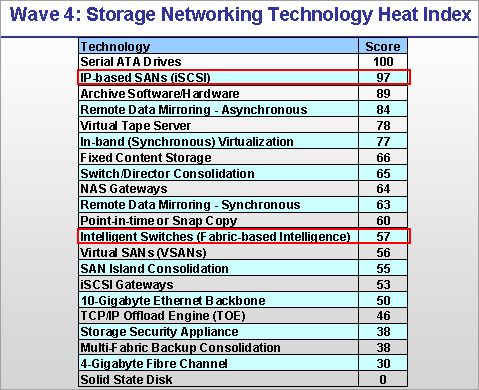
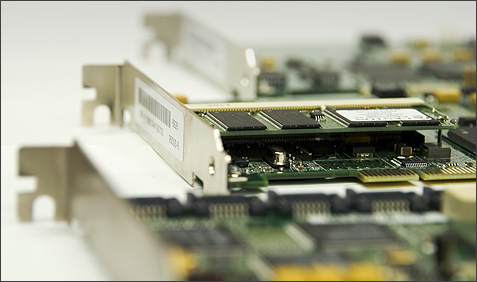
 Test field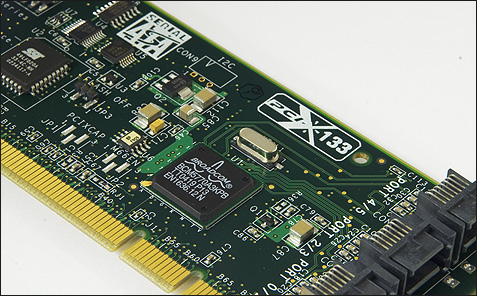
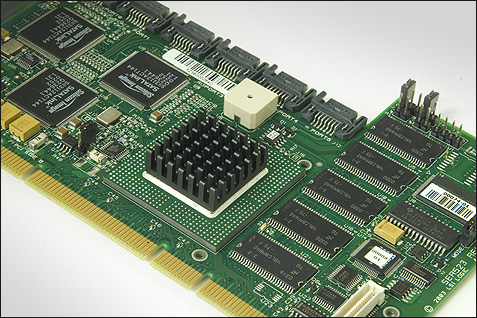
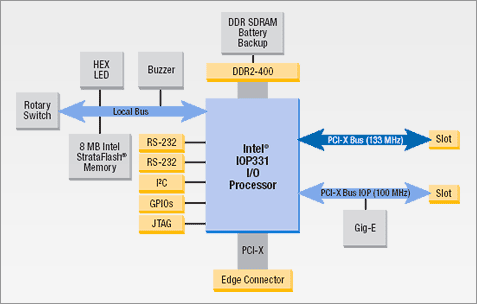
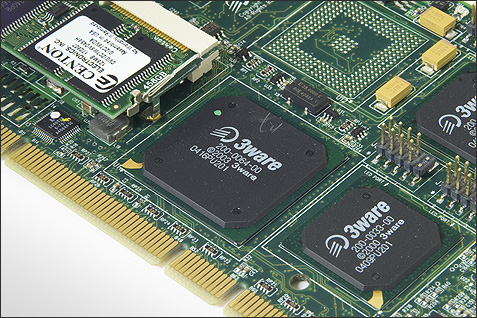
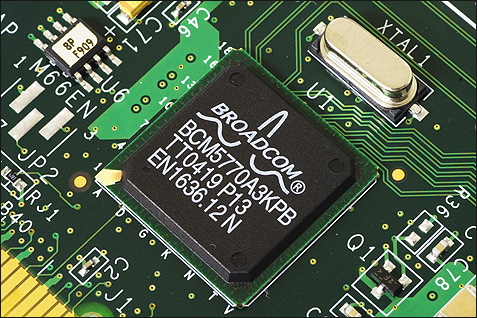
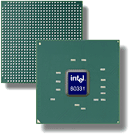 For systems with a PCI-X interface, Intel is offering the IOP331 I/O processor. The specifications of the IOP331 are almost eqeal to the IOP332. The IOP331 is equipped with a PCI-X to PCI-X bridge and communicates with the host through PCI-X. IOP331 processors are used on the PCI-X SATA RAID adapters from Areca and LSI Logic. The 8-port Areca ARC-1120 is reviewed in this article. One generation behind the IOP331 is the IOP321, which is sporting a DDR200 memory interface and is available in clock frequencies ranging from 400MHz to 600MHz. The IOP321 lacks an integrated PCI bridge. The IOP321 is used on the LSI MegaRAID SCSI 320-2X and is at the heart of many external RAID solutions. The MegaRAID SCSI 320-2X showed for the first time the power of the new generation XScale I/O processors.
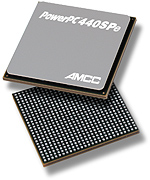 Besides the I/O processors from Intel, embedded processors from other manufacturers are used for I/O purposes. The PowerPC 7xx-series from IBM are one example. AMCC, the owner of 3ware,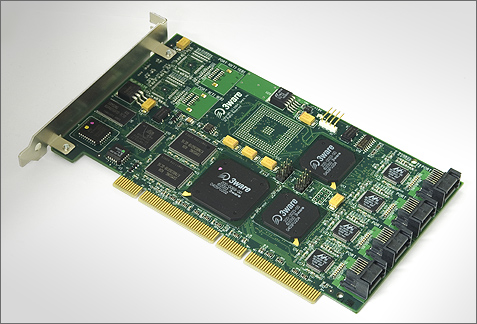
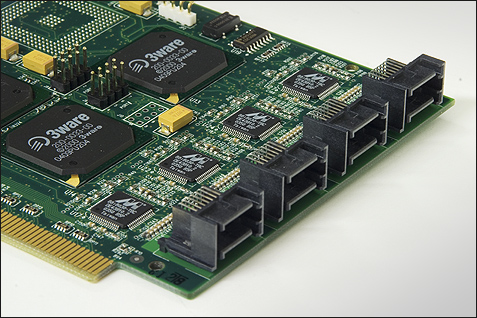
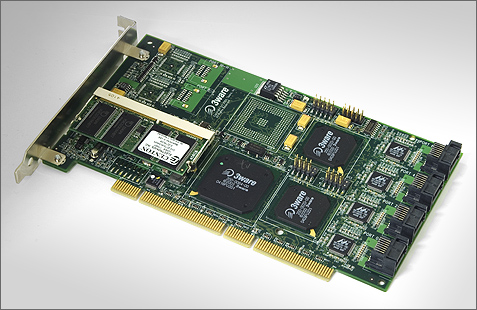
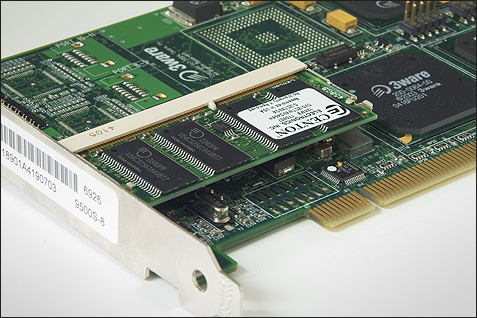

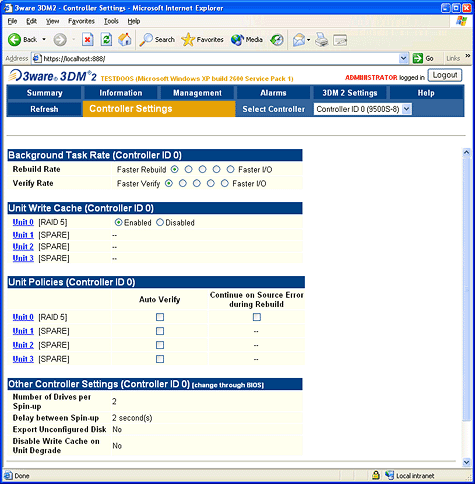
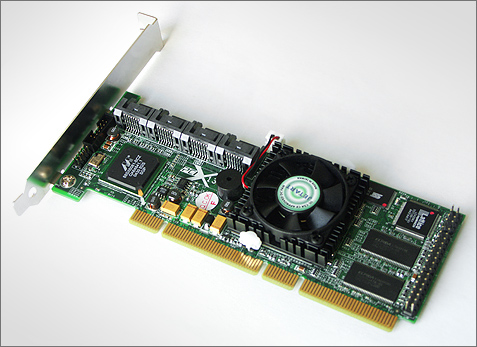
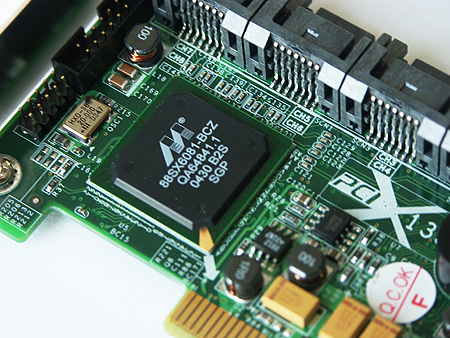
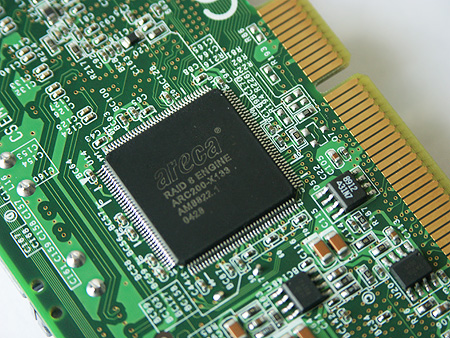
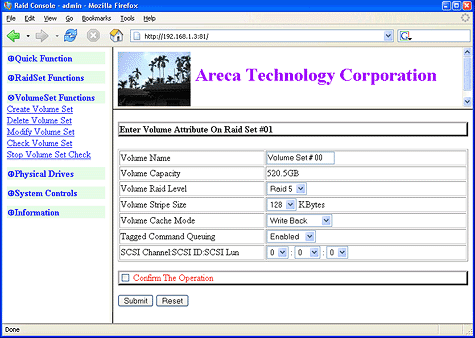
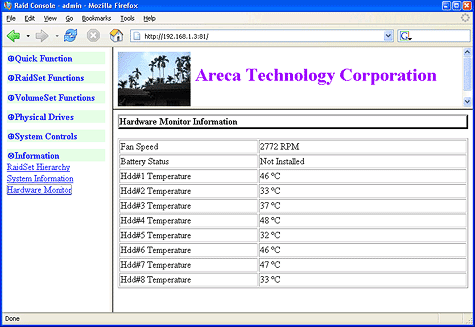
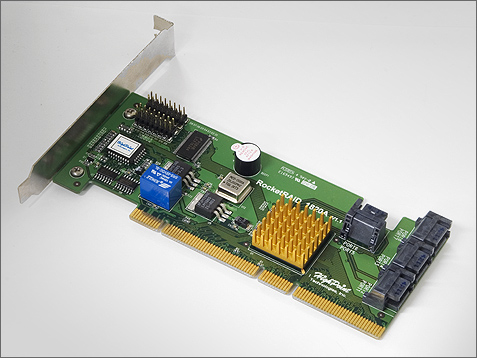
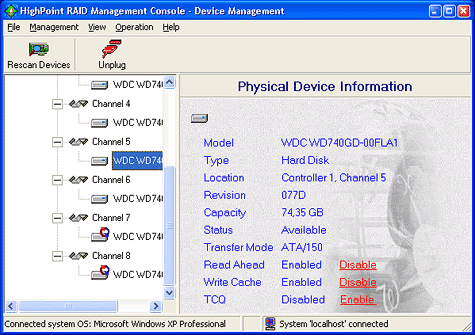
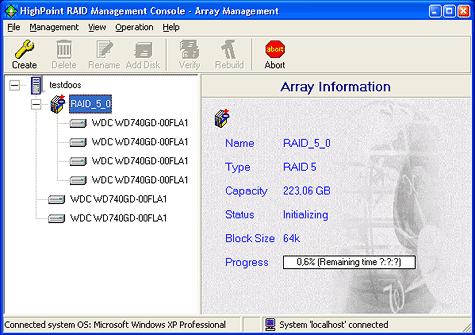
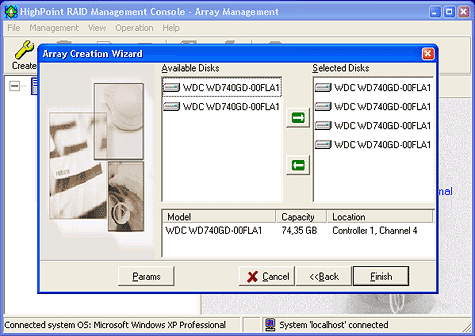
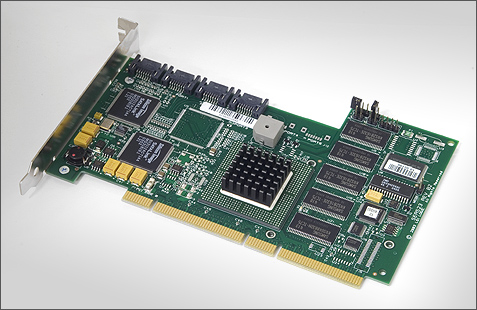
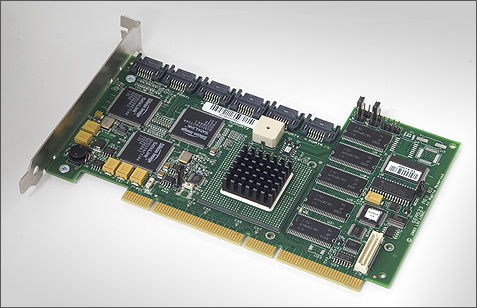
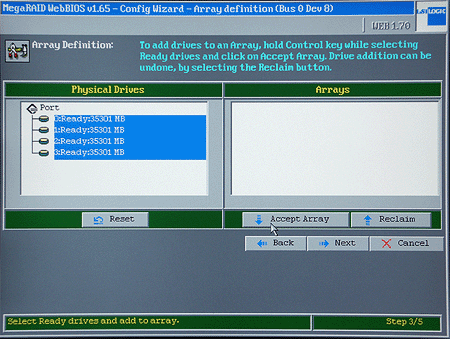
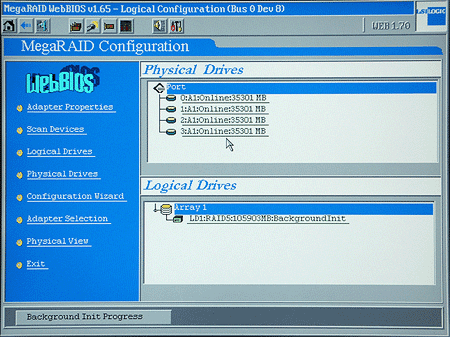
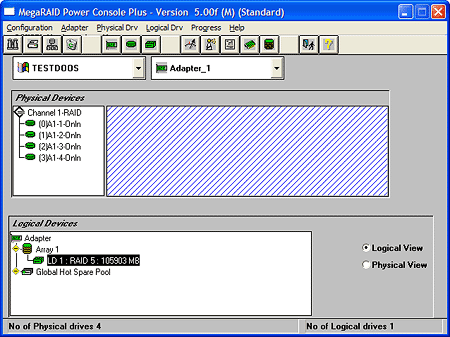
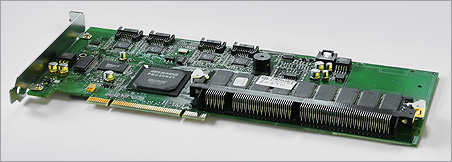
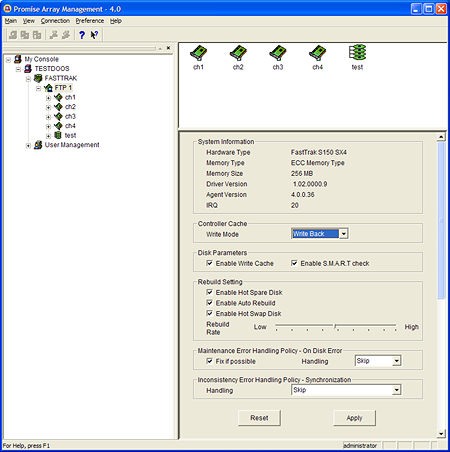
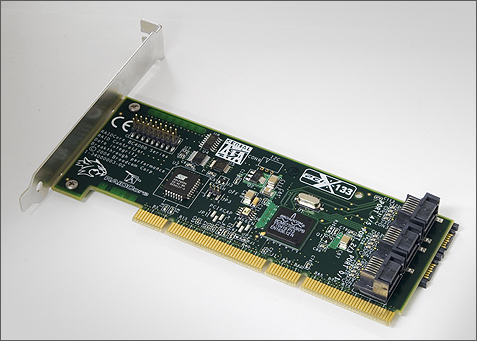
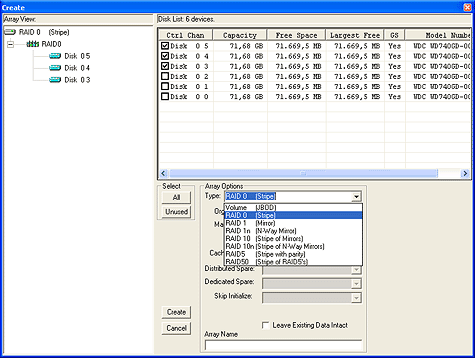
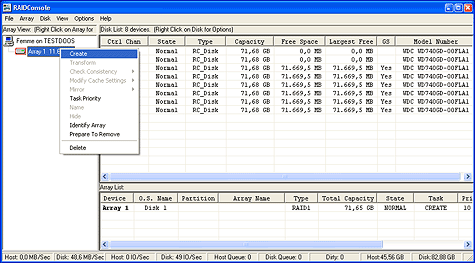


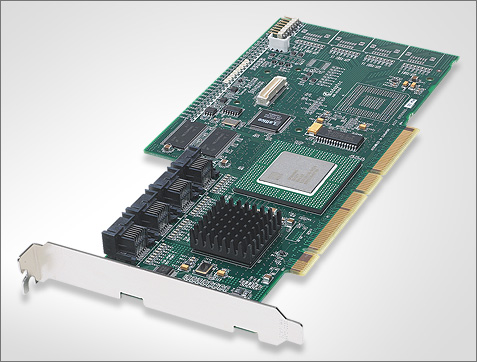

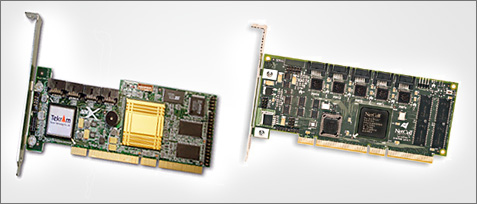



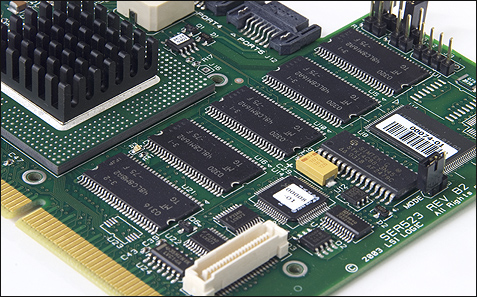


 1,59
1,59


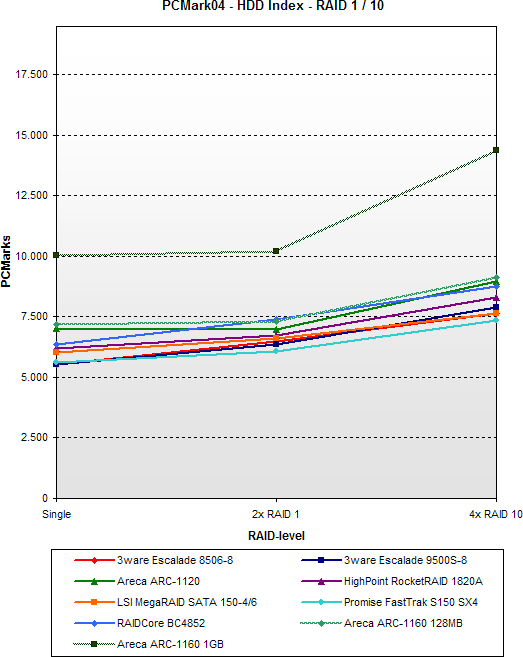

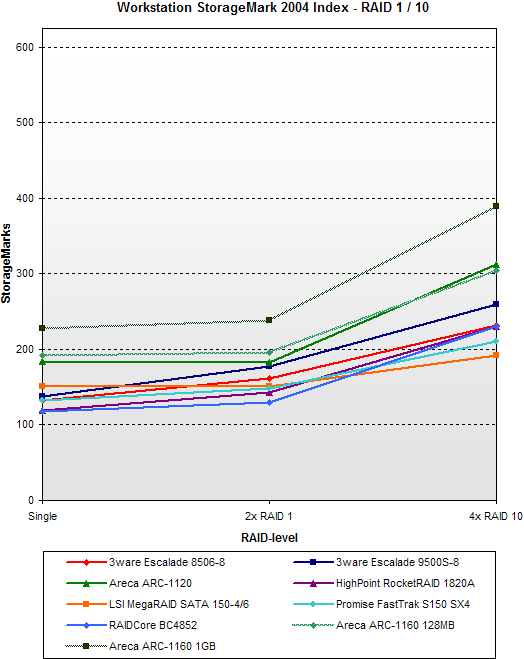
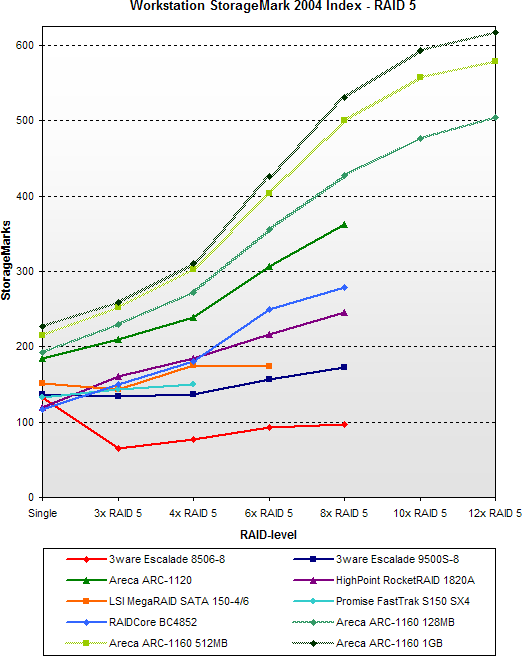


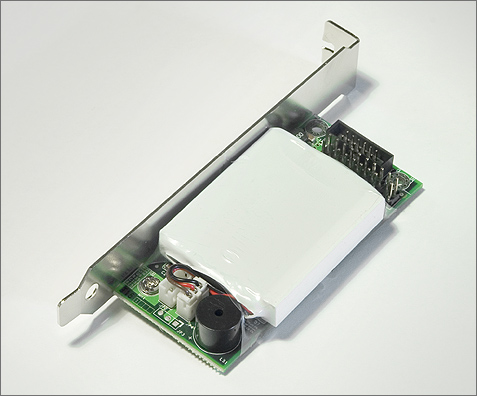

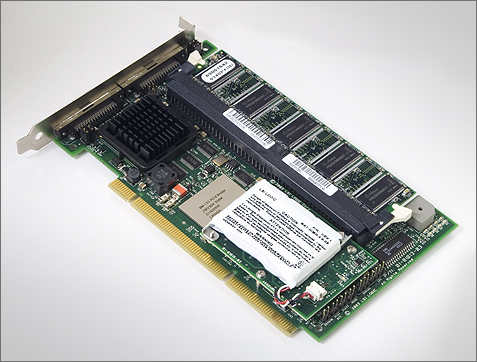
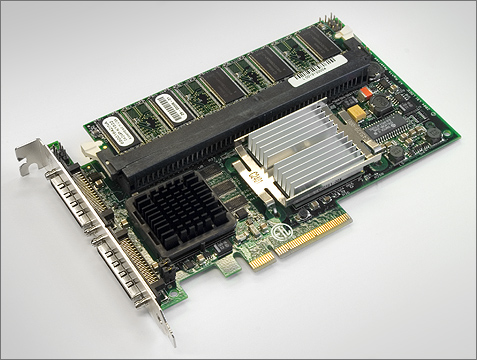
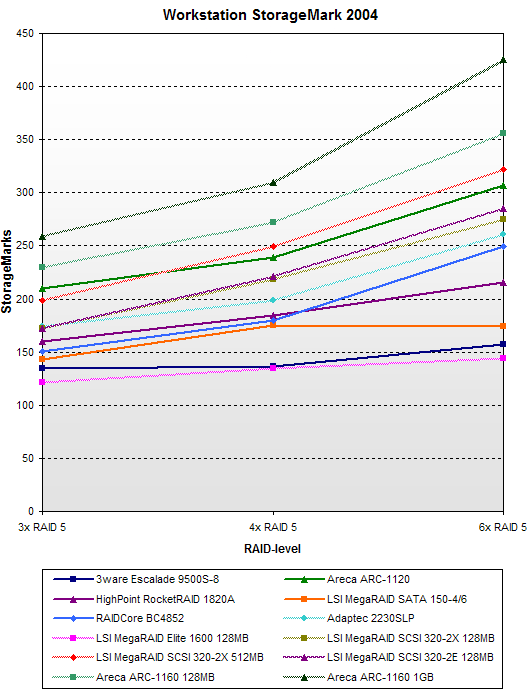
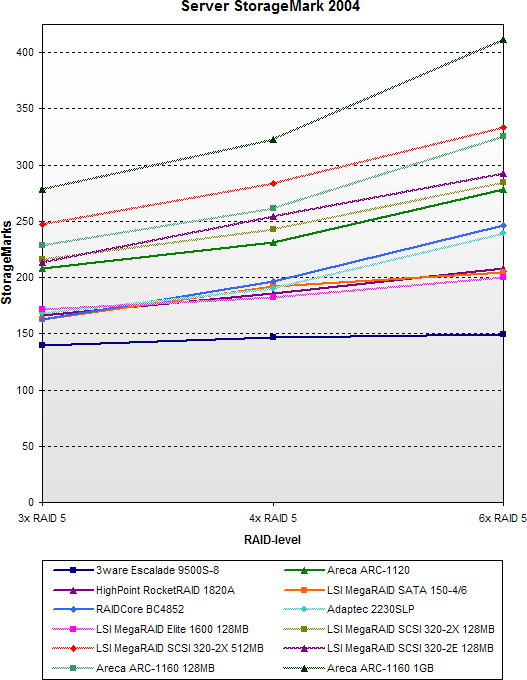
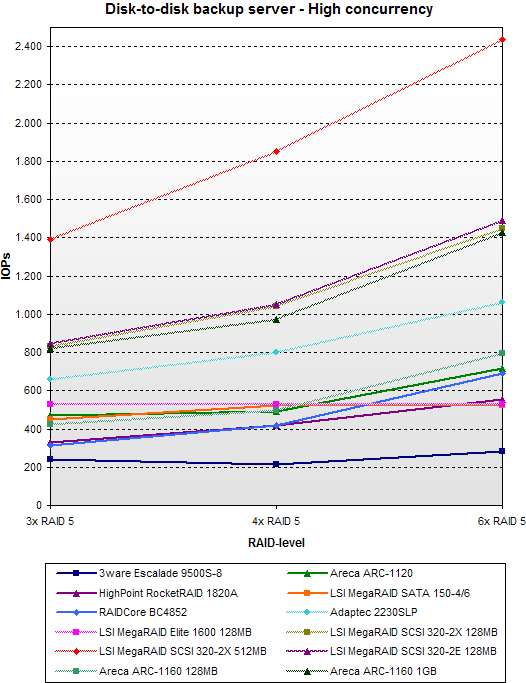

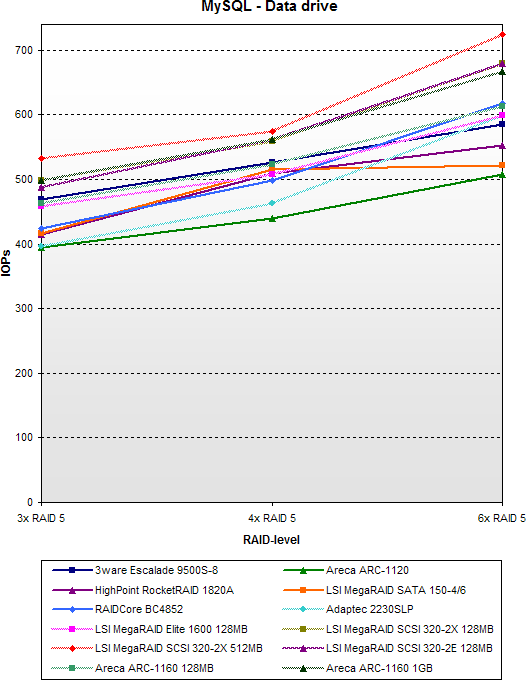
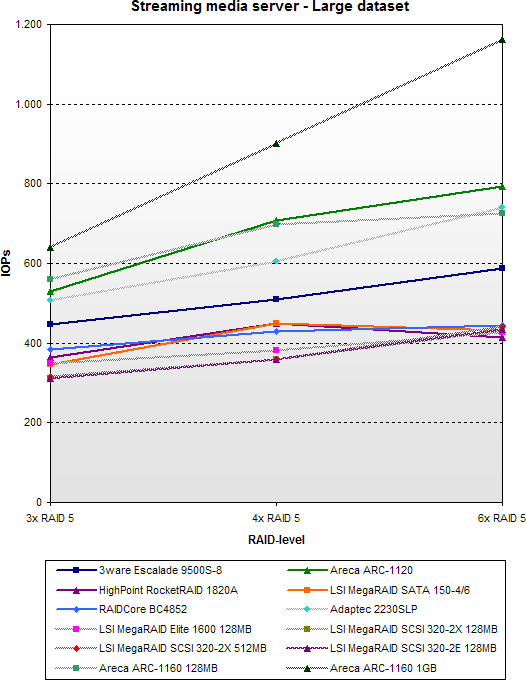
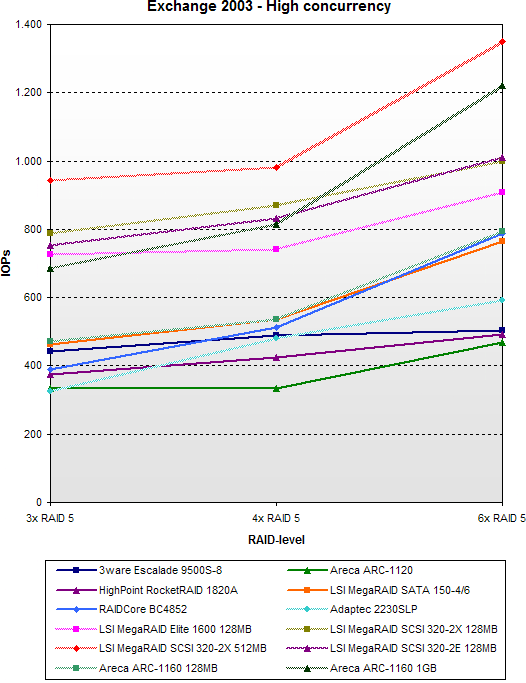


 275,5
275,5

 218,3
218,3