Een eigenschap die *nix-gebruikers vaak missen op Windows-systemen is de mogelijkheid tot het schrijven van geavanceerde scripts en het beheren van een computersysteem via de commandline. Hoewel VBScript enkele interessante opties biedt en er sinds het DOS-tijdperk batch-bestanden gebruikt kunnen worden, was het Microsoft duidelijk dat er een markt was voor een script-omgeving vergelijkbaar met onder andere de bash-shell in pakweg Linux- en FreeBSD-systemen en dat de beschikbare tools onder Windows daarvoor te beperkt waren. Met de Windows PowerShell wil Microsoft aan die wens tegemoetkomen. Of al deze doelstellingen gehaald worden en of deze shell zich zal kunnen meten met Linux-omgevingen die reeds jaren in gebruik zijn, zal pas blijken wanneer de shell officieel gelanceerd wordt, maar met behulp van de reeds beschikbare release candidate proberen we al een inschatting te maken van de mogelijkheden.
Het ontstaan van de Windows PowerShell
Al sinds de lancering van de eerste MS-DOS-versie hebben computergebruikers de beschikking over een commandline interface. Deze tool ging en gaat door het leven als command.com, of in NT-gebaseerde Windows-versies als cmd.exe, en moet een tekstueel alternatief bieden om beheerstaken uit te voeren. De bestaande commandlines bieden echter slechts beperkte mogelijkheden tot het scripten van geavanceerde tools en slagen er bovendien niet altijd in alle functionaliteit uit de grafische interface te bieden. Daarnaast zijn command.com en cmd.exe niet helemaal in overeenstemming met de Posix 2-regels, wat vooral voor Unix-beheerders een kwalijke zaak is.
In 1998 werd de Windows Script Host geïntroduceerd met de lancering van Windows 98. Het ging hierbij om een geavanceerdere toepassing waarbij de gebruiker over verschillende talen kon beschikken om scripts te schrijven waarmee onder andere shell-scripts geschreven kunnen worden en applicaties bestuurd kunnen worden, sterk leunende op ActiveX-functies. Door de gebrekkige documentatie, het niet geïntegreerd zijn in de shell en het opduiken van een aantal virussen die via lekken in de browser op kwaadaardige wijze gebruikmaakten van de mogelijkheden van deze scripting shell, kreeg WSH al gauw een kwalijke reputatie.
In tegenstelling tot *nix-programma's, waar de cli-commando's de basis vormen waarop een GUI geënt kan worden, is het bij Microsoft zo dat de GUI de essentie vormt en dat het moeilijk is een bijpassende tekstuele commandoset te creëren. Het werd Microsoft dan ook duidelijk dat zowel gebruikers als systeembeheerders over een uitgebreide tekstuele shell wilden beschikken om allerlei taken uit te voeren. Dit alles resulteerde erin dat op 11 september 2005 de eerste publieke bètaversie van Monad gelanceerd werd. Beta 3 van deze software verscheen op 10 januari op het net en in april kondigde Microsoft aan dat Monad herdoopt zou worden naar 'Windows PowerShell'. De Windows Powershell is misschien wel Microsofts meest uitgebreide en gepromote initatief voor commandline-toepassingen, het is zeker niet de eerste ervaring met een CLI. Zo is er al sinds jaren de NT Resource kit beschikbaar, die heel wat commandline utilities bevat.
Ondanks eerdere geruchten en speculaties zal de Windows PowerShell niet als standaardshell voor Windows Vista functioneren, maar zal deze Windows-versie over cmd.exe blijven beschikken. Bovendien zal Microsoft deze shell blijven ondersteunen om compatibiliteit met oudere programma's te blijven garanderen.
#
# Voorbeeldfunctie die een lijst met geïnstalleerde software genereert
#

Function Show-InstalledSoftware {
$prod = Get-WmiObject win32_product
$prod| sort name |ft Name, Version, Vendor, Installdate  -a
}

set-alias sis Show-InstalledSoftware
Een kort, eenvoudig voorbeeld dat de mogelijkheden van PowerShell illustreert
.NET als basis voor de Windows Powershell
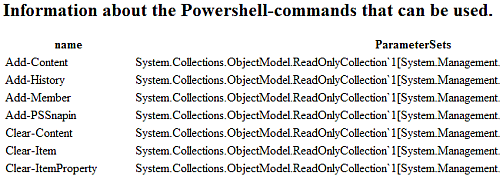
Aangezien Windows Powershell in belangrijke mate op .NET gebaseerd is, is enig inzicht in de werking van dit platform onmisbaar voor wie aan de slag wil met Powershell-scripts, die als extensie .ps1 zullen dragen. Het .NET-platform is vergelijkbaar met J2EE in die zin dat het naast een runtime omgeving een ontwikkelframework omvat. De .NET-API is bovendien volledig objectgeoriënteerd en dat principe wordt ook in Powershell gevolgd. Zo erven alle Cmdlets hun basiseigenschappen van dezelfde klasse en is het zelfs mogelijk eigen Cmdlets te ontwikkelen. Dit biedt een belangrijk voordeel boven sommige Linux-tools, omdat het bijvoorbeeld door het overerven van een 'toString-method' betekent dat de verschillende commando's hun uitvoer op een consistente manier genereren.
PS C:\Documents and Settings\Yoeri> Get-Command |
>> ConvertTo-Html name,ParameterSets -title "Process Information" -body "<H2>Inf
ormation about the Powershell-commands that can be used.</H2>" |
>> Set-Content c:\scripts\commands.htm
>>
PS C:\Documents and Settings\Yoeri> Get-Process |
>> ConvertTo-Html name,path,fileversion -title "Process Information" -body "<H2>
Information about the processes running on the computer.</H2>" |
>> Set-Content c:\scripts\processen.htm
>>
Dat PowerShell in sterke mate op de .NET-fundamenten rust, heeft ook zijn gevolgen voor de mogelijkheden op de commandline. Het typecasten van variabelen is daar een mooi voorbeeld van. Zo zorgt de opdracht [int]"10" + 5 ervoor dat de string omgezet wordt naar een integerwaarde en vervolgens opgeteld wordt, zodat het resultaat 15, en niet 105, bedraagt. Met wat geavanceerde opdrachten is het door slim gebruik van de juiste dll-bestanden en objecten zelfs mogelijk Windows Forms te creëren vanaf de commandline. Het is overigens nog niet mogelijk om ps1-commando's te triggeren met behulp van GUI-events. Ontwikkelaar Jeffrey Snover heeft echter al laten weten dat men wel aan een aantal Cmdlets werkt om interactie met GUI's mogelijk te maken, maar dat deze naar alle waarschijnlijkheid niet in de eerste release van de shell verwerkt zullen worden.
De basisconcepten van Windows Powershell
De codenaam van Windows Powershell luidt 'Monad' en die naam werd niet toevallig gekozen. In zijn werk 'Monadology' beschrijft Gottfried Leibniz een filosofie waarin het universum samengesteld is uit fundamentele elementen, monads genaamd. Dit principe werd in het achterhoofd gehouden tijdens het ontwikkelen van de vernieuwde shell en heeft geresulteerd in een verzameling Cmdlets die de fundamenten van de scripting-omgeving vormen.
Terwijl Unix-commando's hoofdzakelijk gebaseerd zijn op tekstuele invoer en uitvoer, werkt Powershell voornamelijk met objecten. Wanneer de interactie plaatsvindt via het scherm, kunnen de resultaten daardoor eenvoudig tekstueel weergegeven worden, maar als de uitvoer van een commando gebruikt moet worden als invoer voor een ander commando, is door deze benadering geen tool als grep of awk meer nodig.
Voorbeeldopdracht die de prestaties van de computer overzichtelijk weergeeft
Parsing Modes
Powershell is in staat om opdrachten en scripts in twee verschillende modes te parsen: command mode en expression mode. Expression mode is vergelijkbaar met de meeste high-level programmeertalen, waarbij getallen beschouwd worden als numerieke gegevens en strings tussen quotes geplaatst moeten worden. Expressions zien er als volgt uit:
In command mode is het niet nodig strings tussen aanhalingstekens te plaatsen, maar worden enkel variabelen - voorafgegaan door een $-teken - en tekst tussen haakjes niet als string beschouwd. Enkele voorbeelden hiervan zijn:
Dit biedt als belangrijk voordeel dat het mogelijk is heel wat typwerk te sparen wanneer men in command mode werkt. Er schuilen echter ook gevaren in deze modus, vooral wanneer men met Boolean-variabelen werkt. Het toekennen van een willekeurige string zal, zoals ervaren programmeurs weten, immers resulteren in de waarde 'True', zelfs als deze string de tekst 'False' bevat. Men is dus verplicht gebruik te maken van de variabelen $True en $False. In welke parsing mode gewerkt wordt, wordt bepaald door het eerste teken van de opdracht. Wanneer de lijn begint met een getal, een variabele of een string tussen dubbele aanhalingstekens, wordt expression mode gebruikt. Command mode wordt ingeschakeld als het eerste teken een ampersand (&), een punt gevolgd door een spatie, of een ander karakter is.
Expressie
Evaluatie
Parsing mode
2+2
Begint met een getal
Expression mode
"Hello World"
Begint met een string tussen dubbele quotes
Expression mode
Hello World
Begint met een letter
Command mode
& "Hello World"
Begint met een ampersand
Command mode
. "script.ps1"
Begint met een punt gevolgd door een spatie
Command mode
.123
Begint met een punt gevolgd door een getal
Expression mode
.HelloWorld
De punt is onderdeel van de naam '.HelloWorld'
Command mode
Providers
Niet alleen de commando's en de te verwerken gegevens worden als objecten behandeld, maar ook de zogenaamde 'data storage'. In de meeste gevallen zullen de gegevens waarmee gewerkt wordt op de harde schijf bewaard worden en zal er dus een bestandssysteem aan te pas komen. Het principe van hiërarchische opslag, waarbij directories op hun beurt zowel andere directories als bestanden kunnen bevatten, is algemeen bekend en is zo handig gebleken dat in *nix-systemen zelfs virtuele directories als /proc en /dev in het leven geroepen werden. Om zo hardware op een generieke manier aan te kunnen spreken, net zoals directory's en bestanden aangesproken kunnen worden. Dit fenomeen is ook terug te vinden in Powershell, met name in de providers.
Voor elke denkbare hiërarchische opslagmogelijkheid kan een provider geschreven worden die deze locatie toegankelijk maakt. Met een aantal standaardcommando's of Cmdlets kan met deze providers gecommuniceerd worden, zonder dat specifieke kennis van het onderliggende opslagsysteem benodigd is. Gegevens in het Windows-register zijn bijvoorbeeld eenvoudig toegankelijk via een provider die 'Subkeys' voorstelt als directories en waarbij de combinatie van een sleutel en zijn waarde voorgesteld wordt als eigenschap of property van de Subkey.
Aangezien het vaak nuttig kan zijn resultaten van commando's tussentijds bij te houden om die wat verder in een script opnieuw te gebruiken, vormen variabelen een onmisbaar onderdeel in elke script- en programmeertaal. Tijdens het werken met de Powershell kunnen variabelen herkend worden aan de $ die de naam voorafgaat. In de uitdrukking $lengte = "Lente van de tekst".length is $lengte dan ook de variabele waarin het resultaat van de expressie na het gelijkheidsteken opgeslagen wordt. Het is overigens niet nodig een variabele voor gebruik te definiëren. Een constructie als Dim lengte as Integer uit VBScript is dan ook overbodig geworden. De Powershell-interpreter herkent het dollarteken automatisch en bepaalt op basis van de waarde die in de variabele opgeslagen wordt om welk type het gaat. De naam van de variabele eindigt bij het eerste zogenaamde 'word breaking character'. Dit kan een spatie, een punt of een komma zijn. Als men toch dergelijke tekens in de naam van de variabele wil gebruiken, is het mogelijk de naam tussen accolades te plaatsen.
PS> $stringVariable = "This is a string"
PS> $stringVariable
This is a string
PS> $!@#$%^&*() = "This is a non-traditional variable name"
Invalid variable reference. '$' was not followed by a valid variable name character. Consider using ${} to delimit the name.
At line:1 char:1
+ $ <<<< !@#$%^&*() = "This is a non-traditional variable name"
PS> ${!@#$%^&*()} = "This is a non-traditional variable name"
PS> ${!@#$%^&*()}
This is a non-traditional variable name
Een aantal variabelenamen zijn echter gereserveerd door de Powershell. Het gaat daarbij onder andere om variabelen die gebruikt kunnen worden om de werking van de Powershell te controleren. In de onderstaande tabel zijn een aantal van die variabelen opgenomen.
Variabelenaam
Beschrijving
$^
Bevat het eerste teken van de laatste lijn die ingevoerd werd in de shell.
$$
Bevat het laatste teken van de laatste lijn die ingevoerd werd in de shell.
$_
Het huidige object in de pipeline; kan onder andere gebruikt worden in scripts, filters, where-clausules en switch-statements.
$?
Bevat de 'success/fail'-status van het laatst uitgevoerde statement.
$Args
Wordt gebruikt bij het creëren van functies die parameters vereisen.
$Error
Bevat de laatste error die gegenereerd werd tijdens het uitvoeren van een statement.
$foreach
Verwijst naar de enumerator in een foreach-lus.
$HOME
The homedirectorie van de gebruiker; verwijst naar %HOMEDRIVE%\%HOMEPATH%.
$true
Boolean 'waar'
$false
Boolean 'vals'
$null
Een null-object.
Types variabelen en werken met arrays
Zoals hierboven al aangegeven wordt, is het in Powershell-scripts niet nodig om variabelen te definiëren, maar wordt het variabeletype automatisch bepaald aan de hand van de gegevens die erin opgeslagen worden. Zo zal $intVar = 123 resulteren in een integer, terwijl $strVar = "Hello World" een string tot resultaat zal hebben. De verregaande integratie van .NET heeft tot gevolg dat zowat elk type variabele uit .NET ook in Powershell bruikbaar is: array, bool, byte, char, char[], decimal, double, float, int, int[], long, long[], regex, single, scriptblock, string, type en xml. Omdat het in bepaalde gevallen wenselijk is zelf te kunnen bepalen welk type een bepaalde variabele zal worden, is er ook een casting-mogelijkheid ingebouwd. In de volgende twee voorbeelden wordt er bijvoorbeeld voor gekozen om de strings respectievelijk als integer en als xml-variabele te bewaren:
Voor het creëren van een array volstaat het de verschillende waarden in te voeren, gescheiden door een komma. Het terughalen van een specifieke waarde uit een array gebeurt met behulp van de index, waarbij de eerste waarde index 0 heeft.
PS> $array = 1, 2, 3, "test"
PS> $array[3]
test
Om te achterhalen welke functies en properties beschikbaar zijn bij een bepaald object of variabeletype is er het commando Get-Member.
Conditionele statements en rekenkundige operatoren
Als men een waarde opgeslagen heeft in een variabele, is het natuurlijk de bedoeling om daar wat mee te gaan doen. Vaak zal men deze waarden met elkaar willen vergelijken of er bewerkingen mee uitvoeren en ook daar is de Powershell op voorzien. Aangezien de Powershell-syntax heel wat aspecten van C# geleend heeft, zullen programmeurs zich al gauw thuisvoelen in deze omgeving.
Operator
Beschrijving
=
Kent de waarde van het argument toe aan de variabele.
+=
Telt de waarde van het argument op bij de waarde van de variabele en slaat het resultaat op in de variabele.
-=
Trekt de waarde van het argument af van d waarde van de variabele en slaat het resultaat op in de variabele.
*=
Vermenigvuldigt de waarde van het argument met de variabele en slaat het resultaat op in de variabele.
/=
Deelt de waarde van de variabele door het argument en slaat het resultaat op in de variabele.
%=
Slaat de rest van de deling van de variabele door het argument op in de variabele
Vanzelfsprekend kunnen de operatoren +, -, *, / en % ook gebruikt worden in gewone expressies als $som = 1 + 2 * 3. Daarnaast kunnen $teller++ en $teller-- gebruikt worden om de variabele $teller respectievelijk te verhogen en te verlagen. Ook voor het vergelijken van variabelen zijn overigens een aantal operatoren voorzien. Door de letter c toe te voegen voor onderstaande operatoren, wordt de conditie hoofdlettergevoelig gemaakt, bijvoorbeeld -clt voor de hoofdlettergevoelige versie van -lt.
Operator
Beschrijving
-lt
Kleiner dan
-le
Kleiner dan of gelijk aan
-gt
Groter dan
-ge
Groter dan of gelijk aan
-eq
Gelijk aan
-ne
Niet gelijk aan
-contains
Gaat na of het argument na de operator voorkomt in het argument voor de operator
-notcontains
Controleert of het argument na de operator niet voorkomt in het argument voor de operator
-like
Vergelijkbaar met -eq, maar kan wildcards verwerken.
-notlike
Vergelijkbaar met -ne, maar kan wildcards verwerken
-match
Controleert of het argument voldoet aan een reguliere expressie
-notmatch
Gaat na of het argument niet voldoet aan een reguliere expressie
Het hoe en wat van Cmdlets
De kern van de Powershell wordt gevormd door de zogenaamde Cmdlets. Dit zijn ingebouwde commando's die allen gebaseerd zijn op dezelfde .NET-klasse en dus ook over een basisset eigenschappen en functies beschikken. Bovendien is het mogelijk om zelf Cmdlets te schrijven en deze aan de Powershell toe te voegen. De naam van de commando's is over het algemeen zelfbeschrijvend gekozen en bestaat uit een werkwoord gevolgd door een zelfstandig naamwoord. Met het commando set-date, is het dus bijvoorbeeld mogelijk om de huidige datum in te stellen, terwijl get-process een lijstje met draaiende processen teruggeeft. Met de opdracht get-command krijgt men een overzicht van de beschikbare Cmdlets.
Deze opdracht is echter niet beperkt tot ingebouwde Cmdlets, maar kan ook informatie verschaffen over commando's die niet tot de Powershell behoren. Zo is het door gebruik te maken van de parameter *.com mogelijk een overzicht te krijgen van de commando's met .com-extensie. In dat geval krijgt men echter geen lijstje met de beschikbare parameters voor dit commando, omdat deze niet vanuit de Powershell bepaald kunnen worden, maar het volledige pad naar het bestand voorgeschoteld.
Werken met parameters
Zoals bij het gebruik van het commando Get-Commands al duidelijk werd, is het mogelijk om parameters mee te geven met Cmdlets. Deze parameters worden voorafgegaan door een koppelteken en de naam van de parameter. Om bijvoorbeeld de gegevens van het proces explorer.exe op te vragen kan de parameter ProcessName als volgt gebruikt worden: Get-Process -ProcessName explorer. Om typwerk te besparen is het echter niet nodig de volledige parameternaam te hanteren. Het volstaat de eerste karakters te gebruiken, zodoende dat er geen twijfel meer kan bestaan over welke parameter bedoeld wordt. In het eerder genoemde geval zijn er geen andere parameters die met de letter 'p' beginnen, dus zou Get-Process -p explorer volstaan. Daarnaast zijn er ook Cmdlets die 'position sensitive' parameters hebben. Dit betekent dat de naam van de parameter helemaal weggelaten kan worden, zodat Get-Process explorer volstaat.
Verder zijn er een aantal parameters die bij elke Cmdlet gebruikt kunnen worden, de zogenaamde 'Common Parameters'.
Parameter
Functie
Debug
Geeft meer informatie over de acties die ondernomen worden tijdens het uitvoeren van het commando.
ErrorAction
Controleert het gedrag van het commando als er een fout optreedt.
ErrorVariable
De naam van de variabele waarin objecten waarbij zich een fout voordoet moeten opgeslagen worden.
OutVariable
Naam van de variabele waarin de uitvoer van het commando moet opgeslagen worden. Equivalent aan het pipen van de uitvoer door middel van | set-variable <naam> -passthru true.
Confirm
Vraagt de gebruiker om bevestiging alvorens wijzigingen in het systeem aan te brengen.
Verbose
Geeft gedetailleerde informatie over het verloop van het commando.
WhatIf
Geeft informatie over aanpassingen die het commando zou uitvoeren, maar voert deze niet effectief uit.
Zelf Cmdlets maken
Naast het gebruik van de ingebouwde Cmdlets, is het dankzij de .NET-funderingen mogelijk om zelf Cmdlets te schrijven die vervolgens in de Powershell gebruikt kunnen worden. Een gedetailleerde omschrijving van de werkwijze hiervoor valt buiten het bestek van deze feature, maar programmeurs die aan de slag willen met .NET kunnen terecht op MSDN voor een uitleg over hoe Cmdlets te schrijven.
Een alias voor Cmdlets creëren
Om gebruikers van andere shells, als cmd.exe of bash, tegemoet te komen hebben de ontwikkelaars van de Powershell ervoor gezorgd dat er standaard reeds een aantal veelgebruikte aliassen voor bepaalde Cmdlets aanwezig zijn. Deze zitten overigens niet in de shell zelf ingebakken, maar worden gedefinieerd in een zogenaamd profile-bestand. Zo kunnen Bash-gebruikers er bijvoorbeeld voor opteren ls in te typen, waarna achter de schermen eigenlijk Get-ChildItem uitgevoerd wordt, wat resulteert in een lijstje met bestanden en subdirectories in de huidige map. Daarnaast is het mogelijk om met behulp van het commando set-alias zelf een of meerdere aliassen voor een veelgebruikt commando te definiëren.
Een van de meest fundamentele acties in scripts is het vergelijken van twee of meer waarden en op basis van de uitkomst een specifieke actie ondernemen. Conditionele expressies mochten dus ook in de Powershell niet ontbreken en bijgevolg hebben de ontwikkelaars niet alleen in een if-statement voorzien, maar behoren ook switch-commando's tot het arsenaal van de Powershell-scripter.
Overigens moet bij het gebruik van deze statements wel vermeld worden dat deze niet helemaal gelijk zijn aan wat .NET-ontwikkelaars gewend zijn. Omdat de <- en >-tekens in de Powershell gebruikt worden om piping te verzorgen, dient men gebruik te maken van de eerder vermelde operatoren. Wat dan weer wel overeenkomt met hogere programmeertalen is het gebruik van de if-then-else-constructie.
PS> 3 -lt 5
True
PS> 3 -lt 5 -and 5 -lt 3
False
PS> if ("Test".GetType().Name -eq "String")
>> { "De variabele is van het type string" }
>> else { "De variabele is niet van het type string" }
>>
De variabele is van het type string
PS> if (123 | Get-Member | findstr "TypeName" | findstr "String")
>> { "De variabele is van het type string" }
>> else { "De variabele is niet van het type string" }
>>
De variabele is niet van het type string
Net zoals bij eenvoudige vergelijkingen is het ook mogelijk om het resultaat van een complete if-then-else-boom op te slaan in een variabele. $var = 5 -lt 6 zal dus tot resultaat hebben dat een boolean 'True' opgeslagen wordt in de variabele $var, evenals if (5 -lt 6) { $var = "Waar"} else { $var = "Onwaar"}. Dit laatste kan echter korter geschreven worden als $var = if (5 -lt 6) { "Waar"} else {"Onwaar"}.
Wanneer een variabele met meerdere waarden vergeleken moet worden, wordt een combinatie van if-statements echter al gauw onduidelijk. In dat geval kan een switch-structuur gebruikt worden, zoals die bekend is van programmeertalen als C++ en C#. Als geen van de gedefinieerde waarden als 'True' evalueert, zal de expressie die bij 'default' hoort uitgevoerd worden. Indien geen default gespecificeerd werd, zal er niets gebeuren, maar wordt ook geen foutmelding gegenereerd.
PS> $var = 2
PS> switch ($var) {
>> 1 { "Je koos voor de eerste optie" }
>> 2 { "Je koos voor de tweede optie" }
>> 3 { "Je koos voor de derde optie" }
>> default { "Je maakte een ongeldige keuze" }
>> }
>>
Je koos voor de tweede optie
Logische lussen en iteraties
Naast conditionele statements zijn ook lusconstructies vaak een onmisbaar onderdeel van een shellscript. Daarvoor hebben Powershell-scripters twee procedurele loop-statements ter beschikking gekregen. Het eerste is de welbekende for-lus die weinig uitleg behoeft.
PS> for ($i = 0; $i -lt 10; $i++) {
>> "Het kwadraat van " + $i + " bedraagt " + $i * $i
>> }
>>
Het kwadraat van 0 bedraagt 0
Het kwadraat van 1 bedraagt 1
Het kwadraat van 2 bedraagt 4
Het kwadraat van 3 bedraagt 9
Het kwadraat van 4 bedraagt 16
Het kwadraat van 5 bedraagt 25
Het kwadraat van 6 bedraagt 36
Het kwadraat van 7 bedraagt 49
Het kwadraat van 8 bedraagt 64
Het kwadraat van 9 bedraagt 81
Wel interessant om hier te vermelden is de mogelijkheid tot het gebruik van de foreach-lus. Wanneer men door een collectie of lijstje van objecten wil lopen, is het hiermee onnodig in een variabele bij te gaan houden hoeveel items er geëvalueerd moeten worden of te gaan goochelen met exit-condities. Het kan bovendien nog eenvoudiger door het lijstje met objecten gewoon door middel van piping aan het foreach-commando te bezorgen. In dat geval kan de variabele $_ gebruikt worden om naar het huidige element in de for-lus te verwijzen.
Vaak wil men echter niet zomaar een bestaand lijstje doorlopen, maar moet een reeks commando's uitgevoerd worden tot dat aan een bepaalde voorwaarde voldaan is. In die functionaliteit wordt voorzien door de while-lus.
De mogelijkheid om door een lijstje met objecten te lopen, is natuurlijk uiterst handig, maar vaak wil men deze objecten in een bepaalde volgorde terugkrijgen, al was het maar voor het overzicht. Met behulp van de eerder genoemde for-lussen en ingenieus gebruik van arrays en variabelen lijkt het geen koud kunstje te zijn om een sorteeralgoritme te schrijven, maar ook daar heeft Microsoft aan gedacht bij de ontwikkeling van de Powershell. De uitvoer van een commando kan namelijk probleemloos naar het 'sort-object'-commando gepiped worden, wat resulteert in een - desgewenst omgekeerd - alfabetisch gesorteerd lijstje.
Deze Sort-Object is echter niet de enige functie die geïnspireerd werd door een SQL-achtige syntax. In de Powershell zien we namelijk ook termen als select en where opduiken. Zoals hierboven zichtbaar is, levert een commando als Get-Process een uitgebreid lijstje op, waarvan vaak maar weinig informatie op dat moment nuttig is. Door de uitvoer van het commando door te sturen naar een select-statement, kunnen de nuttige kolommen gefilterd worden.
PS> Get-Process | sort-object CPU -Descending | select ProcessName, CPU

ProcessName                     CPU
-----------                     ---
HotTopic                9406,109375
IEXPLORE                1169,296875
IEXPLORE                    240,625
explorer                   193,5625
rundll32                  98,640625
OUTLOOK                   89,984375
System                    89,109375
mirc                       69,40625
Maar zelfs daar houdt het niet op, want ook het filteren van de resultaten met behulp van een where-clausule behoort tot de mogelijkheden. Een lijstje met internet-explorerprocessen is namelijk nog eenvoudig te realiseren met de opdracht Get-Process iexplore, maar een overzicht van de processen en het aantal Handles per proces waarvan het cpu-gebruik de waarde 50 overstijgt, lijkt al moeilijker te realiseren. Dankzij de krachtige piping-mogelijkheden is dit met de Windows Powershell echter eenvoudig mogelijk.
PS> Get-Process |
>> Select ProcessName, Handles, CPU |
>> where { $_.CPU -gt 50 }
>>

ProcessName                                   Handles                       CPU
-----------                                   -------                       ---
explorer                                          463                   58,6875
firefox                                           266                161,984375
iexplore                                          104               6093,046875
OUTLOOK                                          1368                  83,96875
rundll32                                          115                 76,421875
Veiligheid
Microsoft kondigde het al aan met betrekking tot Windows Vista, maar ook tijdens de ontwikkeling van de Windows Powershell werd uitvoerig over de veiligheidsaspecten nagedacht.
Net zoals bij bijvoorbeeld de Bash-shell onder Linux is het ook mogelijk om met Windows Powershell kwaadaardige scripts te schrijven. Hoeveel schade een script kan aanrichten is volledig afhankelijk van de rechten van het gebruikersaccount waaronder het opgestart wordt. Hoewel er met Vista verbetering beloofd wordt, is het tot op heden zo dat deze rechten onder Windows - onder andere door standaard als administrator te werken - vaak uitgebreider zijn dan onder Linux en dat scripts dus ook potentieel gevaarlijker kunnen zijn. Dit is voor de Powershell echter niet anders dan voor andere applicaties. Bovendien zal Powershell in zijn standaardconfiguratie weigeren om scripts die niet digitaal ondertekend zijn uit te voeren.
Een eerste maatregel die Microsoft invoerde om misbruik te voorkomen, is dat ps-scripts niet uitgevoerd kunnen worden door er dubbel op te klikken. Doordat gebruiker de naam van een script moet intypen, in plaats van erop te dubbelklikken, is deze zich beter bewust van het feit dat een script opgestart wordt en van de bijhorende veiligheidsrisico's. Systeembeheerders kunnen de Windows Powershell bovendien zo configureren dat deze weigert ongesigneerde scripts uit te voeren. Als een geldig certificaat ontbreekt, zullen de zogenaamde 'untrusted' scripts niet uitgevoerd worden. Daarnaast wordt met een certificaat ook een hashwaarde bewaard, zodat men kan controleren of een script aangepast werd nadat het digitaal ondertekend werd.
Naarmate de acceptatie van de Powershell stijgt, valt het te verwachten dat er ook sites uit de grond zullen schieten waar interessante en minder interessante scripts ter download aangeboden zullen worden. Geïnteresseerde gebruikers zullen natuurlijk de mogelijkheid hebben om de broncode lijn per lijn te onderzoeken om na te gaan of er geen ongewenste bijeffecten zullen optreden. Een andere mogelijkheid is echter gebruik te maken van de -whatif-parameter. Wanneer deze parameter aan een commando toegevoegd wordt, krijgt men immers informatie over welke wijzigingen doorgevoerd zullen worden, zonder dat deze aanpassingen ook effectief gebeuren.
PS > remove-item * -whatif

What if: Performing operation "Remove Directory" on Target "C:\Documents and Settings\Yoeri\Desktop".
What if: Performing operation "Remove Directory" on Target "C:\Documents and Settings\Yoeri\Gist".
What if: Performing operation "Remove File" on Target "C:\Documents and Settings\Yoeri\.jalbum-recent-projects.properties".
What if: Performing operation "Remove File" on Target "C:\Documents and Settings\Yoeri\winscp.RND".
Vanzelfsprekend is het ook mogelijk om te eisen dat elke actie bevestigd wordt. Hiervoor is de parameter -confirm bedoeld:
PS> remove-item *[1-3] -confirm
Confirm
Are you sure you want to perform this action?
Performing operation "Remove File" on Target "C:\Documents and Settings\Yoeri\testdir\file1".
[Y] Yes  [A] Yes to All  [N] No  [L] No to All  [S] Suspend  [?] Help
(default is "Y"):
Certificaten
Standaard kunnen in de Powershell geen scripts uitgevoerd worden, maar functioneert de software alleen als interactieve shell. Om verschillende veiligheidsniveau's aan te duiden,wordt er gewerkt met ExecutionPolicy's. Deze kunnen ingesteld worden met het commando Set-ExecutionPolicy, gevolgd door Restricted, Allsigned, RemoteSigned of Unrestricted. Restricted is de standaardmode en laat het niet toe scriptbestanden uit te voeren. AllSigned biedt die mogelijkheid wel, maar stelt de voorwaarde dat alle scripts ondertekend worden door een vertrouwde partij. RemoteSigned stelt deze eis dan weer alleen voor scripts die gedownload werden via applicaties als Outlook, Internet Explorer of Live Messenger, maar speelt andere scripts zonder morren af. Unrestricted ten slotte is de onveiligste mode en stelt geen enkele beperking aan de te draaien scripts.
Wie zijn scripts dus wil gaan gebruiken zonder meteen vatbaar te zijn voor allerhande kwaadaardige code, zal zijn bestanden dus digitaal moeten ondertekenen. Dit kan met behulp van een externe partij als Verisign, een zogenaamde 'Certificate Authority', maar voor gebruikers die hun scripts alleen intern willen gebruiken, wordt dit al gauw een dure aangelegenheid. Daarom is er ook de mogelijkheid om 'self-signed scripts' te gaan gebruiken. Om hier gebruik van te maken moet de .NET Framework 2.0 SDK geïnstalleerd worden.
Na installatie krijgt men beschikking over het programma makecert.exe. Met de programmaregel makecert -n "CN=PowerShell Local Certificate Root" -a sha1 -eku 1.3.6.1.5.5.7.3.3 -r -sv root.pvk root.cer -ss Root -sr localMachine - dat zal verzoeken een private sleutel in te voeren - wordt de computer waarop het commando uitgevoerd wordt bevorderd tot 'local certificate authority'. Vervolgens moet men met behulp van deze pas geconfigureerde certificate authority een eigen certificaat aanmaken. Dat kan met de opdrachtregel makecert -pe -n "CN=PowerShell User" -ss MY -a sha1 -eku 1.3.6.1.5.5.7.3.3 -iv root.pvk -ic root.cer. In PowerShell kan met de opdracht Get-ChildItem cert:\CurrentUser\My -codesign geverifieerd worden dat het certificaat correct aangemaakt werd.
Het certificaat is nu beschikbaar, evenals de autoriteit die het certificaat kan goedkeuren, maar de laatste stap is het digitaal ondertekenen van een script. Hiervoor is de Cmdlet Set-AuthenticodeSignature beschikbaar. Het uitvoeren van dit commando heeft als resultaat dat een signature-block toegevoegd wordt aan het scriptbestand. Als men het script wil aanpassen, zal men bijgevolg een nieuwe signature moeten genereren.
SignerCertificate Status Path ----------------- ------ ---- A180F4B81AA81143AD2969114D26A2CC2D2AD65B Valid foo.ps1
Windows-beheer
Ervaren systeembeheerders zullen de term 'WMI' - een gestandaardiseerde interface tot heel wat hardware en software die in Windows NT4 het levenslicht zag en sinds Windows 2000 als 'de standaard' beschouwd wordt - ongetwijfeld herkennen. De 'Windows Management Instrumentation' kan met verschillende scriptingtalen benaderd worden en dus is er ook in de Powershell voorzien in een get-wmiobject-Cmdlet. Volgens Microsoft-ontwikkelaar Bruce Payette is het de bedoeling dat in de toekomst grafisch beheer van een Windows-systeem gerealiseerd zal worden door gebruik te maken van MMC's als grafische laag bovenop MSH, maar tot het zover is moet men het met de standaard commandline interface stellen.
Met behulp van get-wmiobject kan een beheerder niet alleen een lokaal systeem beheren, maar ook toegang krijgen tot andere computers via het netwerk. Het MAC-adres van een lokale computer opzoeken is immers wel mogelijk met het ipconfig-commando, maar wanneer dit via WMI opgelost wordt, is het script ook bruikbaar voor het opzoeken van informatie van systemen op afstand.
Het onderstaande script synchroniseert twee directory's door na te gaan of alle bestanden uit de bronmap ook voorkomen in de doelmap en vice versa. Bovendien worden de tijden waarop er laatst naar een bestand geschreven werd met elkaar vergeleken en als deze afwijken, wordt het nieuwste bestand over het oudste gekopieerd.
if (! (test-path $SourceDir)) { throw "$($SourceDir) is not a valid directory!" } if (! (test-path $DestinationDir)) { throw "$($DestinationDir) is not a valid directory!" }
# Check if destination directory is missing any files in the source # directory.if any file is missing, copy them over to the backup dir. get-childitem $SourceDir | foreach { if ($_.PsIsContainer) { $childDstDir = (join-path $DestinationDir $_.Name) if (! (test-path $childDstDir)) { [void](mkdir $childDstDir) } BackupFolder $_.FullName $childDstDir } else { $srcFile = $_.FullName $destFile = join-path $DestinationDir $_.Name
# Check if Source dir is missing any files on the backup dir. # if there is/are file(s) missing, copy them over from backup dir to src dir get-childitem $DestinationDir | foreach { if ($_.PsIsContainer) { $childSrcDir = (join-path $SourceDir $_.Name) if (! (test-path $childSrcDir)) { [void](mkdir $childSrcDir) } BackupFolder $childSrcDir $_.FullName } else { $srcFile = join-path $SourceDir $_.Name if (! (test-path $srcFile)) { remove-item $_ write-host "Deleted file $($_)" $script:iDestDeletedCount++ } } } } #}}}
#{{{ function WaitKey function WaitKey { param( [String] $strPrompt = "Press any key to continue ... ") Write-Host Write-Host $strPrompt -NoNewline $key = [Console]::ReadKey($true) Write-Host } #}}}
#{{{ MAIN BODY $iCopyCount = 0 $iDestDeletedCount = 0
# # Dit script haalt de laatste acht headlines van Tweakers.net op # en geeft ze met een samenvatting weer in de browser # function Show-HTML ($html) { $ie=New-Object -ComObject InternetExplorer.Application $ie.menubar=0 $ie.toolbar=0 $ie.statusbar=0 $ie.navigate("about:blank")
# Author: Marcel Ortiz
# Modified by: Sung Kim
# Deze functie berekent de MD5-hash van een opgegeven bestand
#

function Get-MD5 {
param([System.IO.FileInfo] $file)

begin {
function DisplayUsage {
$private:UsageString =  'USAGE: Get-MD5 [System.IO.FileInfo]`n'
$private:UsageString += 'Examples:`n'
$private:UsageString += '1) Get the MD5 bytes for the specified argument`n'
$private:UsageString += '`tGet-MD5 (Get-Item file_name)`n'
$private:UsageString += '2) Get MD5 bytes for pipeline input`n'
$private:UsageString += '`tls | Get-MD5`n'
$private:UsageString += '3) How to check(a quick way) if two files have same MD5 hash values`n'
$private:UsageString += '`tif (Compare-Object (get-md5 (gi fileName1)) (get-md5 (gi fileName2))) `n'
$private:UsageString += '`t{ "different" } else { "same" }'
Write-Host -ForegroundColor "White"  $private:UsageString
}

function ComputeHash([System.IO.FileInfo]$fileInfo) {
$PRIVATE:stream = $null;
# A type Shortcut for MD5CryptoServiceProvider type
# Reference: http://blogs.msdn.com/powershell/archive/2006/07/12/663540.aspx
$PRIVATE:cryptoServiceProvider = [System.Security.Cryptography.MD5CryptoServiceProvider];
$PRIVATE:hashAlgorithm = new-object $PRIVATE:cryptoServiceProvider
$PRIVATE:stream = $fileInfo.OpenRead();
$PRIVATE:hashByteArray = $PRIVATE:hashAlgorithm.ComputeHash($PRIVATE:stream);
$PRIVATE:stream.Close();

# We have to be sure that we close the file stream
# if any exceptions are thrown.
trap {
if ($PRIVATE:stream -ne $null) {
$PRIVATE:stream.Close();
}
break;
}

return $PRIVATE:hashByteArray;
}

}

process {
if ($_ -is [IO.FileInfo]) {
ComputeHash($_)
}
}

end {
# Check if "-?", "-h" or "-help" argument has been passed
if ($args[0] -match '-(\?|(h|(help)))') {
DisplayUsage
return;
}

if ($file) {
ComputeHash($file)
}

trap {
DisplayUsage;
break;
}
}
}
Externe links
[1] Wikipedia - PowerShell [2] Ars Technica - A guided tour of the Microsoft Command Shell [3] Microsoft - Windows PowerShell RC1 Documentation Pack [4] MSDN - Powershell Blog [5] secretGeek - An Absolute Beginner's Babystep in PowerShell [6] Blogspot - Monadblog [7] Microsoft - Windows Powershell [8] Bart de Smet - B# Blog
Nuttige downloads
[1] Windows Powershell RC1 [2] .NET Framework 2.0 [3] Windows Powershell RC1 Documentation Pack [3] Powershell Editor and IDE
Dankwoord
Tot slot een dankwoord aan onze moderator elevator en GoT-gebruiker mutsje voor de assistentie die zij bij het schrijven van deze feature verleenden.
Het kan aan mij liggen, maar als ik dat backup-script zie van MS dan vind ik dat op zich nog redelijk veel regels. Even snel vergeleken met een random linux backup-script - beetje aanpassen nog en het doet praktisch hetzelfde. Het enige wat er te zeggen is over de *nix-versie is misschien dat deze moeilijker te begrijpen is voor een leek. Terwijl daarentegen de MS-versie misschien wel meer regels is, maar wèl begrijpelijker.
De wedstrijden "hoe schrijf ik een programma in zo min mogelijk regels" horen bij C thuis en laten we hopen dat ze daar ook blijven. Leesbare code heeft toch wel voordelen.
De wedstrijden "hoe schrijf ik een programma in zo min mogelijk regels" horen bij C thuis en laten we hopen dat ze daar ook blijven. Leesbare code heeft toch wel voordelen.
Niet direct bij C, eerder bij Perl ofzo. C code is helemaal niet speciaal kort of obfuscated.
Voor java heb je beanshell wat OO is en voor veel scripting doeleinden te gebruiken is. Je bent wel gebonden aan de in Java aanwezige objecten, en je eigen objecten natuurlijk.
Maar het lijkt erop dat PowerShell voor .Net is wat beanshell voor java is. Aangezien .Net een belangrijk component is van Vista is het in PowerShell makkelijker beheertaken uit te voeren.
Ik weet niet zeker, maar ik dacht dat mono (.net voor linux) ook met zoiets bezig was... dacht ik, misschien, mogelijkerwijs, ofzo
Python en perl kan je beide in interactive mode draaien. Als je geen nood hebt aan een interactive shell kan je naast perl en python ook andere talen als php, tcl, ... gebruiken
Door de gebrekkige documentatie, het niet geïntegreerd zijn in de shell en het opduiken van een aantal virussen die via lekken in de browser op kwaadaardige wijze gebruikmaakten van de mogelijkheden van deze scripting shell, kreeg WSH al gauw een kwalijke reputatie.
Ik weet het niet maar volgens mij is VBScript prima gedocumenteerd.
Kwaadaardige code heeft niet zoveel met VBScript te maken, ook een exe of com kan kwaadaardig zijn...
Niet dat VBScript nog bij de tijd is en veranderingen niet nodig zijn maar VBScript is als beheerder nog steeds prima te gebruiken..
Ook als 100% commandline door cscript te gebruiken (of te defaulten naar commandline)
PowerShell is uiteraard een 100% verbetering / uitbreiding maar met VBScript kan veel meer dan hier wordt voorgesteld....
De voorbeeldscriptjes kunnen ook prima met VBScript bijvoorbeeld...
En is deze Powershell dan via SSH of telnet te benaderen?
Zo nee.. dan zie ik niet één twee drie wat voor functionaliteit het heeft als je nog vast zit aan Terminal services met daarin een venster.
En inderdaad... je bent nog steeds verplicht een GUI te draaien.
Je kan (net als WMI) tegen remote computers scripten, en als je echt wil is het opzetten van een ssh-server onder Windows ook prima mogelijk hoor.
Hoewel telnet standaard uit staat kan je dit ook met ipsec encrypten, heb je ongeveer hetzelfde effect als ssh.
Het kan allemaal. Alleen op een iets andere manier (niet dat dat zo erg is) dan onder *nix achtigen.
[edit]
Afgezien daarvan: waarom moet het nou weer op de *nix manier?
Hopelijk toch niet om dan weer te kunnen zeggen dat ze weer iets gejat hebben?
Sheez...
Vooral het feit dat het object georienteerd is, spreekt me aan.
Weet hier iemand of men voor linux ook bezig is met object georienteerde shells?
Ruby is goed te gebruiken voor shell taken. Bovendien is Ruby volledig object georienteerd. Het levert een interactieve shell mee. Deze heet irb (interactive ruby shell). Soms als je iets in gewikkelders wilt dan je /tmp directory leeghalen is het wel handig. Dit voorbeeldje gooit alle core bestanden weg:
Als je erin geinteresseerd bent, kun je voor een uitgebreidere uitleg van de shell hier kijken. Python, een andere OO scripttaal, heeft ook een shell (ipython).
En nu zoekt find eerst naar de naam en dan bekijkt hij of het een file is, het is slimmer om dat om te draaien. En gnu find heeft ook nog een aardige optie. Daarbij expand de * wildcard, dus dat werkt niet goed.
dus dan wordt het:
find / -type f -name '*.core' -delete
Maar bijna iedereen gebruikt locate, en die maakt een database van alle files, dus is het handiger om die te raadplegen. Die corefiles hebben geen haast ten slotte:
locate '*.core'|xargs rm -f
Of nog handiger: voeg de volgende regel aan /etc/profile toe:
Een van de grote voordelen van bestaande cli applicaties is dat er (bv dmv trial and error) erg snel een resultaat valt te behalen. Een doorslaggevend aspect is dat de documentatie direct voorhanden is, bijvoorbeeld door de applicatie zonder argumenten aan te roepen, met --h, /?, etc. of man <utilitynaam>. Dit was een van de grote missers van windows scripting host imho. Heeft MS een documentatiefeature ingebouwd voor objecten? Kan ik een object ertoe bewegen zijn invocatie/interface specificatie te dumpen?
Het vergelijk tussen VBScript en PowerShell gaat eigenlijk maar half op.
VBScript was een tijd lang de manier om complexere taken te automatiseren binnen Windows, aan de andere kant was het veel meer een echte script taal met daaraan de beperkingen die de meeste talen hebben (geen bruikbare interactieve shell, geen in-line documentatie, etc).
Met PowerShell heb je een shell die daadwerkelijk op de eerste plaats shell is en pas op de tweede plaats als scripting taal kan dienen - daarmee komt dus inderdaad commandos als Get-Help en dergelijke naar voren die ook veel beter passen
Om live beelden te zien hoe Windows PowerShell werkt.
Wat leuke filmpjes op channel 9 http://channel9.msdn.com/tags/monad
Vooral de sql statements in powershell ben ik echt over te spreken dit geeft zoveel kracht en toch is het zo simpel.
1 ding waar ik nog een vraag over heb.
Windows PowerShell zal niet als standaardshell voor Windows Vista functioneren
Het wordt dus een optionele shell die je als admin weer moet gaan installeren, en onder windows longhorn wordt het de standaard shell, even voor de goeie duidelijkheid!
Het was natuurlijk al wel heel lang mogelijk om windows varianten van de unix shell gewoon onder windows te installeren en daarmee over vrijwel gelijke functionaliteit te beschikken als met unix shells.
Wat ik me dan afvraag is hoe die -whatif werkt. Ik neem niet aan dat ie compleet sandboxed dingen gaat uitvoeren. Als je bijvoorbeeld een (slecht gebouwd) script hebt dat blijft loopen tot alle bestanden in een map zijn verwijderd, blijft dit oneindig lang doorlopen als je hem -whatif'ed.

 Het ontstaan van de Windows PowerShell
:strip_exif()/u/865/bj.gif?f=community)
:strip_icc():strip_exif()/u/23374/monkey2.jpg?f=community)
/u/43807/ZwartGat.png?f=community)

/u/64204/crop5e333d1575fff.png?f=community)

:strip_icc():strip_exif()/u/35680/crop59a884759c1cb_cropped.jpeg?f=community)
:strip_icc():strip_exif()/u/4167/bacall8.jpg?f=community)

:strip_icc():strip_exif()/u/2646/shine.jpg?f=community)
:strip_icc():strip_exif()/u/81722/bacardi.jpg?f=community)
:strip_icc():strip_exif()/u/16763/crop566aa99d61c99_cropped.jpeg?f=community)


/u/102837/Windows%25208%2520logo.png?f=community)