"Stop the RAID 0 insanity!" "There is no place, and no need for a RAID-0 array on a desktop computer." With these words Storage Review and AnandTech banished RAID 0, or striping, from their desktops. For several years, RAID 0 had been considered the Holy Grail for power users wanting to maximize performance from their hard drives. But according to these two websites the general opinion of pc-enthusiasts was misguided. In their eyes, RAID 0 was useless, a hype, and didn't improve performance on desktop machines at all. The world needed enlightment. No more striping or bragging about transfer rates.
'It is our hope that these findings taken as a whole will stem an internet-wide trend where enthusiast-oriented websites blithely incorporate RAID0 into their "high-end" single-user boxes, ignorant to both theory and empirical results', preached Storage Review.
Harsh words from two leading websites, that made us raise our eyebrows. After all, hadn't our own benchmarks shown time and time again that various RAID-setups can hugely benefit desktop systems? We'd often seen I/O performance increase by forty to sixty percent in striped environments. The over-simplified way in which especially Storage Review takes stance against RAID 0, combined with our doubts about the testing methods of both AnandTech and Storage Review, have led to this article. We can already reveal that our test results are such that there is absolutely no way we will follow Storage Review's advice against the use of striping.
RAID 0 in theory
The principle behind RAID 0 is as simple as it is effective, and is known to many tweakers. The system creates an array of separate hard drives, and spreads the data evenly over the drives in the array. This is called striping, and because it results in multiple drives reading or writing data at the same time, I/O performance is improved. Unlike other RAID-levels, RAID 0 does not offer protection against drive failure in any way, so it's not considered 'true' RAID by some (the 'R' in RAID stands for 'redundant', which does not apply to RAID-0). Striping, however, is also used in many other RAID-levels, such as RAID 5 (striping and distributed parity) and RAID 10 (striping and mirroring).
The advantages of striping become rapidly clear when looking at sequential disk access times, because sequential access is especially well suited to distribute data over multiple drives. As long as the system bus doesn't slow things down, performance increases of up to one hundred percent are no exception. Furthermore, striping offers the possibility to perform multiple I/O operations at the same time, by giving each spindle one action to process. This can benefit the processing time when many small I/O operations have to be completed in a short time, as long as the queue contains at least two operations, and the requested data is on two different disks. However, the performance gain on desktops won't be as high as on servers, since desktops usually have to cope with relatively few I/O operations (ranging from about one and a half when near-idling, to eight under full load). However, bearing in mind that desktop systems mostly deal with sequential I/O, RAID 0 still has plenty of potential on desktops.
Although RAID 0 does not significantly improve drive access times, the improved sequential transfer rates and the possibility to perform multiple I/O operations at the same time can cause a remarkable decrease of the so-called average 'service time', which is the most important parameter when evaluating storage performance. The size of the stripes, the type of hard disk used in the array, and the type of RAID-controller are the most important factors in the overall performance of an array. A stripe size somewhere between 64K and 256K usually seems to give the biggest performance increase on desktop applications.
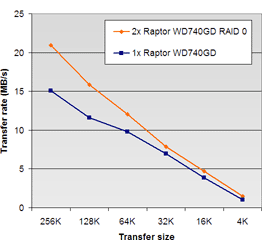
The impact of striping on the transfer rate is visualized in the two graphs below, where we have plotted the transfer rate of a single Western Digital Raptor WD740GD against a RAID 0-array (consisting of two Raptors) at various block sizes and queue-depths. On the left we see the transfer rate when performing one simultaneous I/O, on the right we see the transfer rate with a queue consisting of eight I/O's. These tests were performed using just read commands, fifty percent of which were random.
Left: Transfer rate at 1 waiting I/O | Right: Transfer rate at 8 waiting I/O's
Because of the striping setup's overhead, the single Raptor WD740GD is faster than the RAID-0 machine, with a queue length of one and a transfer size of up to 32K. When the transfer size increases to 64K however, the two striped Raptors take the lead from the single drive. Increasing the number of operations in the I/O-queue to eight means the striped setup leaves the single Raptor in a cloud of dust. At peak performance, the RAID-configuration manages 99.6MB/s in a completely sequential reading pattern, versus 70.1MB/s for the single setup, even though the PCI bus is significantly limiting the RAID-controller's performance.
AT's and SR's benchmarks (1)
Before evaluating our own findings and having a look at the benchmarks conducted by AnandTech and Storage Review, we should determine to what type of applications our tests are related. The desktop environment not just implies spreadsheets, word processing, browsing, mail clients and other, rather 'light' applications; on the desktop of the power user p2p-sharing, image- and video editing and backing up all kinds of digital media are frequent activities, too. AnandTech, Storage Review and Tweakers.net all share the same audience: power users and tweakers who want to maximize power, speed and usability of their rig. Unlike the average secretary, our target audience is continuously multi-tasking, which can include downloading everything that can be found on the internet, while taking pictures at the highest possible settings. In short: they demand the highest performance from their desktop.
The testing methods used by all three sites have a few things in common. Storage Review, AnandTech and Tweakers.net all use the famous IPEAK Storage Performance Toolkit from Intel, that records disk access in Windows applications to a trace that can be played back as a benchmark on other disks or RAID arrays. Using the IPEAK toolkit, SR, AT and Tweakers.net developed their own benchmarks, which explains some of the differences in the results obtained. Sadly, AnandTech and StorageReview hardly provide any information regarding their methods, making it difficult to get an insight in the kind of tests that they performed.
AnandTech
Tests performed by AnandTech consist of two IPEAK traces, the application benchmarks Winstone 2004 and SysMark 2004, and stopwatch-measured loading times of popular games like FarCry and Unreal Tournament. IPEAK traces were created with Business Winstone 2004 and Multimedia Content Creation Winstone 2004. Both of these benchmarks are also used by Tweakers.net, so we do have some experience with disk usage of BSW2004 and MCCW2004. On the other hand: Anandtech's traces are not really identical to those of Tweakers.net, since the latter added some load by running WinAMP and eMule. Since disk usage by these two applications was limited to an average of 200KB/s it didn't have any noticeable influence on the trace properties. The Business Winstone 2004 programs Internet Explorer, Outlook, PowerPoint, Norton Anti-Virus and WinZip generated just a little I/O activity, with an average load of eight percent. A safe conclusion would be that a Business Winstone 2004-benchmark alone is not a good starting point when testing RAID 0 performance. On the contrary: to have some reliable tests, we will need to put heavy loads on the array.
Disk load of the Business Winstone 2004 trace
Disk load with the Multimedia Content Creation Winstone 2004 trace
That is where Multimedia Content Creation Winstone 2004 comes in. With some powerful applications like Premiere, Photoshop, WaveLab and Windows Media Encoder, this is a much heavier and therefore a more suitable benchmark. After creating our traces, we see an average disk load of 19 percent, most of that concentrated around peaks of up to 90 percent. According to AnandTech's tests, two RAID 0 configured Raptor WD740GD disks are 38,1 percent faster in MCCW2004 and 19,8 percent faster in BSW2004. Results recorded in the Tweakers.net Benchmark Database show two striped WD740GD disks offering a benefit of 36,1 percent in BSW2004 and even 50 percent in MCCW2004. To execute these tests, AnandTech used an Intel ICH5 Southbridge while Tweakers.net had a Promise FastTrak S150 TX2plus controlling the RAID array. Despite the fact that we were forced to use a PCI-slot, which does not offer enough bandwidth to let the Raptors show their full capabilities, instead of a PCI-X-slot, our performance scaling was still better than AnandTech's result show.
Apart from Winstone 2004, AnandTech also uses SysMark 2004 and the actual Winstone 2004 application benchmark to compare hard drive performance. With the exception of the SysMark 2004 Communication Office Productivity Performance subtest, all Winstone 2004 and SysMark 2004 benchmarks show a small difference in performance when comparing several hard drives and the Raptors as single disks or in RAID config. This is not a big surprise though, since these system benchmarks rely heavily on which cpu, memory and chipset are used. Because of this, the final results do not reflect differences in responsiveness between various drive configurations. Some power users seem to notice an improvement, though. Data from the Business Winstone 2004 trace has already proven that disk activity with this benchmark is rather low and, although we don't have any details at our disposal, It is reasonable to conclude this applies to most of the SysMark 2004 tests.
Another problem we have to face when using system benchmarks to measure storage performance is that we don't have any clue about how the creators of Winstone and SysMark calculate the results of their benchmarks. A reasonable theory, for example, would be that activities that rely on processing power weigh more heavily in the final score than I/O activities. Although traces created by these benchmarks can be useful to measure disk performance, the system benchmarks themselves are not suitable for this goal. If we do want to make some conclusions based on AnandTech's benchmarks, we could say that the Raptor WD740GD in RAID 0 does not scale badly compared to the (marginal) differences in performance between for example a single Raptor WD740GD and a Western Digital WD1200JB.
System performance - Business Winstone 2004
WD Raptor WD740GD
2x RAID 0
25,725
WD Raptor WD740GD
Single
24,825
WD Raptor WD360GD
Single
24,350
WD Caviar WD1200JB
Single
23,725
System performance - Multimedia Content Creation Winstone 2004
WD Raptor WD740GD
2x RAID 0
33,250
WD Raptor WD740GD
Single
32,400
WD Raptor WD360GD
Single
32,125
WD Caviar WD1200JB
Single
31,450
The third part of AnandTech's benchmark suite, measuring loading times in games, can also be questioned. Just like the previous tests, these tests show a slight improvement in performance with the RAID configurations, with highly diverging performance. Our gaming traces show that most games have very little impact on modern hard drives and generate a rather low load. Even the heavyweight champion Battlefield Vietnam was able to burden a Raptor WD360GD for only 17,1 percent average with a short peak of 70 percent. Other games had even lower averages and didn't rise above 80 percent peak usage. Therefore we conclude that loading game levels is mostly cpu intensive and does not rely on storage devices. This conclusion is again illustrated by the insignificant improvents when loading levels in Far Cry and Unreal Tournament. Also, measurements with Unreal Tournament show some unlikely differences between a Raptor WD740GD and the other disks in the arena. It seems to be 12,9 percent faster than number two, a Seagate Barracuda 7200.7, while the others (one of them is a Raptor 360GD and a rather old IBM Deskstar 75GXP) offer a performance varying not more than 8,4 percent.
Game level loading times - Farcry (seconds)
WD Raptor WD740GD
2x RAID 0
39,7
WD Raptor WD740GD
Single
40,6
WD Raptor WD360GD
Single
41,1
WD Caviar WD1200JB
Single
42,6
Game level loading times - Unreal Tournament 2004 (seconds)
WD Raptor WD740GD
2x RAID 0
29,4
WD Raptor WD740GD
Single
29,4
WD Raptor WD360GD
Single
34,1
WD Caviar WD1200JB
Single
35,8
When we have a look at our own Gaming StorageMark 2004 Index, two Raptors in a RAID 0 array raise performance with 23,5 percent when stripe sizes are set to 128K and even an improvement of 33,3 percent is measured whith stripe sizes of 64K. These results again show that stripe sizes are critical to reach optimal performance, and also show that modern games can, even on a computer with a fast processor, gain benefit from a RAID 0 configuration. Something that is also subjectively noted by users who installed a RAID adapter in their gaming computer.
AT's and SR's benchmarks (2)
Storage Review has acquired a good reputation with its reviews and tests of hard drives. Actually, SR is the only website performing serious investigations considering real world performance of hard drives. The site did some pioneering work on developing methods for testing hard drives and was the first to benchmark hard drives using the IPEAK Storage Performance Toolkit. Other sites like Tweakers.net and AnandTech followed SR's lead. However, one area of interest that Storage Review missed was RAID, adapters and configurations. The article about TCQ and RAID that was published last month does not seem to change that trend, despite its disputed conclusions.
Storage Review's current test suite has reached the age of two since it was introduced in 2002, built on Office DriveMark 2002, High-End DriveMark 2002, Bootup DriveMark 2002, Gaming DriveMark 2002 and Server DriveMark 2002. Server tests are based on some synthetically created access patterns, created by IOMeter (which relevance we already doubted here, links to a Dutch page) and desktop testing is performed by IPEAK SPT. Office DriveMark 2002 is based on a trace during half an hour of office usage by Storage Review's webmaster. High-End DriveMark 2002 is a trace of disk usage during Content Creation Winstone 2001, Bootup DriveMark 2002 speaks for itself and Gaming DriveMark 2002 is a trace of activities performed by games like Black & White, Counterstrike, Diablo 2 and The Sims.
Storage Review, unlike AnandTech, does give some information about its traces in the description of their testing methods. It seems that the Office DriveMark 2002 trace had an average queue depth of 1,34 I/O's and an average of 23KB transfer size. The Content Creation Winstone 2001 trace on average contains 1,4 I/O's with a transfer size of 69,5KB. Compared to statistics of our more modern Winstone 2004 traces, both Business Winstone 2004 and Multimedia Content Creation 2004 seem to have higher loads than Storage Review's corresponding tests. BSW2004, with some extra Winamp and eMule activity, gives us a queue with an average of 3,22 I/O's and MCCW2004 even has 8,82 I/O's in its queue. The transfer sizes seem to be in line with those of Storage Review: 25,7KB in the BSW2004 trace and 62,1KB in MCCW2004's trace.
This higher queue-load in Tweakers.net's traces is positive for RAID 0 configurations, which can easily distribute commands to different disks when facing a large queue. Storage Review's tests on the contrary offer almost no possibility for simultaneous transactions, which puts a limit on performance gains with a RAID 0 array, since all improvements should come from higher transfer rates with sequential access. The fact that traces made with Business Winstone 2004 and Multimedia Content Creation 2004 provide quite different results with Storage Review's older traces, indicate clearly that our colleagues should actualize their benchmarks. BSW2004 and MCCW2004 are both realistic simulations of multi-tasking users in some current software-editions. Disk activities generated by the Winstone 2004 suite are certainly no exception for target group.
The hypothesis that RAID 0 will perform poorly in desktop benchmarks by Storage Review is confirmed in a recent article by Storage Review, on the topic of TCQ and RAID performance of the Raptor 740GD. Using a Promise FastTrak S150 TX4 controller, two Raptors show a pitiful improvement of 10,3 percent in Office Drivemark 2002. The performance gain in High-End DriveMark 2002 reaches a sad 12,9 percent. Only the Windows XP boot benchmarks show a decent improvement of 46,2 percent.
Performance scaling Raptor WD740GD RAID 0 - Windows XP boot (%)
Tweakers.net
Promise S150 TX2plus
45,6
Storage Review
Promise S150 TX4
46,2
Performance scaling in the office and content creation benchmarks performed by Storage Review contrast severely with Tweakers.net's tests, where the Raptor array, as mentioned earlier, showed a 36,1 percent improvement in Business Winstone 2004 and a nice gain of 50 percent in the Multimedia Content Creation Winstone 2004. The fact that Storage Review had the FastTrak S150 TX4 crawling on a 32-bits 33MHz PCI-bus can't be a fair explanation for the disappointing results, since our FastTrak S150 TX2plus was also installed on a legacy PCI-slot. Bandwidth is of greater importance for RAID 0 performance, since the improvements in Storage Review's tests had to be obtained with faster sequential transfer rates. Differences between the Promise FastTrak S150 TX4 and the TX2plus can in no possible way cause such a big difference in results, since both adapters are very similar to each other.
The fact that there is a significant improvement in the Windows XP boot benchmark clearly shows that Storage Review's system could have some obvious advantages with RAID 0 when using correct workloads. Therefore, we suggest that Storage Review's benchmarks are not typical for the demanding use patterns in current office and content creation applications.
Tweakers.net's findings
Our observations clearly show that the testing methods of AnandTech and Storage Review are too limited to jump to conclusions about the use of striping in desktop environments - let alone that they could be used to sign RAID 0's death sentence. Both AnandTech's and Storage Review's results of the IPEAK largely contradict Tweakers.net's benchmarks, where RAID 0 does show significant improvements in the I/O performance.
In the case of Storage Review, this can be explained by their use of traces based on older software, which isn't representative of present-day 'power user' workloads. Using system benchmarks to assess storage performance is at the very least questionable anyway, because they mainly depend on CPU performance. The same thing goes for the loading times of games - not to mention the fact that a test limited to two games will never give a realistic view of performance in general.
Most striking is the fact that neither AnandTech nor Storage Review even bothered to test RAID in situations where the performance of the storage system really matters - for example when a backup application, anti-virus tool or compression program is active in the background while demanding content creation applications are running in the foreground. These are conditions that quickly give rise to noticeable latencies and in which single drive setups don't suffice anymore.
Tweakers.net bases its testing methods on intense system use of a 'power user'. Such users are, after all, our target audience. Besides traces of Business Winstone 2004, Business Winstone 2004 Multi-tasking Test and Multimedia Content Creation Winstone 2004, we created traces of several games using IPEAK Storage Performance Toolkit and we recorded disk access in I/O-intensive actions, such as copying files, defragmenting partitions, running a virus scanner and installing software. As is to be expected from a 'power user', we often employed multitasking, though not in an unrealistic way. All in all we created 27 tests, together resulting in our Desktop StorageMark 2004, Gaming StorageMark 2004 and Workstation StorageMark 2004 indexes. The result is a broadly oriented test suite, which gives a realistic image of performance in various situations.
function collapseAll() " rel="external"> var lists = document.getElementsByTagName('OL'); for (var j = 0; j < lists.length; j++) " rel="external"> lists[j].style.display = "none";
lists = document.getElementsByTagName('ol'); for (var j = 0; j < lists.length; j++) " rel="external"> lists[j].style.display = "none"; var e = document.getElementById("bdb_root"); e.style.display = "block";
In this article, we focus even more on RAID 0's possibilities by not only showing IPEAK benchmarks, but also doing some measurements with a stopwatch. To offer a clear view on the differences concerning I/O performance, on the next page we give you the results of desktop-, gaming- and workstation-indexes. Not only configurations with one or two Raptors of the first and second generation were tested, but also a heavily armed LSI Logic MegaRAID SCSI 320-2X with 512MB cache and four Maxtor Atlas 15K SCSI-disks. This MegaRAID SCSI 320-2X is also available as the Intel SRCU42X and is the fastest SCSI RAID adapter at the moment. His job: proving good RAID 5 performance with up to date RAID implementations. This way, we can immediately finish the dated dogma about bad performance of RAID 5. The MegaRAID SCSI 320-2X will show us another advantage of (high-end) RAID adapters, the onboard cache that, together with the striping, is able to offer a remarkable improvement over cache-less RAID controllers.
StorageMark 2004 results
All benchmarks were performed on our StorageMark 2004-A test bed, which is powered by a MSI K8D Master-F motherboard, an 1.4GHz AMD Opteron 240 processor and 2GB PC2100 ECC Registered DDR SDRAM. The Raptors were driven by a Promise FastTrak S150 TX2plus that, as mentioned earlier, was installed on a 32-bit 33MHz PCI-slot since we couldn't get the adapter to work on the PCI-X bus. As a result, this was a little bottleneck which could limit the adapter from reaching its maximum performance. You will see however that there still was a remarkable increase when using RAID 0. The LSI MegaRAID SCSI 320-2X was installed on a 100MHz PCI-X-slot. This was not the best situation possible too though, since cache bandwidth is limited to 304MB/s instead of 406MB/s when installed on a 133MHz PCI-X slot. Therefore, in the B-edition of our testbed we changed the motherboard to a Tyan Thunder K8S with 133MHz PCI-X.
For means of comparison, in the tables below we have included results of the 3ware Escalade 9500S-8 with two and four disks in RAID 0. The Escalade 9500S-8 has 128MB cache memory and is provided with 64bit 66MHz PCI. The difference with the Promise FastTrak S150 TX2plus illustrates how both factors can have their influence on performance. Tests with the MegaRAID SCSI 320-2X were performed with 128MB and 512MB DDR cache. Since 18GB is too small to get some reliable measurements, we did not include results of our single Maxtor Atlas 15K. Our traces were created on a 36GB disk, which would cause requests higher than 18GB to be mapped to the inside of the disk. We did some tests with this disk in single placing, but it was performing worse than the Raptor WD360GD. A 73GB model of the Atlas 15K would certainly perform better.
We can see some excellent performance scaling of the Raptor WD360GD in the Desktop StorageMark 2004 Index. Striping the two dinosaurs increases I/O performance with almost 47 percent. The Raptor WD740GD disks are even faster when they operate independently, so they scale less since we have the PCI-bus as a bottleneck. On the other hand, an improvement of more than 36 percent is still a better result than what AnandTech and Storage Review were able to obtain. The 3ware Escalade 9500S-8 even adds 22,8 percent to those performance results.. When we add another two disks, the overall performance improvement even raises to 134 percent in comparison with a single Raptor WD740GD. The LSI MegaRAID SCSI 320-2X delivers some nice performance, a little better than the Escalade 9500S-8 with two Raptors in RAID 0. Raising cache size from 128MB to 512MB results in an improvement of 13.5 percents.
In the Gaming StorageMark 2005 Index, differences between RAID configurations are much less obvious. However, the difference between a Promise FastTrak S150 TX2plus with a stripe size of 64K (score: 170.5) and the same adapter with a stripe size of 128K (score: 157.3) is remarkable. The fact is that in the desktop and workstation tests, the FastTrak is a little faster with a stripe size of 128K. Other adapters were tested with their best performing stripe size from the desktop and workstation benchmarks. Therefore scores might have been better when we had optimized the settings for gaming benchmarks. Since there is hardly any data to be written during gaming tests, raising cache size on the MegaRAID SCSI 320-2X doesn't seem to affect the performance a lot.
Improvements in performance show up in every part of the desktop, gaming and workstation suites. The table below shows performance gains for each subtest of the desktop suite. Performance of the 3ware Escalade 9500S-8 was compared to those of the FastTrak S150TX2plus with one disk. The Raptor WD360GD in RAID 0 was compared to a single WD360GD. In one test (File copy B, a scenario where we copy from a network drive to the local hard disk) however, the FastTrak S150 TX2plus with two WD740GD's is slower than a single drive. In all other tests on the other hand, differences vary from eight to ninety percent. The 3ware Escalade 9500S-8 proves to be a lot faster than the FastTrak in most cases.
Best performance scaling is shown in the workstation benchmark. The Raptor WD360GD improves 62 percent and the WD740GD even manages to show 47 percent better performance than the FastTrak S150 TX2plus. Excellent performance also for the 3ware Escalade 9500S-8, which is 79 percent better than a single Raptor when it is provided with two disks and even 260 percent faster with four disks. The MegaRAID SCSI 320-2X performs somewhere between both 3ware configurations.
Performance scaling in Desktop StorageMark 2004
Test
WD360GD 2xR0
WD740GD 2xR0
9500S-8 2xR0
9500S-8 4xR0
Race against the clock (1)
Benchmarks from the IPEAK Storage Performance Toolkit offer a clear view on the effects of striping on I/O performance with desktop workloads. Keep in mind though that we are talking about I/O performance here, which does not necessarily result in better overall performance. When the computer cannot process the I/O data fast enough because other parts, like for instance the CPU, form a bottleneck, the result will be a system that does not work one single bit faster than before. To visualize some examples of the time than can be saved by implementing RAID 0, we tested several configurations by performing some normal Windows-actions and measuring the time necessary to perform those actions with a stopwatch. Every test was performed three times to get more reliable results and before performing each test, Windows was rebooted. The complete installation of the operating system, including all applications and data files was transferred from a Ghost image to the hard drives and the RAID arrays.
The different tests vary from booting up Windows and opening pictures in Photoshop, to copying files and installing a service pack. Some tests were performed with some extra background activity like a backup, virus scan or file copy. Those are some typical situations where there's a big load on the hard drives, while users still want to work with maximum speed.
On the starting grid we see two Raptor WD360GD's, two Raptor WD740GD's, a MegaRAID SCSI 320-2X 512MB with four Atlas 15K's in a RAID 5 configuration and some single drive configs with the Raptors mentioned earlier. The computer was provided with a dual Athlon XP 2400+ on an Asus A7M266-D-motherboard with 1GB PC2100 ECC Registered DDR SDRAM and a GeForce FX 5900. Performance of this system is comparable to an Athlon 64 2800+. All SATA-disks were tested on a FastTrak S150 TX2plus, which was placed on a 66MHz PCI-slot. Attempts to get the 3ware Escalade 9500S-8 in this tests failed because it refused to enable write-back caching on the hard drives. This resulted in a poor score in the Photoshop test. Apart from single and two-drive RAID 0 configurations with Raptor WD740GD disks, we also tested a setup with two independent Raptors. The Windows pagefile, Photoshop scratch disk and temporary directories were stored on the second disk. The setup with independent disks performed an alternative for the filecopy benchmark where files were copied from the first disk to the second, instead of copying to the same disk. Not completely fair, but it does give us an idea about how independent disks perform in such situations.
Everyone who has ever worked with Photoshop before will know its freaky need for memory. It doesn't matter whether you have 512MB, 1GB or 2GB of memory, Photoshop can and will use it all. Apart from that, there are scratch files that weigh over 100MB, if not GB. This results in rather heavy loads on the hard drive. Therefore, our first test consists of opening several pictures in Photoshop CS. We are talking about 25 JPEG's with a resolution of eight megapixel and an average filesize of 4.76MB. Uncompressed, such a file takes 22.9MB of data. Somewhere halfway opening the pictures, we notice the scratchfile to start suffering to finish on a size of almost 1GB.
Loading times of the different drive and RAID configurations don't show any remarkable differences. Opening pictures seems to put more load on the CPU, and not as much on the hard drive. The MegaRAID SCSI 320-2X finishes first, 16 percent better than the last one in the row, the single Raptor WD360GD. Creating a dedicated swap and scratch partition seems to offer a bit of advantage, but results in less improvement than striping two disks.
Opening pictures with Photoshop (seconds)
Atlas 15K
4
RAID 5
MegaRAID SCSI 320-2X
38,4
Raptor WD740GD
2
RAID 0
FastTrak S150 TX2plus
39,4
Raptor WD360GD
2
RAID 0
FastTrak S150 TX2plus
39,6
Raptor WD740GD
2
Dual
FastTrak S150 TX2plus
43,0
Raptor WD740GD
1
Single
FastTrak S150 TX2plus
44,1
Raptor WD360GD
1
Single
FastTrak S150 TX2plus
45,9
Making regular backups is a good idea, certainly when storing valuable data on a RAID 0 array (which is not such a good idea, by the way). Therefore we performed the same test again, but this time using Windows XP's default backup tool to back up 10GB of pictures to a network drive, using an Intel Pro/1000MT gigabit Ethernet controller on the client, and a Broadcom NeXtreme PCI-X gigabit Ethernet controller in the server, linked together through a Micronet switch with eight ports.
The Raptor WD360GD seems to suffer a bit from the simultaneous activities performed by Photoshop and the backup. This problem seems to be solved with the WD740GD though, probably because of the improved caching. The gold medal goes to the MegaRAID SCSI 320-2X again, who doesn't seem to have a problem with the backup, since the necessary time for opening those pictures only rises with 20 percent. The Raptor WD740GD needs 50.6 percent more time in single configuration and 23.6 percent extra time when configured with two drives in RAID 0. Using RAID 0 on the Raptor WD360GD offers us 36.9 percent of performance gain. RAID 0 with the Raptor WD740GD results in 11.6 percent improvement and even 26.7 percent when using a dedicated disk for scratch and swap files. This configuration performs very good in our test.
Opening pictures in Photoshop while performing a network backup (seconds)
Atlas 15K
4
RAID 5
MegaRAID SCSI 320-2X
46,0
Raptor WD740GD
2
Dual
FastTrak S150 TX2plus
48,7
Raptor WD740GD
2
RAID 0
FastTrak S150 TX2plus
58,7
Raptor WD740GD
1
Single
FastTrak S150 TX2plus
66,4
Raptor WD360GD
2
RAID 0
FastTrak S150 TX2plus
70,8
Raptor WD360GD
1
Single
FastTrak S150 TX2plus
112,3
In our next benchmark, we are searching a Thunderbird mailbox for the word 'Pentium'. This mailbox is over 600MB in size and the search seems to put a decent load on the drive, but on second thought, disk load is not heavy enough to get reliable results. There is not much to discuss therefore: this test is almost completely limited by cpu performance. Running a virus scan in the background does raise the search times a little but there is no obvious difference in performance between the different configurations.
Searching through a Thunderbird mailbox (seconds)
Atlas 15K
4
RAID 5
MegaRAID SCSI 320-2X
35,6
Raptor WD360GD
2
RAID 0
FastTrak S150 TX2plus
35,8
Raptor WD740GD
2
RAID 0
FastTrak S150 TX2plus
35,9
Raptor WD740GD
2
Dual
FastTrak S150 TX2plus
36,1
Raptor WD740GD
1
Single
FastTrak S150 TX2plus
36,1
Raptor WD360GD
1
Single
FastTrak S150 TX2plus
36,1
Searching through a Thunderbird mailbox + Kaspersky virus scan (seconds)
Atlas 15K
4
RAID 5
MegaRAID SCSI 320-2X
40,4
Raptor WD360GD
2
RAID 0
FastTrak S150 TX2plus
41,3
Raptor WD740GD
1
Single
FastTrak S150 TX2plus
41,6
Raptor WD740GD
2
RAID 0
FastTrak S150 TX2plus
42,4
Raptor WD740GD
2
Dual
FastTrak S150 TX2plus
42,4
Raptor WD360GD
1
Single
FastTrak S150 TX2plus
42,9
Race against the clock (2)
We continue our stopwatch measurements with a file transfer performancetest. The dataset contains snapshots with a total size of 535MB and an average file size of 4.5MB. In RAID 0 and single drive configurations the files were copied from and to the same partition. In the configuration with the two independent disks, the files of the first disk were cloned to the second disk. This is, of course, a best case scenario for the independent configuration. In daily practice it's not always possible to plan a filetransfer in such a way that both disks can be put to work simultaneously.
In spite of the optimum scenario for the configuration with two independent disks, the RAID 5-configuration crossed the finishline first. The exceptional performance of this controller in this case - the MegaRAID SCSI 320-2X is nearly three times faster than the next RAID configuration in line - can be attributed entirely to its enormous cache. In second place we find the Raptor WD740GD disks, trailed at respectable distances by the Raptor WD740GD and WD360GD stripe configurations. RAID 0 shows its usefulness in file duplication: the Raptors in RAID 0 are approximately 32 percent faster than their solitary operating brothers .
File copy (seconds)
Atlas 15K
4
RAID 5
MegaRAID SCSI 320-2X
10,2
Raptor WD740GD
2
Dual
FastTrak S150 TX2plus
16,8
Raptor WD740GD
2
RAID 0
FastTrak S150 TX2plus
28,2
Raptor WD360GD
2
RAID 0
FastTrak S150 TX2plus
28,7
Raptor WD740GD
1
Single
FastTrak S150 TX2plus
41,3
Raptor WD360GD
1
Single
FastTrak S150 TX2plus
42,1
Launching the Kaspersky virusscanner results in a light increase in transfer times for single drive and RAID 0-configurations. The MegaRAID SCSI 320-2X and the independent Raptors are more hindered by the virusscanner's presence; obviously, the MegaRAID uses its cache less effectively. Nonetheless, in an almost Schumacherian way the MegaRAID manages to win this race as well.
File copy + Kaspersky virusscan (seconds)
Atlas 15K
4
RAID 5
MegaRAID SCSI 320-2X
22,0
Raptor WD740GD
2
Dual
FastTrak S150 TX2plus
26,8
Raptor WD360GD
2
RAID 0
FastTrak S150 TX2plus
32,0
Raptor WD740GD
2
RAID 0
FastTrak S150 TX2plus
32,8
Raptor WD740GD
1
Single
FastTrak S150 TX2plus
43,2
Raptor WD360GD
1
Single
FastTrak S150 TX2plus
43,9
The test continues with measuring how long it takes the configurations to boot Windows and start-up Photoshop CS. Photoshop produced a few unexpected results on a number of configurations, since in some cases startup times were seconds lower than during previous testruns. Scratch file creation was probably the cause of these erroneous differences, and therefore they have not been included in the comparison table. Striping or subdividing hard disks doesn't seem to deliver spectacular performance improvements. Nevertheless, there were still some noticeable differences to be found.
Photoshop CS start-up time (seconds)
Atlas 15K
4
RAID 5
MegaRAID SCSI 320-2X
7,8
Raptor WD740GD
2
RAID 0
FastTrak S150 TX2plus
8,6
Raptor WD740GD
2
Dual
FastTrak S150 TX2plus
9,6
Raptor WD360GD
2
RAID 0
FastTrak S150 TX2plus
9,7
Raptor WD740GD
1
Single
FastTrak S150 TX2plus
9,8
The Windows boot time was measured between the moment the POST-screen disappeared and the LOG IN screen appeared on the monitor. The RAID 0 arrays perform significantly better than the single drive configurations, resulting in 31 to 37 percent lower boot times. Similar to starting up Photoshop, the two independent Raptors are hardly faster than a single disk. Disappointing is the time of the MegaRAID SCSI 320-2X. In the first seven seconds of starting up Windows the MegaRAID showed no disk activity, which resulted in higher boot times. Starting up fast is a lost race for the MegaRAID because initializing the controller and the SCSI-channels takes too much time.
Windows XP boot-up (seconds)
Raptor WD740GD
2
RAID 0
FastTrak S150 TX2plus
8,4
Raptor WD360GD
2
RAID 0
FastTrak S150 TX2plus
9,2
Raptor WD740GD
2
Dual
FastTrak S150 TX2plus
11,7
Raptor WD740GD
1
Single
FastTrak S150 TX2plus
12,2
Atlas 15K
4
RAID 5
MegaRAID SCSI 320-2X
13,1
Raptor WD360GD
1
Single
FastTrak S150 TX2plus
14,6
The results shown earlier are perhaps disappointing for those who follow the teachings of Storage Review and share a rock-solid belief in the uselessness of RAID 0 on the desktop, but we've got good news for them: RAID 0 can be a slower configuration! The two tests mentioned below are examples of this. The first test was installing Windows XP Service Pack 1. The light overhead of striping during the handling of small requests in a situation with minimum I/O queue, is probably the reason why RAID 0 is slower in this case. Although you would not expect it directly, the processor load is considerably high during the installation of SP1 updates. The MegaRAID 320-2X SCSI's higher performance is due to the large write-back cache (which makes faster I/O writes possible), in addition to the lower access times of the Atlas 15K disks.
Windows XP SP1 installation (seconds)
Atlas 15K
4
RAID 5
MegaRAID SCSI 320-2X
253
Raptor WD740GD
2
Dual
FastTrak S150 TX2plus
275
Raptor WD360GD
1
Single
FastTrak S150 TX2plus
286
Raptor WD740GD
1
Single
FastTrak S150 TX2plus
286
Raptor WD740GD
2
RAID 0
FastTrak S150 TX2plus
298
Raptor WD360GD
2
RAID 0
FastTrak S150 TX2plus
309
The second example of weaker RAID 0 performance is found in a test which uses Windows Explorer to search for files that contain the word "Pentium". Here too you'd expect the hard disk perfomance to be of major importance to the results, but find out in the end that it is the processor that plays the biggest role in this part. Results of the Raptor WD740GD's are left out because the benchmark was added after the WD740GD's had been tested.
Windows Explorer search task (seconds)
Raptor WD360GD
1
Single
FastTrak S150 TX2plus
87,6
Atlas 15K
4
RAID 5
MegaRAID SCSI 320-2X
94,6
Raptor WD360GD
2
RAID 0
FastTrak S150 TX2plus
100,4
But the "anti-RAID-club" shouldn't start celebrating their victory, because when we add a background activity to this test like copying a network file, the RAID 0-configurations immediately take revenge on the defenceless Raptor WD360GD. Whereas the search task on the single Raptor WD360GD takes almost twice as long this way, the two RAID configurations experience much less inconvenience from the extra workload. The two Raptors in RAID 0 are 34 percent slower and the MegaRAID SCSI 320-2X requires 28 percent more time to complete its tasks. Our last test proves the usefulness of RAID in situations with heavy I/O. If you want to be able to keep on working undisturbed in those kind of situations, RAID is a blessing.
Windows Explorer search task+ netwerk file copy (seconds)
Raptor WD360GD
2
RAID 0
FastTrak S150 TX2plus
127,2
Atlas 15K
4
RAID 5
MegaRAID SCSI 320-2X
127,7
Raptor WD360GD
1
Single
FastTrak S150 TX2plus
168,6
Subjective improvements
The RAID-configurations not only do well in most stopwatch trials; they also 'feel' faster, reflecting an increase in the overall responsiveness of the system. When coming from a single Raptor WD740GD to two striped Raptor WD740GDs a sense of relief is noticeable. You get used to it quickly, but stepping back to the single Raptor again confirmed that there is a notable difference; the single Raptor felt 'slower'. Sure, it's still a mighty fast drive on its own, but it doesn't come close to a striped setup. For power users with a well-developed instinct for responsiveness, RAID will deliver. For beginners or less-demanding users who spend more time worrying about getting their printer or dial-up connection to work, the difference might not be noticeable. But then again, that's not the target audience, is it?
The results of a recent poll on the Tweakers.net front page confirm that RAID 0 isn't just a hype. Nearly thirty percent of the responders said they were using a RAID-setup, over fifty percent of which reported major improvements in performance. Thirty percent noted a slight improvement in performance, and only fifteen percent said they hadn't noticed a difference. We realise this isn't a scientifically accurate way to assess the subjective performance of RAID-systems, but it is merely another confirmation of the test results on the previous pages.
How our users experience RAID (%)
Big improvement
56,1
Small improvement
29,4
No improvement
14,5
RAID and safety
In this article, we discussed several possibilities of RAID 0 considering performance. RAID 0 however has one big disadvantage, namely the increased risk of data loss. If one disk in the array fails, all data is lost. Therefore, we would not advise RAID 0 to anyone who wants to store valuable or important information. Even when you make regular backups, as soon as Murphy does his job you can expect your recent backups to be corrupted as well. By using mirroring in combination with striping (RAID 10), or by using parity (RAID 5), the risk of losing data is greatly reduced. Mind that, especially when using cheap ATA- or SATA-disks, a problem with a drive is certainly not inconceivable. Furthermore, there is always a risk that your RAID-adapter drops a disk in the array. RAID 5, 10 or other levels which provide in redundancy make sure that those incidents can be survived without data loss.
Using RAID 10 does not require you to get some extra hardware. Actually, almost all SATA RAID-adapters with four ports know how to do this. A RAID 5-adapter with some decent performance is a bit more expensive. To eliminate the overhead of parity calculations, fast I/O processors and efficient write-back cache are mandatory. The current generation of SATA RAID-adapters do not perform as well as their SCSI-counterparts at the time of writing, which causes the performance improvement in SATA RAID 5 configurations to be limited.
In the table below, we gathered some of our testing results with SCSI and SATA RAID-adapters. In the RAID 5 category, the MegaRAID SCSI 320-2X puts down the best performance.
The test results that Tweakers.net produced show that RAID 0 is far from obsolete in a desktop environment. Using RAID 0 is not 'ignorant', as Storage Review stated, and its former reputation deserves to be restored. Striping does not always increase performance (in certain situations it will actually be slower than a non-RAID setup), but in most situations it will yield a significant improvement in performance. It's not just our benchmark results that support this view: the majority of Tweakers.net readers who at one time or another tried striping, feel that the overall responsiveness of their computer improved when employing RAID 0.
AnandTech and Storage Review should be wise to investigate matters more thoroughy before jumping to quick conclusions. You don't judge a Porsche on its capabilities to carry groceries. A car like that serves a different purpose, and it should be judged on that instead - even if it will never fulfill its true purpose in real life. Power users, tweakers and hardware enthusiasts, the target audience AnandTech, Storage Review and Tweakers.net try to please, use their desktop systems in a different way than the pretty blonde next door who only uses it to check her Hotmail account. What we're trying to say is that you shouldn't assess the performance of RAID 0 with benchmarks that are not made to test the performance of the storage subset. AnandTech and Storage Review's negative verdict on RAID 0 in the desktop environment will likely have a profound influence on the opinions of uninformed users for years to come. A sure loss, since their verdict couldn't stand up to trial.
I believe RAID 0 only fulfills its purpose as a storage subset for large quantities of files. Not for applications or games.
If you want to have redundancy in your operating system use RAID 1. If you want to have redundancy in your files and data use RAID 5.
If you want to have performance in games and applications for rendering, photoeditting, etc use multiple single configured disks and seperate the swap file from the other frequently accessed disk (read: not partitions).
I believe that was the point of this review, to show that rather than dismissing RAID 0 outright, it can be used where it makes sense, depending on usage patterns it just might do that.
What does give RAID 0 in particular a bad name is some of the motherboard implementations (no cache, no hardware acceleration, chipset bandwidth limitations and sometimes shoddy firmware), it would be more interesting to see a comparison between these and some more upscale controllers like those from 3ware.
For me it brought a small increase in performance over two single disks, but I dropped it because of reliability problems (not a good idea to combine with the ill fated Deathstars).
For me it brought a small increase in performance over two single disks, but I dropped it because of reliability problems (not a good idea to combine with the ill fated Deathstars).
Is the theoretical loss in reliability really an issue in practice? I mean, in the past few years of very intensive daily work behind my PC with a single HDD I have encountered at most 2 events of data-loss. If this would increase to 4 events per 4 years (100% up) with two HDDs in RAID 0, I don't really see that much of a problem to get rid of it. Sure, every time you lose your data it's one time too many, but really important stuff is backed-up on external storage devices like ZIPs or MEMkeys anyway. Downloaded movies, music and stuff like that can be downloaded again, right?
believe that was the point of this review, to show that rather than dismissing RAID 0 outright, it can be used where it makes sense, depending on usage patterns it just might do that
If that was the point of the review, they made a very poor job of getting it across.
Also it would mean that they haven't gotten the point of the reviews on Anandtech and Storagereview. Their point was not that Raid0 is useless for every scenario. Their point was that Raid0 is useless for the desktop. Even for powerusers. And that is true.
The scenario's Tweakers has used on to show that Raid0 is usefull are not realistic real-life scenario's.
Powerusers opening loads of pictures in photoshop while making a backup at the same time? Yeah right. Power users don't make regular backups. (if at all) It's grasping for straws to create a scenario with high I/O
Sure, I can also create a lot of situations where Raid0 is faster. But none of those are everyday situations for powerusers.
im absolutely not convinced raid-0 is of any use to the desktop user. to the contrary i think the 100% increase in chance of dataloss is a strong indication -not- to use raid-0 at all.
and then there's amdahls law. if you optimize a subsystem you beter take care that the actual use of the subsystem legitimizes that subsystem optimization.
it doesnt make sense to optimize a subsystem that is not the bottleneck for the overall system performance.
look at the numa architecture of the dual opteron workstation. theoretically the improved bandwidth of the numa memorysystem is 100%. but does your typical windows installation use it? hell no! so thats a wasted optimization, clearly violating amdahl law.
the same can be reasoned for raid-0. the 100% extra harddisk benchmark measured with specialized "storage scope" benchmarking utilities -will- show the 100% increase. however this increase wont surface in the overall system benchmark of desktop use. it will evaporate because harddisk througput just isn't the bottleneck in desktop use.
your hard earned bucks can better be invested in additional pc memory. this memory will give the OS more headroom to optimize disk IO by caching and read-ahead strategies.
I breezed through the pro-RAID article that was /.ed a couple of days ago; I'm not one to directly criticize someone else's work, I'd rather let my work stand on its own and have the readers come to their own conclusions so that is all I will mention on that topic. You all aren't here to read about my review of someone else's review of a review, so I won't bother with something like that - instead I've got a better idea
Ever since I posted my RAID article I've been working up ideas to make everyone happy for inclusion in a future definitive desktop RAID guide; the debate died down after the article so I didn't expect to revisit it until later, but with the renewed interest I thought about getting the guide done sometime this week. Reality set in and I don't believe it's physically possible for me to get the type of guide I'm planning done before the week is over, so it will have to wait until September. But rest assured, it will be done. Let me know if there's anything you'd like to see tested in particular, but I'm not planning on leaving any stone unturned for that guide - those of you who know me should know what to expect
goede ontwikkeling dat dit soort artikels ook engels worden vertaalt, maakt tweakers toch een stuk 'professioneler'.. zolang de originelen maar in het nederlands worden geschreven
is dit eenmalig of gaat die meer met zulke reviews gebeuren?
(translated) is this the first time a review gets translated, and will it happen again in the future?
It certainly isn't 'unique', it happened more than once in the past. Although the Dutch article is prior, we can decide to translate an article if English people might be highly interested in it. In this case we are analysing and criticizing the test results and conclusions of two sites writing in English, so it could be considered as a logical step to translate it.
I think he did mean the past simple of react (which is reacted as far as I know). Though he could better say "It would be nice if visitors will react in English on this article"
Can anybody please explain to me why companies like Apple, Compaq/HP and IBM (all reasonably 'capable' companies, when it comes to technological innovation and application) don't deliver RAID-0 on their high-end workstations?
Is that because their high-end workstations are not used by the so-called 'powerusers', and for that reason don't require RAID-0? (presuming you buy a high-end system for performance reasons, and not for 'extra' stability)
Or is it because these companies did some research and found that running RAID-0 on a workstation is 'ignorant'.
Or does t.net has knowledge that IBM/Apple/HP does not?
Can anyone please answer this question, without obfuscating it by changing the subject?
I will, for convenience, rephrase the question: Why don't companies like IBM, HP and Apple use RAID-0 (as a standard option) in their high-end workstations?
I think it might have something to do with the bad name raid-0 has. Companies, whether they need performance or not, are likely to favour stability over performance at all times. For that reason the pre-build systems will stand a much better chance of being the product of choice for companies, if they don’t consist of doubtable hardware.
My guess is that if companies like Compaq and IBM sold comparable systems that only differed in having a raid-0 setup, the non-raid systems would sell better.
It might also be true that computers often poses more power than is strictly needed by the end-user. So the extra costs of a good raid-controller won’t weight up to the fact that the performance gain is not that big.
If that was the reason those companies would offer Raid0+1 systems.
Also a professional user that would really benefit from Raid0 wouldn't mind copying his work package for that day from a third disk to the array and copying it back to that third disk at the end of the day. (or to a server)
Companies like HP, IBM etc might even create some tools for them to make it easier.
If that was the reason those companies would offer Raid0+1 systems.
Furthermore, they could easily put something about stability issues in a RAID-0 User Disclaimer, or something.
Wouldn't be the first time a big multinational would protect themselves against liability that way ;p
No, I really think the fact that RAID-0 isn't seriously 'pushed' as performance technology for high-end workstations, is simply because the big companies know it doesn't really increase performance like the benchmarks would suggest.
(Of course, if you specifically *ask* for RAID-0, they'll be happy to deliver it. A sale is after all a sale ;p)
That's because the system's they selling are systems for the "beginners" or for busnisse. The beginner doesn't now and don't ned a RAID-0. If you buy a PC for a compagny then the risk is to high for RAID-0. I should use RAID-5 or something for powerstations.
If I buy a high-end HP graphics workstation, I assure you, I am NOT a 'beginner'.
Furthermore, graphics workstations use so called 'scratch disks', which are comparable to '/tmp' directories. Mostly the data on these disks is 'volatile' (it won't reside on the disks for longer then a couple of hours, maybe days).
Running RAID-0 on these disks can, in theory, help a lot in performance. Stability is not a real issue, because of the 'temporary' nature of the data contained on these scratch disks.
Still, companies like Apple (number 1 deliverer of graphics workstations) don't even offer RAID-0 on their systems. If you want RAID-0 on, say, your brand new dual G5, you need to buy a non-apple certified, generic, PCI RAID-0 Adapter. Apple just doesn't offer it.
If RAID-0 was such a blessing for the REAL poweruser, then why don't companies that are famous for their poweruser-base (like Apple with their graphics workstations) 'push' that technology (like they do with dual-cpu systems, etc.), in order to sell more systems?
What do we consider a typical 'desktop' PC? I think that's a key question if you want to definitively answer a question like 'is RAID 0 blessing or hype on the desktop?'.
I mean: i find it fairly obvious that a graphics workstation with a lot of RAM, running software that uses a lot of so-called 'scratch disks', can benefit from the extra performance that RAID 0 has to offer. And last time I checked, a graphics workstation was classified under the 'desktop PC' category. So I think I'll have to agree with t.net in this case.
For that same reason, I can understand that a developer workstation that is used to develop software and has to compile millions of lines of code each day, can noticably benefit from the same performance-increase. And a developer workstation is *also* a desktop PC.
But somehow, i find it hard to conceive a situation in which a standard 'office', 'home', or 'gaming' desktop PC (which cover about 95% of the desktop PC market) can noticably benefit from RAID 0. If any of these desktop PC's have performance issues, they are mostly caused by things like the processing power of the CPU, the performance of the GPU or the ammount of available RAM. Equipping these systems with RAID 0 will most likely not do anything positive performance-wise.
Furthermore, I think the 'Porsche'-metaphore that was used by t.net does not completely cover the point. As far as I can see, the point AnandTech and SR made was in the order of: 'It is of little to no use to run RAID 0 in a desktop environment. Spending your money on RAID-0 is ignorant. You can better spend it on a faster (15,000rpm) single disk, more RAM, a faster CPU or just about anything but RAID 0'. Which is kinda analog to saying 'It is of little to no use to use a Porsche for carrying your groceries. If you want to move around groceries, you can better invest in a bigger car (so you can move more groceries around in the same time), or even a truck'.
On which T.net responds: "You shouldn't judge a Porsche on it's ability to carry groceries. A car like that serves a different purpose and should be judged on that." (which is, in the case of a Porsche, a very true statement ;p).
Isn't this the same as saying: "You shouldn't judge RAID 0 on it's ability to perform in a desktop environment. A technology like that serves a different purpose and should be judged on that."?
And isn't that, more or less, the same as saying: "It is of little to no use to run RAID 0 in a desktop environment, since it was designed to perform under heavy loads you rarely find on desktop PC's"?
Anyways, what I would like to know is: for what desktop-enviroment *IS* RAID 0 useful, and when is it more wise to spend your (extra) money on a better CPU, more RAM or a faster (more rpm's) HD? Because this is something *both* reviews fail to inform the reader about, and I think in the end this is one of the few things the readers actually *really* want to know.
Spending your money on RAID-0 is ignorant. You can better spend it on a faster (15,000rpm) single disk, more RAM, a faster CPU or just about anything but RAID 0'.
I think you are missing an important point here: what are the costs of RAID? It's almost free since most motherboards have already RAID functionality and if you want a decent storage capcity buying two disks is cheaper than one large disk. The only real downside of RAID 0 is a higher risk of data loss.
But somehow, i find it hard to conceive a situation in which a standard 'office', 'home', or 'gaming' desktop PC (which cover about 95% of the desktop PC market) can noticably benefit from RAID 0.
I can image a lot of situations where RAID would improve the performance of a 'standard' desktop pc. Think about: starting up windows, copying files, loading games.
I can image a lot of situations where RAID would improve the performance of a 'standard' desktop pc. Think about: starting up windows, copying files, loading games.
I completely agree with this, but:
you didn't include benchmarks of the above with:
1) faster disks
2) More RAM
3) a better CPU
So, in short: RAID-0 *can* (and will) have *some* influence, but to what extent (compared with other solutions)?
The 'abstract' benchmarks that were used in the reviews don't answer any of such questions. They only say as much as: Under the load of our (chosen) set of benchmarks, RAID-0 performs better then a single disk.
But it totally doesn't tell the reader how to translate these benchmarks to actual desktop-PC performance (like the things you mentioned: booting windows, etc.), or how to compare a RAID-0 upgrade to, for instance, extra RAM or a better CPU.
Perhaps you should read the article? All of those things are benchmarked!
b) you didn't include benchmarks of the above with:...
That's outside the scope of this article to include all those things. If you're interessend in that kind of information it shouldn't be hard to find and secondly the article does contain tests with differend hard disks.
The 'abstract' benchmarks that were used in the reviews don't answer any of such questions.
Abstract? They are all based on popular programs and it can't get any more real world than the stop watch tests (and yes, this includes booting windows!).
hehe....my bad; Just after I posted, I noticed that your test in fact did include the above things.
Anyways, my point is that i still don't know whether i can better invest my money in RAID-0 (which effectively means i need to at least buy a second disk), or in extra RAM or a faster CPU.
There is no doubt in my mind that RAID-0 will speed up the boottime of windows, and the load-time of games. But so will extra RAM or a faster CPU.
Now, what can i better spend my 100 euros on: a second HD for RAID-0, a faster (single) HD, a slightly better CPU, a slightly better GPU, or extra RAM? After all this time, this is still the key question, and there is still no answer.
I mean: it is easy to say that RAID-0 is great, and that it can improve your performance, say, 20%. But if you can improve your performance by 30%, simply by spending the same ammount of money on a better CPU, or on more RAM, all of a sudden RAID-0 doesn't seem so great anymore.
Now I'm not saying that RAID-0 isn't any good. I'm just saying that since Anandtech and SR proved one thing, and then you now claim another, things haven't really got more transparent. I mean: anandtech aren't a bunch of fools, and neither are you. But who is right? Both sites claim they have the numbers to support their claims. Strangely enough, they can't *BOTH* be right.
Now tell me, how exactly does this techno-tugg-o-war help us, the readers?
Anyways, my point is that i still don't know whether i can better invest my money in RAID-0 (which effectively means i need to at least buy a second disk), or in extra RAM or a faster CPU.
That's indeed something that isn't aswered in this article. However it is clear that RAID gives a performance advantage and that is what this article is all about.
Now, what can i better spend my 100 euros on: a second HD for RAID-0, a faster (single) HD, a slightly better CPU, a slightly better GPU, or extra RAM? After all this time, this is still the key question, and there is still no answer.
That's simply a question that can't be answered. It depends what kind of tasks you want to perform with your computer and what you want to be fast (and also how you calculate costs). This article gives an idea of the performance advantages of RAID, nothing more and nothing less.
Now tell me, how exactly does this techno-tugg-o-war help us, the readers?
It will lead to the truth about the performance of RAID with desktop usage. Nothing more, nothing less.
i read a lot of post above where people are trying to devine "a desktop".
IMHO if we speak about a desktop on a site where the knowledge and interest in computers is far above avarege and in a lot of cases also professional, then i think most people will agree that if we say desktop here we also mean computers used for video/audio editing and software/graphics development systems and these are systems that can surely benefit from RAID 0
offtopic: i dont now if its the englisch language but the general level of discussion in this thread is much higher than in most other threads
thums up for us
Since they don't have a life they don't have anything interesting to put on video anyway. A video about cold pizza's and warm coca cola is kinda boring
Software graphics development? Yeah right. How about they might do that at the office and just play games at home. A more realistic scenario.
Many tweakers think of themselves as power users. But if they would really monitor their systems for a month, they would find that their own machines are not as heavily taxed as they think.
If the editors monitor their own system, then I am convinced that they will discover that 99.99% of the time that they do heavy editing in photoshop, that they are not running a backup in the background.
They best way to define desktop usage, would be to let all tweakers here run some tool, that for one month would monitor their desktop usage. The results would be an eye-opener to many people.
mtjdevries hits the nail on it's head (slaat de spijker op z'n kop ;p) in the above posting. I would have modded him up if I still had mod-privileges in this thread, but now I can do nothing but to fully agree with him.
Most self-proclaimed 'powerusers' are only 'powerusers' because the multiple 24/7 systems they have at home, with all the dozens of fans and watercooling pumps, eat up a lot of 'power'.
However, this kind of 'power' usage has nothing to do with cpu-power or computing power, which are associated with 'heavy computing tasks'.
I really think that everyone that is NOT a company, graphics designer, or a very (and i mean: VERY)active member of some software-development community is also NOT a real poweruser. Not even most of us tweakers (including myself, for that matter).
I still think, that if u have an P4 2.4GHZ.
With raid-0 and an P4 2.8GHZ.
The 2.4GHZ boots games up faster, and give u performance.
I notice it in games and Photoshop.
I do much things at one time, such as watching an movie,
scanning for virusses.
Running an server.
Thats wy i get much benefit from raid-0.
I have an friend of mine, wich has an 36GB raptor.
Wich is sort of effective as an raid-0.
He is always in the game first, doesnt have to wait.
Only at himself.
But, what i dont like @ raid-0, is that it isnt safe.
Thats wy im going to buy me an 74GB raptor.
Wich is expensiver though, but i think its worth it.
Watching a movie isn't such a demanding task for a harddisk.
Running virusscans? Most pople just use some virus shield. Just scanning files when they are being written. Far more efficient, and doesn't put a heavy load on the harddisk.
What kind of server do you run? Webservers usually don't tax a harddisk, and fileservers are usually limited by network bandwith.
Are you still so sure, that your multitasking puts a lot of load on the harddisk that will benefit highly from Raid0?
"It is a common error to believe that speeding up the transfer rate of data, as the single-user form of striping does, should help any system. Single-user type striping has only an insignificant performance impact on typical multi-user business systems."

 "Stop the RAID 0 insanity!" "There is no place, and no need for a RAID-0 array on a desktop computer." With these words Storage Review and AnandTech banished RAID 0, or striping, from their desktops. For several years, RAID 0 had been considered the Holy Grail for power users wanting to maximize performance from their hard drives. But according to these two websites the general opinion of pc-enthusiasts was misguided. In their eyes, RAID 0 was useless, a hype, and didn't improve performance on desktop machines at all. The world needed enlightment. No more striping or bragging about transfer rates.
 RAID 0 in theory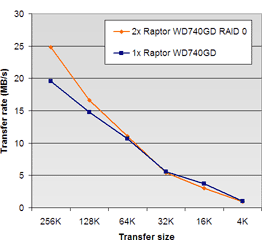


 36,1
36,1

 19,8
19,8


 294,1
294,1

 238,4
238,4:strip_icc():strip_exif()/u/93581/SL1200.jpg?f=community)

:strip_exif()/u/59344/kroko.gif?f=community)
:strip_icc():strip_exif()/u/6511/icoon%2520t.net.jpg?f=community)
 .
.
/u/93683/hadoop_med.png?f=community)
:strip_exif()/u/116064/calvinfall.gif?f=community)
/u/32434/crop67ffa6b56c4fb_cropped.png?f=community)
:strip_icc():strip_exif()/u/89682/henk.jpg?f=community)
:strip_icc():strip_exif()/u/1740/shark.jpg?f=community)
:strip_icc():strip_exif()/u/79618/dead_southpark_small.jpg?f=community)

:strip_exif()/u/2172/crop57acf4ac04e70.gif?f=community)

:strip_exif()/u/30814/newgot.gif?f=community)
'%20onclick='toggleBullet(this)'%20title='Open%20vertakking'><img%20src='https://tweakimg.net/g/map/t1.gif'%20width=11%20height=15%20border=0><img%20src='https://tweakimg.net/g/map/t4.gif'%20width=10%20height=15%20border=0><img%20src='https://tweakimg.net/g/map/t2.gif'%20width=9%20height=15%20border=0></a>%20<a%20href=)
</a></li><li><img%20src='https://tweakimg.net/g/map/t1.gif'%20width=11%20height=15%20border=0><img%20src='https://tweakimg.net/g/map/t4.gif'%20width=10%20height=15%20border=0><img%20src='https://tweakimg.net/g/map/map_bench.gif'%20width=16%20height=14%20border=0>%20<a%20href=)
</a></li><li><img%20src='https://tweakimg.net/g/map/t1.gif'%20width=11%20height=15%20border=0><img%20src='https://tweakimg.net/g/map/t4.gif'%20width=10%20height=15%20border=0><img%20src='https://tweakimg.net/g/map/map_bench.gif'%20width=16%20height=14%20border=0>%20<a%20href=)
</a></li><li><img%20src='https://tweakimg.net/g/map/t1.gif'%20width=11%20height=15%20border=0><img%20src='https://tweakimg.net/g/map/t4.gif'%20width=10%20height=15%20border=0><img%20src='https://tweakimg.net/g/map/map_bench.gif'%20width=16%20height=14%20border=0>%20<a%20href=)
</a></li><li><img%20src='https://tweakimg.net/g/map/t1.gif'%20width=11%20height=15%20border=0><img%20src='https://tweakimg.net/g/map/t4.gif'%20width=10%20height=15%20border=0><img%20src='https://tweakimg.net/g/map/map_bench.gif'%20width=16%20height=14%20border=0>%20<a%20href=)
</a></li><li><img%20src='https://tweakimg.net/g/map/t1.gif'%20width=11%20height=15%20border=0><img%20src='https://tweakimg.net/g/map/t4.gif'%20width=10%20height=15%20border=0><img%20src='https://tweakimg.net/g/map/map_bench.gif'%20width=16%20height=14%20border=0>%20<a%20href=)
</a></li><li><img%20src='https://tweakimg.net/g/map/t1.gif'%20width=11%20height=15%20border=0><img%20src='https://tweakimg.net/g/map/t4.gif'%20width=10%20height=15%20border=0><img%20src='https://tweakimg.net/g/map/map_bench.gif'%20width=16%20height=14%20border=0>%20<a%20href=)
</a></li><li><img%20src='https://tweakimg.net/g/map/t1.gif'%20width=11%20height=15%20border=0><img%20src='https://tweakimg.net/g/map/t4.gif'%20width=10%20height=15%20border=0><img%20src='https://tweakimg.net/g/map/map_bench.gif'%20width=16%20height=14%20border=0>%20<a%20href=)
</a></li><li><img%20src='https://tweakimg.net/g/map/t1.gif'%20width=11%20height=15%20border=0><img%20src='https://tweakimg.net/g/map/t4.gif'%20width=10%20height=15%20border=0><img%20src='https://tweakimg.net/g/map/map_bench.gif'%20width=16%20height=14%20border=0>%20<a%20href=)
</a></li><li><img%20src='https://tweakimg.net/g/map/t1.gif'%20width=11%20height=15%20border=0><img%20src='https://tweakimg.net/g/map/t4.gif'%20width=10%20height=15%20border=0><img%20src='https://tweakimg.net/g/map/map_bench.gif'%20width=16%20height=14%20border=0>%20<a%20href=)
</a></li><li><img%20src='https://tweakimg.net/g/map/t1.gif'%20width=11%20height=15%20border=0><img%20src='https://tweakimg.net/g/map/t4.gif'%20width=10%20height=15%20border=0><img%20src='https://tweakimg.net/g/map/map_bench.gif'%20width=16%20height=14%20border=0>%20<a%20href=)
</a></li><li><img%20src='https://tweakimg.net/g/map/t1.gif'%20width=11%20height=15%20border=0><img%20src='https://tweakimg.net/g/map/t4.gif'%20width=10%20height=15%20border=0><img%20src='https://tweakimg.net/g/map/map_bench.gif'%20width=16%20height=14%20border=0>%20<a%20href=)
</a></li><li><img%20src='https://tweakimg.net/g/map/t1.gif'%20width=11%20height=15%20border=0><img%20src='https://tweakimg.net/g/map/t4.gif'%20width=10%20height=15%20border=0><img%20src='https://tweakimg.net/g/map/map_bench.gif'%20width=16%20height=14%20border=0>%20<a%20href=)

</a></li><li><img%20src='https://tweakimg.net/g/map/t1.gif'%20width=11%20height=15%20border=0><img%20src='https://tweakimg.net/g/map/t4.gif'%20width=10%20height=15%20border=0><img%20src='https://tweakimg.net/g/map/map_bench.gif'%20width=16%20height=14%20border=0>%20<a%20href=)
</a></li><li><img%20src='https://tweakimg.net/g/map/t1.gif'%20width=11%20height=15%20border=0><img%20src='https://tweakimg.net/g/map/t4.gif'%20width=10%20height=15%20border=0><img%20src='https://tweakimg.net/g/map/map_bench.gif'%20width=16%20height=14%20border=0>%20<a%20href=)
</a></li><li><img%20src='https://tweakimg.net/g/map/t1.gif'%20width=11%20height=15%20border=0><img%20src='https://tweakimg.net/g/map/t4.gif'%20width=10%20height=15%20border=0><img%20src='https://tweakimg.net/g/map/map_bench.gif'%20width=16%20height=14%20border=0>%20<a%20href=)
</a></li><li><img%20src='https://tweakimg.net/g/map/t1.gif'%20width=11%20height=15%20border=0><img%20src='https://tweakimg.net/g/map/t4.gif'%20width=10%20height=15%20border=0><img%20src='https://tweakimg.net/g/map/map_bench.gif'%20width=16%20height=14%20border=0>%20<a%20href=)
</a></li><li><img%20src='https://tweakimg.net/g/map/t1.gif'%20width=11%20height=15%20border=0><img%20src='https://tweakimg.net/g/map/t4.gif'%20width=10%20height=15%20border=0><img%20src='https://tweakimg.net/g/map/map_bench.gif'%20width=16%20height=14%20border=0>%20<a%20href=)
</a></li><li><img%20src='https://tweakimg.net/g/map/t1.gif'%20width=11%20height=15%20border=0><img%20src='https://tweakimg.net/g/map/t4.gif'%20width=10%20height=15%20border=0><img%20src='https://tweakimg.net/g/map/map_bench.gif'%20width=16%20height=14%20border=0>%20<a%20href=)
</a></li><li><img%20src='https://tweakimg.net/g/map/t1.gif'%20width=11%20height=15%20border=0><img%20src='https://tweakimg.net/g/map/t4.gif'%20width=10%20height=15%20border=0><img%20src='https://tweakimg.net/g/map/map_bench.gif'%20width=16%20height=14%20border=0>%20<a%20href=)
</a></li><li><img%20src='https://tweakimg.net/g/map/t1.gif'%20width=11%20height=15%20border=0><img%20src='https://tweakimg.net/g/map/t4.gif'%20width=10%20height=15%20border=0><img%20src='https://tweakimg.net/g/map/map_bench.gif'%20width=16%20height=14%20border=0>%20<a%20href=)
</a></li><li><img%20src='https://tweakimg.net/g/map/t1.gif'%20width=11%20height=15%20border=0><img%20src='https://tweakimg.net/g/map/t4.gif'%20width=10%20height=15%20border=0><img%20src='https://tweakimg.net/g/map/map_bench.gif'%20width=16%20height=14%20border=0>%20<a%20href=)
</a></li><li><img%20src='https://tweakimg.net/g/map/t1.gif'%20width=11%20height=15%20border=0><img%20src='https://tweakimg.net/g/map/t4.gif'%20width=10%20height=15%20border=0><img%20src='https://tweakimg.net/g/map/map_bench.gif'%20width=16%20height=14%20border=0>%20<a%20href=)
</a></li><li><img%20src='https://tweakimg.net/g/map/t1.gif'%20width=11%20height=15%20border=0><img%20src='https://tweakimg.net/g/map/t4.gif'%20width=10%20height=15%20border=0><img%20src='https://tweakimg.net/g/map/map_bench.gif'%20width=16%20height=14%20border=0>%20<a%20href=)
</a></li><li><img%20src='https://tweakimg.net/g/map/t1.gif'%20width=11%20height=15%20border=0><img%20src='https://tweakimg.net/g/map/t4.gif'%20width=10%20height=15%20border=0><img%20src='https://tweakimg.net/g/map/map_bench.gif'%20width=16%20height=14%20border=0>%20<a%20href=)
</a></li><li><img%20src='https://tweakimg.net/g/map/t1.gif'%20width=11%20height=15%20border=0><img%20src='https://tweakimg.net/g/map/t4.gif'%20width=10%20height=15%20border=0><img%20src='https://tweakimg.net/g/map/map_bench.gif'%20width=16%20height=14%20border=0>%20<a%20href=)
</a></li><li><img%20src='https://tweakimg.net/g/map/t1.gif'%20width=11%20height=15%20border=0><img%20src='https://tweakimg.net/g/map/t4.gif'%20width=10%20height=15%20border=0><img%20src='https://tweakimg.net/g/map/map_bench.gif'%20width=16%20height=14%20border=0>%20<a%20href=)
</a></li><li><img%20src='https://tweakimg.net/g/map/t1.gif'%20width=11%20height=15%20border=0><img%20src='https://tweakimg.net/g/map/t4.gif'%20width=10%20height=15%20border=0><img%20src='https://tweakimg.net/g/map/map_bench.gif'%20width=16%20height=14%20border=0>%20<a%20href=)
</a></li><li><img%20src='https://tweakimg.net/g/map/t1.gif'%20width=11%20height=15%20border=0><img%20src='https://tweakimg.net/g/map/t4.gif'%20width=10%20height=15%20border=0><img%20src='https://tweakimg.net/g/map/map_bench.gif'%20width=16%20height=14%20border=0>%20<a%20href=)
</a></li><li><img%20src='https://tweakimg.net/g/map/t1.gif'%20width=11%20height=15%20border=0><img%20src='https://tweakimg.net/g/map/t4.gif'%20width=10%20height=15%20border=0><img%20src='https://tweakimg.net/g/map/map_bench.gif'%20width=16%20height=14%20border=0>%20<a%20href=)
</a></li><li><img%20src='https://tweakimg.net/g/map/t1.gif'%20width=11%20height=15%20border=0><img%20src='https://tweakimg.net/g/map/t4.gif'%20width=10%20height=15%20border=0><img%20src='https://tweakimg.net/g/map/map_bench.gif'%20width=16%20height=14%20border=0>%20<a%20href=)