 Synology heeft de final release van versie 3.0 van Disk Station Manager uitgebracht. DSM is de beheersoftware die op diverse nas-producten van het bedrijf draait. De Disk, Cube en Rack Stations bieden meer dan alleen extra opslagruimte. Zo kunnen ook backups van alle clients op het netwerk worden gemaakt en kunnen bestanden via http, ftp, bittorrent, usenet en emule worden gedownload, zodat bijvoorbeeld de energiegulzige pc 's nachts uit kan, terwijl de download gewoon binnenkomt. Verder kunnen via de ingebouwde iTunes-server audio- en videobestanden over het netwerk worden gestreamd, kan met behulp van php en MySQL een dynamische website worden gehost en kan het als printserver fungeren.
Versie 3.0 brengt een groot aantal veranderingen met zich mee. Zo is de gebruikersinterface nu multitasking en draaien alle taken en applicaties in een eigen venster binnen hetzelfde webbrowserscherm. Verder is het eenvoudiger om foto's en muziek naar een iPhone of Android-apparaat te streamen, is er ondersteuning voor het ext4-filesystem, waardoor het mogelijk is om volumes tot 20TB aan te maken, en is DSM 3.0 volledig ipv6-compatibel. De belangrijkste verbeteringen worden hieronder nog eens op een rijtje gezet.
Personalized Web Desktop:Multitasking:
- The new DiskStation Manager Desktop is redesigned to provide an easy-to-use and intuitive user interface. The personal Desktop keeps users' applications and functions easily accessible. Besides, it's customizable so that users can change the wallpaper and background color on their own preference.
- Login style is introduced to provide users the alternatives with different login screens and the convenience of adding users' own recognition.
- Main menu is comprised of control panel and all applications, from which users can freely drag the icons to Desktop, or remove it at a later time. The application icons in main menu are available to users at all times.
- Control panel consolidates all system settings where users can easily modify both software and hardware settings. Home button on the navigation bar provides instant access back to the homepage of control panel.
- Help browser is added to provide direct access to a comprehensive library of all functions’ introduction and instructions. Home button on the navigation bar provides instant access back to the homepage of Help.
- Search field on both task bar and navigation bar on Control Panel helps users to look through applications or Help at the same time.
- Search field is added to task bar on User, Group, and Domain Privileges to assist admin locating the user accounts and group with ease and efficiency.
- Uploading queue on task bar provides quick information of the latest uploading tasks.
- File task monitor allows users to check the progress of all uploading and background tasks.
- System Information and Resource Monitor help users to track the health status of their DiskStations.
- Storage Manager is added to help users easily organize their hard drives and volumes, as well as iSCSI LUN and target.
- Backup and Restore is added to provide centralized management for all your ongoing backup tasks.
- Package Management allows users to quickly enable or disable any service provided by quick install applications packed and tested by Synology.
- Notification window on task bar alerts users when a background task is completed.
- Show Desktop button allow users to minimize all application windows to the task bar, and provides instant access to restore all running applications.
File Browser:
- Users can run multiple applications simultaneously on Desktop and switch between them instantly. Multitasking support saves users from the constant wait of refreshing the whole webpage. All running applications are placed on the task bar.
iSCSI Enhancements:
- File Browser provides easy file navigation on Desktop.
- Drag-and-drop between two different file browsers to copy or move files is now supported and provides easy file management.
- File uploading in the background is supported therefore allows users to switch to another application without interrupting.
- File browser now replaces File Station of the default management UI port. File Station on the customized port remains the same.
Surveillance Station 5:
- LUN mapping support allows multiple LUNs to be mapped to each iSCSI Target.
Audio Station Enhancements:
- 254 more IP camera models from Sanyo, Toshiba, Cisco, Axis, Panasonic, AirLive, Messoa, TP-Link, Compro, Etrovision, and other brands are now supported. View the complete list here.
- ONVIF and PSIA support provides the compatibility between Surveillance Station 5 and ONVIF and PSIA compliant IP cameras.
- The whole user interface is revamped to provide easy navigation and easy-to-use user experience. Larger viewable area is available in Live View and Timeline.
- 25 channels & 36 channels layout are now added in Live View to offer users who utilize the centralized management on Surveillance Station with more options.
- A custom login port is added to provide users with independent access to Surveillance Station without logging into DSM.
- Non-sync mode in Timeline event player allows users to view events from up to 4 IP cameras simultaneously in a more efficient way.
- Time slicing is now added to Event Player to split the playing event into four equal-length clips to help users quickly glance through the whole event.
- Guard wizard is added to guide users through the process of setting up the patrol and Guard tasks with the IP cameras.
- Event filter is enhanced with new layout to help users locate the events within a timely fashion.
- Log filter is now added to help users quickly spot the log event they are looking for.
File Station Enhancements:
- Music playback for audio files in AAC, APE, AIFF, FLAC, WMA, and OGG formats is now available in streaming mode with WAV transcoders.
Photo Station Enhancement:
- File operations including move, copy, and delete in the background is supported to allow users to continue their work without waiting.
- Upload files with size over 4GB is now supported with Java Runtime Environment (JRE) 5 or onward.
iPhone App (Free download on Apple®App Store):
- Google map function is enhanced, allowing browsing multiple locations where all the photos are taken within the same album if the geo-information is available.
Android Phone Applications (Free download on Google® Android Market):
- DS photo is enhanced and renamed to DS photo+. It allows users to easily browse through photos and videos on Photo Station with the thumbnail slider on the go, including interactive with friends through the photo or video comments in real time. Users can easily find out the location where the photo is taken with the built-in Google map, and they can download and store the pictures onto their iPhone/iPod touch and enjoy the flashbacks anytime anywhere. In addition, users can upload photos and videos from their iPhone/iPod touch straight to Photo Station with DS photo+.
- DS audio is enhanced with the Remote control feature which provides intuitive interface to browse through Audio Station music tank, it allows users to remote control Audio Station music playing on the attached speakers conveniently. Users can now browse music by folders and genres, then able to play music in the background in iOS 4.
- DS cam now supports multitasking in Apple iOS 4 and H.264 in event playback.
WebDAV:
- DS cam allows users who own an Android phone to live view IP cameras managed on Surveillance Station, take snapshots, and view recorded events stored on their Surveillance Station whenever network connection is available.
- DS photo+ allows users who own an Android phone to easily browse through photos and videos on Photo Station with the thumbnail slider on the go, including interactive with friends through the photo or video comments in real time. Users can easily find out the location where the photo is taken with the built-in Google map, and they can download and store the pictures onto their Android phones and enjoy the flashbacks anytime anywhere. In addition, users can upload photos and videos from their Android phone straight to Photo Station with DS photo+.
- DS audio allows users who own an Android phone to stream their own music stored on DiskStation on the go. Besides, the Remote control feature provides intuitive interface to browse through Audio Station music tank, it allows users to remote control Audio Station music playing on the attached speakers conveniently.
PHP Enhancements:
- Web-based Distribution Authoring and Versioning is added to allow users to manage and edit files on DiskStation remotely with the support of content metadata and overwrite protection. It helps a disperse group of users around the world work on the same project as a team, which will greatly increase the effectiveness of group collaboration.
Power Schedule Enhancement:
- PHP management is now enhanced to allow users easily enable or disable PHP module individually.
- PHP modules added: eaccelerator, mcrypt, LDAP, and intl.
EZ-Internet Router Support:
- Multiple startup and shutdown schedule is now available with the new flexible power schedule design.
Enhanced NFS Performance:
- More than 60 router models from Netgear, Buffalo, TP-Link, DrayTek, and other brands are now supported. View the complete list here.
PHP Upgrade:
- The NFS upload performance is improved by a maximum of 43.14%:. The test results are listed below:
- DS710+ - Max. Upload Improvement 43.14%
- DS409+ - Max. Upload Improvement 10.38%
- DS410j - Max. Upload Improvement 24.02%
openSSL Upgrade:
- PHP is upgraded to 5.3.2.
Data Replicator 3 (v.145) Enhancements:
- openSSL is upgraded to 1.0.0.
- Enhanced Microsoft Office 2007 files sync backup.
- Enhanced sync backup option.
- Enhanced immediate backup functionality.
- Enhanced 8-bit character password handling.
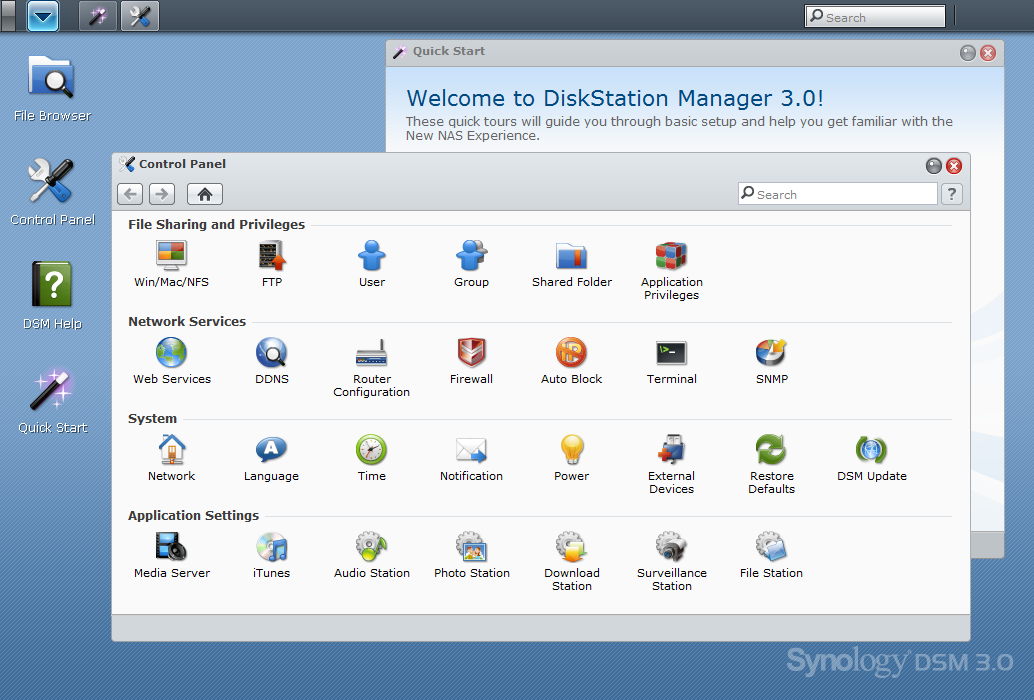
Synology Disk Station Manager 3.0 screenshot, klik op de afbeelding voor een grotere versie.

:fill(white):strip_exif()/i/1246977412.jpeg?f=thumbmedium)
:fill(white):strip_exif()/i/1259051765.jpeg?f=thumbmedium)
:fill(white):strip_exif()/i/1296484013.jpeg?f=thumbmedium)
:fill(white):strip_exif()/i/1230718074.jpg?f=thumbmedium)
:fill(white):strip_exif()/i/1230718117.jpg?f=thumbmedium)
:fill(white):strip_exif()/i/1239721878.jpeg?f=thumbmedium)
:fill(white):strip_exif()/i/1280230600.jpeg?f=thumbmedium)
:fill(white):strip_exif()/i/1258536436.jpeg?f=thumbmedium)
:fill(white):strip_exif()/i/1239352208.jpeg?f=thumbmedium)
:fill(white):strip_exif()/i/1258028877.jpeg?f=thumbmedium)
:fill(white):strip_exif()/i/1240681868.jpeg?f=thumbmedium)
:fill(white):strip_exif()/i/1272537771.jpeg?f=thumbmedium)
:fill(white):strip_exif()/i/1259051552.jpeg?f=thumbmedium)
:fill(white):strip_exif()/i/1254989926.jpeg?f=thumbmedium)
:fill(white):strip_exif()/i/1240478592.jpeg?f=thumbmedium)
:fill(white):strip_exif()/i/1246966719.jpeg?f=thumbmedium)
:fill(white):strip_exif()/i/1270993880.jpeg?f=thumbmedium)
:fill(white):strip_exif()/i/1266311260.jpeg?f=thumbmedium)
:fill(white):strip_exif()/i/1264063572.jpeg?f=thumbmedium)
:fill(white):strip_exif()/i/1266399654.jpeg?f=thumbmedium)
:fill(white):strip_exif()/i/1246978116.jpeg?f=thumbmedium)
:fill(white):strip_exif()/i/1244627539.jpeg?f=thumbmedium)
:fill(white):strip_exif()/i/1230246683.jpg?f=thumbmedium)
:fill(white):strip_exif()/i/1230246665.jpg?f=thumbmedium)
:strip_icc():strip_exif()/u/25704/scorpius_80_80.jpg?f=community)
:strip_icc():strip_exif()/u/182506/crop5c1cef952de8e_cropped.jpeg?f=community)

/u/1934/av-559.png?f=community)
:strip_icc():strip_exif()/u/71967/Grimlock.jpg?f=community)
:strip_icc():strip_exif()/u/12330/dnangel_70.jpg?f=community)

:strip_icc():strip_exif()/u/58247/corne.jpg?f=community)
/u/26246/crop6a032c48dff2a_cropped.png?f=community)
/u/197786/crop64b2f2dc4d188.png?f=community)

:strip_exif()/u/67404/C64.gif?f=community)

:strip_exif()/u/25859/test2.gif?f=community)

/u/24970/tesla_avatar.JPG?f=community)
