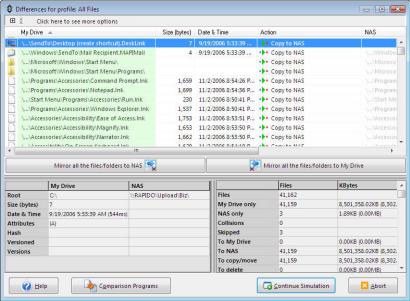
 2BrightSparks heeft zijn backupprogramma SyncBackSE een update gegeven naar versie 4.3. Dit programma kan data synchroniseren of simpelweg een backup maken naar een locatie op dezelfde schijf, een andere schijf, een ander medium zoals een cd-rw of een CompactFlash-kaartje, een ftpserver of een ziparchief. Naast SyncBackSE is er ook SyncBack Freeware (ook beschikbaar in het Nederlands), een enigszins afgeslankte versie. Hieronder zijn alle veranderingen te vinden die sinds versie 4.2.1 in het programma zijn aangebracht:
Changes in SyncBackSE version 4.3:Changes in SyncBackSE version 4.2.7.0:
- Fixed: Open/locked files can now be copied on Vista x64 (they can already be copied on 64-bit versions of XP and 2003)
- Fixed: Progress bar flickering on Vista
- Updated: Dutch translations (thanks to Hans Fraiponts)
- Updated: Help file
Changes in SyncBackSE version 4.2.5.0:
- Fixed: Spurious memory related errors
- Fixed: Re-registers FTP COM object to avoid problems with SmartFTP on Windows 2000
- Fixed: Other minor cosmetic bugs
- Updated: Help File (Program and PDF Version)
- Updated: Certificates used on SyncBackSE executable etc.
Changes in SyncBackSE version 4.2.4.0:
- New: Uses SITE UTIME on Pure-FTPD servers (if supported by server)
- Updated: Will automatically switch to or from passive mode when using FTP and initial directory list times out
- Fixed: Self extracting Zip files that contain filenames with Unicode characters will now extract when run
- Fixed: Self extracting AES encrypted Zip files will now extract when run
- Fixed: Can now select 0 in versioning settings to specify setting is to be ignored
- Fixed: Recursive junction point testing not done if junction points are being ignored
- Fixed: Wrongly deletes restored file if not using safe copy with FTP and file is copied from FTP
- Fixed: Wrongly deletes restored file if not using safe copy with FTP and file is restored from single Zip
- Fixed: Random access violations when changing actions in Differences window
- Fixed: Bug in FTP component where it sometimes returned wrong information for empty folders
- Fixed: "If the FTP server cannot set a files date & time..." setting should not be used if Fast Backup profile
- Fixed: Scheduling profiles with an ampersand in their name in Vista
- Fixed: Some NAS devices do not copy across read-only file attributes
- Fixed: Access Denied when using safe copies and some NAS devices
Changes in SyncBackSE version 4.2.3.1:
- Updated: Temporary folders in Vista filtered out by default
- Updated: Junction points are now ignored by default on Vista
- Updated: The file and folder selection tree will not show junction points if profile is set to ignore them
- Updated: Help file
- Fixed: Splitting of Zip files
- Fixed: Skipping folders and files on Vista when a folder contains a junction point
- Fixed: Copying locked files inside junction points to a single zip file
[break]
- New: Japanese translation by Ikuo Karatsu (also a Japanese translation of the entire help file)
- Updated: Czech translations
- Updated: %DAYOFMONTH% can be used instead of %DAY%
- Fixed: Access violation when using Portuguese and going to Fast Backup page of profile configuration
- Fixed: Bad variable type error message when using Windows 2000 and exporting profiles or using Zip files
- Fixed: Next Run column shows next run if set to run in background
- Fixed: Dialog about new version available is stay-on-top to avoid it being hidden behind main window
- Fixed: Exception when a filename in a versions folder starts with a period
- Fixed: Was using wrong network login username and password when restoring
- Fixed: Restart/shutdown setting now shown in Global Settings->Expert if not using Vista
- Fixed: File date & time now unchanged when shortcuts updated
- Fixed: Excess versions now deleted when using FTP
- Fixed: Removed "cannot use VSS" warnings from log files as they confused many
- Fixed: Split Zip files can now be larger than 4GB
- Fixed: Ctrl-Shift-R, -S will not force the Differences window to appear (Ctrl-R, -S still will)
- Fixed: Resume of FTP upload/download modified to handle local file open errors better
- Fixed: The selections and filters can now be changed if the source cannot be reached
- Fixed: Open/comparing files in Differences window will now open currently selected version while changing it
- Fixed: Cannot choose a filename for a single Zip file that is an existing folders name
- Fixed: Renaming of the destination when changing to and from single zip compression
- Fixed: Missing links to other log pages

:strip_exif()/i/1193693643.jpg?f=thumbmedium)
:strip_icc():strip_exif()/u/149883/crop57a462252fb63_cropped.jpeg?f=community)

:strip_exif()/u/33907/avatar8642_1.gif?f=community)
:strip_icc():strip_exif()/u/49080/Tealon.jpg?f=community)

:strip_exif()/u/132236/icon.gif?f=community)
:strip_icc():strip_exif()/u/26287/wazzup2.jpg?f=community)
/u/91594/crop670f840bd8665_cropped.png?f=community)